00191134-03.pdf - 第31页
GEM for SIPLACE V5.01 ©Siemens AG, all rights r eserved page 31 of 252 S6F21 Host requests an Annotated Event Report ass ociated with a Report ID. 7 LPH'ULYHQ7UDFH The SIPLACE s upports T ime Dr iven Trac e…

GEM for SIPLACE V5.01
Page 30 of 252 ©Siemens AG, all rights reserved
'DWD&ROOHFWLRQ
9DULDEOHV
The SIPLACE has a fixed set of Variables which can be read by the Host. Each Variable
is identified by a unique Variable ID (VID). The Variables which exist are shown in
"Appendix A -- Variables".
There are three types of Variables: Status Variables, Data Variables, and Equipment
Constants. The Host can read Variables of any type, but can set values only for
Equipment Constants. The Host can read values for Status Variables and Equipment
Constant whenever the SIPLACE is On-Line, but values for Data Variables are typically
meaningful only immediately after certain Collection Events (CEIDs), and so are typically
reported only in Event Reports (S6F11).
$UH<RX7KHUH
The Host can send S1F1 at any time to determine if the SECS link is operational. The
SIPLACE responds with S1F2, if the equipment is in the ONLINE & COMMUNICATING
states. This indicates Model Number (MDLN) and Software Revision Number
(SOFTREV).
+RVW5HTXHVWV6WDWXV
The Host can send S1F3 when the Equipment is On-Line to read Equipment Constants
from the SIPLACE.
The Host can send S2F13 when the Equipment is On-Line to read Equipment Constants
from the SIPLACE.
For this Equipment, S1F3 and S2F13 with a list of VIDs are essentially the same. That is,
either message can return Variables of any type. However, S1F3 with a zero-length list
will return only VIDs of type SV, and S2F13 with a zero-length list will return only VIDs of
type EC.
6HWWLQJ(TXLSPHQW&RQVWDQWV
The Equipment Operator can change the value for Equipment Constants. Once the
Operator has changed an EC value, the Equipment will note the EqConstChange Event
(CEID 1000001). The VID for the changed EC will be reported to the Host in the variable
ECIDCHANGE (VID 1002036).
(YHQW5HSRUWV
The SIPLACE has a fixed set of Events which can occur. Each Event is identified by a
unique Collection Event ID (CEID). The CEIDs which exist are shown in "Appendix B --
Collection Events".
When an Event occurs, the Equipment sends the appropriate S6F11 Event Report
message to the Host (if that particular event has been enabled). Event Reports are
defined by the Host (S2F33) and linked to a specific CEID (S2F35).
The Equipment allows the Host to enable and disable Event Reports using S2F37. If the
Host enables a CEID, for which no Event Report is defined, the Equipment will send a
"null" (no data) report when the event occurs.
The Host can "force" Event Reports on the Equipment using the following Event Report
Request messages:
S6F15 Host Requests an Event Report associated with a CEID.
S6F17 Host requests an Annotated Event Report associated with a CEID.
S6F19 Host requests an Event Report associated with a Report ID.

GEM for SIPLACE V5.01
©Siemens AG, all rights reserved page 31 of 252
S6F21 Host requests an Annotated Event Report associated with a Report ID.
7LPH'ULYHQ7UDFH
The SIPLACE supports Time Driven Trace initiated from the Host. The Host initializes a
trace using S2F23. The Equipment will send the data requested after the specified time
interval has expired. The data will be sent using the S6F1 (Trace Data Send) message.
The Equipment can handle several concurrent traces. The number of concurrent traces
is determined by the size of the trace data requested. The Equipment can support at
least four concurrent traces to a maximum size (i.e. all variables requested).
The equipment allows Host definition of trace data to exceed the one-block limit when
reported. That is, the SEMI E5 standard states that the S6F1 (Trace Data Send)
message is limited to a single SECS block; but the Equipment will allow this point to be
overlooked at the Host's request. If the Host does define trace data to be larger than one
SECS block, then the Equipment will send the multiple blocks, not preceded by the
S6F5/S6F6 Inquire/Grant scenario.
/LPLWV0RQLWRULQJ
The Host can define limits for various Variables on the SIPLACE. When the appropriate
limits transitions occur, the SIPLACE will report this occurrence by sending an event to the
Host (if the event is enabled). The Host may define limits for a particular Variable through
the S2F45 (Define Variable Limit Attributes). Through this message, the Host may define
up to seven limits for each eligible Variable. For each limit (LIMITID), the Host defines an
UPPERDB and a LOWERDB. The SIPLACE generates events when a transition across
these boundaries occurs. The Host may set the rate at which the SIPLACE polls the
Variables to determine if a limit has been crossed by setting the GEMLIMITSTIMER
variable (VID 65).
GEM for SIPLACE V5.01
Page 32 of 252 ©Siemens AG, all rights reserved
/LPLWV7DEOH
This table lists the Variables for which the Host may set limits and the event which is
called in case of a Limits Monitoring transition.
VID Variable Min Max Event
(YHQW6LJQDOLQJ
For any event that exists on the Equipment, the event message will be sent to the Host
only if the reporting for that particular event has been enabled. In this "EVENT
SIGNALLING" section, assume that the Host has enabled the proper reporting so that
these events will be sent to the Host.
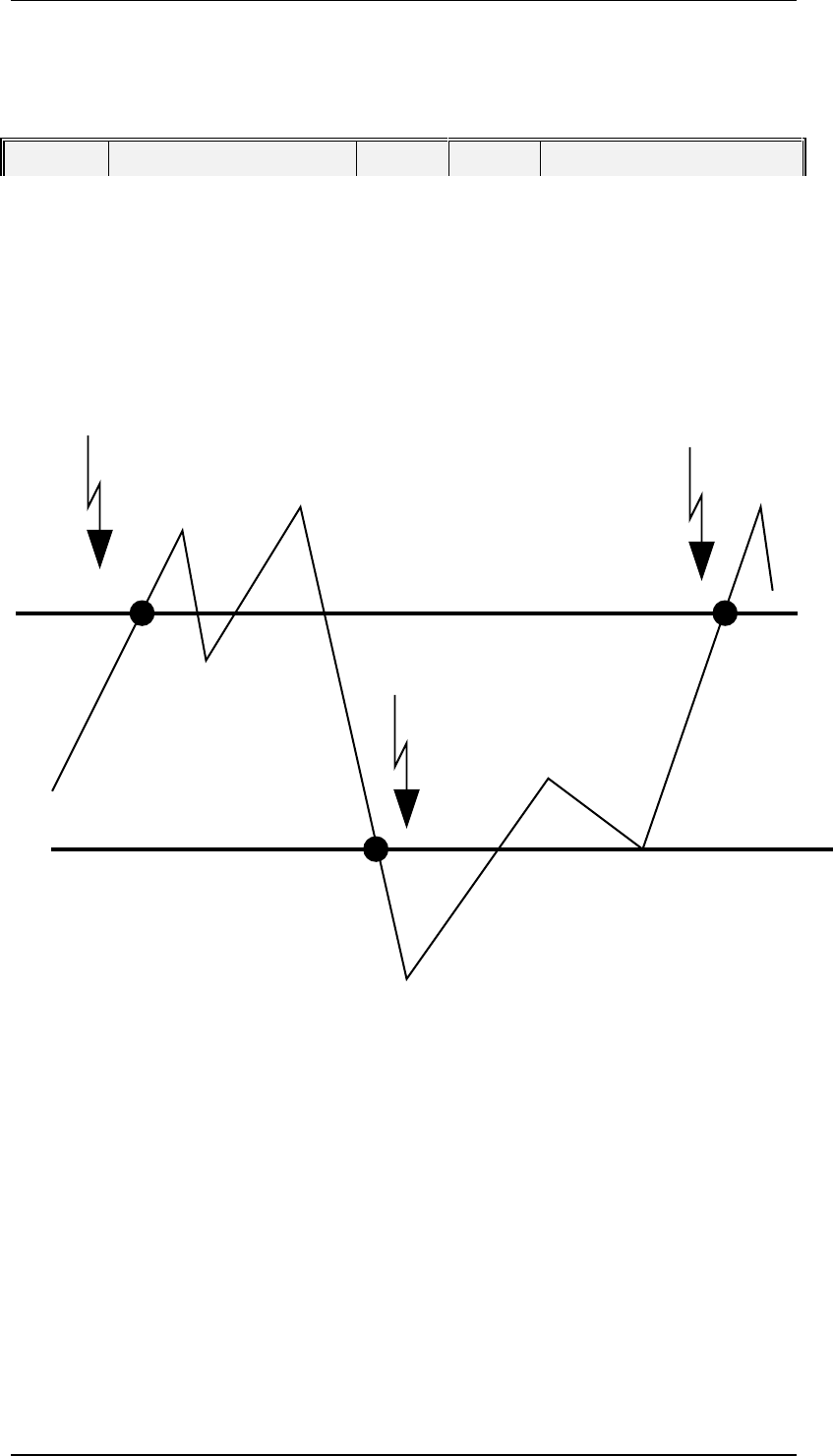
After the Host sets UPPERDB and LOWERDB values for a particular limit, the SIPLACE
will send an event message when a transition occurs across these boundaries. The
procedure for reporting is explained in the following chart and state chart diagram:
UPPERDB
LOWERDB
Limit Transition
Event
Limit Transition
Event
Limit Transition
Event
Limits Events Signaling