N7201A653E.pdf - 第135页
NPM- TT2 EJ M1EE-MB-05M-0 3 ACTIVATION 1 2 Confirm the message 3 To 9 ● For a tray feeder (→ P.14-8) ● For a feed er cart (→ P.3-2) Remove the PCB-support block ● Be carefu l not to drop an object on the multi-recognitio…
NPM-TT2 EJM1EE-MB-05M-03
Cleaning
the PCB-
support
blocks
Describes cleaning of the PCB-support block.
●If a foreign body such as dust is present in the PCB-support block and the PCB holder, it could cause
attachment problems with the PCB-support block, thus damaging PCBs.
●Tasks for the PCB support block (for automatic change) (option) are also the same.
Tool used: Lint free cloth, brush Time required: 10 minutes
Maintenance
5-3-1
CAUTION
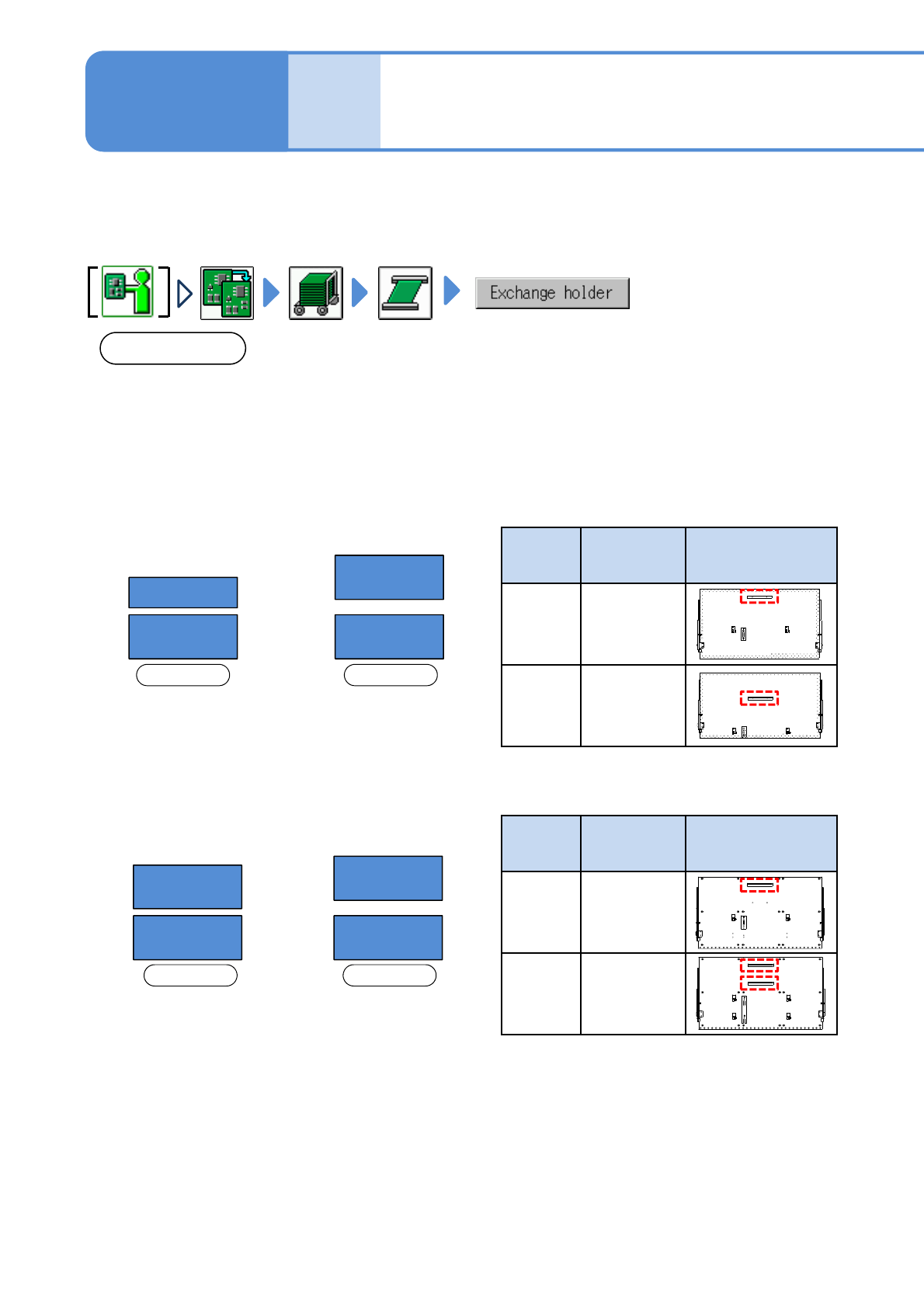
The type and arrangement of the PCB support block on the rear side vary between single lane mode and dual
lane mode. (See below)
When lane mode is changed, the layout of the support blocks must be changed as well.
Make sure to use the support block suitable for each lane mode; otherwise the machine does not operate
properly.
■Arrangement on
single lane mode
■Arrangement on
dual lane mode
Front side Front side
B
A A
A
■Arrangement on
single lane mode
■Arrangement on
dual lane mode
Front side Front side
D
C C
D
PCB
support
block
Product No. PCB support block
arrangement
(rear side)
C
N610144183AD
D
N610144184AD
●For PCB support block (for automatic change) (option)
* If you wrongly install the PCB support block of C with D,
you cannot change to the arrangement in single lane
mode.
●For PCB support block (standard)
PCB
support
block
Product No. PCB support block
arrangement
(rear side)
A
N610136590AA
B
(option)
N610136589AA
5-3-1-1
Cleaning the PCB-
support blocks
( PC size conveyor ) 1
NPM-TT2 EJM1EE-MB-05M-03
ACTIVATION
1
2
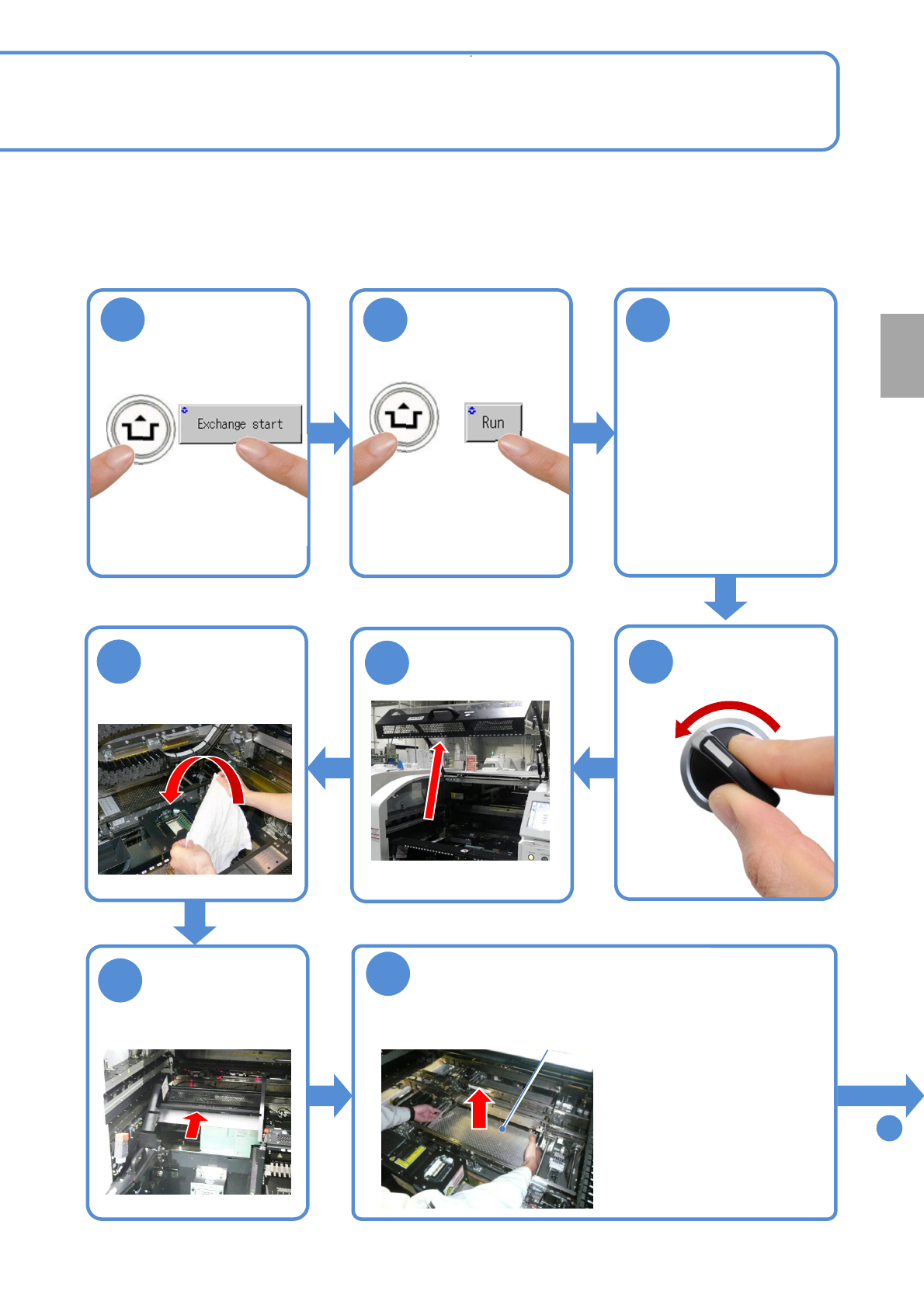
Confirm the
message
3
To
9
●For a tray feeder
(→ P.14-8)
●For a feeder cart
(→ P.3-2)
Remove the PCB-support
block
●Be careful not to drop an
object on the multi-recognition
camera or bump the multi-
recognition camera.
●If there are support pins on
the PCB support block, be
careful not to fall them.
PCB-support block
OFF
SERVO
5
4
7
6
8
Fold the feeder
table cover to
the back
Every
140
hours
PeriodicPeriodicPeriodic
inspection
(X-axes in the front and
rear move to the
retraction position)
(The PCB-support block
moves upward)
Cover the multi-
recognition
camera with a
lint free cloth
ACTIVATION
5-3-1-2
Detach the tray
feeder or the
feeder cart on the
rear side
NPM-TT2 EJM1EE-MB-05M-03
ACTIVATION
Cleaning
the PCB-
support
blocks
Maintenance
5-3-1
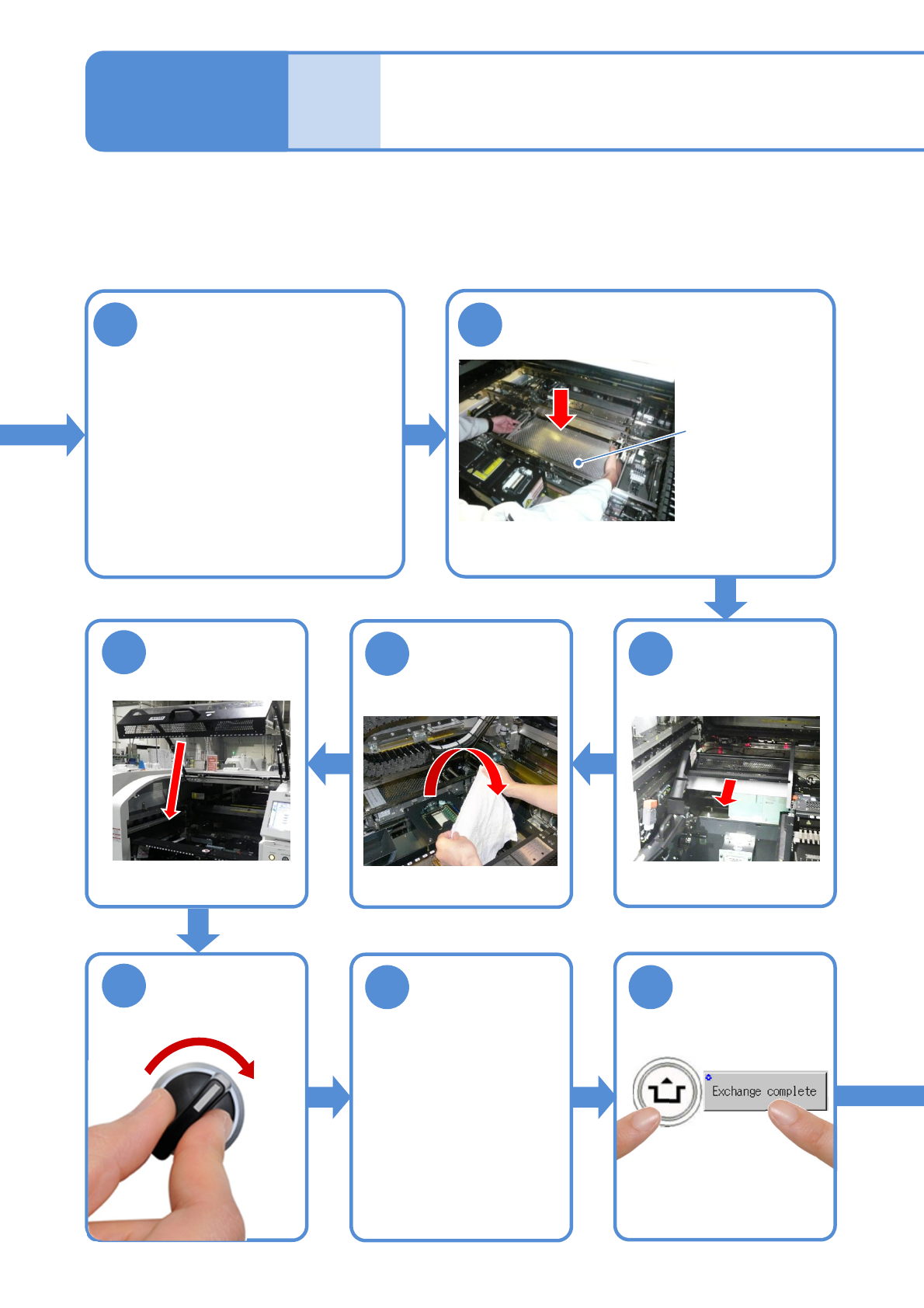
Attach the tray
feeder or the
feeder cart
●For a tray feeder
(→ P.14-8)
●For a feeder cart
(→ P.3-2)
Attach the PCB-support block as it
is no tilt
(It may interfere with the rail)
Remove the lint
free cloth
PCB-support block
Clean the PCB holder and
the PCB-support block
9
10
12 11
13
15 16
14
SERVO
ON
Return the
feeder table
cover back
Cleaning the PCB-
support blocks
( PC size conveyor ) 2
5-3-1-3
●Clean the top surface of the PCB
support block (for automatic change)
with a lint free cloth dampened with
cleaning solvent.
●Be careful not to scratch coating
material on the surface of the PCB
support block (for automatic change) by
sharps.
●Push down the four corners of the PCB
support block by hands and check that it is not
loose and rattling.