N7201A653E.pdf - 第184页
EJM1EJ-MB-06 M-02 NPM-TT2 PCB conveyor 2 3 ● Six PCB detectio n senso r s on each lane ・ Transparency type: Four sets (a pair of the light-emitting side and the light-receiving side) ・ Reflection type: Two sets ● How to …
EJM1EJ-MB-06M-02NPM-TT2
Tool used: Swabs (MTNZ001268AA)
Time required: 8 minutes
PCB conveyor 1
1
2
6-9-2
Every
560
hours
PeriodicPeriodicPeriodicPeriodic
inspection
Adjust the
conveyor width
of 150 mm(For
better
workability)
(→[Operating
procedure] P.2-5-4)
Detach the tray
feeder or the
feeder cart
●For a tray feeder
(→ P.14-8)
●For a feeder cart
(→ P.3-2)
To
3
EJM1EJ-MB-06M-02NPM-TT2
PCB conveyor 2
3
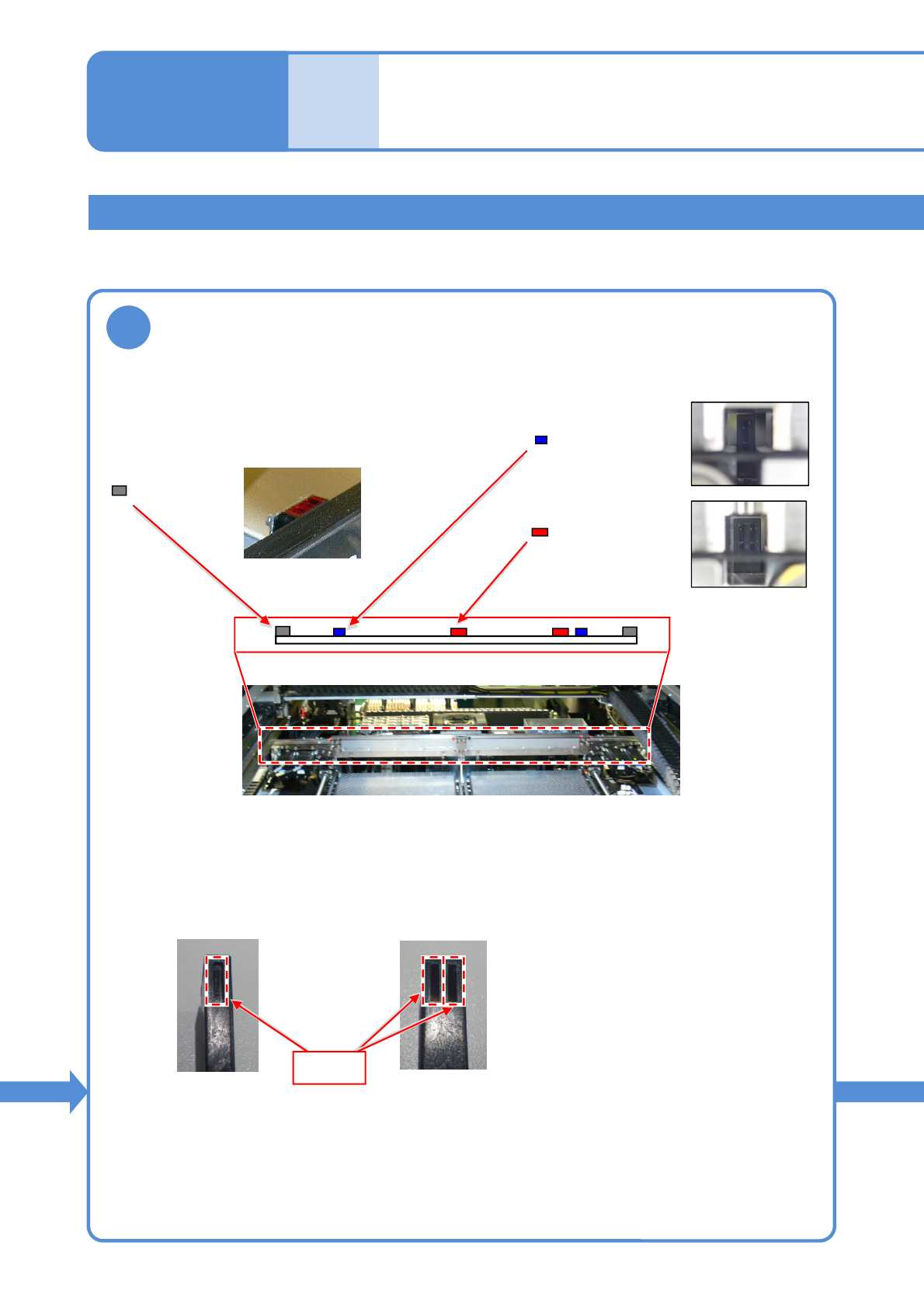
●Six PCB detection sensors on each lane
・Transparency type: Four sets
(a pair of the light-emitting side and the light-receiving
side)
・Reflection type: Two sets
●How to identify the type of the PCB detection sensor (transparency type) as either
single type or double type.
6-9-3
: Transparency type
(Single type)
: Transparency type
(Double type)
: Reflection type
Cleaning the PCB
detection sensors 2
Maintenance
6-9
Single type
Double type
Detecting
section
Verify the location and type of each PCB detection sensor.
EJM1EJ-MB-06M-02NPM-TT2
4
Clean the PCB detection sensors
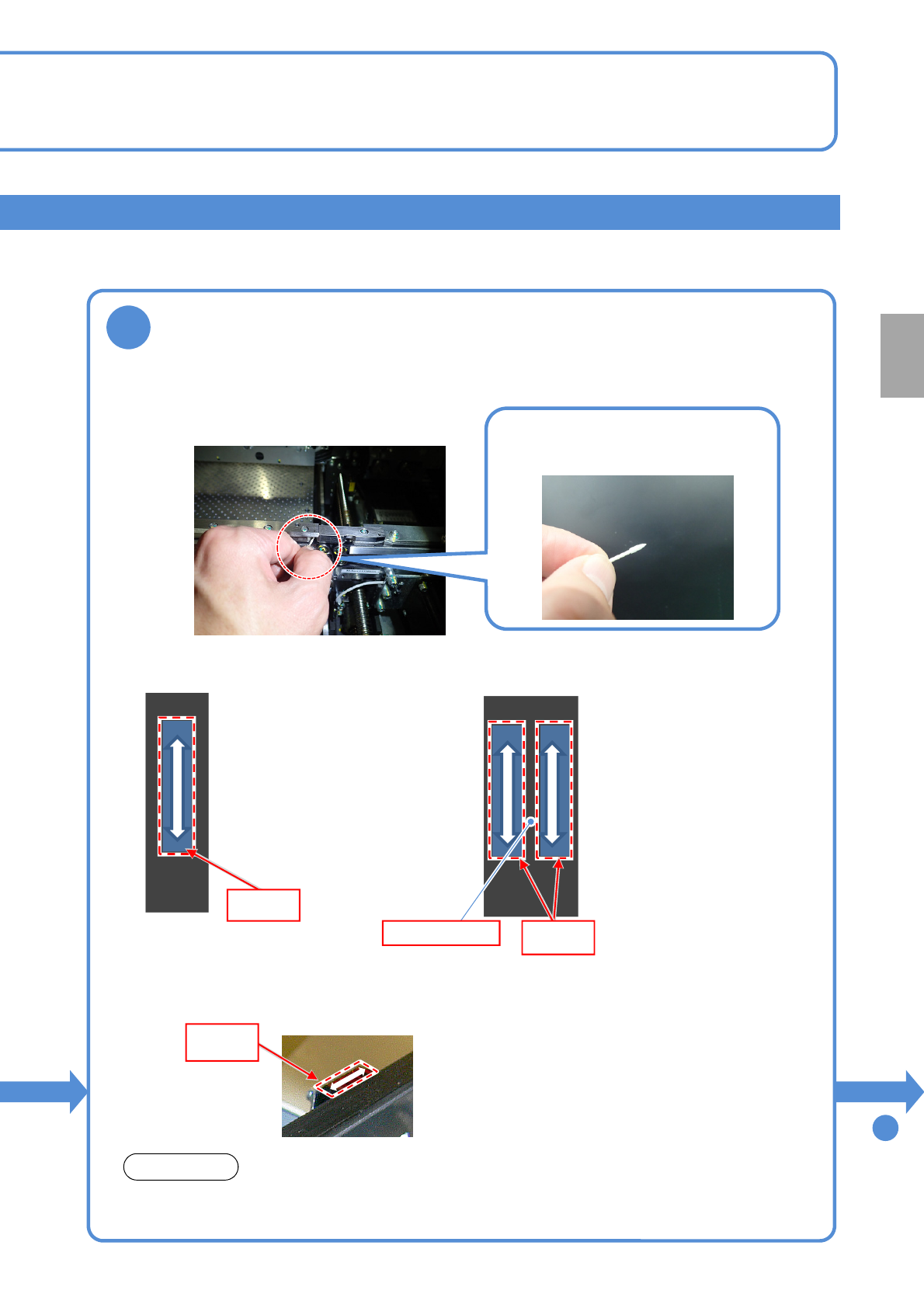
●Touch the swab tip to detecting section of the PCB detection sensor (transparency type)
and move it as shown below to remove any stain.
●It is recommended that you hold
the swab near its tip when doing
the cleaning.
[Cleaning of the single type]
●With the touch of your hand
or finger, check that the tip
of a swab is in contact with
the detecting section of a
sensor. Then, move the
swab up and down 4 or 5
times to clean it.
[Cleaning of the double type]
●With the touch of your finger
or hand, check that the tip of
a swab is in contact with the
detecting sections of a
sensor. Then, move the
swab up and down 4 or 5
times to clean them (both
sections).
●When moving from one
detecting section to another,
check for the step located
midway between the
sections by touching it with
your hand or finger.
Detecting
section
Detecting
section
In-between step
Dampen the tip (1 mm or so from the end) of each swab before cleaning.
If dried, the swab may not be able to remove any stain thoroughly.
NOTICE
To
5
6-9-4
Every
560
hours
PeriodicPeriodicPeriodicPeriodic
inspection
●Touch the swab tip to detecting section of the PCB detection sensor (reflection type) and
move it as shown below to remove any stain.
Detecting
section