N7201A653E.pdf - 第205页
EJM1EJ-MB-06 M-02 NPM-TT2 6-18 -2 Every 560 hours Periodic Periodic Periodic Periodic inspection Precaution when t he nozzle vacuum pad for support pins is repla ced If the vacuum pad is not inserted all the way, it may …
EJM1EJ-MB-06M-02NPM-TT2
6-18-1
Maintenance
6-18
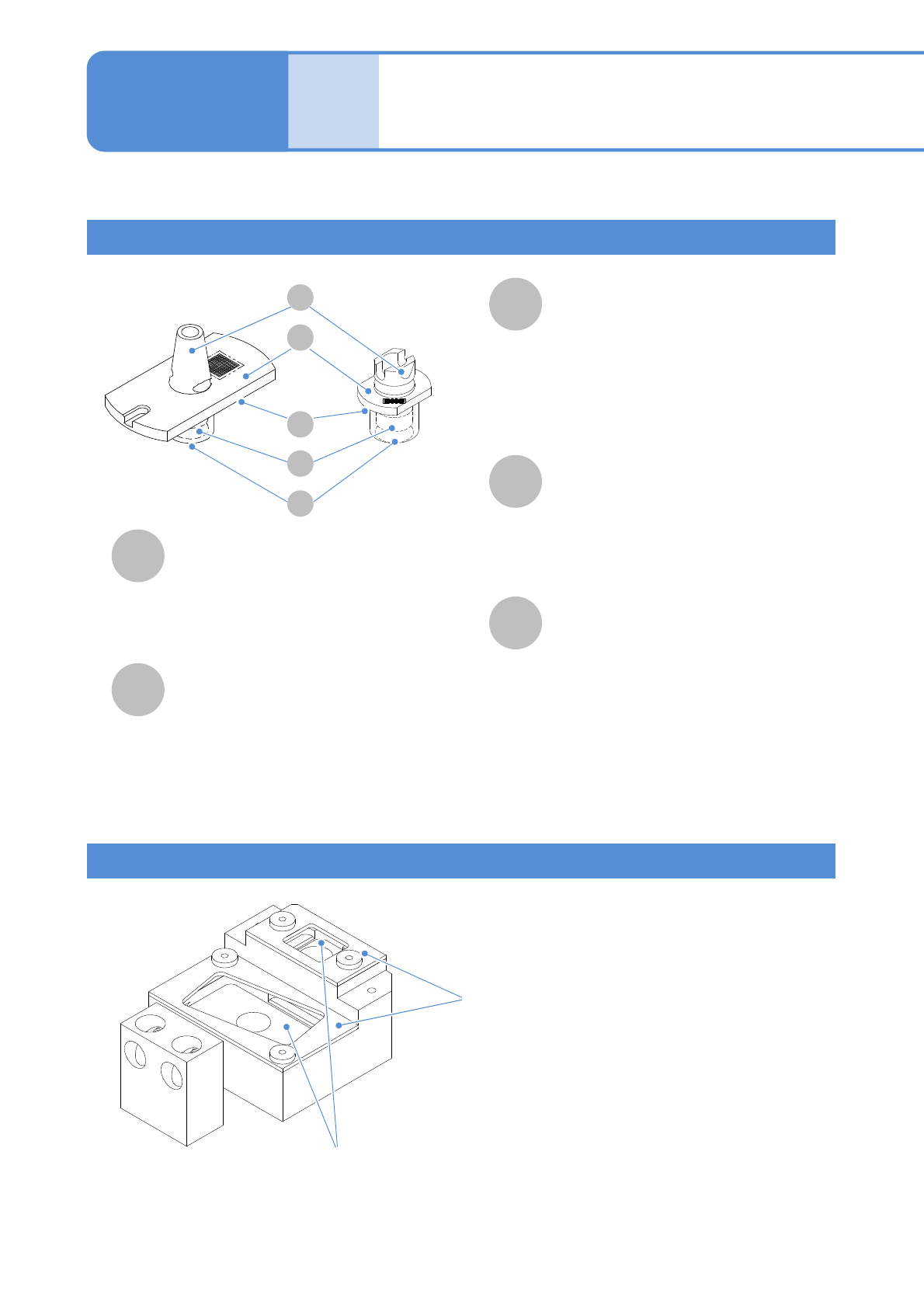
Name and role of a nozzle for support pins
A
B
D
E
C
Nozzle inside
(Foreign objects adhering inside the
nozzle hinder the pickup and
arrangement of the support pins, and
various detection functions using vacuum
pressure)
Nozzle changer for support pins
Describes how to clean the nozzle and nozzle changer for support pins.
The cleaning method is as same as the nozzle
for component pickup.
(→P.6-4)
(It is not necessary to use ultrasonic cleaning
equipment)
Nozzle flange upper surface
The nozzle type and serial No. are shown
by the 2D code. The 2D code area is
recognized by the head camera.
(Leaving this part dirty results in a
recognition error)
E
A
D
B
C
Nozzle changer upper cover
●When nozzles are manually removed, turn the
nozzle flange in a counterclockwise direction
until it is not stuck with the hole of the upper
cover and remove it upward.
Nozzle changer upper surface
(Any contamination of the nozzle changer
upper surface allows contaminants to adhere
to the nozzle reflector, resulting in
recognition errors)
Cleaning the nozzle (option) and
nozzle changer (option) for
support pins 1
Nozzle tip (nozzle section)
This is the part to directly contact with
the flange of the support pin, and it
picks support pins up.
(Contamination on the vacuum hole can
cause an pickup error)
●A vacuum pad is installed for stable
pickup.
Nozzle taper surface
This is the part to be chucked by the
nozzle holder of the placement head.
(Contamination on the taper surface and
chucking groove may cause an air leak
and faulty chucking)
Nozzle reflector
Unlike the nozzle reflector for component
placement, this is the same material as
flange. This part checks whether the
nozzle is properly placed or not by
reflecting the LED light from the multi-
recognition camera.
(Leaving this part dirty results in a
recognition error.)
This is the unit that is used to stock support pin
nozzles. When support pins are automatically
changed upon changeover, the placement head
automatically changes nozzles.
EJM1EJ-MB-06M-02NPM-TT2
6-18-2
Every
560
hours
PeriodicPeriodicPeriodicPeriodic
inspection
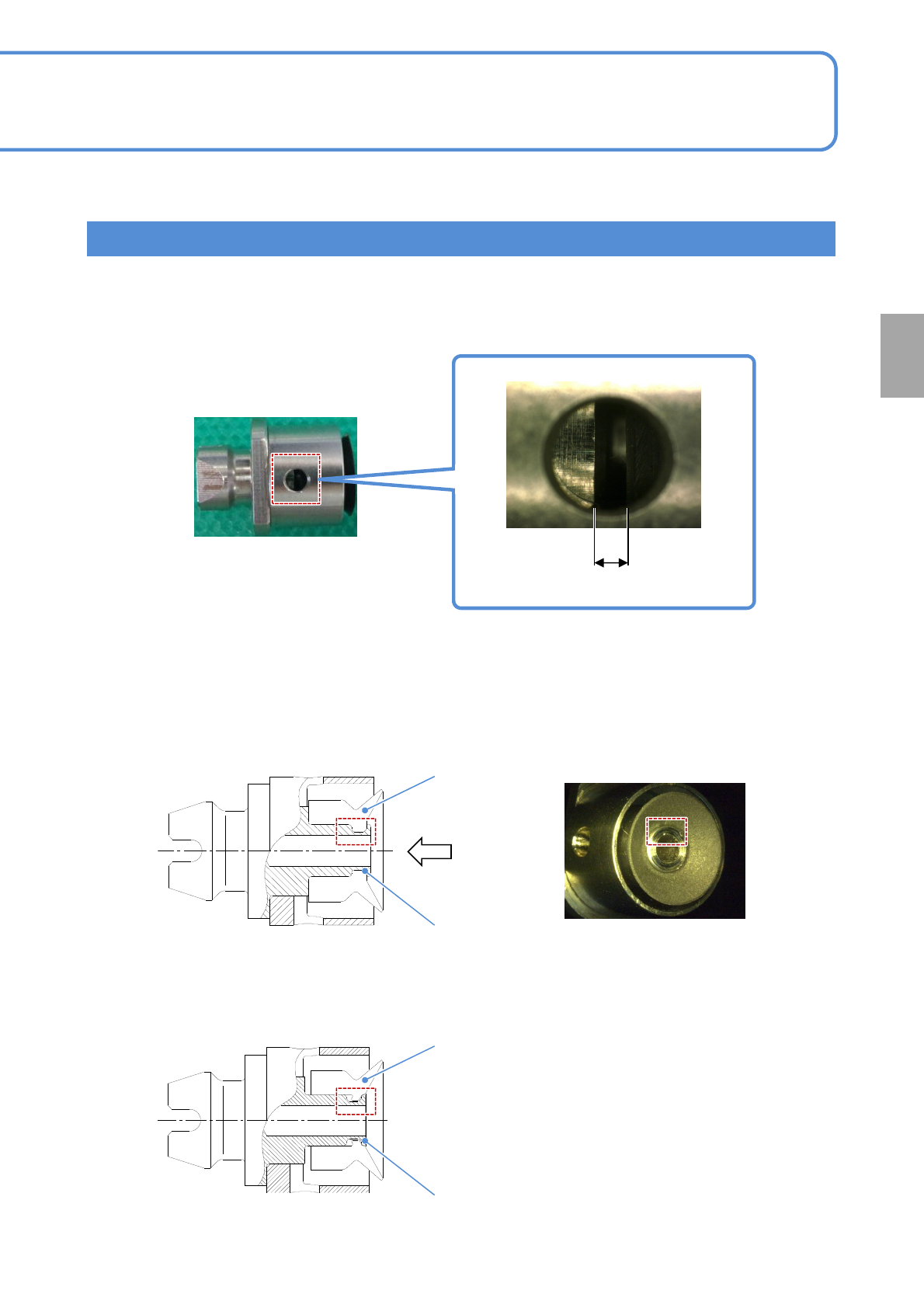
Precaution when the nozzle vacuum pad for support pins is replaced
If the vacuum pad is not inserted all the way, it may reduce the accuracy of the support pin arrangement
position, resulting in support pin replacement error. When the vacuum pad is replaced, make sure to check
the insertion condition of the vacuum pad. Install the vacuum pad as shown below so that there is no gap.
Gap
The insertion condition of the vacuum pad can be checked from the vacuum side. Make sure to check if the
vacuum pad is installed all the way to the end of the metal flange.
■When the vacuum pad is installed correctly
Vacuum pad
Metal flange
A
Arrow A
■When the vacuum pad is not installed all the way
Vacuum pad
Metal flange
EJM1EJ-MB-06M-02NPM-TT2
6-18-3
Maintenance
6-18
Cleaning the nozzle (option) and
nozzle changer (option) for
support pins 2
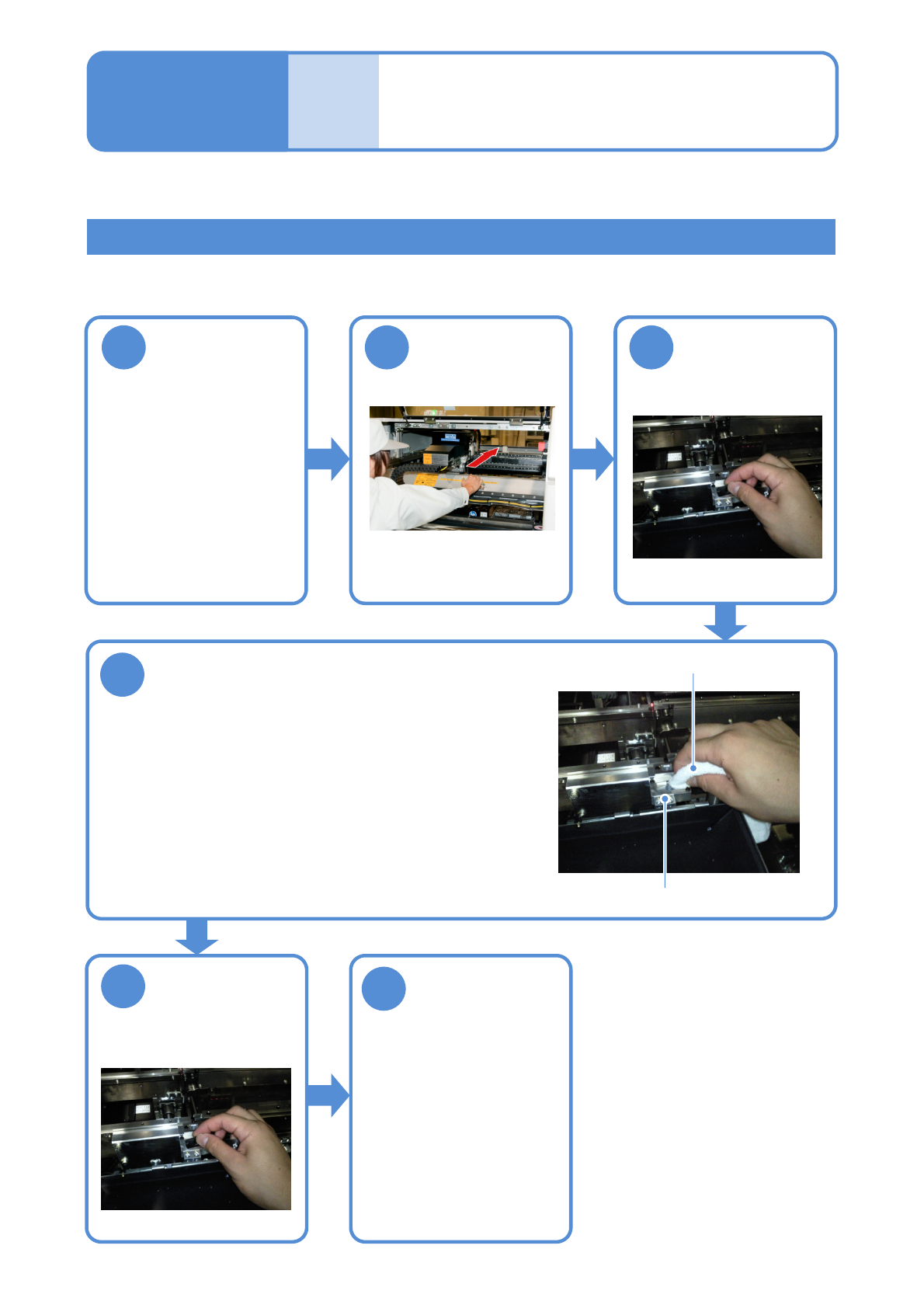
Push the Y-axis
inward
Wipe the top face of the nozzle changer
Nozzle changer
Lint free cloth
4
●Do not leave any contamination on the face in
contact with the nozzle flange.
●Clean the inside with swabs and the surface with a
lint free cloth.
●Make sure there is no dust in the space between the
upper cover and upper surface of the nozzle
changer.
Cleaning the nozzle changer for support pins
1 2
6
Tool used: Lint free cloth, swabs
Time required: 5 minutes
Remove the
nozzle for
support pin
3
5
Return the nozzle
for support pin
back to original
position
Detach the tray
feeder or the
feeder cart
●For a tray feeder
(→ P.14-8)
●For a feeder cart
(→ P.3-2)
Attach the tray
feeder or the
feeder cart
●For a tray feeder
(→ P.14-8)
●For a feeder cart
(→ P.3-2)