N7201A653E.pdf - 第223页
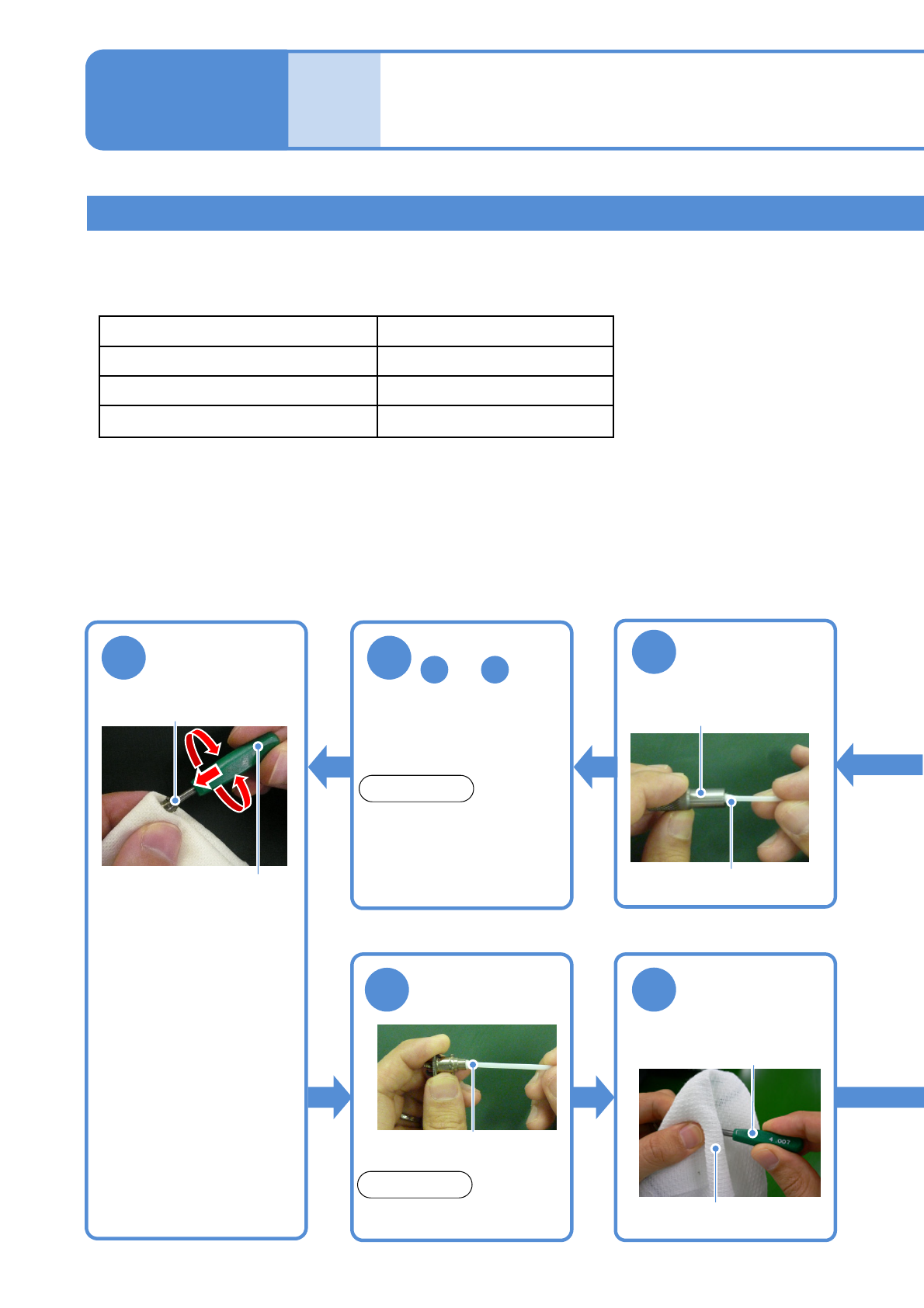
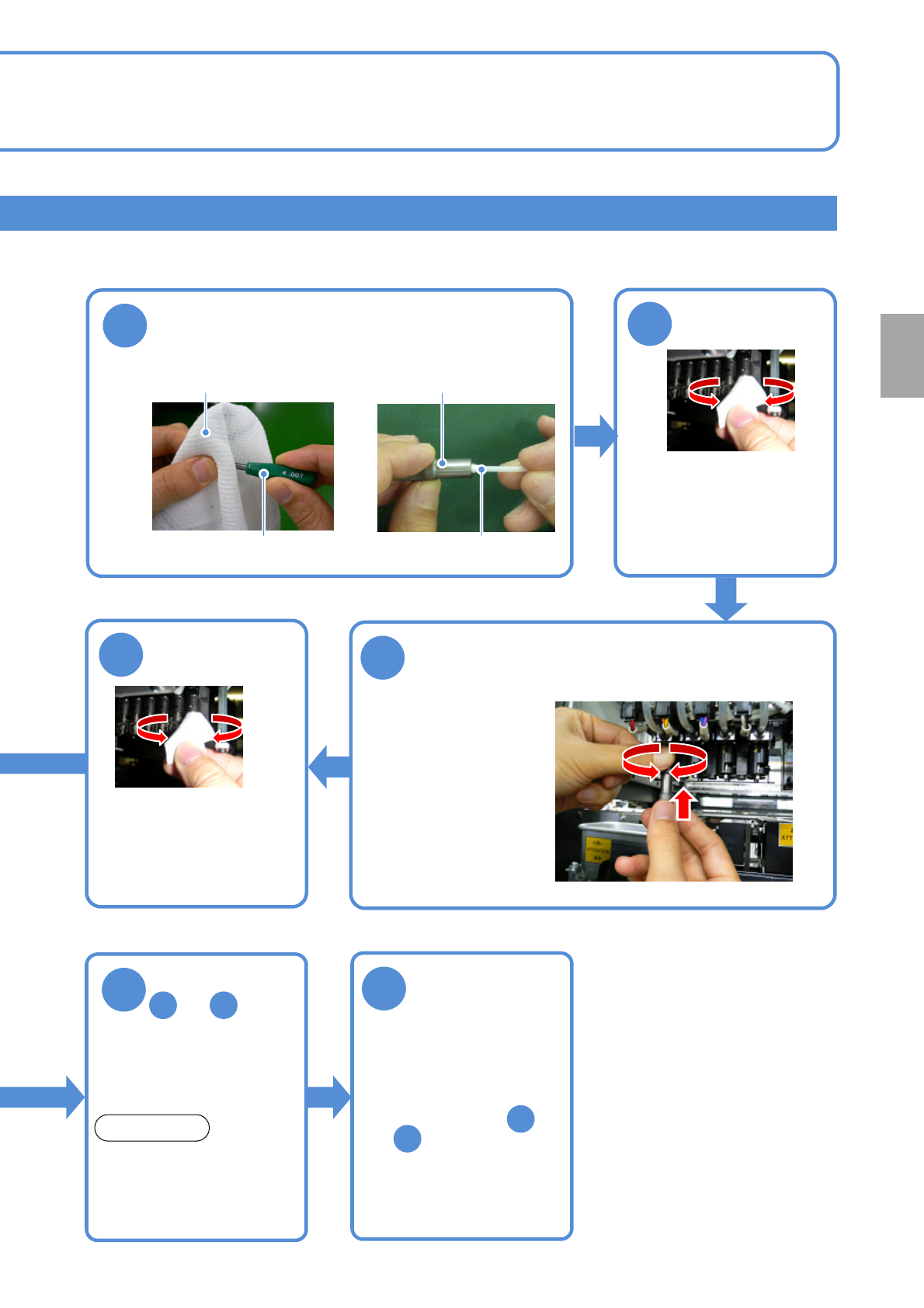
NPM- TT2 EJM1EE-MB-07 M-02 Periodic Periodic Periodic inspection 1 Clean the refresh jigs 3 Wipe off contamination on the shaft 11 Check the sliding of the nozzle holder . 2 Clean the shaft ● Insert the clean ing tool to…
NPM-TT2 EJM1EE-MB-07M-02
Cleaning the nozzle holder 6
(8-nozzle head (option))
Maintenance
7-1
Clean the sliding surfaces
Describes how to clean contamination being stuck to the transfer head shaft and the nozzle holder.
Tool used: Allen wrench (3 mm, 4 mm),Lint free cloth, cotton swab, cleaning paper
Lubricant : FL100 (N510059330AA),Grease:LCG100
Time required: 84 minutes
●How to remove the nozzle holder (→P.7-1
-3)
●Apply grease to the nozzle holder shaft cleaning tool and the nozzle holder refresh jigs after use, and keep
them in the dedicated case. The case shall be stored in the clean and less moisture place.
●Do not use the rusty nozzle holder shaft cleaning tool and the nozzle holder refresh jigs.
●Cover the multi-recognition camera with the lint free cloth to avoid dust adhesion before cleaning.
Name 8-nozzle head
The set of the nozzle holder cleaning tool
N610133913AA
Nozzle holder shaft cleaning tool
N210130779AA
Nozzle holder refresh jig
N510055113AA
7
Wipe off
contamination
on the shaft
8
Clean the nozzle
holder
5
Clean the
refresh jigs
Nozzle holder shaft
cleaning tool
6
Perform steps
to
3 5
●Perform until the jig can be
inserted smoothly.
NOTICE
●Do not insert it forcefully.
The jig may get stuck.
Nozzle holder
refresh jig
Nozzle holder
●Hold the nozzle holder by
hand, and push and
horizontally rotate the
nozzle holder refresh jig.
●Use the lint free cloth not
to come off the clamp
claw and spring.
FL100-dampened cotton
swab
NOTICE
9
Nozzle holder
refresh jig
Clean the nozzle
holder cleaning
tool
●Shake well before opening
the FL100.
7-1-11
Cleaning solvent-dampened
baby cotton swab
Cleaning solvent-dampened
lint free cloth
NPM-TT2 EJM1EE-MB-07M-02
PeriodicPeriodicPeriodic
inspection
1
Clean the refresh jigs
3
Wipe off contamination on
the shaft
11
Check the sliding
of the nozzle
holder.
2
Clean the shaft
●Insert the cleaning tool to
the shaft and rotate it two
or three times in a nozzle
rotation direction.
●If the paper becomes dirty,
replace it.
●Hold the shaft by hand,
and push up and
horizontally rotate the
nozzle holder shaft
cleaning tool.
4
Clean the shaft
●Insert the cleaning tool to
the shaft and rotate it two
or three times in a nozzle
rotation direction.
●If the paper becomes dirty,
replace it.
10
7 9
●Perform until the jig can
be inserted smoothly.
●Do not insert it forcefully.
The jig may get stuck.
Nozzle holder
refresh jigs
Nozzle holder shaft
cleaning tool
Perform steps
to
NOTICE
●How to attach the nozzle
holder (→P.7-1
-8).
●If it does not slide smoothly,
repeat steps from
to .
1
10
Every
1000
hours
7-1-12
Cleaning solvent-dampened
lint free cloth
Cleaning solvent-dampened
baby cotton swab

NPM-TT2 EJM1EE-MB-07M-02
7-1-13