N7201A653E.pdf - 第285页
NPM- TT2 EJM1EE-MB -12M-04 12-3 -8 Replacing the calendar battery in F A PC(LNB) ● Special skills such as BIOS setti ngs are required for replacing the calen dar battery. Please conta c t us. Consumable parts replacement
NPM-TT2 EJM1EE-MB-12M-04
12-3-7
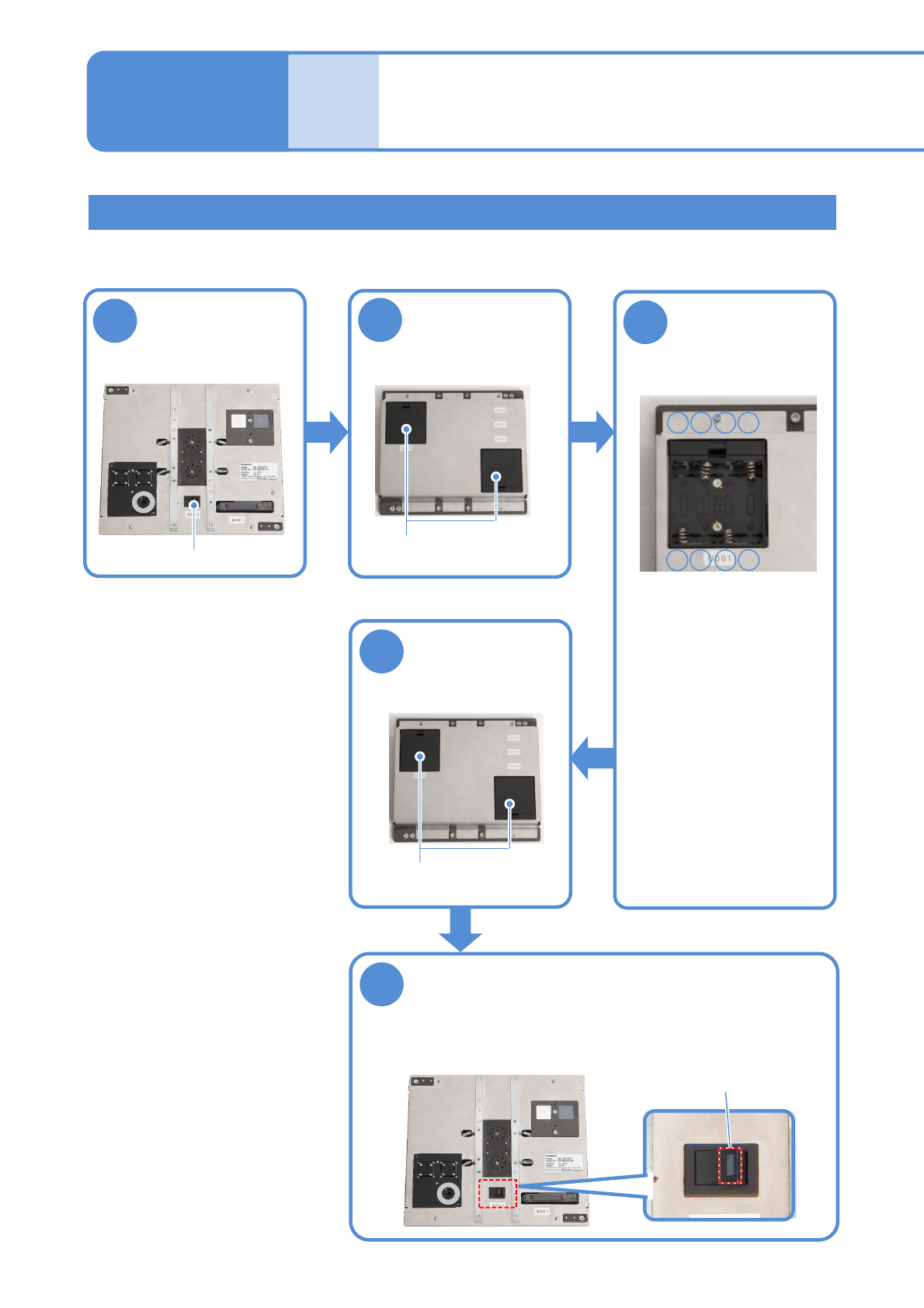
Replacing the batteries for the jig station
2
1
■Front face
■Rear face
3
●Replace all 8 AA size
batteries (4 batteries x 2
boxes)
●Be careful of the (+) and
(-) marks inside the
battery box when
replacing the batteries.
●Do not use new batteries
and used batteries or
different types of batteries
all together.
5
4
●Ensure that the LED lamp for the
power supply switch illuminates.
■Front face
Turn OFF the
power supply
switch
Open the battery
box covers
Replace the
batteries with
new ones
Close the battery
box covers
Turn ON the power supply switch
Battery boxes
-+-
■Inside of the battery box
+
+--+
■Rear face
Battery boxes
Replacing the
batteries 4
Power supply switch
LED lamp
Maintenance
12-3
●Althoughmanganesedioxidebatteriesareacceptable,alkalinebatteriesarerecommended.
●BatteriesarenotincludedwithJigstation.Pleasehaveyourbatteriesready.
Time required: 2 minutes

NPM-TT2 EJM1EE-MB-12M-04
12-3-8
Replacing the calendar battery in FA PC(LNB)
● Special skills such as BIOS settings are required for replacing the calendar battery. Please contact us.
Consumable parts
replacement
NPM-TT2 EJM1EE-MB-12M-04
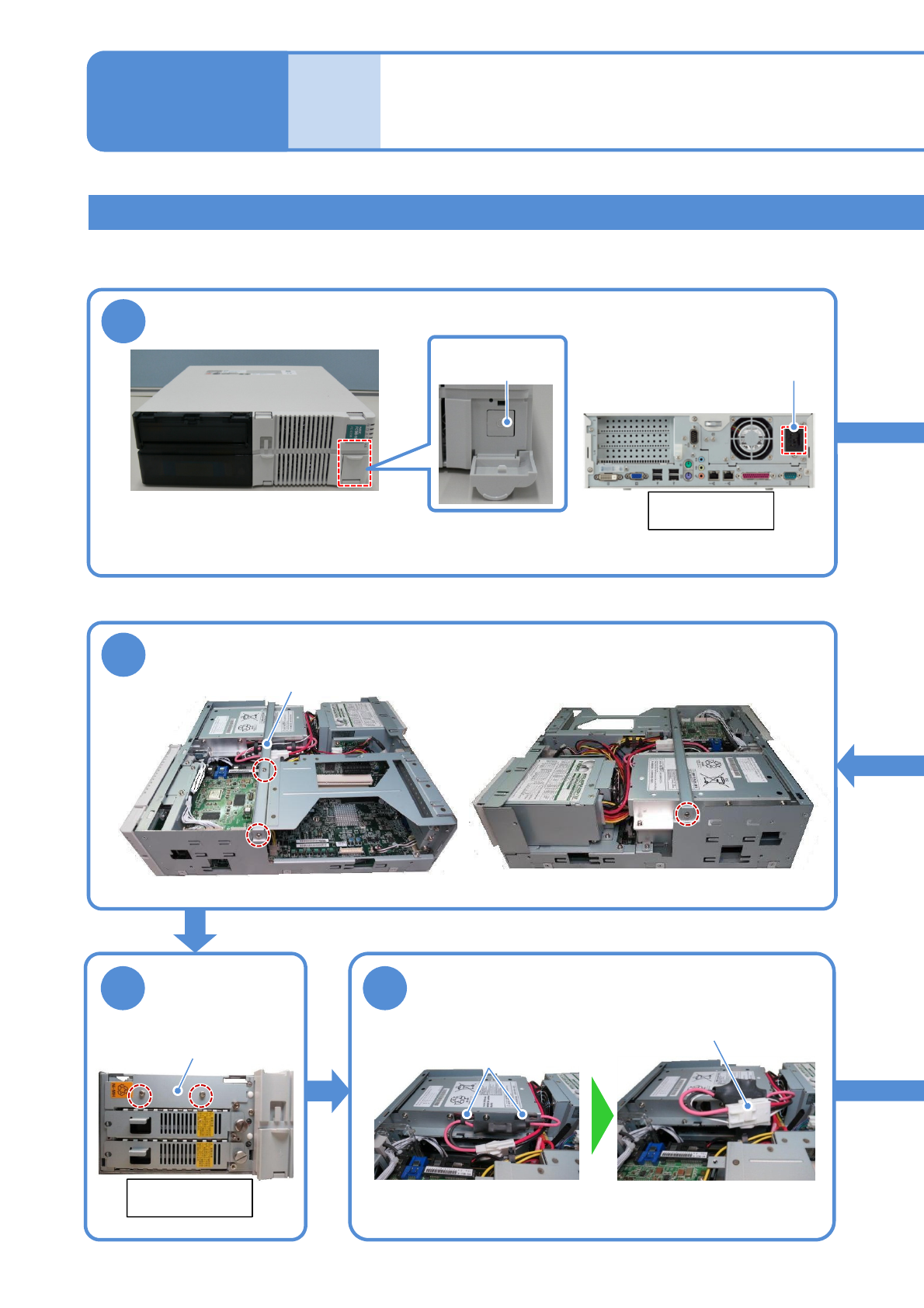
Replacing the UPS battery of the FA computer (LNB) 1
6
1
12-3-9
Rear side of
FA computer
AC power
connector
5
Center bracket
Battery cover
7
①Open the wire stickers (2)
holding the connectors
②Remove the connector
Wire
sticker
connector
Replacing the
batteries 5
Maintenance
12-3
●If a battery is used beyond its service life, the production information in the hard disk may be lost
or the hard disk may be damaged when power failure has occurred.
Turn OFF the power of the FA PC
●To end production, turn OFF the main power supply switches on the machine and then on the LNB.
(→”[LNB] 2.1 Operating Instructions of the Main Power Supply Switch at Production Start/End”)
Main power
supply switch
●Screws (3)
Remove the center bracket
Remove the
battery cover
Remove the UPS battery connector
Front side of
FA computer
●Screws (2)
Tool used: Phillips screwdriver Time required: 30 minutes