N7201A653E.pdf - 第440页
NPM- TT2 EJ M1EE-MB-14M-0 2 14-8 -1 Ho w to handle the tr ay f e eder (option) 1 Maintenance 14-8 How to detach Descr ibes how to handle the single feeder. Time required : 5 minutes 1 T urn OFF the power and lock the mac…
NPM-TT2 EJM1EE-MB-14M-02
14-7-2
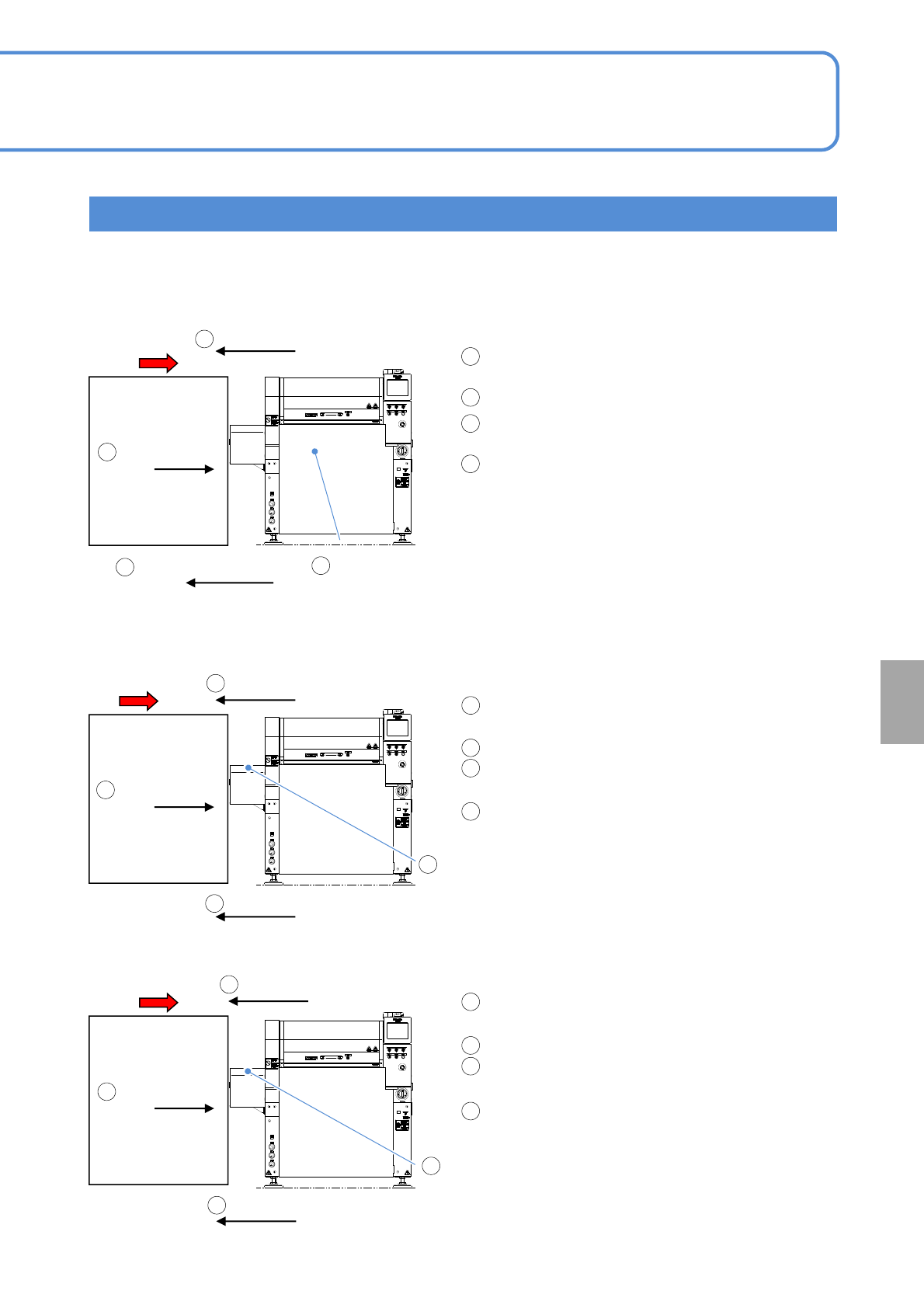
PCB transfer condition in each setting
PCB flow
Unloading PCB
Pre process
machine other
than NPM-TT2
PCB flow
Unloading PCB
Pre process
machine other
than NPM-TT2
■Normal setting (default): [Pre process other company M/C joint] is turned [OFF], and
[Pre process other company M/C joint2], [OFF]
PCB flow
Unloading PCB
Pre process
machine other
than NPM-TT2
NPM-TT2
■Option setting: [Pre process other company
M/C joint] is turned [ON]
■Option setting: [Pre process other company M/C joint2] is turned [ON]
PCB detection sensor
Placement position
[ON]
PCB request signal [OFF]
After unloading a PCB, NPM-TT2’s PCB request
signal is turned [ON].
PCB is unloaded from the pre process machine.
NPM-TT2’s PCB detection sensor (placement
position) is turned [ON].
NPM-TT2’s PCB request signal is turned [OFF].
PCB request signal [ON]
* PCBs are normally unloaded as the PCB request
signal switches from the [OFF] state the [ON]
state. So it cannot cause double PCB transport
and others to malfunction because it remains set
as default.
However, if the pre process machine does not
support our machine specifications, it may
continue unloading PCBs, with the PCB request
signal turned [ON]. In that case, NPM-TT2’s PCB
transfer settings need to be changed.
PCB request signal [ON]
PCB request signal [OFF]
After unloading a PCB, NPM-TT2’s PCB request
signal is turned [ON].
PCB is unloaded from the pre process machine.
The extension conveyor’s PCB detection sensor
(pre process side) is turned [ON].
NPM-TT2’s PCB request signal is turned [OFF].
PCB request signal [OFF]
After unloading a PCB, NPM-TT2’s PCB request
signal is turned [ON].
PCB is unloaded from the upstream machine.
The extension conveyor’s PCB detection sensor
(pre process side) switches from [ON] [OFF].
NPM-TT2’s PCB request signal is turned [OFF].
1
2
3
4
1
2
3
4
1
2
3
4
1
2
4
3
1
2
4
PCB request signal [ON]
PCB detection sensor in
Pre process switches from
[ON] to [OFF]
(extension conveyor)
1
3
PCB detection sensor
Pre process [ON]
(extension conveyor)
3
2
4
●[Pre process other company M/C joint ] and [Pre process other company M/C joint2] cannot be turned [ON]
at the same time.
Installation
NPM-TT2
NPM-TT2
NPM-TT2 EJM1EE-MB-14M-02
14-8-1
How to handle the tray
feeder
(option) 1
Maintenance
14-8
How to detach
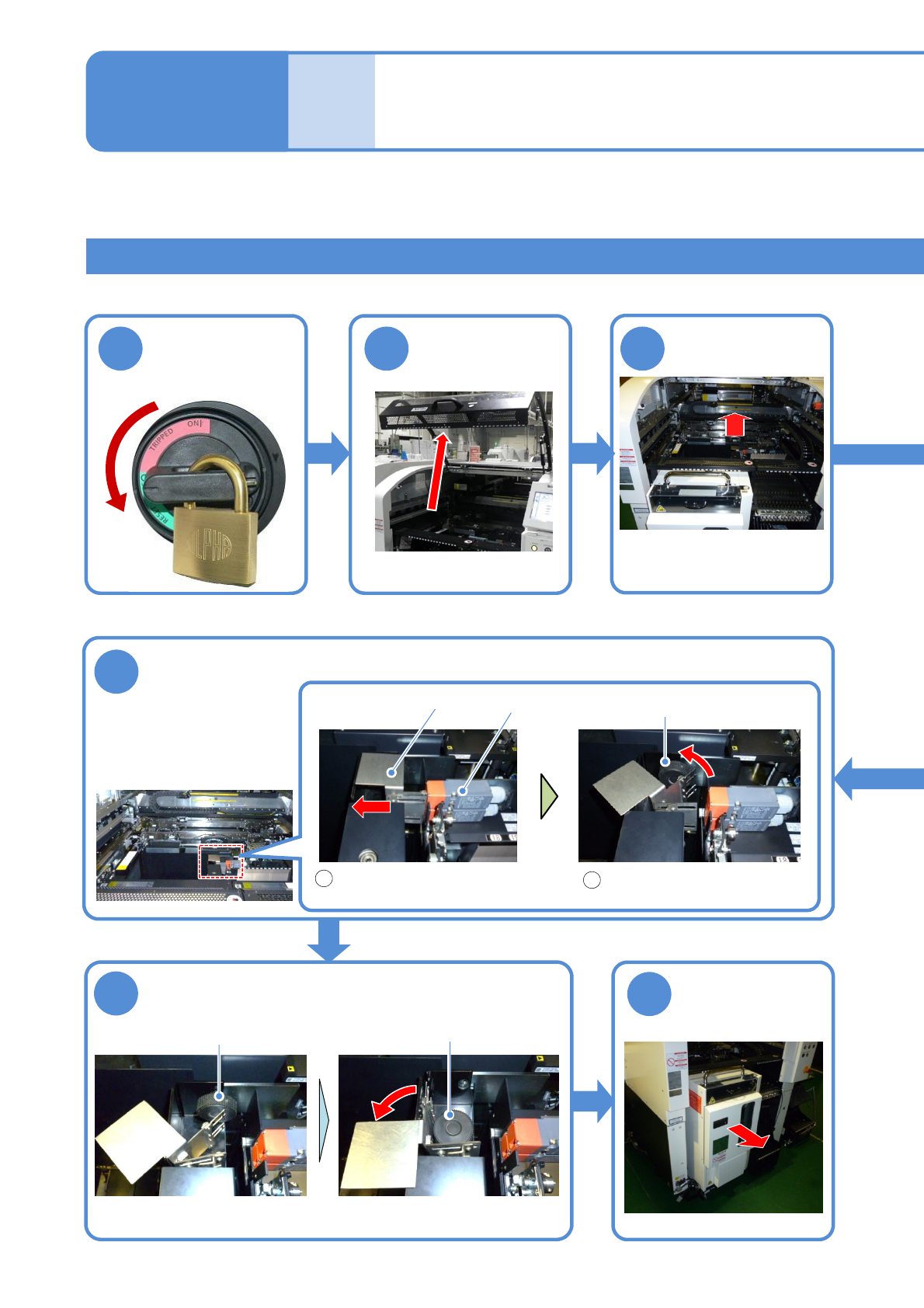
Describes how to handle the single feeder.
Time required : 5 minutes
1
Turn OFF the
power and lock
the machine
OFF
2 3
6
Release the safety switch of the tray feeder
Keep the released handle in
contact with the joint screw B
Slide the handle of the safety
switch to the left
1
2
Safety switch
Handle
7
Remove the joint screw B and install it to the
temporary installation location
8
Detach the tray
feeder
Push it until it goes inward
from the multi-recognition
camera
Push the X-axis
inward
Joint screw B
Joint screw B
Temporary installation
location
NPM-TT2 EJM1EE-MB-14M-02
14-8-2
Installation
5
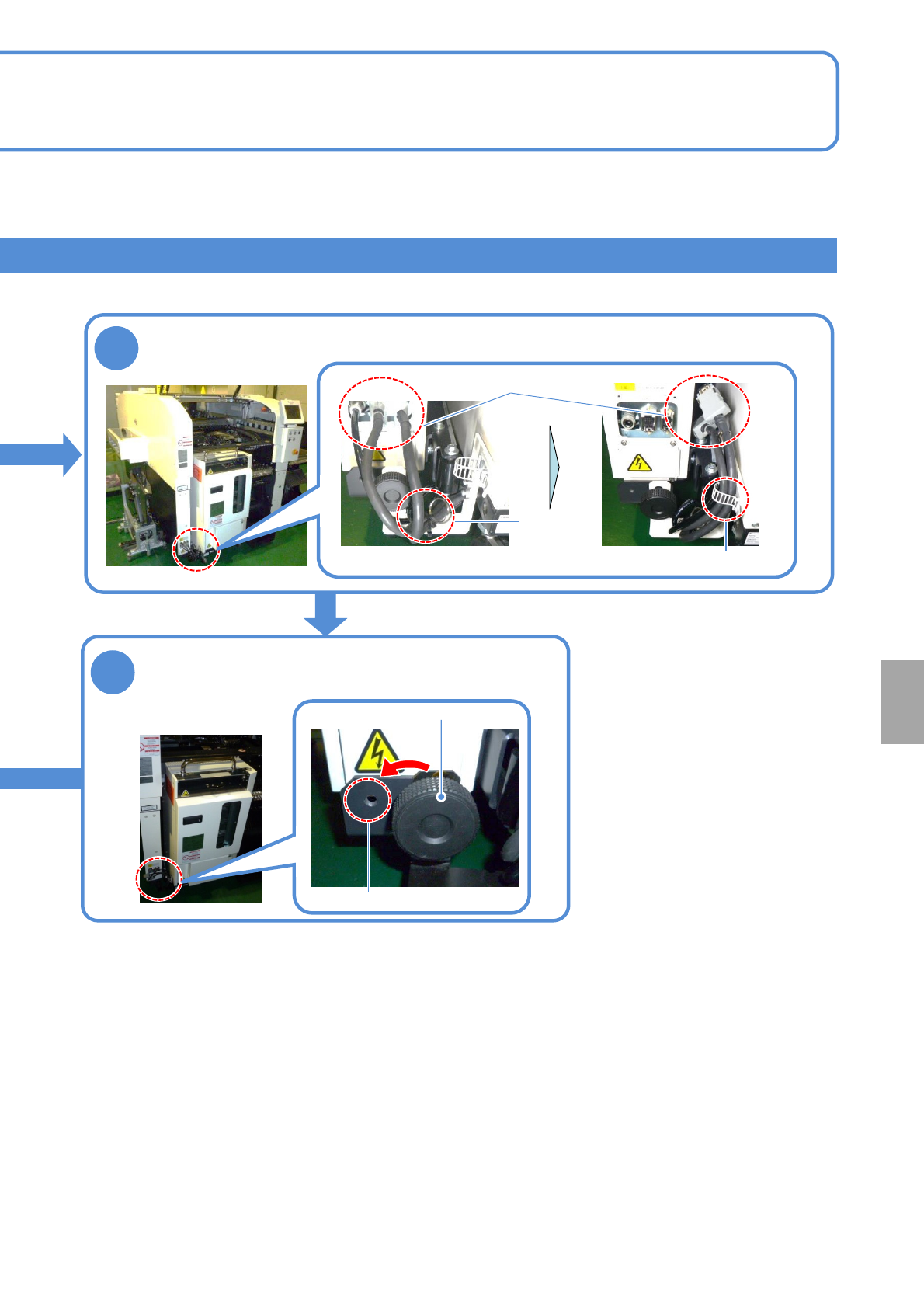
Remove the joint screw A and install it to the
temporary installation location
Temporary installation location
4
Remove the cables and pipes and fix them using a cable tie
Cable tie
Clamping
band
Joint screw A
Cable, pipe
●Do not remove the clamping band