MAN00000772_SI-G200BB_SVCPDFA.pdf - 第238页
Calibration HLGB-10309-01 Calibration Data Edit SHEET 3/4 Format o f CSV fil e for tr anscrip tion corr ection in every angle 5. “1 to 8” on the left row are Inde x No. 6. Input transcription angle into the second row fr…
Calibration
HLGB-10309-01
Calibration Data Edit
SHEET
2/4
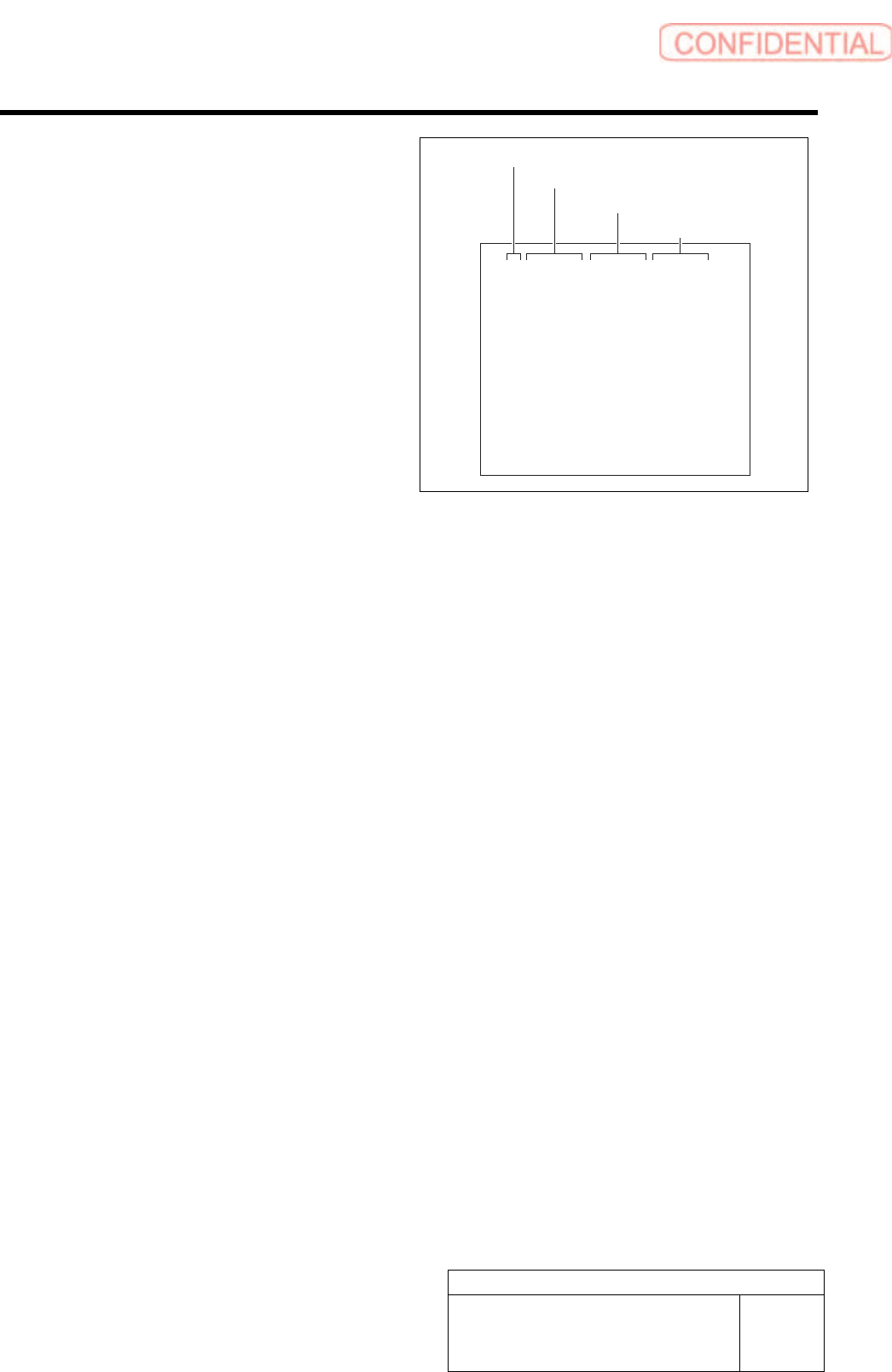
Format of CSV file for transcription correction
1. “1 to 8” on the left row are Index No.
2. Input correction amount in X direction
into the second row from the left.
・ When attempting to correct the fitting
position to the right side (+X direction), input
a value with negative sign.
・ When attempting to correct the fitting
position to the left side (-X direction), input
a value with positive sign.
3. Input correction amount in Y direction
in the third row from the left.
・ When attempting to correct the fiting position
to the upper side (+Y direction), input a
value with negative sign.
・ When attempting to correct the fiting position
to the lower side (-Y direction), input a
value with positive sign.
4. Input angle correction value into the
rightmost row.
・ When correcting the fitting result clockwise,
input a value with positive sign.
・ When correcting the fitting result
counterclockwise, input a value with negative
sign.
1,0.000,0.000,0.000
2,0.000,0.000,0.000
3,0.000,0.000,0.000
4,0.000,0.000,0.000
5,0.000,0.000,0.000
6,0.000,0.000,0.000
7,0.000,0.000,0.000
8,0.000,0.000,0.000
Index No.
Correction value in X direction
Correction value in Y direction
Angle correction value
Calibration
HLGB-10309-01
Calibration Data Edit
SHEET
3/4
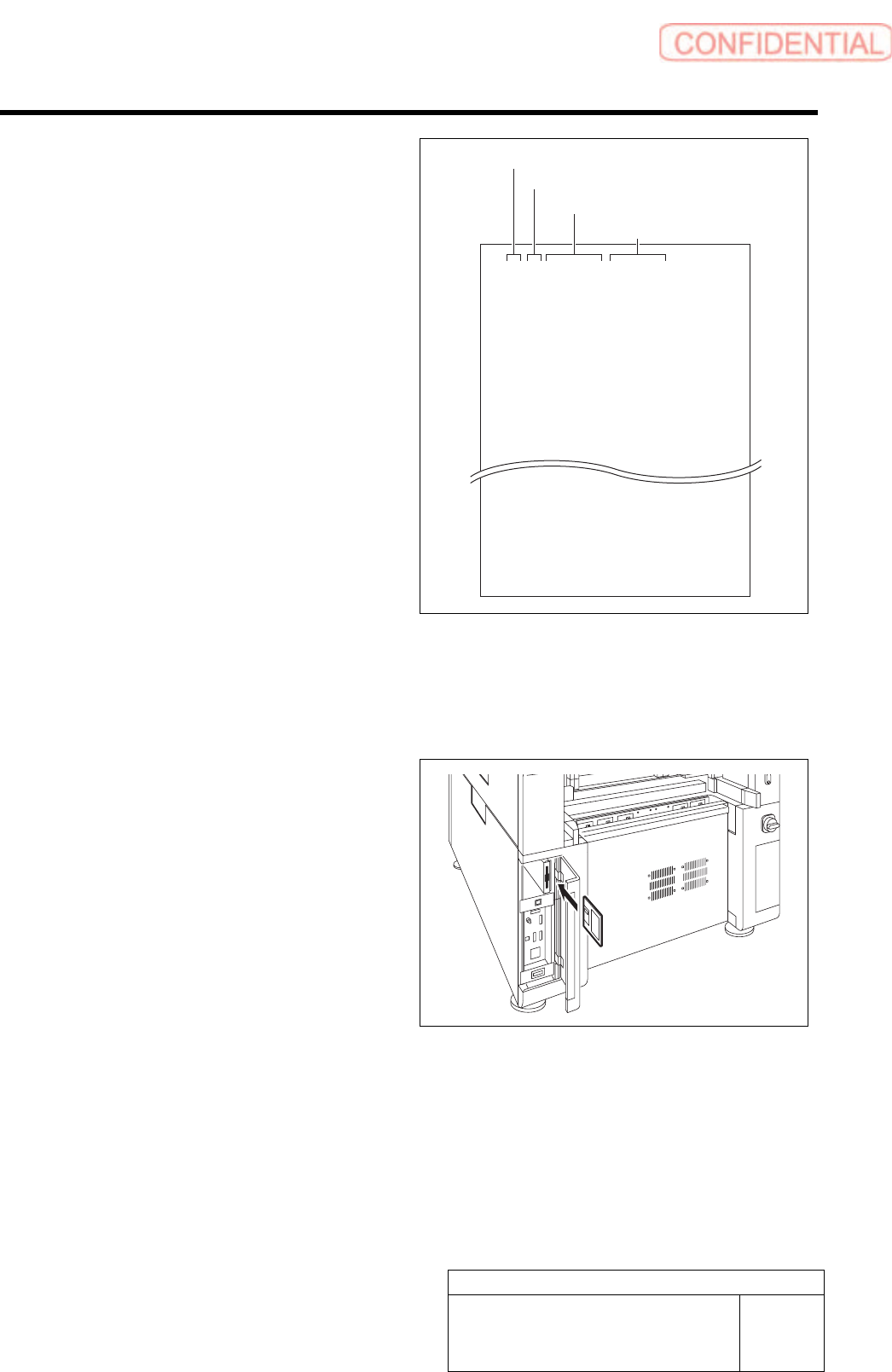
Format of CSV file for transcription correction
in every angle
5. “1 to 8” on the left row are Index No.
6. Input transcription angle into the
second row from the left.
Input four kinds of transcription angles, 0 degree,
90 degrees, 180 degrees and 270 degrees to one
Index No.
7. Input correction amount in X direction
in the third row from the left.
・ When attempting to correct the fitting
position to the right side (+X direction), input
a value with positive sign.
・ When attempting to correct the fitting
position to the left side (-X direction), input
a value with negative sign.
8. Input correction amount in Y direction
in the third row from the left.
・ When attempting to correct the fitting
position to the right side (+Y direction), input
a value with positive sign.
・ When attempting to correct the fitting
position to the left side (-Y direction), input
a value with negative sign.
1,0,0.000,0.000
1,90,0.000,0.000
1,180,0.000,0.000
1,270,0.000,0.000
2,0,0.000,0.000
2,90,0.000,0.000
2,180,0.000,0.000
2,270,0.000,0.000
8,0,0.000,0.000
8,90,0.000,0.000
8,180,0.000,0.000
8,270,0.000,0.000
2 Save the created CSV file for correction to a
floppy disk.
3 Set the floppy disk which contains the CSV
file for correction to the unit.
Index No.
Transcription angle
Correction value in X direction
Correction value in Y direction
Calibration
HLGB-10309-01
Calibration Data Edit
SHEET
4/4
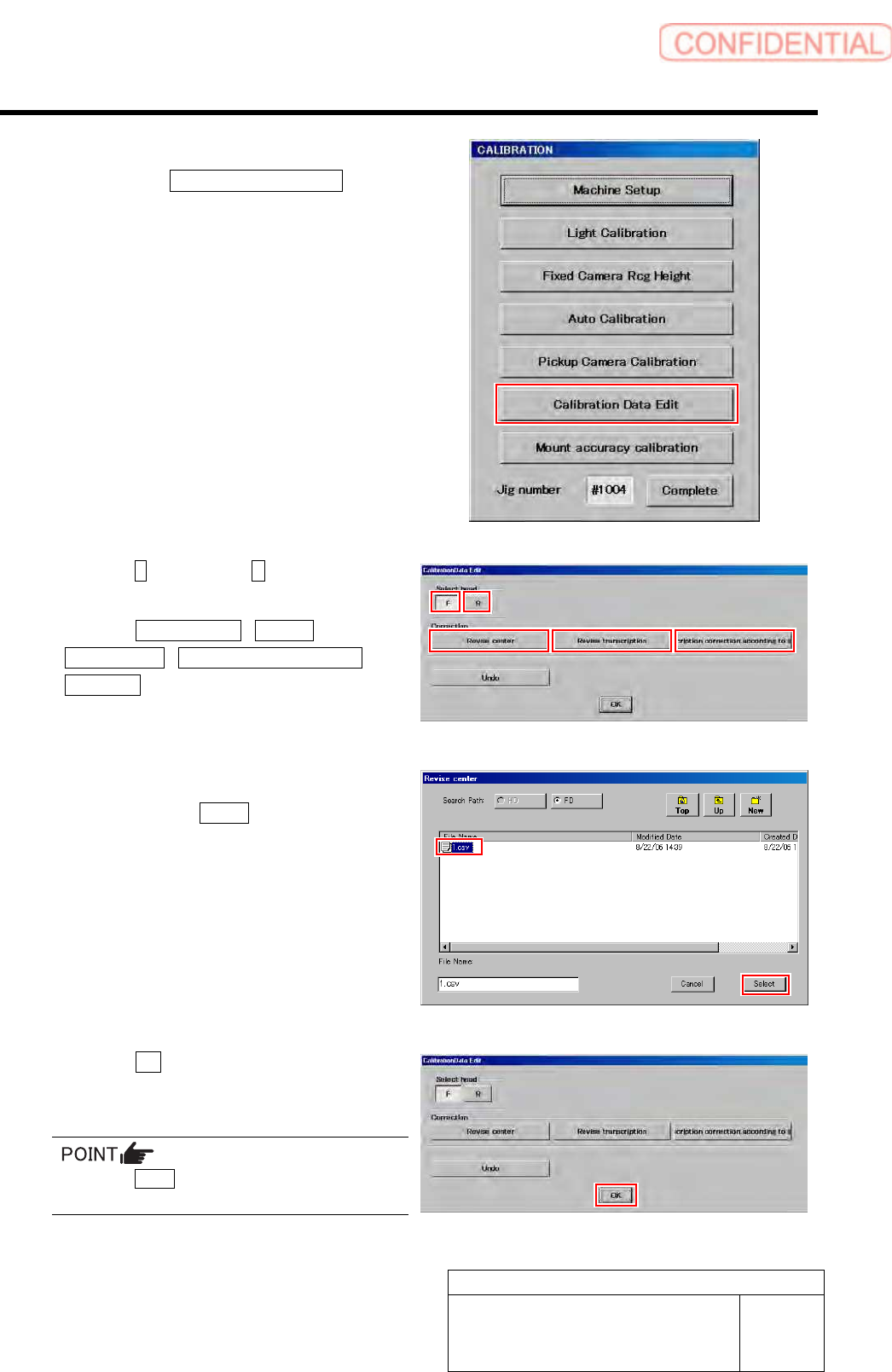
4 Display a Calibration Data Edit screen.
1. Click the Calibration Data Edit button
on the CALIBRATION screen.
Calibration Data Edit screen is displayed.
5 Click the F button or the R button to select a
head to be corrected.
6 Click the Revise center / Revise
Transcription / Transcription correction
according button to select working which
you attempt to correct.
Correction file select screen is displayed.
7 Select a correction file included in the floppy
disk and click the Select button.
Correction file is selected, and the file select screen
closes.
The right screen is an example of file select screen for
rotation center correction.
8 Click the OK button.
The offset value is saved, and the calibration edit
screen closes.
Press the Undo button, then you can return to
previous one calibration data.