MAN00000772_SI-G200BB_SVCPDFA.pdf - 第344页
Adjustment HLGB-10418-01 Adjustment of PWB S topper Sensor SHEET 1/2 Adjustment of PWB S topper Sensor [Procedure] 1 Set PWB on the conveyor . Any PWB sized to be mountable on this machine can be allowed. Mountable PWB: …
Adjustment
HLGB-10417-01
Adjustment of Cassette Float Sensor
Height
SHEET
3/3
8 Adjust the height of the BS-63T attachment bracket at the position of No.39 on the cassette table.
1. Set the feed adjusting jig and cassette float sensor height adjusting jig on the position of
No.39 on the cassette table.
There should be no gap between the feed adjusting jig and the cassette table.
2. Adjust the height of the BS-63T attachment bracket in the same procedure as in the
procedure 7.
9 Check that the LED for the BS-63R normally responds at the position of No.20 on the cassette
table.
Check that the LED for the BS-63R lights up at a part of 5 mm on the cassette float sensor height adjusting jig, and the
LED extinguishes at a part of 6 mm.
10 Finally, again, check that the LEDs for the BS-63R and BS-63T normally respond at the positions of
No.1, 20 and 39 on the cassette table.
If the height is respectively adjusted at the positions of No.1, 20 and 39 on the cassette table, response
condition adjusted at the previous position varies. Be sure to check response of the sensor at the 3
locations after adjustment.
11 Remove the jig.
1. Remove the cassette float sensor adjusting jig and feed adjusting jig.
2. Remove the replacing carrier.
12 Also, adjust the cassette float sensors (BS-375T, BS-375R) on the rear side in the same procedure
as the procedures 3 to 11.
Adjustment
HLGB-10418-01
Adjustment of PWB Stopper Sensor
SHEET
1/2
Adjustment of PWB Stopper Sensor
[Procedure]
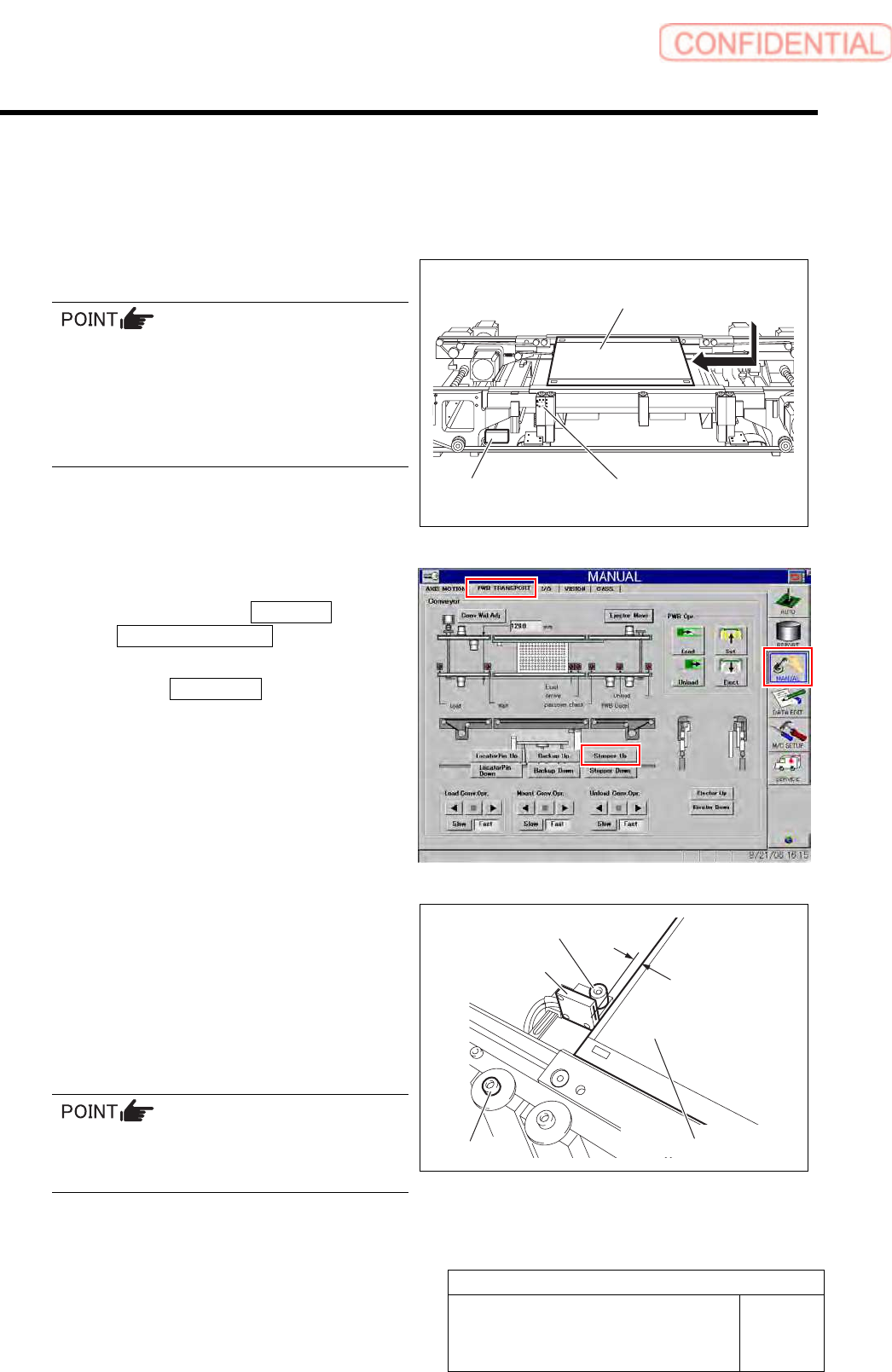
1 Set PWB on the conveyor.
Any PWB sized to be mountable on this
machine can be allowed.
Mountable PWB:
- Minimum PWB dimension: 50 x 50 mm
- Maximum PWB dimension: 460 x 360 mm
- PWB thickness: 0.5 to 2.6 mm
2 Raise the PWB stopper.
1. Click in an order of MANUAL menu
PWB TRANSPORT tab to open the
PWB TRANSPORT screen.
2. Click the Stopper Up button to raise
the PWB stopper.
3 Adjust gap between PWB end face and
PWB stopper sensor to 2mm.
1. Loosen the fixing screws for PWB
stopper sensor.
2. Adjust the position of the sensor so
that the gap between the PWB and the
PWB stopper sensor.
The gap can be easily adjusted by inserting a
hexagon wrench of 2 mm between the PWB and
the PWB stopper.
3. Tighten the fixing screws for the PWB
stopper sensor.
PWB stopper sensor
2 mm
PWB
PWB stopper
PWB
PWB stopper sensor
Sensor amplifier
Fixing screw
Adjustment
HLGB-10418-01
Adjustment of PWB Stopper Sensor
SHEET
2/2
4 Adjust sensitivity of the PWB stopper
sensor.
1. Make adjustment by turning the
sensitivity adjustment volume of the
sensor amplifier so that the PWB
stopper sensor is turned on (both of the
green LED and orange LED light up)
at this position.
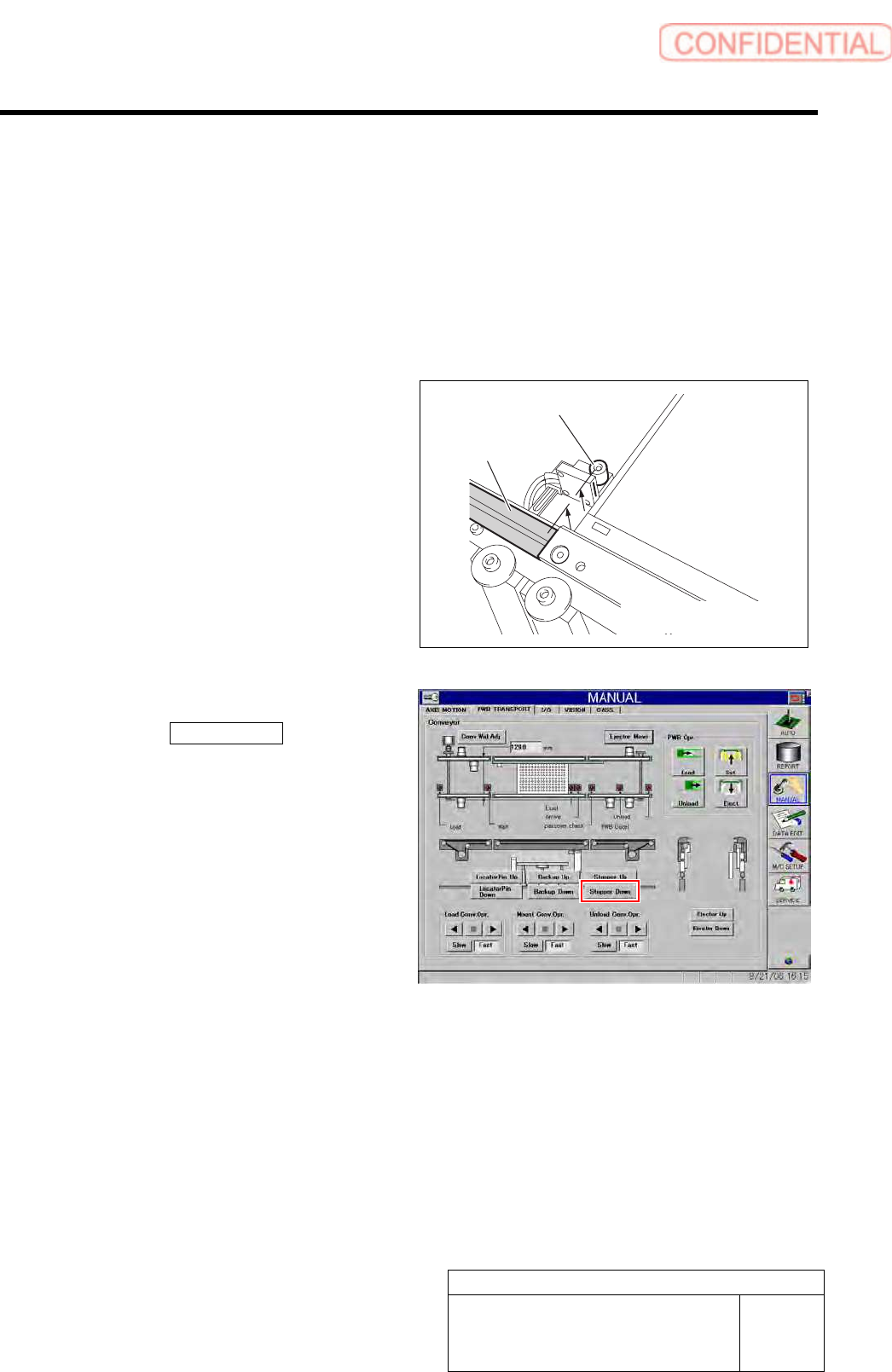
5 Check that the up end of the PWB stopper is
as high as the conveyor rail.
6 Remove the PWB.
1. Click the Stopper Down button to
lower the reference pin.
2. Remove the PWB on the conveyor.
Conveyor rail
PWB stopper