MAN00000772_SI-G200BB_SVCPDFA.pdf - 第604页
Alarm List for the Servo Pack "S igma-III" Series (SGDS type) BBGB-10101-01 Alarm List for the Servo Pack "Sigma-III" Series (SGDS type) SHEET 15/18 [How to use Digit al Operator] Digital Operator (Mo…
Alarm List for the Servo Pack "Sigma-III" Series (SGDS type)
BBGB-10101-01
Alarm List for the Servo Pack
"Sigma-III" Series (SGDS type)
SHEET
14/18
Alarm
Display
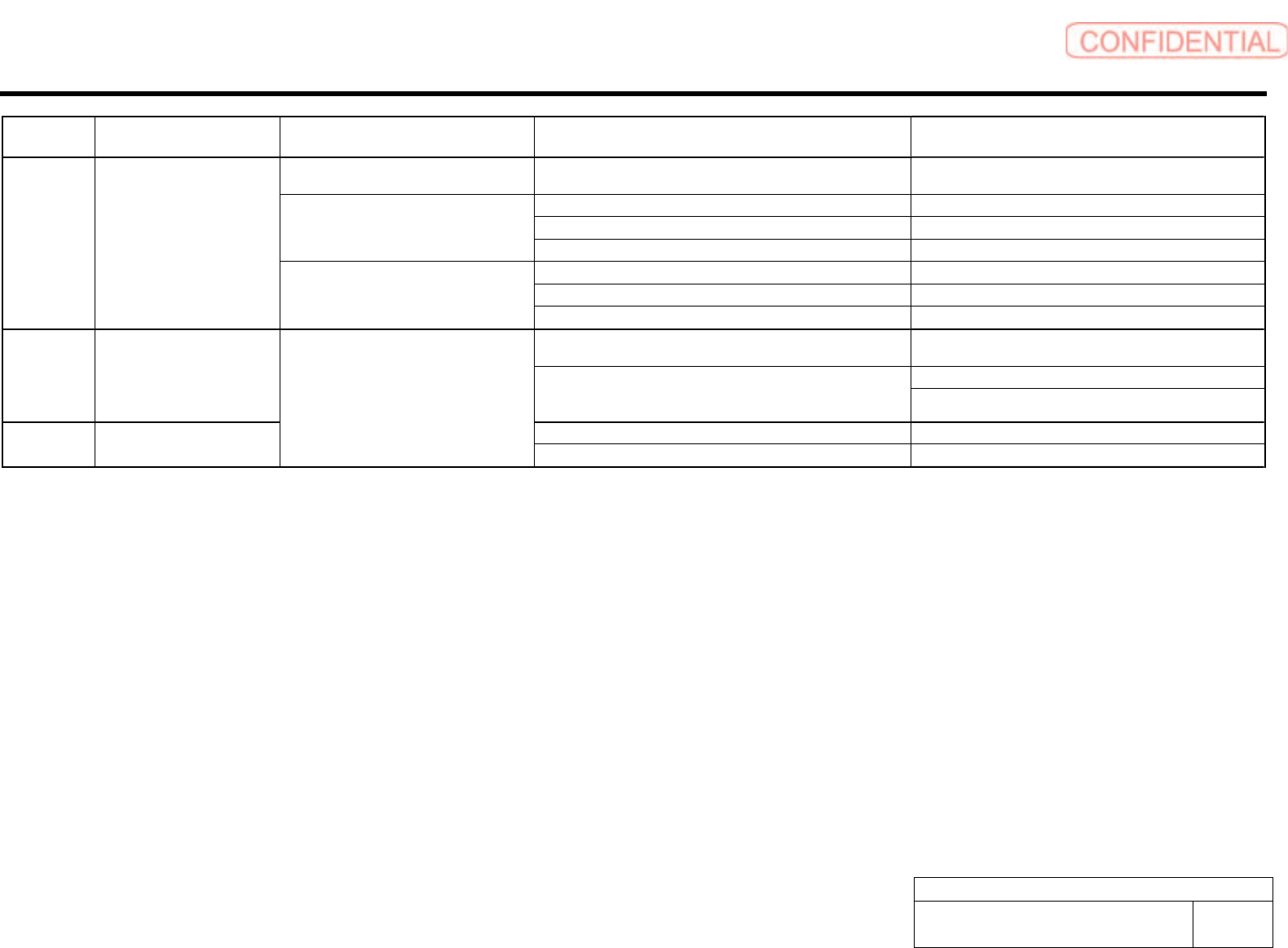
Alarm Name Situation at Alarm Occurrence Cause Corrective Actions
Occurred when the control power supply
was turned ON.
A SERVOPACK fault occurred. Replace the SERVOPACK.
The three-phase power supply wiring is incorrect. Correct the power supply wiring.
The three-phase power supply is unbalanced. Balance the power supply by changing phases.
Occurred when the main circuit power
supply was turned ON.
A SERVOPACK fault occurred. Replace the SERVOPACK.
The contact in three-phase power supply wiring is faulty. Correct the power supply wiring.
Three-phase power supply is unbalanced. Balance the power supply.
A.F10 Power Line Open Phase
Occurred when the servomotor was
running.
A SERVOPACK fault occurred. Replace the SERVOPACK.
The contact between the digital operator and the SERVOPACK
is faulty.
Insert securely the connector, or replace the cable.
Do not lay the cable near noise source.
CPF00 Digital Operator Transmission
Error 1
*1
The external noise interference occurred to the digital operator
or cable is faulty.(The digital operator cable is near noise
source)
Install digital operator far from noise source.
A digital operator fault occurred. Replace the digital operator. CPF01 Digital Operator Transmission
Error 2
*2
Occurred when the power supply was
turned ON with digital operator connected
or when connecting digital operator with
the power supply was turned ON.
A SERVOPACK fault occurred. Replace the SERVOPACK.
*1. This alarm occurs when the communications is still disabled five seconds after digital operator power supply is ON, or when digital operator communications disabled status stays while an option unit is
connected.
*2. This alarm occurs when digital operator received data error occurs consecutively five times, or when the state that digital operator receives no data from SERVOPACK for one second or more occurs
consecutively three times.
Alarm List for the Servo Pack "Sigma-III" Series (SGDS type)
BBGB-10101-01
Alarm List for the Servo Pack
"Sigma-III" Series (SGDS type)
SHEET
15/18
[How to use Digital Operator]
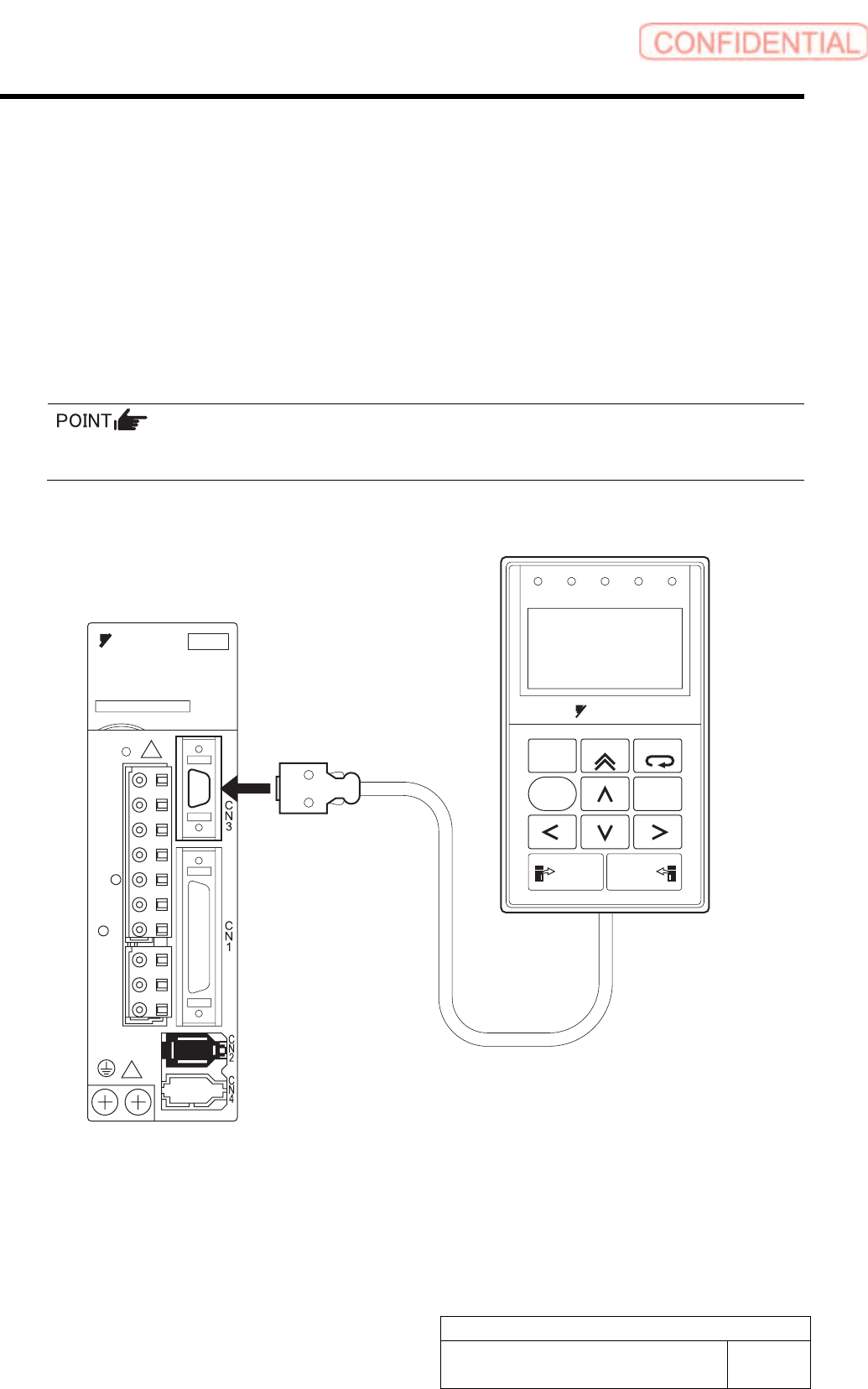
Digital Operator (Model: JUSP-OP05A) for Sigma-III series SGDS SERVOPACK made by
YASKAWA is an option for displaying/setting user constant in the SERVOPACK.
This section describes basics of how to use Digital Operator.
Connecting the Digital Operator
Connect the digital operator to the CN3 connector of the SERVOPACK.
The digital operator connector can be inserted or removed also when the power is supplied to
the SERVOPACK.
ALARM
RESET
SCROLL
YASKAWA
MODE/SET
JOG
SVON
READ
SERVO
DATA
WRITE
SERVO
YASKAWA
200V
SERVOPACK
L1
L2
L1C
L2C
B2
B1/
U
V
W
+
-
SVCN TGON REF
CHARGE
COIN
VCMP
JUSP-OP05A
Di
g
ital O
p
erato
r
SGDS SERVOPACK
Insert securely to the CN3
connector of the SERVOPACK
Alarm List for the Servo Pack "Sigma-III" Series (SGDS type)
BBGB-10101-01
Alarm List for the Servo Pack
"Sigma-III" Series (SGDS type)
SHEET
16/18
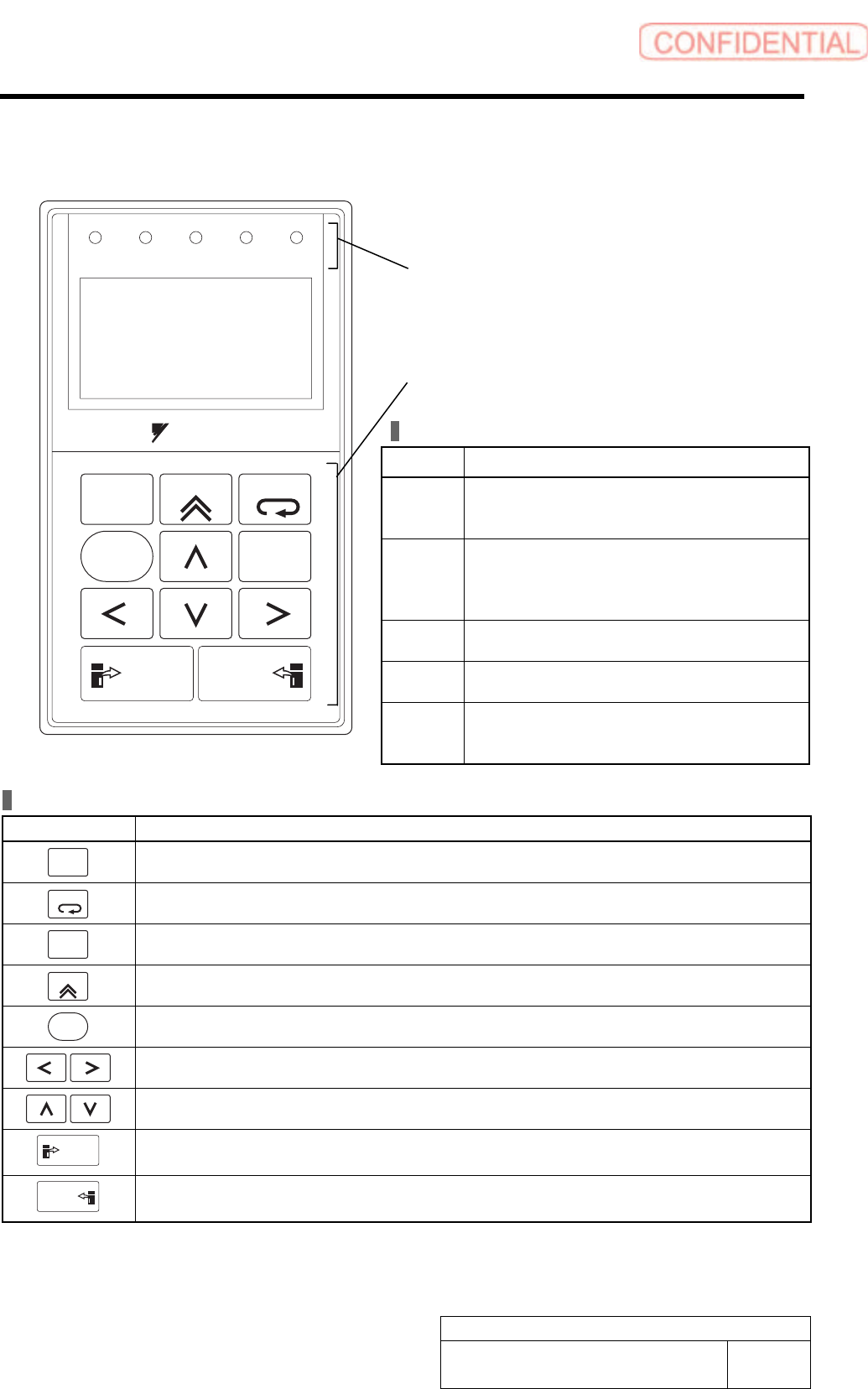
Part Names and Functions
LED Indicator Lamps
Name Function
SVON Lit when the servo is ON.
Unlit at base block (when the power to the
servomotor is OFF.).
COIN
VCMP
Lit when positioning is completed.
Unlit when positioning is not completed.
Lit when the speed is coincident.
Unlit when the speed is not coincident.
IGON Lit while the servomotor is running.
Unlit while the servomotor stops running.
REF Lit when the reference pulse is input.
Unlit when the reference pulse is not input.
CHARGE Lit when the main circuit power supply is ON.
Unlit when the main circuit power supply is
OFF.
ALARM
RESET
SCROLL
YASKAWA
MODE/SET
JOG
SVON
READ
SERVO
DATA
WRITE
SERVO
SVCN TGON REF
CHARGE
COIN
VCMP
Operation Keys
Operation Key Main Function
ALARM
RESET
Resets the alarm. (The alarm cannot be reset unless the cause of the alarm is removed.)
MODE/SET
Switches the Display Mode of digital operator.
DATA
Switches the cursor position between the parameter number and the setting when setting a
parameter. Opens the selected utility function display in Utility Function Mode.
SCROLL
Moves the cursor upward in Parameter/Monitor Mode.
JOG
SVON
Turns the servo ON or OFF at JOG operation.
Moves the cursor to left or right in Parameter/Monitor Mode.
Increases or decreases the parameter number, setting data, monitor number, and utility
function number. Or, rotates the servomotor in forward or reverse direction at JOG operation.
READ
SERVO
Reads parameters saved in the SERVOPACK to the digital operator.
WRITE
SERVO
Saves the display in Parameter/Monitor Mode, JOG operation, and Origin Search.
LED indicators
(Five LED indicator lamps in red)
Operation keys
LCD display
(17 characters × 5 lines)