MAN00000772_SI-G200BB_SVCPDFA.pdf - 第95页
Install Tray Unit (Including machine modification) SHEET 56/73 WKGB-10104-03 Installing Tray Unit (Including machine modification) 3 Set the height of th e VU axis and VL axis. 1. Open the tray offset screen for M/C SETU…
Install Tray Unit (Including machine modification)
SHEET
55/73
WKGB-10104-03
Installing Tray Unit
(Including machine modification)
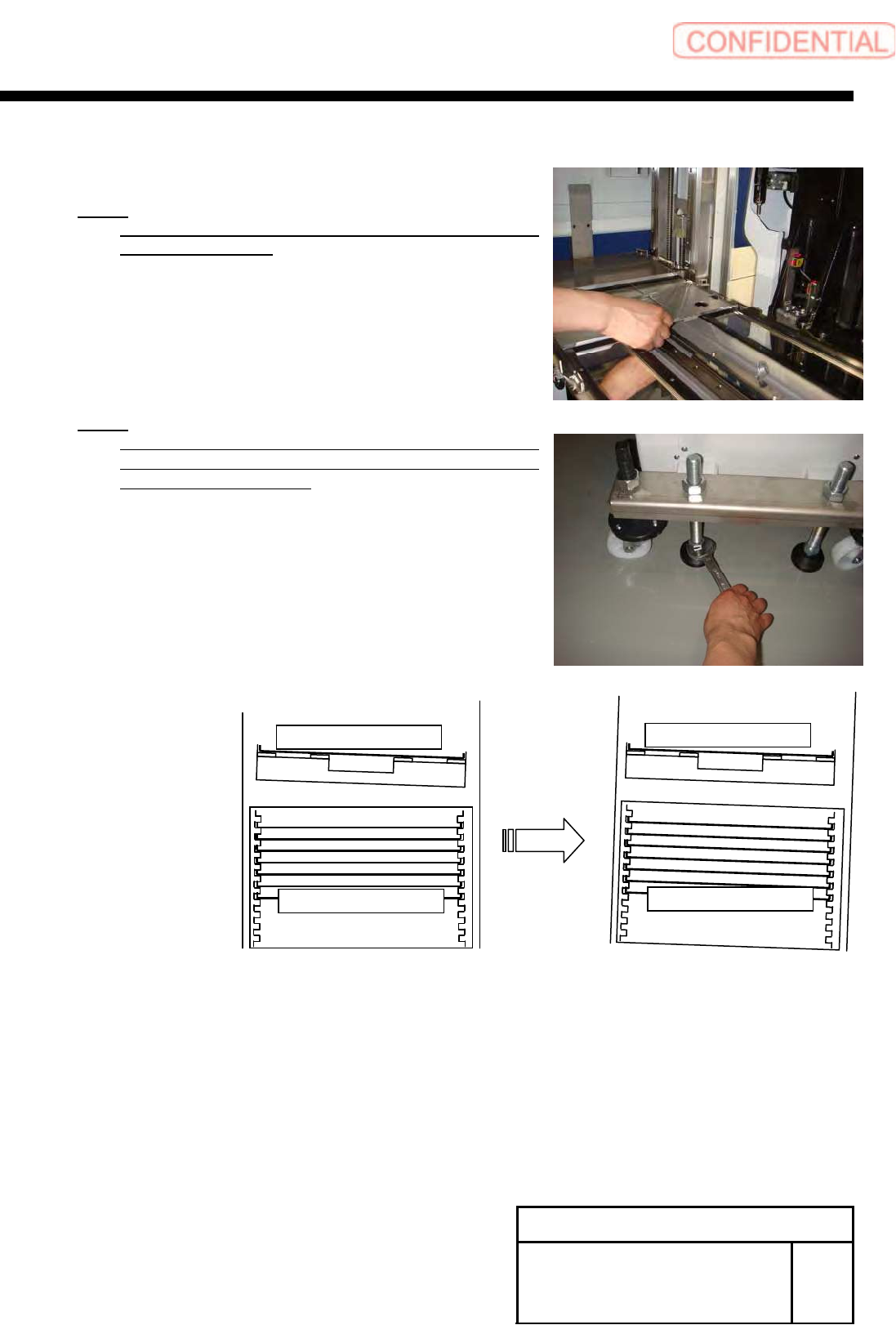
5. Confirm the smooth movement of the palette from
the tray rack.
NOTE:
Adjust the height of the tray rack again if palette can
not move smoothly.
NOTE:
Adjust the inclination of the tray unit according to S
axis unit, when there are differences of the inclination
S axis unit and tray unit.
S-axis Unit
Tray rack
S-axis Unit
Tray rack
Install Tray Unit (Including machine modification)
SHEET
56/73
WKGB-10104-03
Installing Tray Unit
(Including machine modification)
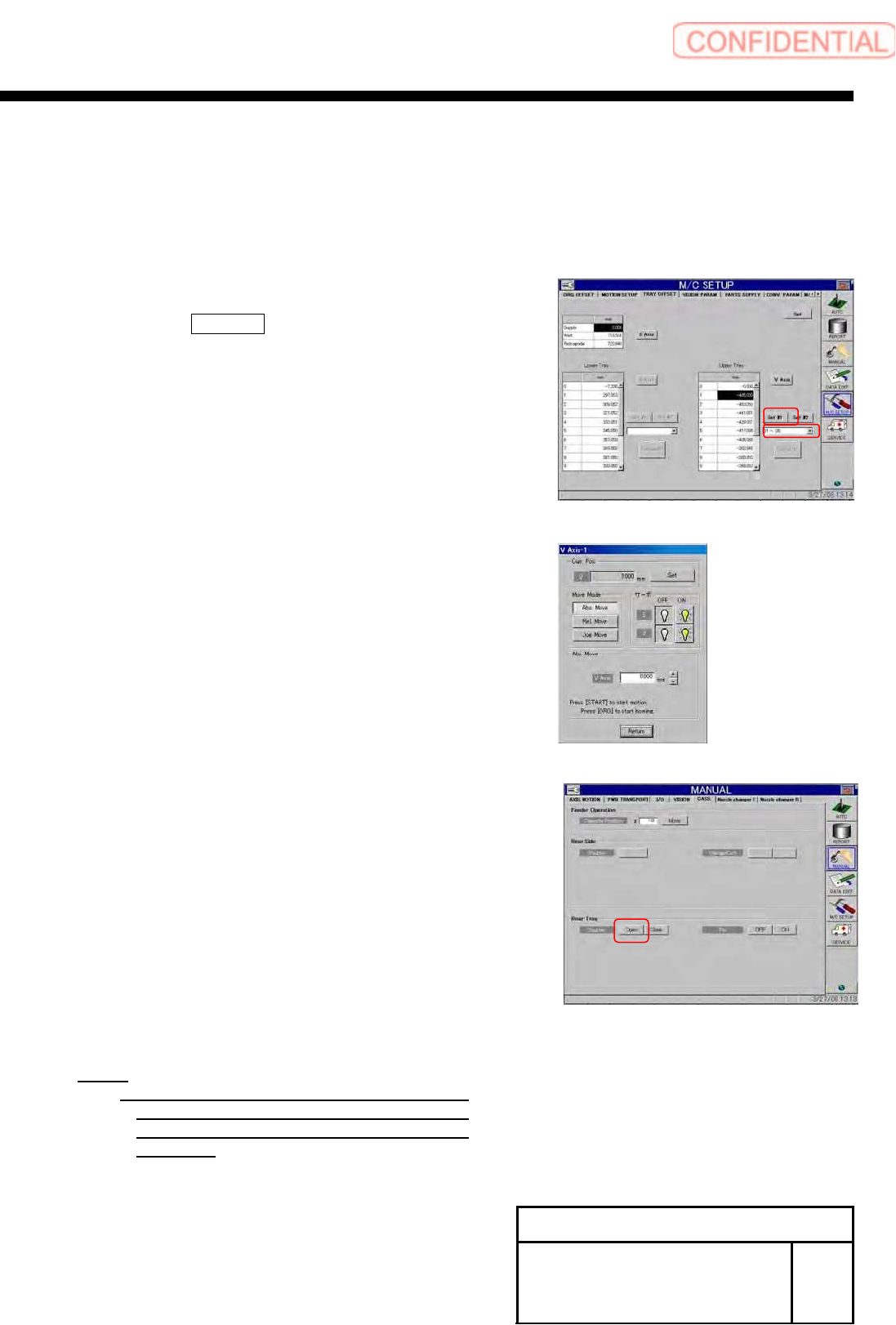
3 Set the height of the VU axis and VL axis.
1. Open the tray offset screen for M/C SETUP.
2. Select “01~05” from the dropdown list.
3. Press the SET #1 button to open the VU Axis
screen.
4. Move the VU axis to a position of the supply
position 501.
5. Open the shutter on the cassette screen for
MANUAL.
6. Check that the tray pallet can smoothly move
between the tray rack and the S axis.
NOTE:
If transit of the tray pallet is not smooth,
adjust height of the tray pallet To a height
which allows smooth transit by JOG
operation.
Install Tray Unit (Including machine modification)
SHEET
57/73
WKGB-10104-03
Installing Tray Unit
(Including machine modification)
7. Close the shutter to return to the Tray Offset
screen.
8. Again, press the SET #1 button to open the VU
Axis screen.
9. Press the Set button on the VU Axis screen to
close.
10. Press the Set button on the Tray Offset screen.
11. Press the SET #2 button on the Tray Offset screen
to open the VU Axis screen.
12. Relative-move by 48[mm] from the supply No. 501.
13. Open the shutter on the cassette screen for
MANUAL.
14. Check that the tray pallet can smoothly move
between the tray rack and the S axis.
NOTE:
If transit of the tray pallet is not smooth,
adjust height of the tray pallet To a height
which allows smooth transit by JOG
operation.
15. Close the shutter to return to the Tray Offset
screen.
16. Again, press the SET #2 button on the Tray Offset
screen to open the VU Axis screen.
17. Press the Set button on the VU Axis screen to
close.
NOTE:
The
calculate button will be enable.
18. Press the Calculate button.
19. Press the Set button on the Tray Offset button.