A10011-ASM-T45-EN-Spec-E_DMS.pdf - 第36页
36 SIPLACE Software Suite Customer Benefit Floating Changeover Based on Split Table Mod e The SIPLACE Pro setup mode "Split Table" enables you to keep certain locations on the tables free at the setup optimizat…
35
SIPLACE Software Suite
General
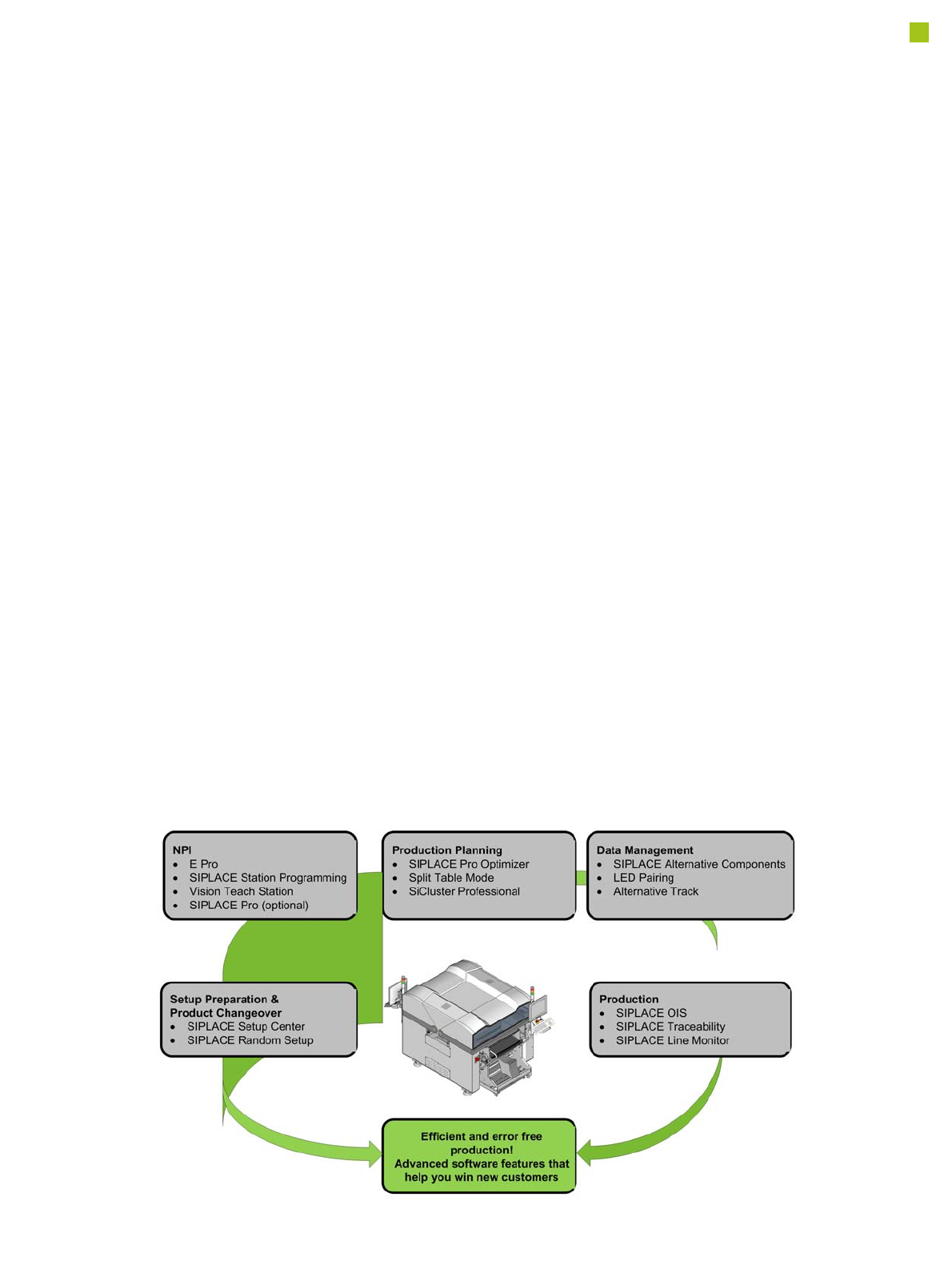
SIPLACE provides compre-
hensive solutions based on
modular software tools for
SMT machines, lines and
production management: the
SIPLACE software suite.
Product definition, optimi-
zation and line control
Fast, fault-free introduction
of products and optimum uti-
lization of production lines
are essential to maximize
production output. The pro-
grams from the SIPLACE
software suite allow you to
easily program products,
fine-tune the programs you
have created and then find
the balance for them within
your SMT production lines.
Production monitoring &
process control
To achieve the production
targets that are set, it is
important to constantly moni-
tor and check the production
facilities. The SIPLACE soft-
ware suite contains monitor-
ing products tailored to suit
the user group. These signal
immediately if limits are
exceeded on the machine or
the production line.
Setup verification &
traceability
Setup errors lead to series
errors. The user-friendly
SIPLACE software programs
help you to avoid such
errors, and thus ensure high
quality in your electronics
production.
The benefits of the
SIPLACE software suite at
a glance:
• User-friendly
• Simple operation
• Fast programming and
error detection
• Reduces changeover
times and stoppages
• Ensures optimum utiliza-
tion of your production
line's productivity
• Real-time information
from the production area
• Incredibly fast distribution
of information
• Optimum use of resources
• Timely notification when
production materials need
to be re-ordered
• Coordination of mainte-
nance
Note: The SIPLACE software suite tools will work with the optional SIPLACE Pro only (not with E Pro).
36
SIPLACE Software Suite
Customer Benefit
Floating Changeover Based
on Split Table Mode
The SIPLACE Pro setup
mode "Split Table" enables
you to keep certain locations
on the tables free at the
setup optimization stage.
Already kitted feeders for the
next setup can then be con-
figured on these free loca-
tions during the production
process.
Benefit:
• Random configuration of
components for next setup
when the machine is run-
ning.
• The downtime for change-
over is reduced to normal
recipe change time.
Alternative Components
An alternative component
can completely replace
another component. An alter-
native component offers the
same functional features as
the standard component. By
defining alternative compo-
nents you can replace the
components for the relevant
placement positions when
the production is in progress
without performing a new
download afterwards.
Alternative components are
defined per placement posi-
tion. Functions in the
SIPLACE Pro PCB editor
support the user to apply
these alternatives to other
placement positions.
General Requirements:
• Alternative components
have to be set up on the
same head type.
• Alternative components
require the same nozzle
type.
• Alternative components
require feeders of the
same feeder type, such as
tape feeder, tray feeders
or stick feeders (e.g.
switching from 16mmE
tape feeder to a 24mmE
tape feeder is supported;
switching from a tape
feeder to a stick feeder is
not supported).
• Components must have
their own part number to
be able to treat alternative
and standard compo-
nents.
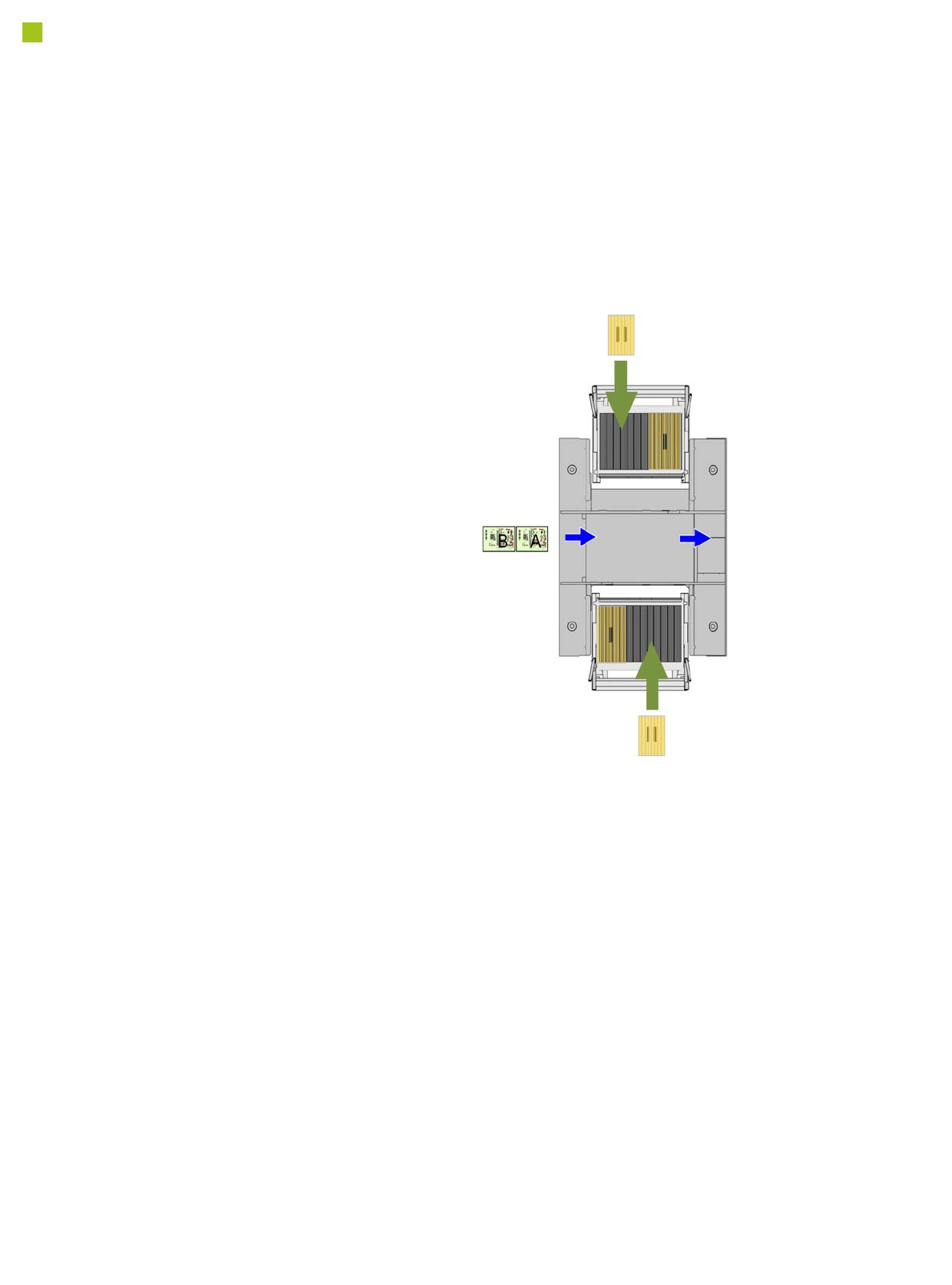
The tables in the current setup are divided into the areas I and II. This
setup has been optimized so that only table area I is used. When product
A is produced, Random Setup allows the next setup B to be configured
in table area II during the production process. The setup in area A or B
can also be a family setup, meaning that it contains the components
needed for various products

37
SIPLACE Software Suite
Customer Benefit
SiCluster Professional
SiCluster Professional allows
you to create a cluster job,
instead of a normal job. The
boards are distributed across
multiple setups (as few as
possible), taking into account
all auxiliary conditions.
SiCluster Professional also
provides the option to calcu-
late constant tables when
planning your setups.
SiCluster Professional calcu-
lates several family setups
for a quantity of boards or
recipes and a line. These
family setups use the same
table configurations i.e. con-
stant tables. One or more
tables can be used
unchanged in all setups and
at the same location. You
can choose at which loca-
tions in the line constant
tables should be used.
Random Setup
1. Configuring spare tracks
while machine is running
You can avoid the need to
splice refill reels if you config-
ure spare tracks. This makes
the refilling of components
more flexible and leads to
fewer malfunctions.
2. Reduced component
sorting time in the pre-
setup area:
• No need to sort by location
or track for the whole line.
• Faster and more flexible
setup of prepared feeders
• Random setup is faster
than configuration of only
one certain track.
• Additional configuration of
spare tracks without
changing the setup in
SIPLACE Pro.
3. The next setup can be
prepared during ongoing
production
The user interface for the
function Next Setup provides
support functions to feeder
changeover (e.g. LED con-
trols, user interface display
showing which components
have already been config-
ured for the next setup and
which are still missing). The
next setup can be conve-
niently configured using the
"Next Setup" function in
Setup Center.
This function shows the fol-
lowing:
• Status display for the next
setup (based on the actual
setup in the line).
• Which components have
been set up or are still
missing from the next set-
up?
• Which components are
configured on the wrong
location? (for Random
Setup within a table)
• Which spare tracks and
multiple setup compo-
nents are in the line?
• Which components will
not be used in the next
setup?
TIP: This function allows you
also to print a delta-list of
materials; basically compar-
ing both setups.
Spare Tracks
Random Setup gives opera-
tors greater configuration
flexibility, allowing compo-
nents to be set up on any
track of the same table or on
another table in the line. If
SIPLACE Setup Center is
working in Random Setup
mode, feeders can be set up
during ongoing operations,
without the need to down-
load the setup again. For
example, spare tracks can be
configured during ongoing
production. These spare
tracks could be either addi-
tional components of the
same type of alternative
components.