WaferTransportSolutionManual.pdf - 第58页
HEAVY PALLET RAILS CALIBRATIONS 1.50 Wafer Transport Solutio n Chapter Issue 1 August 11 Deceleration Setting 1.NOTE A nominal setting is shown below for ro tary and linear camera systems. The setting must be verified us…

HEAVY PALLET RAILS
CALIBRATIONS
Chapter Issue 1 August 11 Wafer Transport Solution 1.49
19. Select Calib. Sensor. The board loads; the camera moves to a position
roughly at the centre of the printer. The vision window displays the location
of the board centre ident (circle).
20. Using the jog buttons locate the circular ident at the centre of the board.
21. Select Confirm. The system carries out an automated cycle, checking the
left and right edges of the board, setting automatic values for the sensor
offset.
Pre-check Before
Standard
Calibration
This procedure sets the deceleration rate for the non-contact board stop.
1. Initialise the printer.
2. Select Load.
3. Load the Calibra. file.
4. Select Back.
5. Press the System button.
6. Select Setup Product.
7. Select Board Thickness and set to 5mm.
8. Select Load Product.
9. Select 265test1.
10. Select Load.
11. Select Back.
12. Select Board Thickness and set to 5mm. This must be set before
calibrating vision height.
13. Select Back.
14. On the user interface navigate to the Diagnostics page and select the
Rising Table module.
15. Select Restore Default Heights. Important. Printer damage may occur if
this step is not carried out.
16. Select Exit.
17. Select Back.
18. Complete the following calibrations as detailed in the machine’s technical
reference manual set:
a. Vision Height Calibration
b. Print Reference Height
c. Reference Position
HEAVY PALLET RAILS
CALIBRATIONS
1.50 Wafer Transport Solution Chapter Issue 1 August 11
Deceleration Setting 1.NOTE
A nominal setting is shown below for rotary and linear camera systems. The
setting must be verified using SPC. If a large shift in Pre-X or if fiducials
cannot be found while running SPC the settings below may need to be
increased.
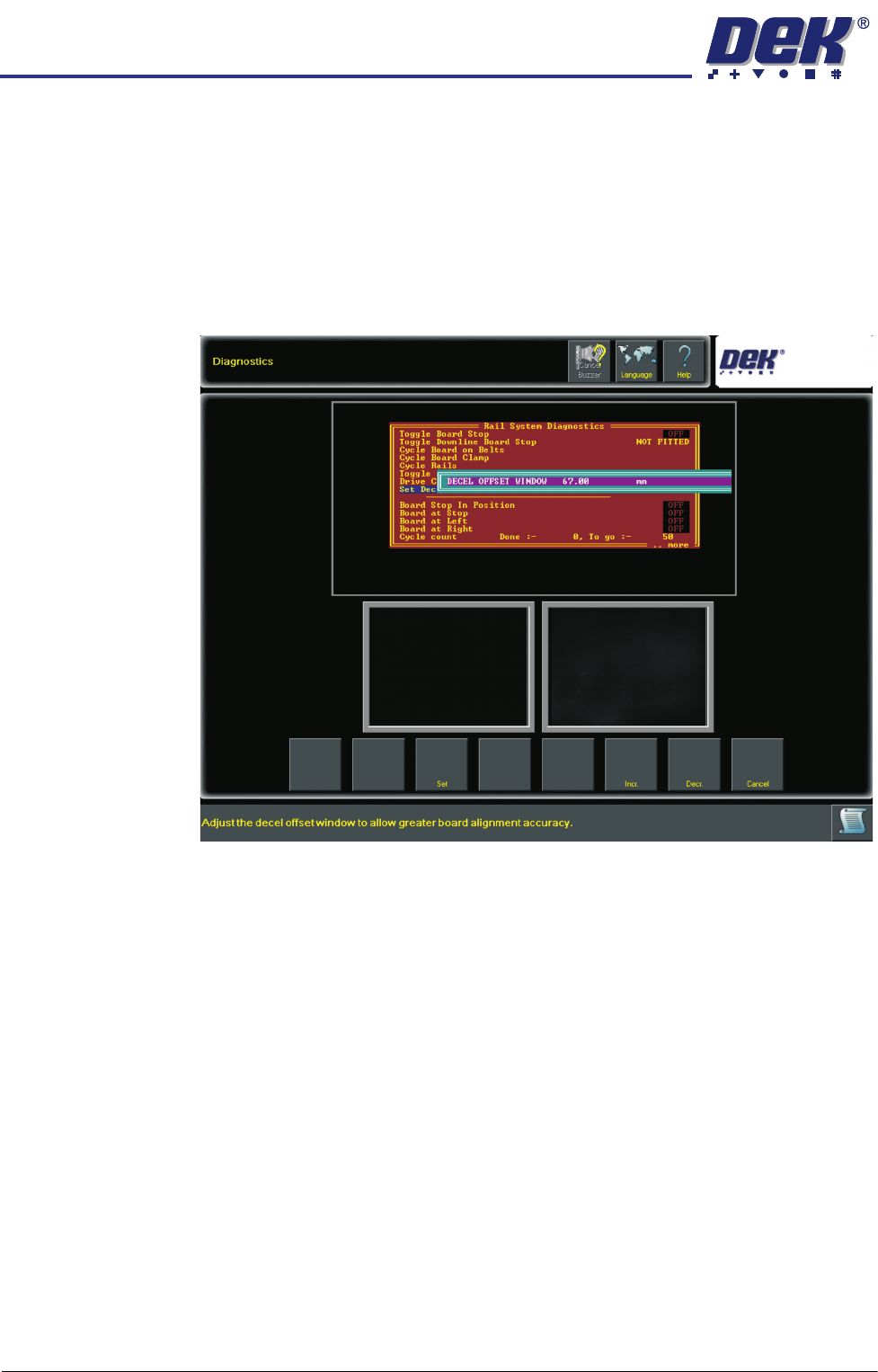
2. On the user interface navigate to the Diagnostics page and select the Rail
System module.
3. Select Set Decel Offset Window Calibration.
4. Set the minimum size to: 67mm for rotary bearing camera systems or
62mm for linear bearing systems.
5. Select Accept.
6. Select Exit.
PRECISION WAFER PALLET
OVERVIEW
Chapter Issue 1 Aug 11 Wafer Transport Solution 2.1
CHAPTER 2 PRECISION WAFER PALLET
OVERVIEW
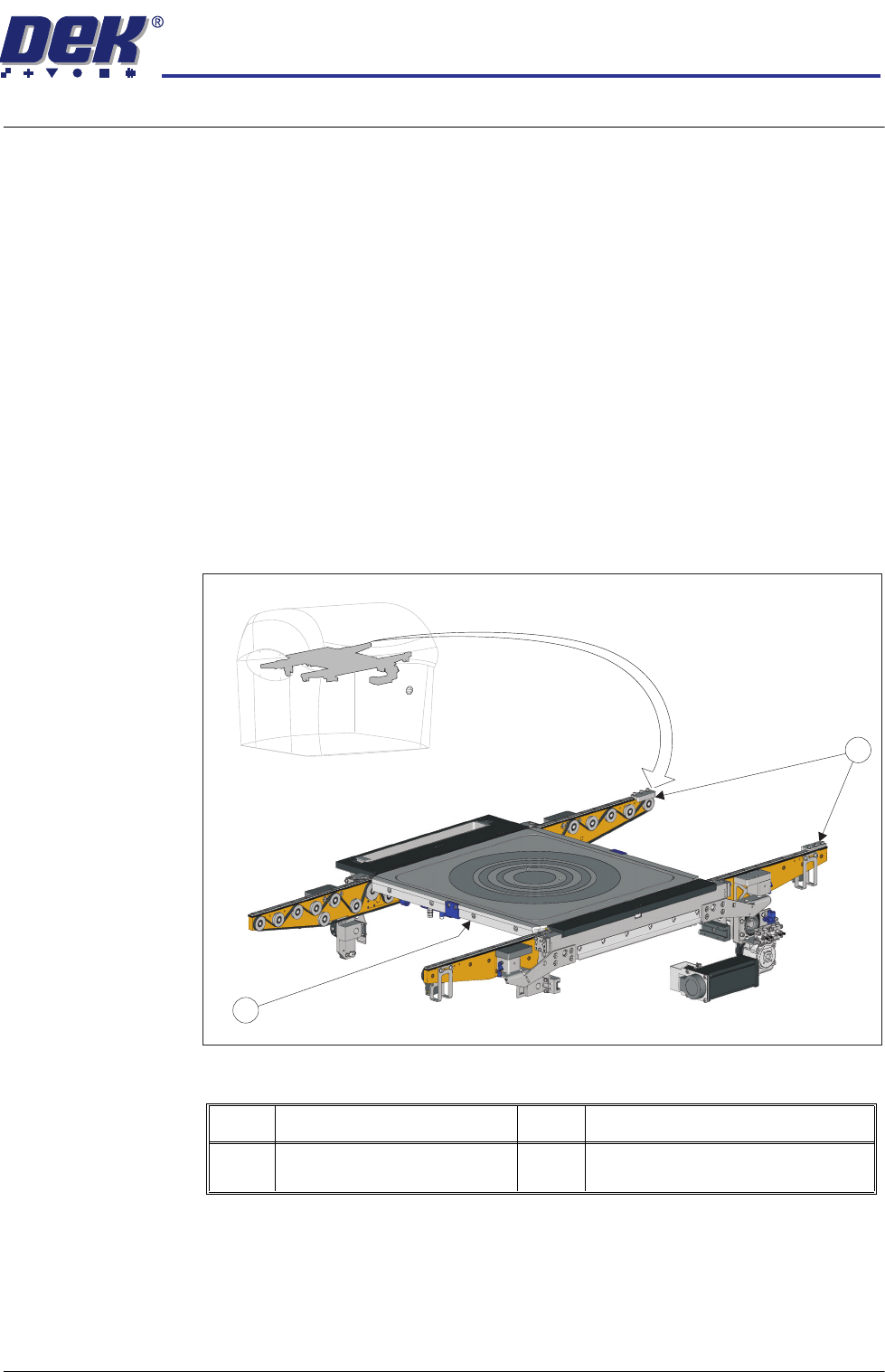
The Wafer Transport Solution consists of a set of heavy pallet rails and a
precision wafer pallet loaded with the wafer to be printed. The system carries
the pallet and a wafer from the downline system into the print station.
Following a print operation, dependent upon system configuration, the wafer is
delivered to the downline conveyor and the pallet is returned to the inline
conveyor, ready to receive the next blank wafer.
The pallet handles 100mm, 150mm, 200mm and 300mm diameter wafers
(standard sizes), having thicknesses ranging from 75µm to 1mm. The pallet is
rigid enough to hold the wafer without the need for additional support tooling.
The transport belts are capable of handling pallets ranging from 1kg to 15kg.
Each wafer is held in place on the pallet by the downline equipment’s
integrated vacuum system. The external downline system automatically feeds
and receives wafers. To run this process, there is no requirement to manually
handle the pallets or wafers.
Figure 2-1 Heavy Pallet Rails and Precision Wafer Pallet
Item Description Item Description
1 Heavy Pallet Rails 2 Precision Wafer Pallet (wafer not
shown)
2
1