00195467-01_Installation Manual Setup Center 2.2.pdf - 第15页
Installation Manual SIPLACE Setup Center 2.2 4.2.5 Docking Stations The installation of the docking stat ion is necessary; If equipme nt of the X-Series is used and a pre setup area or kitting area exists. 15 of 90 -

SIPLACE Setup Center 2.2 Installation Manual
• Database Version
The database is upgraded by the installation. In this step, the current verification data is
deleted and the setup must be verified again after the installation. All data that is connected
to unique IDs (Unique IDs for packaging units and change over tables) will be kept in the
database. This means that after re-verifying the fill-levels of the packaging units are restored.
The database version for SIPLACE Setup Center 2.2 is 1.0.1.5.
The database version for SIPLACE Setup Center 2.1 is 1.0.1.4.
The database version for SIPLACE Setup Center 2.0 is 1.0.1.3.
When working with identical component lots (without Unique IDs), the fill-levels of
the packaging units must be restored manually after the installation (fill-level
corrections).
Database Backup & Recovery Strategy
The setup automatically creates two database jobs, which backup the SIPLACE Setup Center
database. The first job ‘Full backup’ executes a backup of the database and several maintenance
tasks. The job starts every week Sunday at 00.00. The second job ‘Delta backup’ executes only a
backup of the database and starts every day, except Sunday at 00:00. During the backup
SIPLACE Setup Center database is locked and the Setup Center GUI have to wait until unlock.
The backups are stored in “C:\Programme\Siemens SIPLACE\SIPLACE Setup Center\Database”.
A job completion event is written to the Windows application log. More details are written to the
file “SiplaceSetupCenterReport.txt” in the database directory.
4.2.3 Setup Center GUI
It is recommended to install SIPLACE Setup Center GUI once for each line and pre-setup area.
With the “central database” scenario these can use the same database at the same time.
It is recommended to use two barcode scanners per line and SIPLACE Setup Center GUI
installation.
4.2.4 Forced Setup Verification
Activate the forced setup verification at the placement station if it is necessary.
14 of 90
Installation Manual SIPLACE Setup Center 2.2
4.2.5 Docking Stations
The installation of the docking station is necessary; If equipment of the X-Series is used and a pre
setup area or kitting area exists.
15 of 90
-
SIPLACE Setup Center 2.2 Installation Manual
4.2.6 Recommended Installation Scenarios
4.2.6.1 Local Database
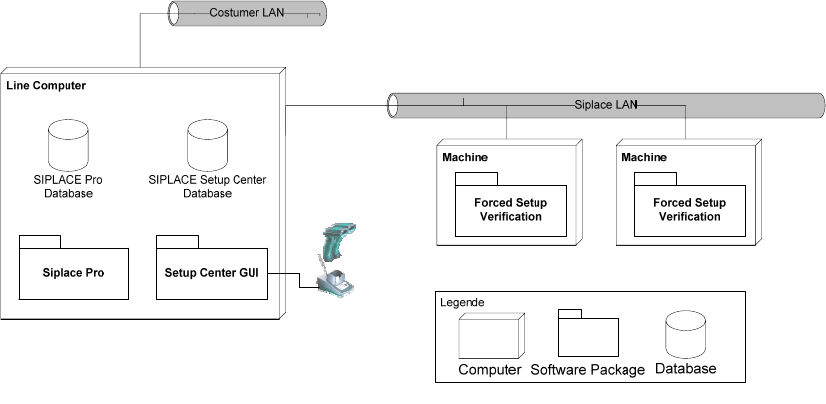
Fig. 4-2 system configuration Local Database
Usually the system configuration ‘Local Database’ is for a small manufacturing facility with one
ore two production lines. An assumption for the configuration is that the SIPLACE Pro database is
also installed locally and no SIPLACE EDM is used. The Setup Center GUI is directly connected
to the local SIPLACE Pro and local Setup Center Database and manages the setup verification
for the stations connected via the SIPLACE LAN.
This scenario can also be used, if a step-by-step introduction is helpful. Then it may also helpful
to omit the ‘Forced Setup Verification’ activation and to start with the unforced setup verification.
After a definite time the forced setup verification can be activated at station and Setup Center.
16 of 90