00195467-01_Installation Manual Setup Center 2.2.pdf - 第17页
Installation Manual SIPLACE Setup Center 2.2 4.2.6.2 Central Database Line Com puter Siplace Pro Setup Center GUI Database Server SIPLACE Pro Database Costumer LAN Machine Machine SC Computer (Pre Setu p Unit) Setup Ce n…
SIPLACE Setup Center 2.2 Installation Manual
4.2.6 Recommended Installation Scenarios
4.2.6.1 Local Database
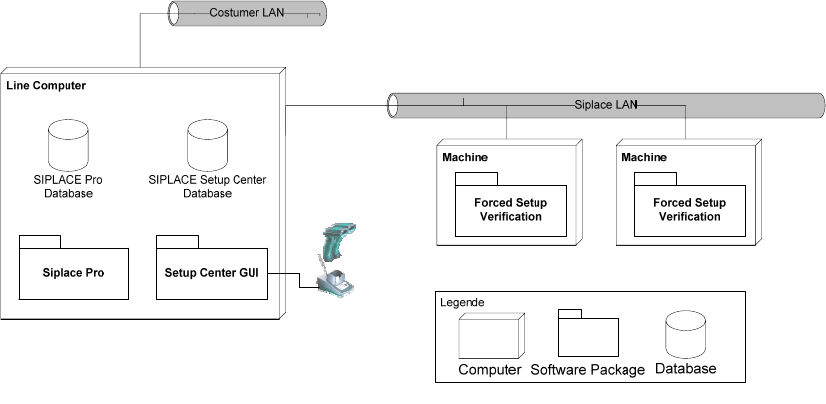
Fig. 4-2 system configuration Local Database
Usually the system configuration ‘Local Database’ is for a small manufacturing facility with one
ore two production lines. An assumption for the configuration is that the SIPLACE Pro database is
also installed locally and no SIPLACE EDM is used. The Setup Center GUI is directly connected
to the local SIPLACE Pro and local Setup Center Database and manages the setup verification
for the stations connected via the SIPLACE LAN.
This scenario can also be used, if a step-by-step introduction is helpful. Then it may also helpful
to omit the ‘Forced Setup Verification’ activation and to start with the unforced setup verification.
After a definite time the forced setup verification can be activated at station and Setup Center.
16 of 90
Installation Manual SIPLACE Setup Center 2.2
4.2.6.2 Central Database
Line Computer
Siplace Pro Setup Center GUI
Database Server
SIPLACE Pro
Database
Costumer LAN
Machine
Machine
SC Computer (Pre Setup Unit)
Setup Center GUI
Forced Setup
Verification
Forced Setup
Verification
CAN Bus
SIPLACE Setup Center
Database
Legende
Computer Software Package
Database
Siplace Pro
Line Computer
Siplace Pro Setup Center GUI
Machine
Machine
Forced Setup
Verification
Forced Setup
Verification
Line Computer
Siplace Pro Setup Center GUI
Machine
Machine
Forced Setup
Verification
Forced Setup
Verification
Machine
Forced Setup
Verification
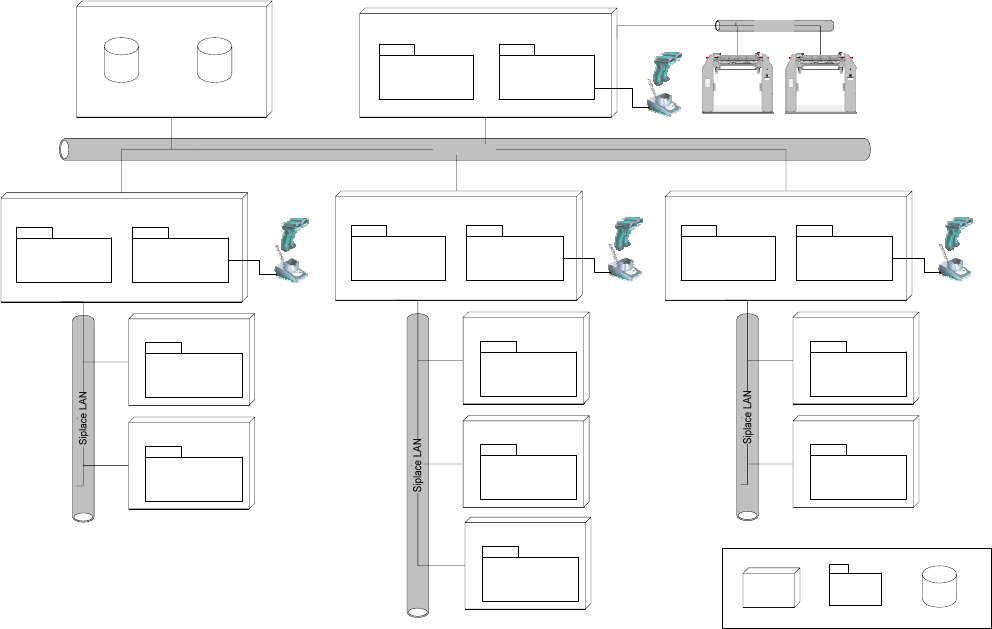
Fig. 4-3 system configuration Central Database
Usually the system configuration ‘Central Database’ is for manufacturing facility with more than
one production line. Prerequisites for the configuration is
• the SIPLACE Pro database is also installed centrally, or
• the SIPALCE EDM product is deployed, or
• a pre setup area with Setup Center is planned, or
• packaging units often moves between different placement lines
The Setup Center GUIs are connected to the local SIPLACE Pro and to the central Setup Center
Database. The docking stations are connected via CAN-Bus to the SC Computer. The pre setup
unit is the reason, why a central Setup Center Database is necessary.
17 of 90
-

SIPLACE Setup Center 2.2 Installation Manual
5 Installation
5.1 Important Preparations
All computers must have been set up and prepared appropriately in advance of the complete
installation of SIPLACE Setup Center to function correctly. 3
These preparatory measures demand knowledge about the administrative functions of Windows
and SQL Server. Please contact your system administrator for assistance if required. 3
Note:
Always exit the running setup verification via task manager/process before
the installation or uninstallation of Setup Center.
Note:
It is not necessary to uninstall the current version of Setup Center before the
installation of the new version of Setup Center.
Note:
If during the installation a note appears, that Microsoft Data Access Components
(MDAC) must be installed, accept this note.
5.1.1 Operation System Installation
The following steps are essential before conducting the installation of SIPLACE Setup Center
• Installation of Windows 2000 Server (SP3 or SP4) or Windows 2000 Workstation (SP3 or
SP4) or Windows XP with SP1a
• Furthermore, you require Windows 2000/XP administrative rights and write rights for all
computers on which you are installing SIPLACE Setup Center.
Note:
You are required to have administrator rights for the installation proedure!
18 of 90