00196378-0102_UM X-Feeder_EN.pdf - 第26页
Overview of X Feeder Modules Functions and Operating Contr ols Display at the Tape Feeder Modules 26 User Manual X Feeder Modules SIPLACE Family 3.1.2.2 LCD and Status Display on 8 - 88 mm Tape Feeder Modules Status disp…
Overview of X Feeder Modules
Display at the Tape Feeder Modules Functions and Operating Controls
User Manual X Feeder Modules SIPLACE Family 25
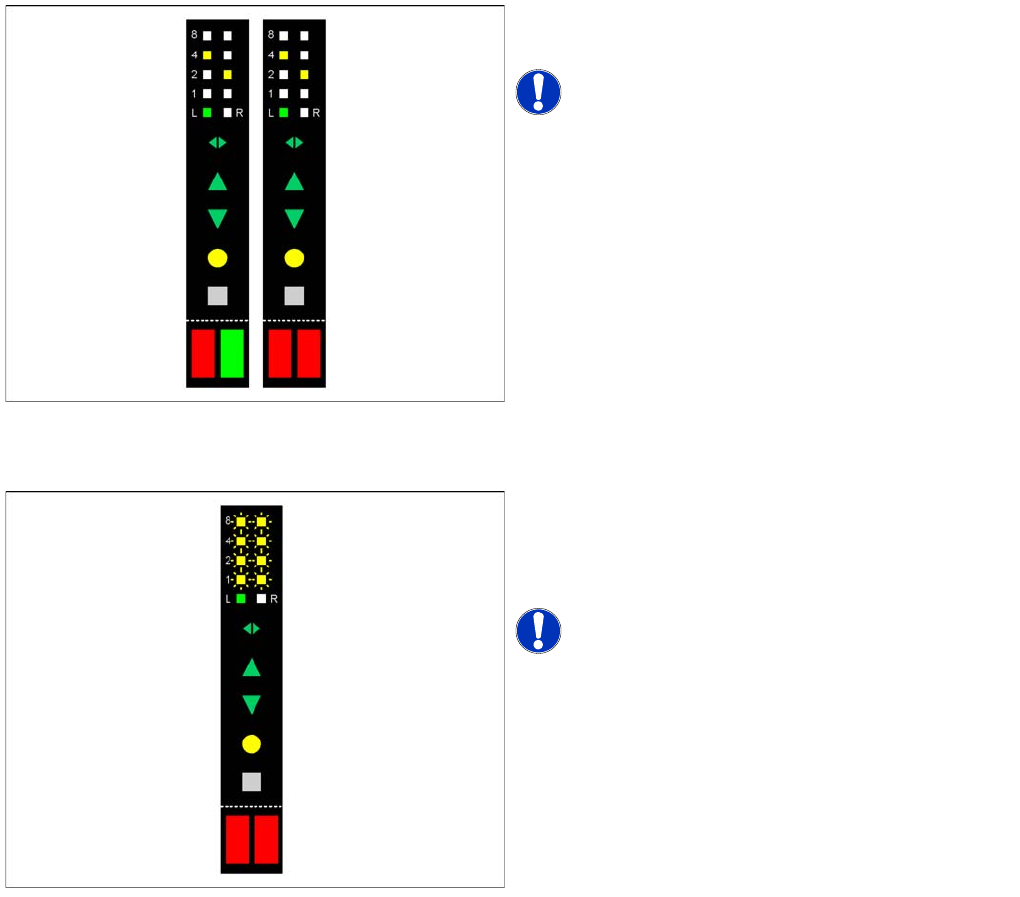
Display of a process error
Display of a module error
See also
5.1 Messages for 2x8 mm Feeder Modules [ ➙ 79]
5.1.1 Module Error: Error Messages Concerning the Control Unit of the Feeder Module [ ➙ 79]
No LED of the pitch display is flashing.
At least one LED of the status display lights up red.
NOTICE! Track errors can occur in both tracks
at the same time.
All LEDs of the pitch display either flash slowly or do not
light up at all, or display a running light.
Both LEDs of the pitch display light up red or or orange or
they flash in red.
NOTICE! For module errors there are different
displays depending on the error type.
Overview of X Feeder Modules
Functions and Operating Controls Display at the Tape Feeder Modules
26 User Manual X Feeder Modules SIPLACE Family
3.1.2.2 LCD and Status Display on 8 - 88 mm Tape Feeder Modules
Status display
▪ If the status display lights up green, the feeder module is ready-to-operate and is needed for the
current placement job. This status display also lights up green, if no placement job has been
assigned yet.
▪ If the status display is orange, this indicates that a warning has been issued. The message is shown
at the LCD:
▪ If the status display lights up red, a malfunction has occurred. The error message is shown at the
LCD:
▪ If the feeder module is not included in the current setup, the status display will remain dark.
Error Messages
The following tables give an overview of the different messages, their meaning and the measures that
have to be taken for fixing the error.
▪ The status display lights up orange in case of warnings and red in case of error messages. At the
same time a message is shown at the LCD of the operator panel.
Warnings
Operator panel
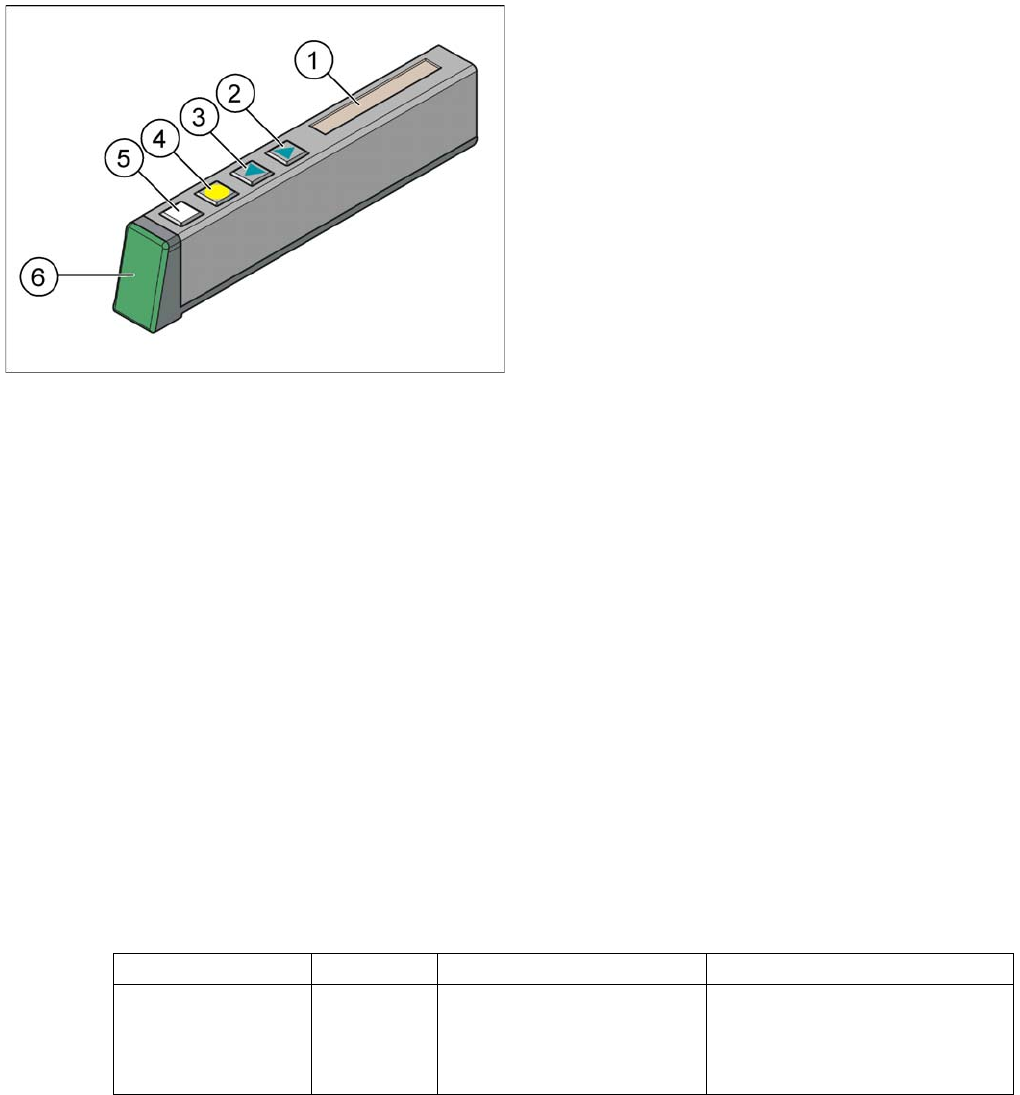
Legend
1. LCD
2. "Forwards" button (green)
3. "Backwards" button (green)
4. "Foil" button (yellow)
5. "Set" button (white)
6. Status display, multicolored (red / orange / green)
These feeder modules are equipped with a multicolored
status display (6) for signalling the operating states and
with a LCD for displaying the messages (1).
Display text LED display Meaning Troubleshooting
Remove Foil
orange The selected function is not
permitted when the cover foil
is tensioned (foil rocker is
pressed down).
If you want to perform this func-
tion, remove the foil from the pair
of toothed wheels and cut it, to re-
lax the foil rocker.

Overview of X Feeder Modules
Display at the Tape Feeder Modules Functions and Operating Controls
User Manual X Feeder Modules SIPLACE Family 27
Error Messages
Display text LED display Meaning Troubleshooting
None red, flashing The application software is
not present or faulty. Soft-
ware remains in the boot
loader.
Load the application software.
Handle
red The feeder module has been
logged in but the removal
handle has not yet been
pushed into the feeder mod-
ule.
Push the removal handle into the
feeder module.
Low Voltage
(Undervoltage)
orange 24 V supply voltage has not
increased the switching on
threshold after being
switched on.
Check the power supply.
Low Voltage
(Undervoltage)
red 24 V supply voltage has al-
ready exceeded the switch-
ing on threshold and has then
collapsed.
Check the power supply.
Feed Timeout
TransTimeout
(Timeout in tape
feeder cycle)
red Tape feeder cycle did not end
correctly within the specified
time (timeout for the "Feed"
function).
Is the tape reel jammed in the
container?
Is the component trapped in the
pickup area, between the tape
and the component window?
Eliminate the obstacle and restart
the conveyor using the arrow
keys of the operator panel. The
feeder module will finish the faulty
feed run and will return to its cor-
rect position.
Foil Torn
red Cover foil was not tensioned
within the prescribed time.
Probably, the foil has been torn.
Re-insert the cover foil and ten-
sion it.
Foil PeelErr
(Error when peeling
off the foil)
red Cover foil has not been cor-
rectly stripped off, although
the tape is being fed in.
The cover foil has probably been
trapped under the pickup window
and therefore has not been
stripped off properly.
Foil Jam
red The foil removal motor is
blocked.
Check, if the foil disposal rolls are
blocked by the cover foil.
EEP-WriteErr
(Error while backing
up data in the EEP-
ROM)
red The data backup has not
been performed correctly in
the EEPROM.
Since the position of the drive is
stored in the EEPROM, a refer-
ence run is necessary in these
cases. Acknowledge the error by
pressing the grey button at the
operator panel. After that, press
the yellow button to acknowledge
the prompt for a reference run
(see the reference run issue for
details).
EEP-ReadErr
(Error while reading
the EEPROM)
red The data from the EEPROM
have not been correctly read.
EEP-DataErr
(Error while backing
up the data in the
EEPROM)
red The data backup has not
been performed completely
in the EEPROM.