00196378-0102_UM X-Feeder_EN.pdf - 第31页
Overview of X Feeder Modules Software Versions Functions and Oper ating Controls User Manual X Feeder M odules SIPLACE Family 31 3.1.4 Software Versions 3.1.4.1 Software Versions for 2x8 mm Tape Feeder Modules Version 1.…
Overview of X Feeder Modules
Functions and Operating Controls Energy and Data Transfer
30 User Manual X Feeder Modules SIPLACE Family
3.1.3.3 Troubleshooting, Maintenance and Cleaning
The X-series FCU also has automatic overload protection. If a feeder module causes an overload, the
monitoring device will respond by switching off the entire EDIF block in which the defective module is
located. After a certain cooling off period, the block will then be automatically reconnected.
Observe the following points, if a feeder module should malfunction in the placement machine:
▪ Check the entire front of the feeder module for components, foil residues, tape residues, contami-
nants or damage.
▪ Make sure that there are no components or contaminants on the transformer surfaces at the front of
the feeder module.
▪ Make sure that there are no components or other contaminants on the transformer surfaces of the
FCU.
▪ Make sure that the feeder module centering pin has been correctly inserted into the hole provided
on the CO table and that the feeder module has been pushed in as far as needed.
▪ Check that none of the feeder module parts are bent or protruding (e. g. loose screws).
▪ Check if the EDIF can freely be moved in the feeder module (floating state).
The EDIF should have a clearance of at least 1 mm.
If the EDIF can only be moved with difficulty or if it appears to be stuck, loosen the two slotted screws
on the feeder module EDIF and restore its ease of movement. Observe both the springs.
▪ Check the three rectangular ferrite core surfaces on the front of the EDIF for damage (breaks,
splintered edges).
▪ Check whether the ferrite cores of the feeder module protrude approx. 0.1 – 0.2 mm from the EDIF
plastic housing. These are flush fitted at the FCU end.
▪ Clean the data transfer optical system with a lint-free cloth, dipped in ethanol. Briefly wipe the front
end.
Aggressive cleaning agents or abrasive wiping movements with dry cloths can tarnish and dull the
front of the optical system. This would disrupt data transfer and could lead to feeder module malfunc-
tions.
▪ Check the fibre optic cable for damage (breaks, splintered edges).
CAUTION
Keep the EDIF clean.
Correct energy and data transmission is essential for a proper function of the feeder module
within the component table. The two halves of the EDIF must be placed very closely together
(no gaps) in order for sufficient energy to be transmitted. The light path for data transfer must
be free of contaminants or obstacles.
NOTICE
Maintenance and Cleaning
By regularly inspecting and cleaning, you reduce unexpected feeder downtime and increase
the productivity of your placement machines. These preventative measures include the follow-
ing tasks, which need to be performed at the prescribed intervals:
►Daily maintenance
Vacuum the feeder modules and remove loose components and contaminants from the
feed-in area.
Empty the foil bin completely.
►Cyclically recurring maintenance
Perform a visual check (e. g. once a year) and make sure that the feeder modules are
neither dirty nor damaged. If necessary, the relevant feeder module may need to be
cleaned or repaired..

Overview of X Feeder Modules
Software Versions Functions and Operating Controls
User Manual X Feeder Modules SIPLACE Family 31
3.1.4 Software Versions
3.1.4.1 Software Versions for 2x8 mm Tape Feeder Modules
Version 1.00
▪ First version released.
3.1.4.2 Software Versions for 8 - 88 mm Tape Feeder Modules
The feeder modules use different versions of the application software. The main differences are de-
scribed below.
Version 1.00
▪ First version released.
Version 1.06
▪ Extended data menu: Path length
▪ Extended data menu: Last error.
▪ Continuous tape feeding with tensioned foil is possible.
Version 1.14
▪ Improvements to troubleshooting.
▪ Barcodes can be scanned from any menu item
▪ Error text "FeedTimeout" replaced by "Feed Error".
Version 1.24
▪ Extended data menu: Splice sensor detection.
▪ Extended service menu: Manual foil stripping.
NOTICE
Older software versions can be upgraded to newer versions with no problems. However, you
should not downgrade an existing software version to an older version without good reason.
Overview of X Feeder Modules
Technical Data Software Versions
32 User Manual X Feeder Modules SIPLACE Family
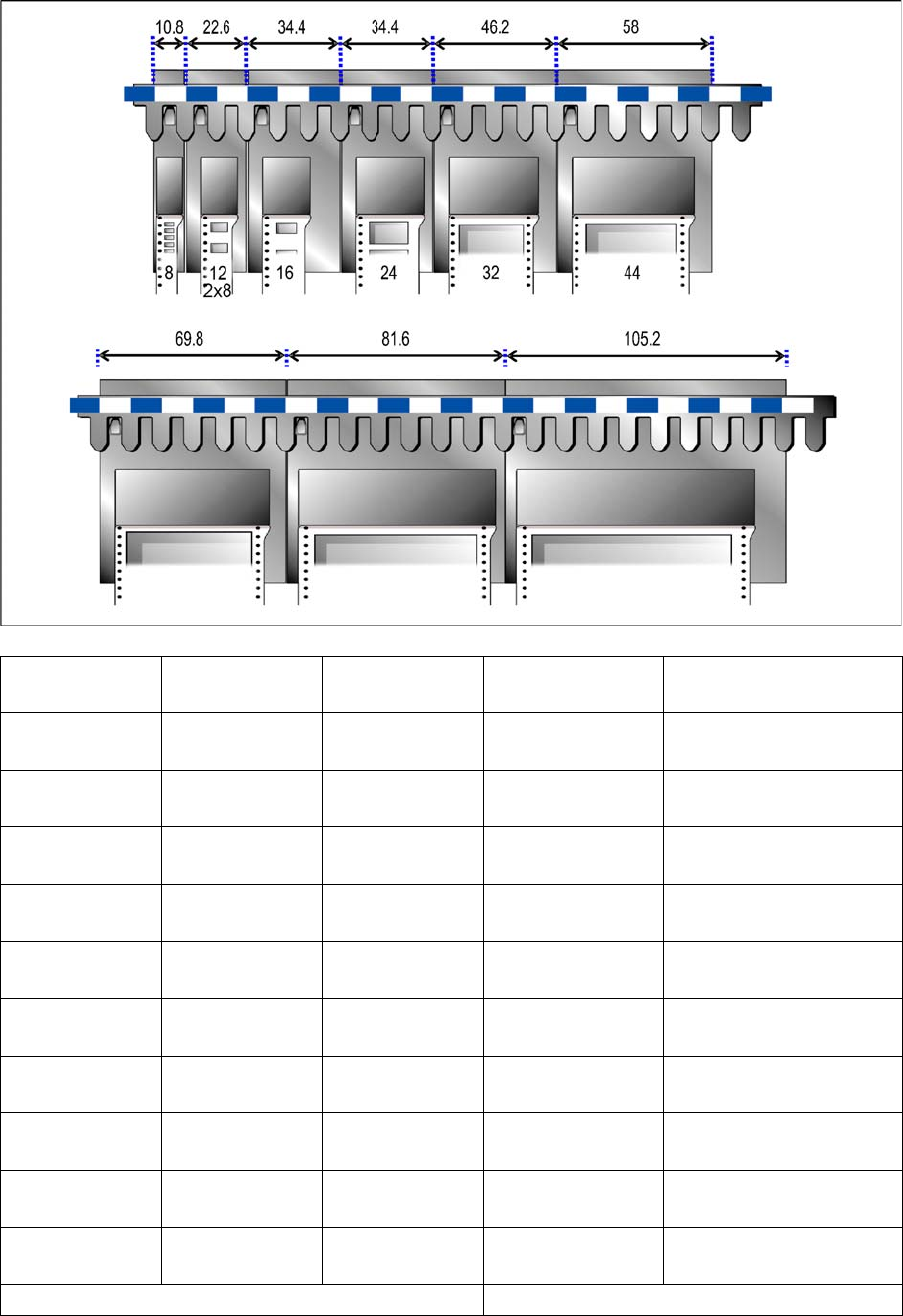
3.2 Technical Data
X feeder module Item No. Width of the
feeder module
Conveyor
pitches
Max. overall height of the
tape material
8 mm X 00141270-xx
00141290-xx *
10.8 mm 1, 2, 4, 8 mm 1.6 mm paper
3.5 mm blister
2x8 mm X 00141269-xx
00141289-xx *
22.6 mm 1, 2, 4, 8 mm 1.6 mm paper
3.5 mm blister
12 mm X 00141271
00141291-xx *
22.6 mm 4 – 16 mm ** 6.5 mm blister
16 mm X 00141272-xx
00141292-xx *
34.4 mm 4 – 20 mm ** 25 mm blister
24 mm X 00141273-xx
00141293-xx *
34.4 mm 4 – 32 mm ** 25 mm blister
32 mm X 00141274-xx
00141294-xx *
42.6 mm 4 – 40 mm ** 25 mm blister
44 mm X 00141275-xx
00141295-xx *
58.0 mm 4 – 52 mm ** 25 mm blister
56 mm X 00141276-xx
00141296-xx *
69.8 mm 4 – 64 mm ** 25 mm blister
72 mm X 00141277-xx
00141297-xx *
81.6 mm 4 – 80 mm ** 25 mm blister
88 mm X 00141278-xx
00141298-xx *
105.2 mm 4 – 96 mm ** 25 mm blister
* Item no. for the feeder module with splice sensor ** Adjustable in 4 mm steps