00196378-0102_UM X-Feeder_EN.pdf - 第53页
Operating Tape Feeder Modules Inserting the Tape Setting Up th e Feeder Module User Manual X Feeder M odules SIPLACE Family 53 4.2.4 Inserting the Tape 4.2.4.1 Inserting the Tape on 2x8 mm Feeder Modules ► (1) Cut the ta…
Operating Tape Feeder Modules
Setting Up the Feeder Module Preparing the Tape Reel
52 User Manual X Feeder Modules SIPLACE Family
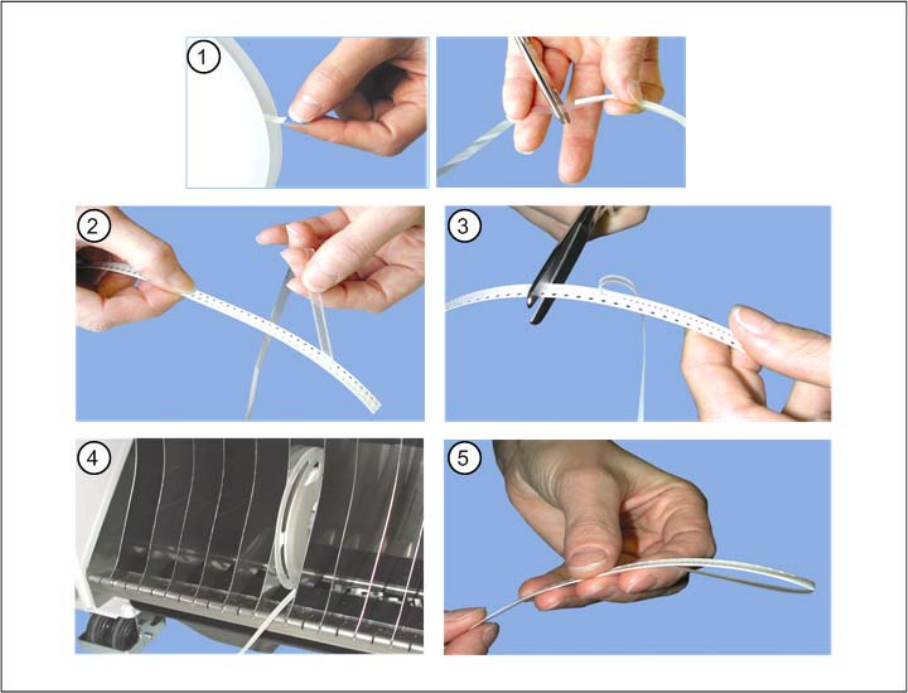
4.2.3 Preparing the Tape Reel
►(1) Cut off the adhesive strip at the beginning of the tape material properly.
►(2) Lift off a piece of the protruding cover foil.
The cover foil should protrude at the tape end for approx. 30 cm.
►(3) Cut off the excess tape.
►(4) Insert the prepared tape reel in the tape reel container.
►(5) Fold the protruding cover foil backwards.
Operating Tape Feeder Modules
Inserting the Tape Setting Up the Feeder Module
User Manual X Feeder Modules SIPLACE Family 53
4.2.4 Inserting the Tape
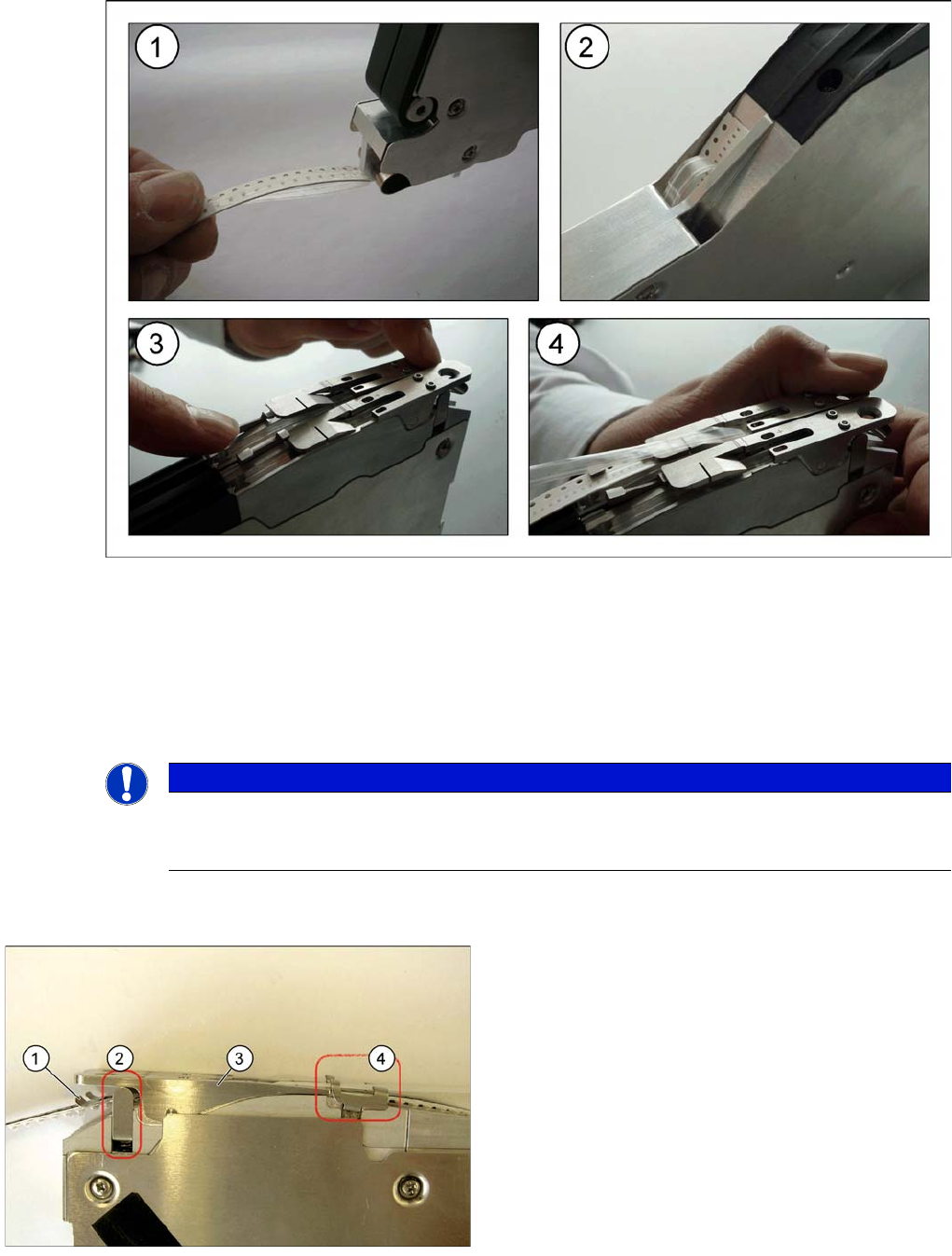
4.2.4.1 Inserting the Tape on 2x8 mm Feeder Modules
►(1) Cut the tape at right angles and fold the protruding cover foil down backwards. Insert the beginning
of the tape into the empty tape duct.
►(2) The tape will reappear at the top opening of the empty tape duct.
►(3) Open the pickup window by pressing it down. Push the tape further on up to the middle of the
pickup window. (See also below)
►(4) Let the tape engage in the toothed wheel by releasing the pickup window.
Pickup Window on 2x8 mm Feeder Modules
NOTICE
There is a small gap in the pickup window, behind the removal edge. This is another removal
edge. The second removal edge can be used for tapes with adhesive cover foils. The compo-
nents then remain in the tape and are not taken off by the cover foil.
Legend
1. Pressure spring
2. Pressure bracket
3. Pickup window
4. Toggle
If you press the front part of the pickup window, this lifts
the back part of the pickup window over the sprocket
wheel.
The toggle is used to lock the pickup window in the top
position.
Operating Tape Feeder Modules
Setting Up the Feeder Module Inserting the Tape
54 User Manual X Feeder Modules SIPLACE Family
Opening the pickup window
►Press the front part of the pickup window from above. The back part of the pickup window will move
up. The pickup window is now in the top position.
►Flip the toggle forwards.
►Release the front part of the pickup window. The pickup window will remain in the top position. You
can now easily insert or remove the component tape.
Closing the pickup window
►Press the front part of the pickup window from above. The back part of the pickup window will move
up.
►Flip the toggle backwards.
►Slowly release the front part of the pickup window. The pickup window will move down to the bottom
position. This fixes the component tape in the sprocket wheel.
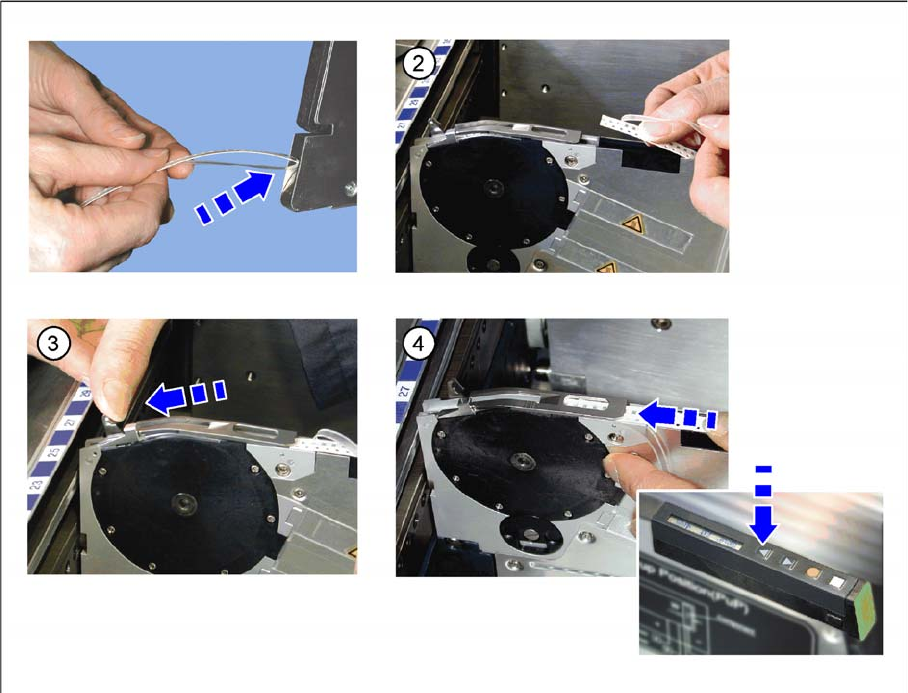
4.2.4.2 Inserting the Tape on 8 - 88 mm Feeder Modules
►(1) Insert the tape at the rear end of the feeder module into the empty tape duct and push it forwards.
►(2) Fold the protruding cover foil backwards.
►(3) Press the lever forwards.
►(4) Push the tape under the pickup window until the stop. Press and re-press the Forwards button
until the tape and the foil are under the pickup window.