00196378-0102_UM X-Feeder_EN.pdf - 第60页
Operating Tape Feeder Modules Setting Up the Feeder Modu le Removing the Tape 60 User Manual X Feeder Modules SIPLACE Family Feeder module in status: Foil tensioned ► (1) Initial status: The tear down pro cedure is enabl…
Operating Tape Feeder Modules
Removing the Tape Setting Up the Feeder Module
User Manual X Feeder Modules SIPLACE Family 59
4.2.7 Removing the Tape
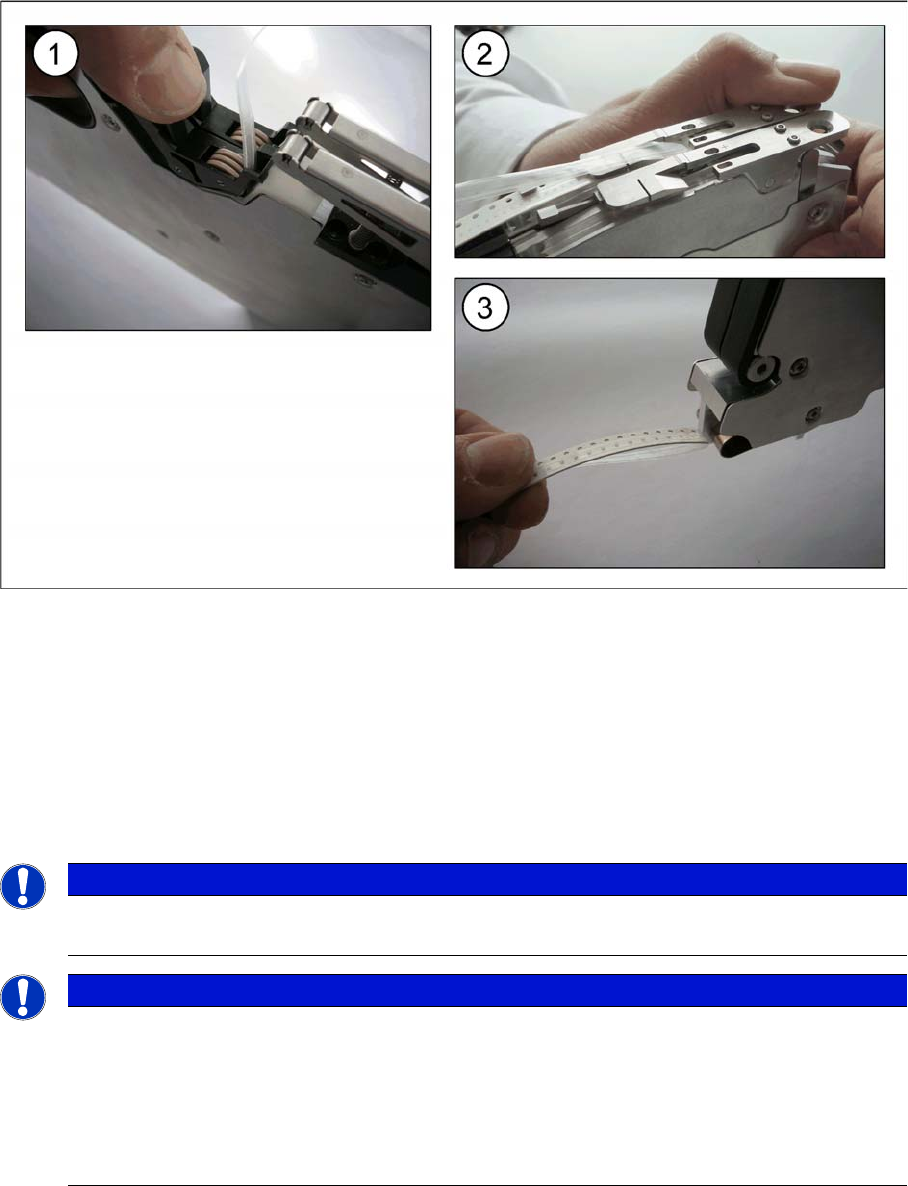
4.2.7.1 Removing the Tape on 2x8 mm Feeder Modules
Removing the tape
►(1) Press the foil removal rocker open and remove the foil. Cut it off if necessary.
►(2) Press the pickup window up.
►(3) Pull the tape out backwards.
Tearing down the feeder module
If the feeder module remains on the changeover table without the tape, you will need to initiate a tear
down procedure. This tear down procedure informs the placement machine that the tape is being inten-
tionally removed and that there is no "foil torn" error.
NOTICE
Before starting the tear down procedure it may be necessary to select the desired track using
the Track change button.
NOTICE
To simplify removing the tapes from both tracks, the tear down procedure is also enabled for
the non-selected track, if one of the following conditions is true:
►The foil in this track is tensioned (the tear down procedure is enabled for 5 seconds, see
tearing down procedure for tensioned foil).
►This track is in the "foil torn" state (the tear down procedure is carried out immediately, see
tearing down procedure after a foil rupture)
Operating Tape Feeder Modules
Setting Up the Feeder Module Removing the Tape
60 User Manual X Feeder Modules SIPLACE Family
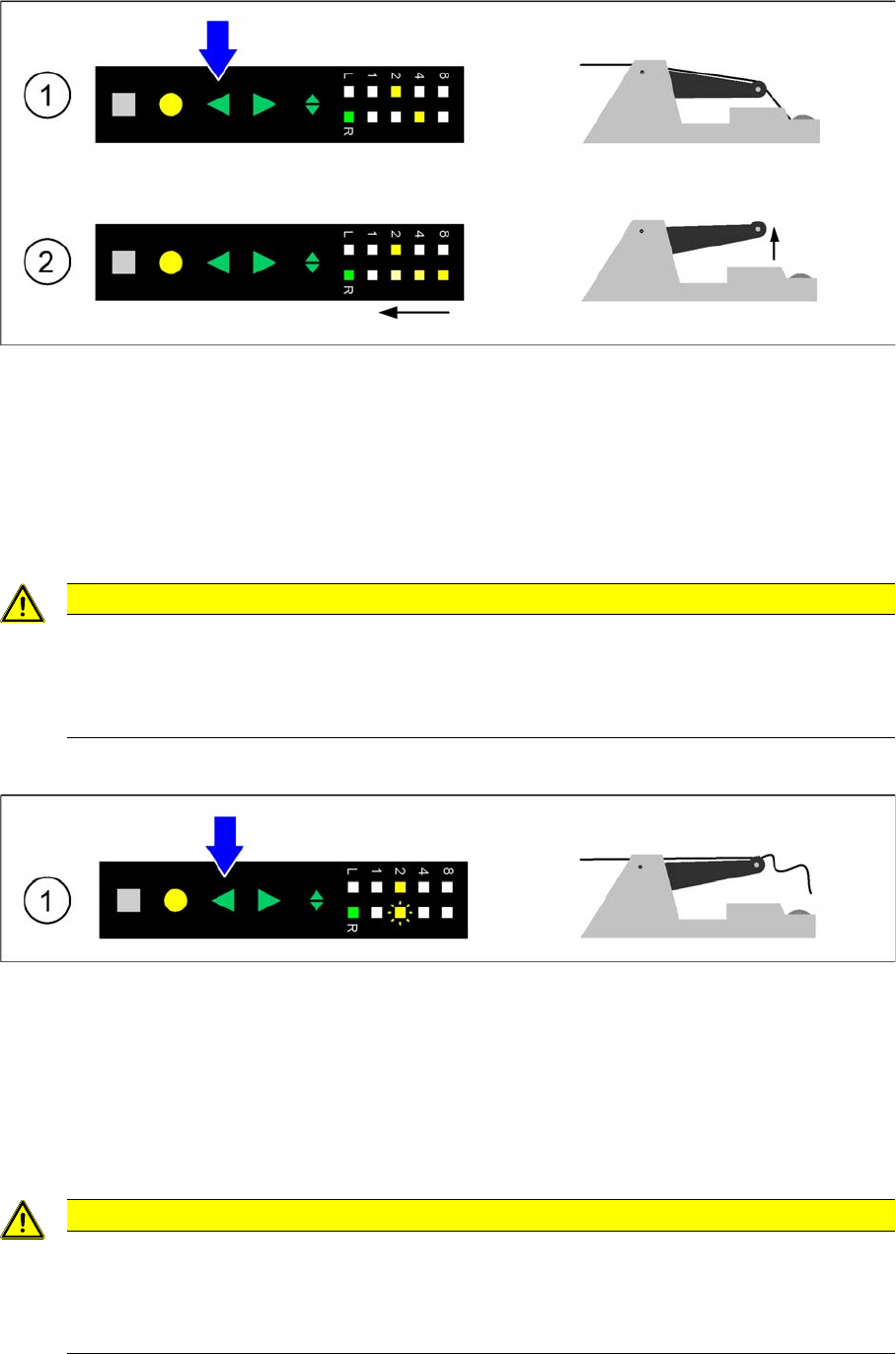
Feeder module in status: Foil tensioned
►(1) Initial status: The tear down procedure is enabled by long pressing the Backwards button.
►(2) Tear down procedure is enabled: After 0.75 seconds the pitch display indicates by a backwards
running light that the tear down procedure is enabled. The Backwards button is now released. After
that the foil rocker is relaxed within 5 seconds (cutting off the foil or relaxing the foil disposal rolls). If
the foil rocker is still tensioned after 5 seconds, the tear down procedure is cancelled.
►Track is torn down: The tear down procedure is completed and the pitch display returns to its initial
status.
Feeder module in status: Torn foil
►(1) Initial status: The error state "Torn foil" is indicated by a red status display and slow flashing of
LED 2 of the pitch display. The tear down procedure is enabled by long pressing the Backwards
button.
►Error "Torn foil" is deleted: After 0.75 seconds the error state "Torn foil" is deleted and the track is
torn down. The status display turns green if the feeder module is needed for the current placement
job and if there is no other error.
►The Backwards button is now released.
CAUTION
Risk of placement head crash
After performing a tear down, make sure that there are no tape or foil residues in the feeder
module pickup area, as the placement head could get caught in these.
►Remove all tape or foil residues.
CAUTION
Risk of placement head crash
After performing a tear down, make sure that there are no tape or foil residues in the feeder
module pickup area, as the placement head could get caught in these.
►Remove all tape or foil residues.
Operating Tape Feeder Modules
Removing the Tape Setting Up the Feeder Module
User Manual X Feeder Modules SIPLACE Family 61
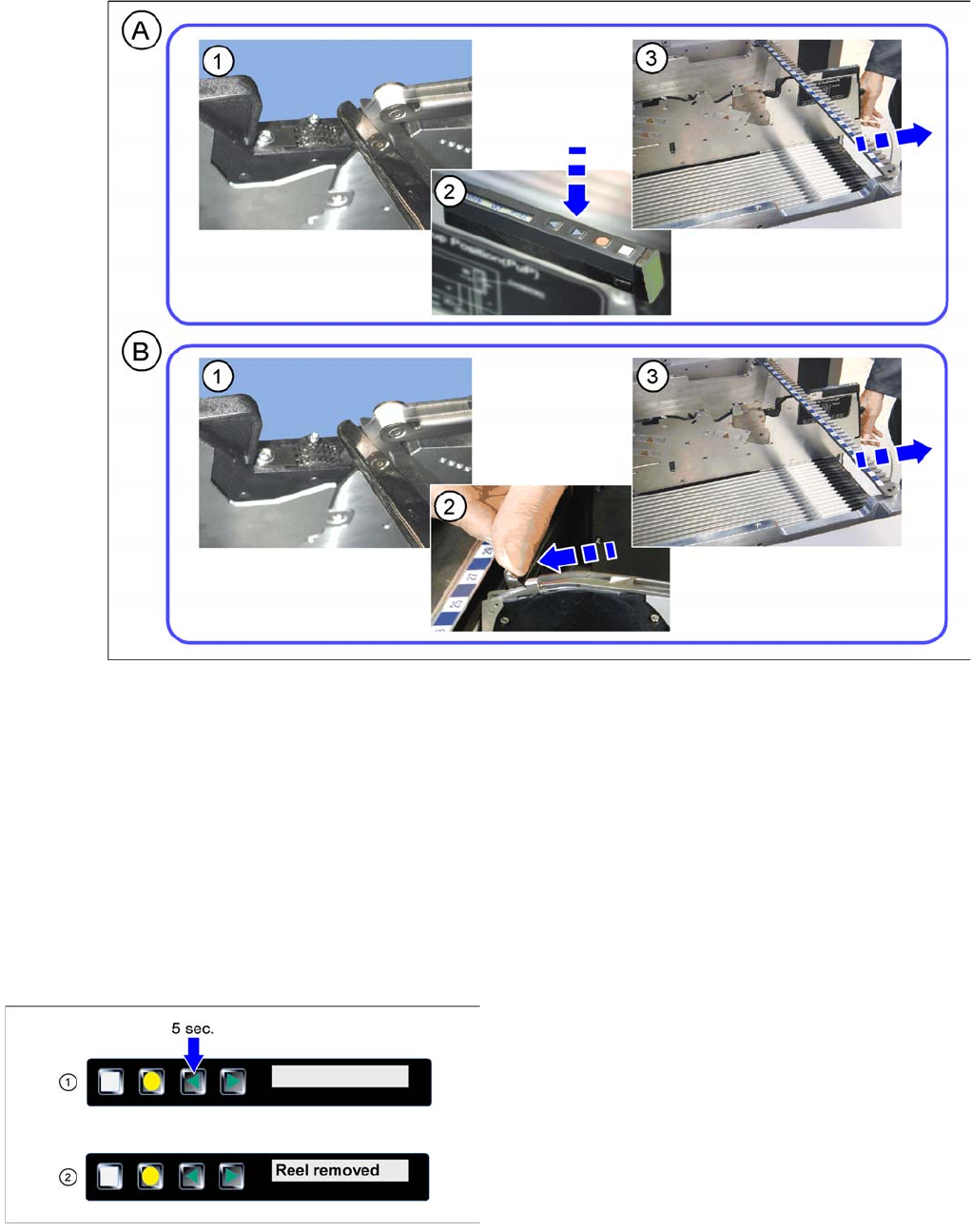
4.2.7.2 Removing the Tape on 8 -88 mm Feeder Modules
Removing the tape
A - Removal of tape with energy supply
►(1) Cut off the cover foil at the foil removal slot.
►(2) Press the "Backwards" key. The tape is moved out of the toothed wheel and lies free.
►(3) Pull the tape backwards out of the feeder module.
B - Removal of tape without energy supply
►(1) Cut off the cover foil at the foil removal slot.
►(2) Press the lever forwards until the stop.
►(3) Pull the tape backwards out of the feeder module.
Tearing down the feeder module
►(1) Press the Backwards button for at least 5
seconds.
►(2) After a successful tear down the display issues the
message Reel removed torn down.