00196378-0102_UM X-Feeder_EN.pdf - 第75页
Operating Tape Feeder Modules Setting the Language for 8 - 88 mm Fee der Modules Removing the F eeder Module from the Component Table User Manual X Feeder M odules SIPLACE Family 75 Feeder module logout via the GUI ► Log…
Operating Tape Feeder Modules
Removing the Feeder Module from the Component Table Setting the Language for 8 - 88 mm Feeder Modules
74 User Manual X Feeder Modules SIPLACE Family
4.4 Removing the Feeder Module from the Component Table
There are the following ways to remove the feeder module from the placement machine.
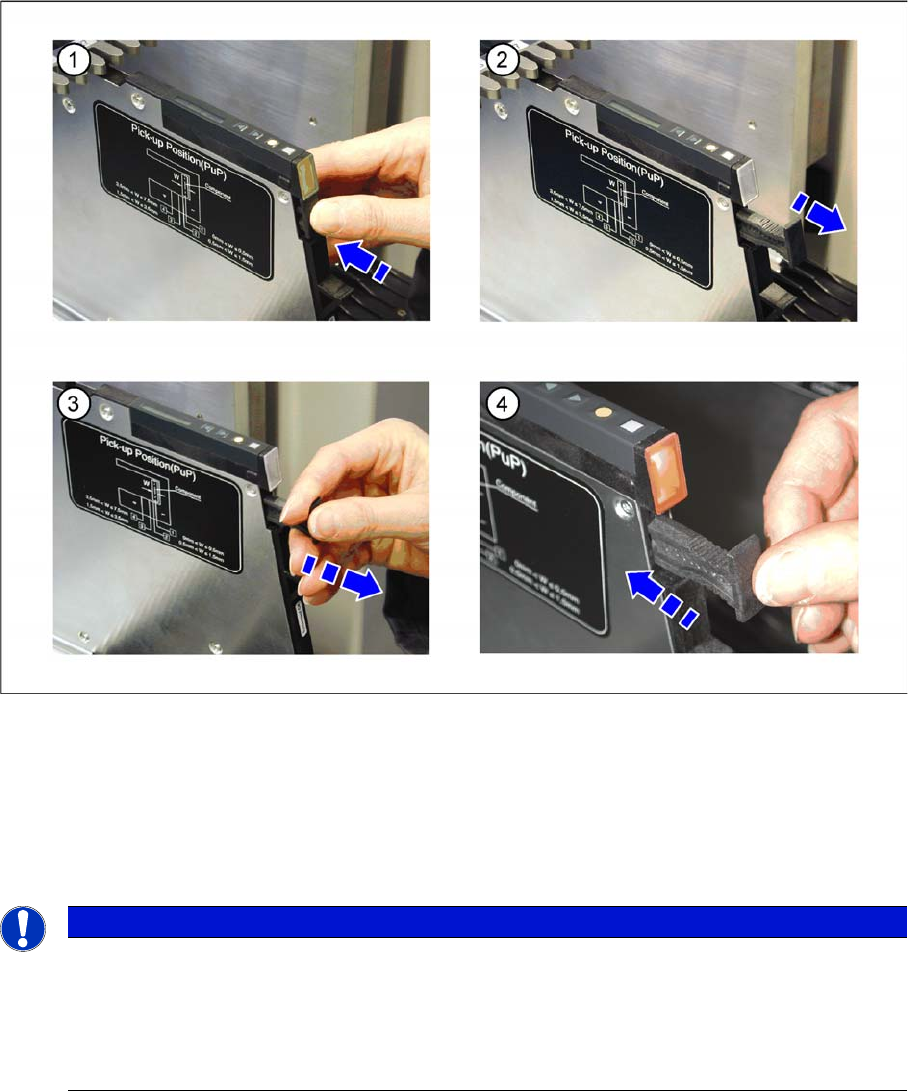
Feeder module logout via the handle
►(1) Press on the handle below the LED at the rear end of the feeder module.
►(2) The logout procedure for the feeder module is started, the status display is switched off and the
removal handle is released. All key data will be saved in the feeder module. After that the feeder
module is automatically logged out at the FCU and the FCU opens the mechanical lock at the com-
ponent table. As soon as the status displays are dark, the logout procedure is completed.
►(3) Use the removal handle to pull the feeder module out of the component table.
NOTICE
(4) If you hesitate too long (approx. 5 seconds), the status display lights up red and the feeder
module must be logged in again.
►Press the removal handle back into the feeder module.
The login procedure for the feeder module is started.
►Wait until the login procedure is completed and the status display lights up green.
Operating Tape Feeder Modules
Setting the Language for 8 - 88 mm Feeder Modules Removing the Feeder Module from the Component Table
User Manual X Feeder Modules SIPLACE Family 75
Feeder module logout via the GUI
►Log out the feeder module at the station computer via the user interface --> Feeder --> Unlock
track´.
The FCU will mechanically unlock the module at the component table, even if there is no current
communication between the FCU and the feeder module.
Removal of the component table
If there is no communication between the FCU and the feeder module, the module can also be removed
manually.
►Move the component table out of the placement machine and manually release it at its front side.
After that, the module can be removed from the component table.
Operating Tape Feeder Modules
Regular Maintenance Regular Maintenance on 2x8 mm Feeder Modules
76 User Manual X Feeder Modules SIPLACE Family
4.5 Regular Maintenance
4.5.1 Regular Maintenance on 2x8 mm Feeder Modules
Emptying the Foil Container
During feeder module operation, the cover foil is stripped
off the tape and pressed through the foil removal into the
foil container. As operations proceed, the foil container
fills up and the foil flap at the back of the feeder module
is subjected to greater pressure.
The foil should now be removed and disposed of.
However, do not tear off the foil by pulling on it as it could
then be caught between the foil disposal rolls and might
cause feeder module malfunctions.
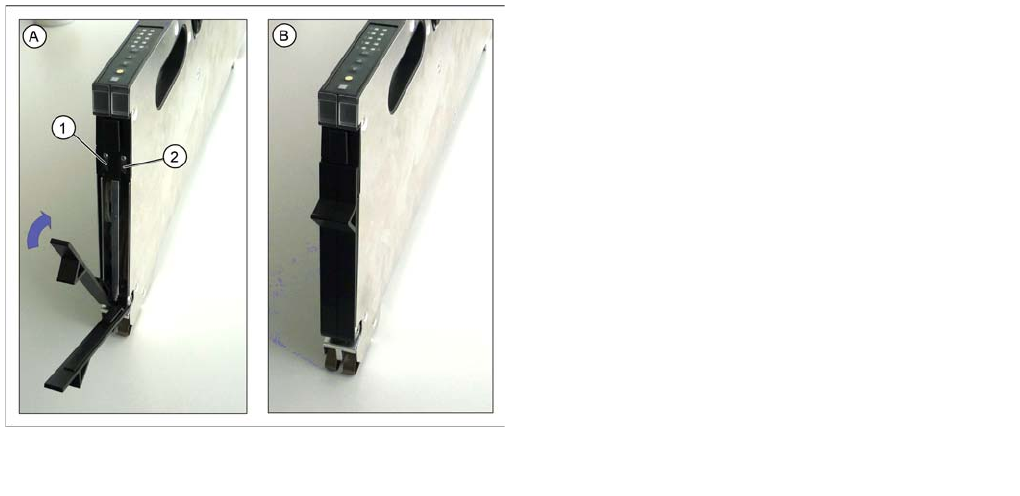
►Cut the cover foil with a pair of scissors or with the
help of the integrated blade. While doing this, pull the
foil just slightly upwards, against the blade.
►Now close the foil flap again.
A) Foil flaps open
1. Blade for left track
2. Blade for right track
B) Foil flaps closed