H02 Head Operation Manual R4a.pdf.pdf - 第5页
Page 5 of 9 height (includes part height and pin length) • A data check error occurs if the H02 head dedica ted short nozzles or custom nozzles of a similar length are not set when there are p art s taller than 17.4 mm i…
Page 4 of 9
4. Production Examples
4.1. Parts taller than 17.4 mm (part height and pin length) are placed using nozzles
The H02 head can place parts with a height of 25.4 mm. When parts taller than 17.4 mm
(includes part height and pin length) are placed with a nozzle, a H02 head dedicated short
nozzle must be used.
1. Job settings
H02 head dedicated short nozzles are standard nozzles and do not have to be specified in
the [Nozzle Name] setting. Select short nozzles for the H02 head in the [Nozzle Changer
Setup].
2. Optimizing the job
Optimize the job. Parts taller than 17.4 mm (adding the part height and pin length together)
are allocated to use the short nozzle and parts 17.4 mm or less are allocated to use standard
length nozzles.
3. Changeover and production
Set the H02 head dedicated short nozzles in the nozzle station and then begin production. If
the nozzle is not set, guidance is displayed to inform the operator to set the correct nozzle.
Follow the guidance if it appears on the operation panel.
Cautions
• H02 head dedicated short nozzles cannot be used with the H01 head.
• A data check error occurs if the H02 head dedicated short nozzles or custom nozzles of a
similar length are specified in the [Nozzle Name] setting for parts 17.4 mm or less in
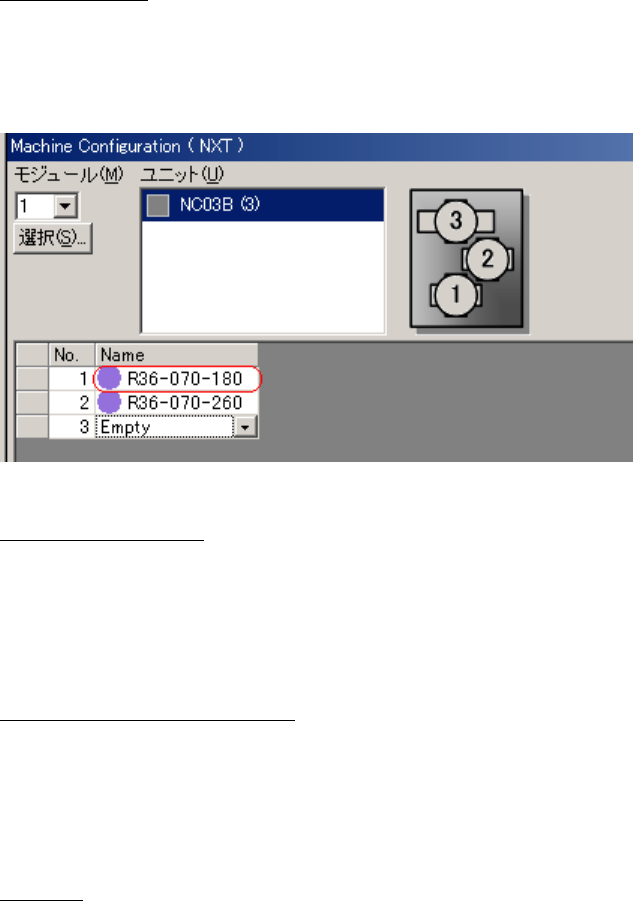
The last 3 digits indicate the nozzle
length. 260 are standard nozzles and 180
are short nozzles.

Page 5 of 9
height (includes part height and pin length)
• A data check error occurs if the H02 head dedicated short nozzles or custom nozzles of a
similar length are not set when there are parts taller than 17.4 mm in height (includes part
height and pin length).
4.2. Parts taller than 21.5 mm (part height and pin length) are placed using mechanical
chucks
The H02 head can place parts with a height of 25.4 mm. When parts taller than 21.5 mm
(including part height and pin length) are placed with a mechanical chuck, a H02 head
dedicated short mechanical chuck must be used.
1. Job settings
H02 head dedicated short mechanical chucks are standard mechanical chucks and have to
be specified in the [Nozzle Name] setting. Select short mechanical chucks for the H02 head
in the [Nozzle Changer Setup].
2. Optimizing the job
Optimize the job.
3. Changeover and production
Set the H02 head dedicated short mechanical chuck in the nozzle station and then begin
production. If the mechanical chuck is not set, guidance is displayed to inform the operator to
set the correct mechanical chuck. Follow the guidance if it appears on the operation panel.
Cautions
• H02 head dedicated short mechanical chucks cannot be used with the H01 head.
• A data check error occurs if the H02 head dedicated short mechanical chucks are
specified in the [Nozzle Name] setting for parts 21.5 mm or less in height (includes part
height and pin length)
• A data check error occurs if the H02 head dedicated short mechanical chucks are not
specified in the [Nozzle Name] setting for part sizes taller than 21.5 mm (includes part
height and pin length).

Page 6 of 9
4.3. Using custom nozzles in production
When using standard nozzles, it is possible to have both holders perform pre-rotation in a
single pick and place cycle regardless of the placing angle. Therefore, pre-rotation is always
used irrespective of the [Do Prerotation] setting in the shape data.
When using custom nozzles, it may not be possible to have both holders perform pre-rotation
in a single pick and place cycle because it depends on the placing angle. When this occurs,
split the pick and place cycle so that the pre-rotation setting can be turned on or off in the job.
The default setting is “Yes”. Change this to “No” if you want to give cycle time priority.
Fuji Flexa settings
[Shape Data]-[Shape Process]-[Process]-[Do Prerotation for Custom Nozzle]
When using custom nozzles, this setting determines whether the part is rotated to the angle
for placement before vision processing.
Specify [Yes] or [No]
4.4. Using the tray remover in production
Usable tray removers
H02 compatible remover (AA6GX00)
Tray removers that cannot be used
Initial type remover (AA3WH09)
Remover with modified pickup (AA3WH10)
Use the tray unit-L with the H02 compatible remover.
An error (????4716) will occur after pushing START, if the tray unit-L has an initial type
remover or a modified pickup remover,