00194579-0202.pdf - 第46页
Retrofit instructions Wide board 242 / 508 mm SIPLACE HS-60 / D4 08/2006 Edition 48 2.6.6 Setting the extended conveyor confi guration "Position of stationary side wall“ to "Wide HS-60“ / "Wide HF series“ …

Retrofit instructions Wide board 242 / 508 mm SIPLACE HS-60 / D4
08/2006 Edition
47
2.6.4 Reducing the minimum traveling range for gantry 4
: Reduce the minimum traveling range of gantry 4 by 25 000.
: Recalibrate the machine (see "Calibrating the machine after moving the machine zero point“).
2.6.5 Calibrating the machine after moving the machine zero point
: Start the SITEST program.
: Carry out a full reference run.
: Restart the placement system.
: Switch to the "Gantries" view.
Select "Calibrate position".
: Run "Calibrate machine zero point“ for each processing area.
To do this, center the PCB camera directly over the machine zero point and click on OK to ac-
cept this position.
: SITEST main view:
Select "Settings" ==> "Save machine data".
: Select "Calibrate machine" from the main view and calibrate all the cameras and heads (the
sequence is given in the dialog).
: Teach the PCB reference corners.
: Calibrate the pick-up positions.
: Carry out a mapping (item no.: 00373952-01).
2.6.5.1 Mapping start position (PCB reference corner) if the extended conveyor configura-
tion "Wide HS-60“ is set
2
The mapping start position is not changed if the machine zero point is moved to the outside. This
is because: 2
The mapping start position is read from the machine database with reference to the machine type
and the mapping width. The mapping width does not change with the moved machine zero point,
so this sequence does not allow the mapping start position to be changed. 2
Remedy:
The PCB mapping sequence allows the mapping start position to be taught. Teaching is straight-
forward if the gantry is moved by 25mm (-y direction) (taught). 2
Retrofit instructions Wide board 242 / 508 mm SIPLACE HS-60 / D4
08/2006 Edition
48
2.6.6 Setting the extended conveyor configuration "Position of stationary side
wall“ to "Wide HS-60“ / "Wide HF series“ / "Standard width“
This describes how to move the "stationary conveyor side wall outside" to the maximum possible
position (Wide HS-60) or to the standard width. The same applies to machine type HS-60. 2
There are three widths available for selection for machines from the HF series: Standard width,
Wide HS-60 and Wide HF series. 2
Requirement: The machine must have been started and "SITEST“ must be started. No mapping
width must be set. 2
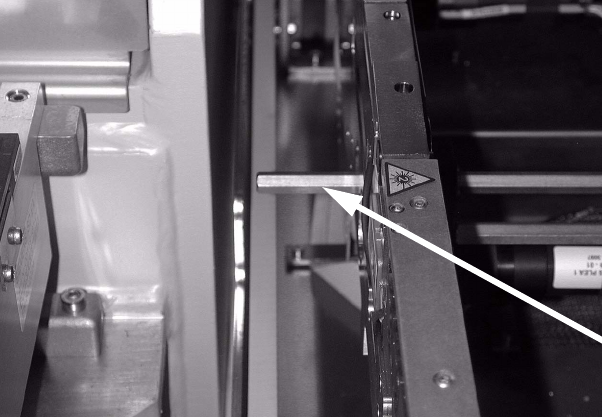
: Check whether the hexagonal shafts are set for the maximum conveyor width. The hexagonal
shaft should connect to the conveyor tray at the outer movable conveyor side wall.
2
2
2
2
2
2
2
2
2
2
2
2
Hexagonal shafts
Retrofit instructions Wide board 242 / 508 mm SIPLACE HS-60 / D4
08/2006 Edition
49
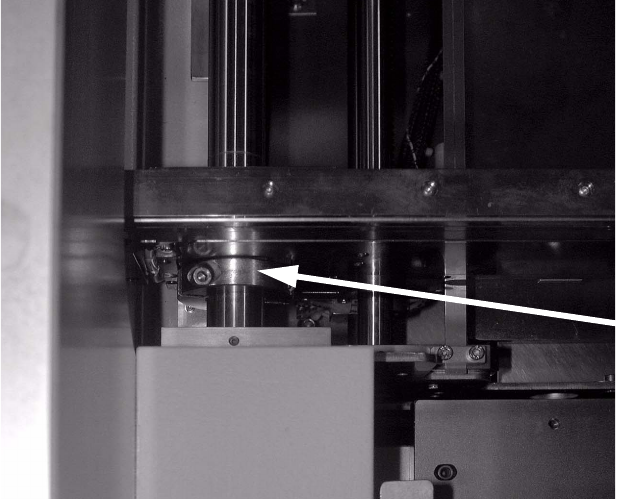
: If this is not the case, loosen the clamping rings on the hexagonal shafts of the stationary con-
veyor side wall (see photograph).
WARNING: The clamping ring can stick on the hexagonal shaft.
Insert the hexagonal shafts as described above. Then fix the hexagonal shaft once more using
the clamping rings.
: Remove the clamping ring for the conveyor side wall of the outer stationary side wall.
2
2
2
2
2
2
2
2
2
2
2
2
2
2
Clamping rings