00191376-07.pdf - 第70页
8 Annual maintenance work HS Preventive Maintenance 01/2006 US E dition 70 8

HS Preventive Maintenance 8 Annual maintenance work
01/2006 US Edition
69
Function test for the used tape cutter 8
a Introduce a DIN A3 sheet or two DIN A4 sheets stuck together into the used tape channel.
8
One DIN A4 sheet on its own is too short to reach the tape cutter. 8
8
8
s Stick the sheet(s) firmly to the used tape channel using adhesive tape.
8
Make sure that no paper protrudes into the traveling range of the placement head. 8
8
8
d Log onto the station as a service engineer and start SITEST.
d Click on the "Component tables" button on the taskbar.
d In the view that appears, click on "Activate tape cutter".
8
: Remove the stuck-on sheet from the used tape channel.
Contact your Regional Service Center if it is not cut through cleanly.
8
8
8
8
8
8
8
8
8
8 Annual maintenance work HS Preventive Maintenance
01/2006 US Edition
70
8
HS Preventive Maintenance 8 Annual maintenance work
01/2006 US Edition
71
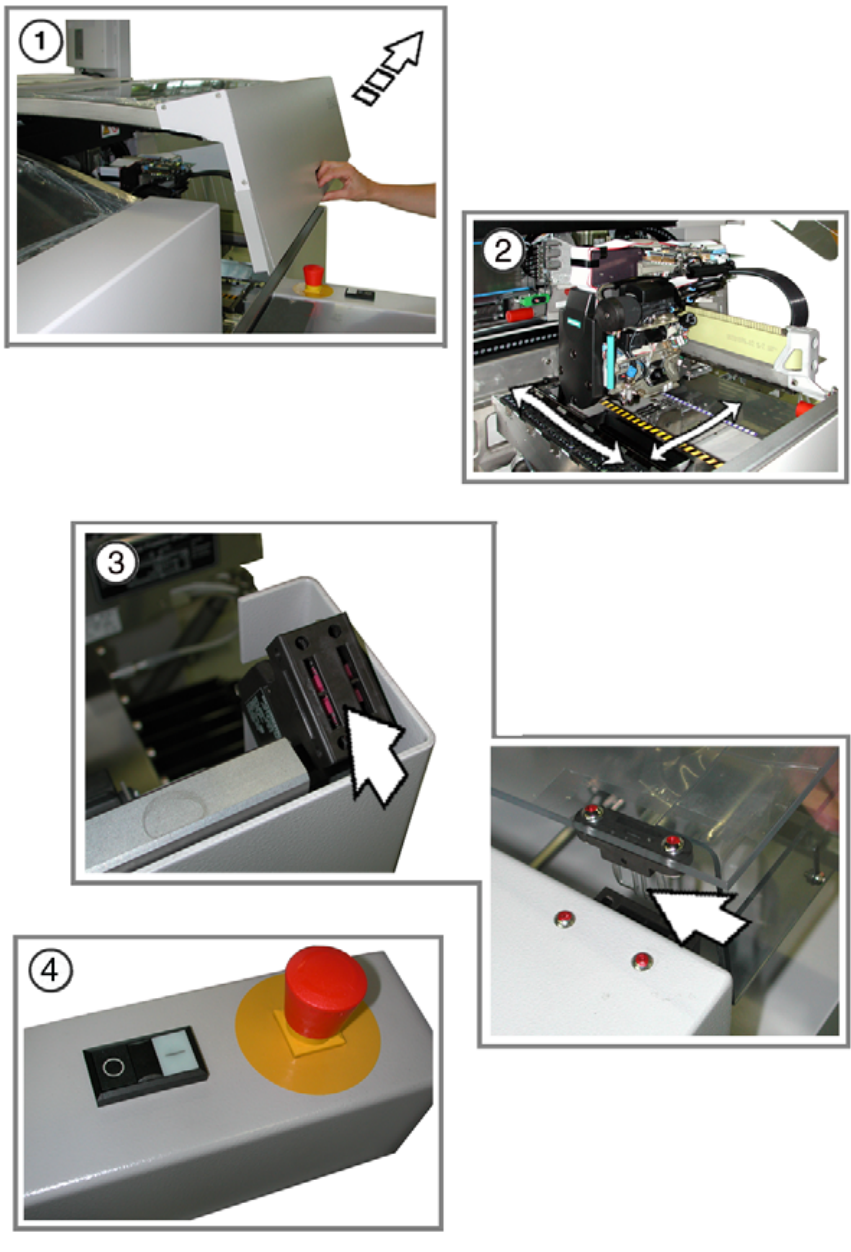
Check the hood switches and emergency stop buttons 8
: Make sure that the placement machine is switched on and the operating system has started
up.
: Makes sure that "Controller ON" is set on the placement machine.
This is displayed on the main fault indicator.
Press the Start button.
8
a Open one of the protective covers. The other protective cover(s) must be closed.
The controller must stop immediately. This will be clearly indicated by the sound of compressed
air being expelled.
s Move the gantry in the X and Y directions.
It must be unpowered and move without resistance.
: If the controller does not switch off or the gantry is not unpowered, the hood switch may be
defective. Replace it with a new switch and test the functions again.
: Test all the protective covers individually and move the relevant gantry.
8
d Check the hood switch for damage, particularly to the plastic bar in the middle.
If there is any damage, replace the hood switch with a new one.
: Check that the actuator slides cleanly and without forcing in the switching unit.
If this is not the case, align the actuator and switching unit with respect to one another.
8
f Check the emergency-stop buttons for damage.
: When you press the button, check that the controller switches off immediately.
Replace the button with a new one if this is not the case.
8
8
8