Portal_Manual_1.2.1_Rev_H-1.pdf - 第86页
Portal PVA Revisio n H ( 2018 ) 86 of 93 17 Notes
Portal
PVA
Revision H (2018)
85 of 93
16.8 Stop Codes
For position and limit errors, the error screen shows the stop codes for all the motors.
This shows which axis (or axes) caused the machine to fault.
Table 2: Stop Code Definitions
Code
Meaning
0
Motors are running, independent mode.
1
Motors stopped at commanded independent position.
2
Decelerating or stopped by FWD limit switch or software.
3
Decelerating or stopped by REV limit switch or software.
4
Decelerating or stopped by Stop Command (ST).
6
Stopped by Abort input.
7
Stopped by Abort command (AB).
8
Decelerating or stopped by Off-on-Error (OE1).
9
Stopped after Finding Edge (FE).
10
Stopped after Homing (HM).
50
Contour running.
51
Contour Stop.
99
MC timeout.
100
Motors are running, vector sequence.
101
Motors stopped at commanded vector.
16.9 Request the Motion Controller Version
Do the procedure below to request the motion controller firmware version. Refer to the
PathMaster® Manual.
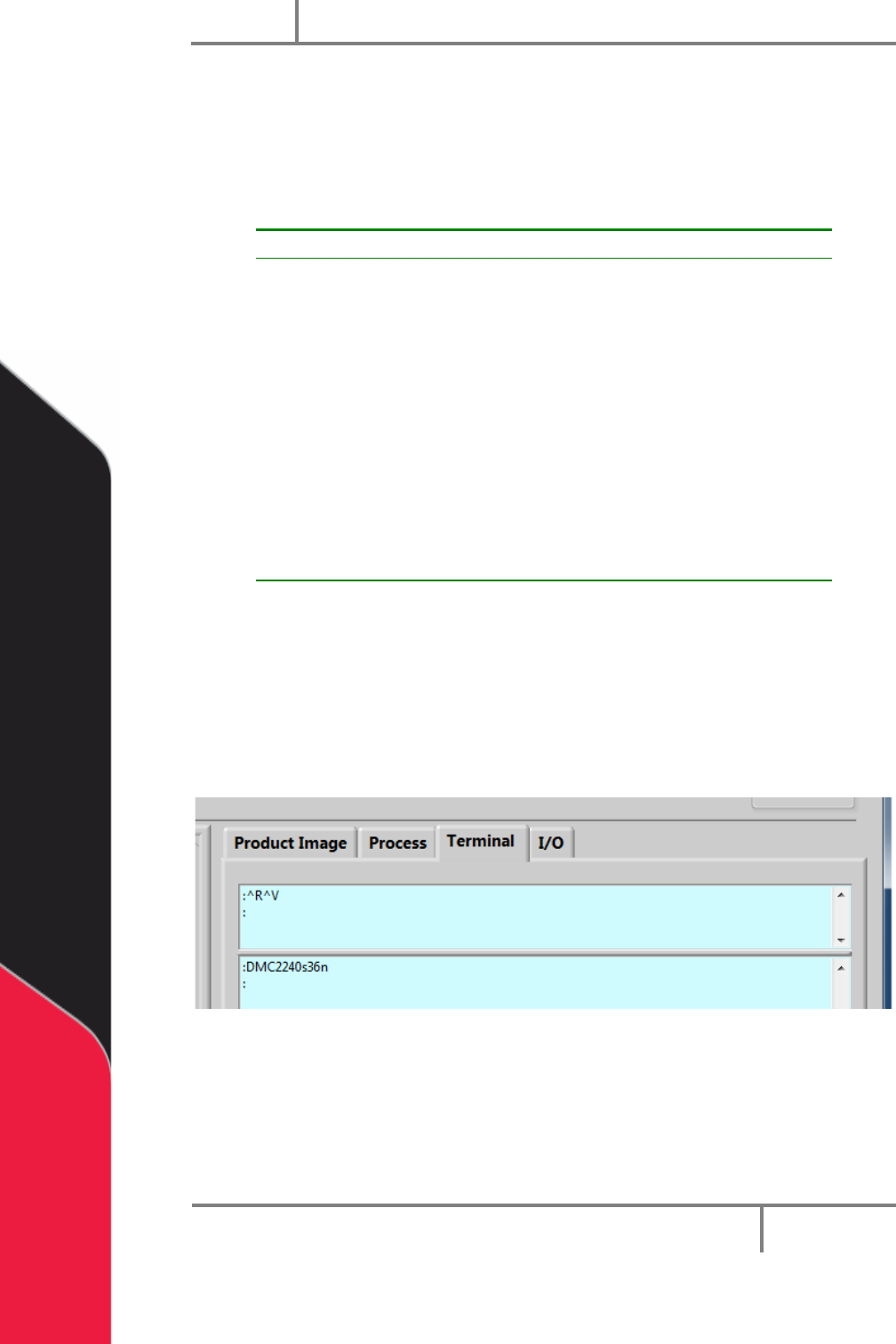
1. Select the Terminal tab on the right side of the portal window.
2. In the terminal window type ‘^R^V’.
Figure 101: Portal Terminal Window
3. Press “Enter”.
The motion controller model and firmware version are shown in the terminal window.
Portal
PVA
Revision H (2018)
86 of 93
17 Notes
Portal
PVA
Revision H (2018)
87 of 93
18 Warranty
PVA Warranty Policy
PVA warrants the enclosed product against defects in material or workmanship on all
components for one year from the date of shipment.
The warranty does not extend to components damaged due to misuse, negligence, or
installation and operation that are not in accordance with the recommended factory
instructions. Unauthorized repair or modification of the enclosed product, and/or the
use of spare parts not directly obtained from PVA (or from factory authorized dealers)
will void all warranties.
All PVA warranties extend only to the original purchaser. Third party warranty claims
will not be honored at any time.
Prior to returning a product for a warranty claim, a return authorization must be
obtained from PVA’s technical support department. Authorization will be issued either
via the telephone, facsimile, or in writing upon your request.
To qualify as a valid warranty claim, the defective product must be returned to the
factory during the warranty period. Upon return, PVA will repair (or replace) all
components found to be defective in material or workmanship.
(Retain this for your records)
Product Information:
PRODUCT: ______________________________
SERIAL NUMBER: ______________________________
DATE OF PURCHASE: ______________________________