OM-1078-002.pdf - 第115页
5.3.6 "Feeder No. Set" Sheet This sheet makes it possible to set the objective feeder No. for teaching. • Sheet Layout When the [Fdr . No. T ray Set] button is pressed in the "Tray T each Pick-Up Pos. [Com…

• Teaching Operation for Settings of Tray Matrix Pitches X and Y,
Side Lengths, and Positional Offsets
(a) Before performing the teaching operation, be sure to con-
firm that correct parameters are set in the "Matrix X" and
"Matrix Y" text boxes of the label "Tray data" in the com-
ponent library data of the pertinent tray.
If incorrect parameters are set, the pitch data cannot be
calculated correctly.
(b) The teaching operation must be performed with "All Beam
Zero" being displayed.
Operation Procedure
(1) Press the [Tray Zeroing Corner] button.
(2) Press the [Data Pos. Move] button.
The P.E.C. recognition camera moves to the specified position.
(3) Confirm that the origin position (tray corner) of the tray is on the
"Recognition" window. Otherwise, press the [Manual Axis] but-
ton for the adjustment.
(4) Press the [Manual Alignment] button and then the [MOVE] but-
ton.
Proceed to the operation of the pointing device and execute the
manual alignment operation.
(5) Press the [Pick-Up First Pos.] button.
(6) After selecting one of the "Position" buttons, press the [Data Pos.
Move] button.
(7) Confirm that the first component in the tray matrix is displayed in
the "Recognition" window. Otherwise, press the [Manual Axis]
button for the adjustment.
(8) Press the [Manual Alignment] button and then the [MOVE] but-
ton.
Proceed to the operation of the pointing device and execute the
manual alignment operation.
Refer to "Pointing Device Operation" in "5.3.3 "Tray Teach Pick-
Up Pos. [Comp. Center Pos.]" Sheet" for details.
(9) Press the [Pick-Up Last Pos.] button.
Follow the same procedure similar to "Pick-Up First Pos." and
perform the teaching operation.
(10) When the [End] button is pressed after the teaching operations
on the three items are completed, it must be determined whether
the taught data should be saved or not.
• When the [YES] button is selected, the data is saved.
• When the [NO] button is selected, the data is not saved.
0311-002 2-41
AHI01EGP
5.3 "TEACHING" Window (Submenu)
Note
5.3.6 "Feeder No. Set" Sheet
This sheet makes it possible to set the objective feeder No. for teaching.
• Sheet Layout
When the [Fdr. No. Tray Set] button is pressed in the "Tray Teach
Pick-Up Pos. [Comp. Center Pos.]", the "Tray Teach Ecc. Pick-Up
Pos. [Pickup Loc. Adj]", or the "Tray Matrix Pitch XY-Side Length"
sheet, the following sheet appears.
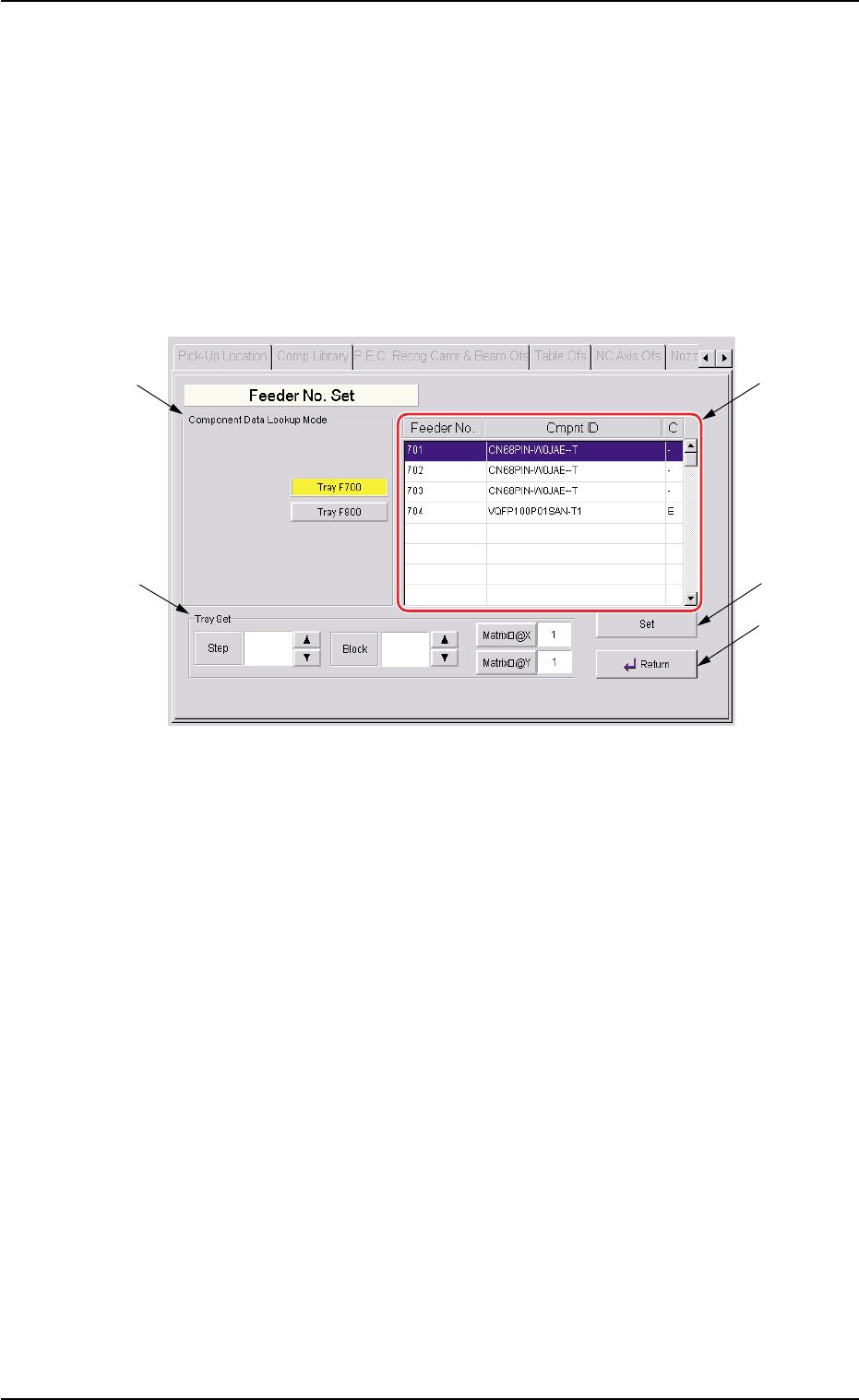
Fig. B27 "Feeder No. Set" Sheet
• Sheet Composition
*1 "Component Data Lookup Mode" Group Box
The provided buttons make it possible to specify the feeder base on
which the feeder to be taught is installed.
When the [Tray F700] or the [Tray F800] button is pressed, the feed-
ers on the selected feeder base are displayed in the "Feeder" list
box (*2).
*2 "Feeder" List Box
Listed are the multi-layer tray feeders specified in the "Component
Data Lookup Mode" group box (*1).
0311-002 2-42
AHI01EGP
5.3 "TEACHING" Window (Submenu)
*1
*3
*2
*4
*5

*3 "Tray Set" Group Box
Parameters can be set in the "Step", "Block", "Matrix X", and "Matrix
Y" text boxes in this group box for the objective tray of the feeder
selected in the "Feeder" list box (*2).
*4 [Set] Button
The feeder selected in the "Feeder" list box (*2) is set as the objec-
tive feeder No. for teaching.
*5 [Return] Button
When this button is pressed, the previous sheet (the "Tray Teach
Pick-Up Pos. [Comp. Center Pos.]", the "Tray Teach Ecc. Pick-Up
Pos. [Pickup Loc. Adj]", or the "Tray Matrix Pitch XY-Side Length"
sheet) appears.
• Operation Procedure
Follow the steps below to specify the feeder No. to be taught.
(1) Specify the multi-layer tray.
The feeder Nos. of the specified multi-layer tray are displayed in
the "Feeder" list box (*2).
(2) Specify a feeder No.
(3) Press the [Set] button (*4).
The objective feeder No. for teaching is determined.
(4) Press the [Return] button.
The "Feeder No. Set" sheet closes and the "Pick-Up Location"
tab sheet appears.
0204-001 2-43
AHI01EGP
5.3 "TEACHING" Window (Submenu)