OM-1078-002.pdf - 第117页
5.3.7 "T ray Unit Adj." Sheet • Sheet Layout When the [T ray Unit Adj.] button is pressed in the "Tray T each Pick- Up Pos. [Comp. Center Pos.]", the "T ray T each Ecc. Pick-Up Pos. [Pickup Loc. …

*3 "Tray Set" Group Box
Parameters can be set in the "Step", "Block", "Matrix X", and "Matrix
Y" text boxes in this group box for the objective tray of the feeder
selected in the "Feeder" list box (*2).
*4 [Set] Button
The feeder selected in the "Feeder" list box (*2) is set as the objec-
tive feeder No. for teaching.
*5 [Return] Button
When this button is pressed, the previous sheet (the "Tray Teach
Pick-Up Pos. [Comp. Center Pos.]", the "Tray Teach Ecc. Pick-Up
Pos. [Pickup Loc. Adj]", or the "Tray Matrix Pitch XY-Side Length"
sheet) appears.
• Operation Procedure
Follow the steps below to specify the feeder No. to be taught.
(1) Specify the multi-layer tray.
The feeder Nos. of the specified multi-layer tray are displayed in
the "Feeder" list box (*2).
(2) Specify a feeder No.
(3) Press the [Set] button (*4).
The objective feeder No. for teaching is determined.
(4) Press the [Return] button.
The "Feeder No. Set" sheet closes and the "Pick-Up Location"
tab sheet appears.
0204-001 2-43
AHI01EGP
5.3 "TEACHING" Window (Submenu)
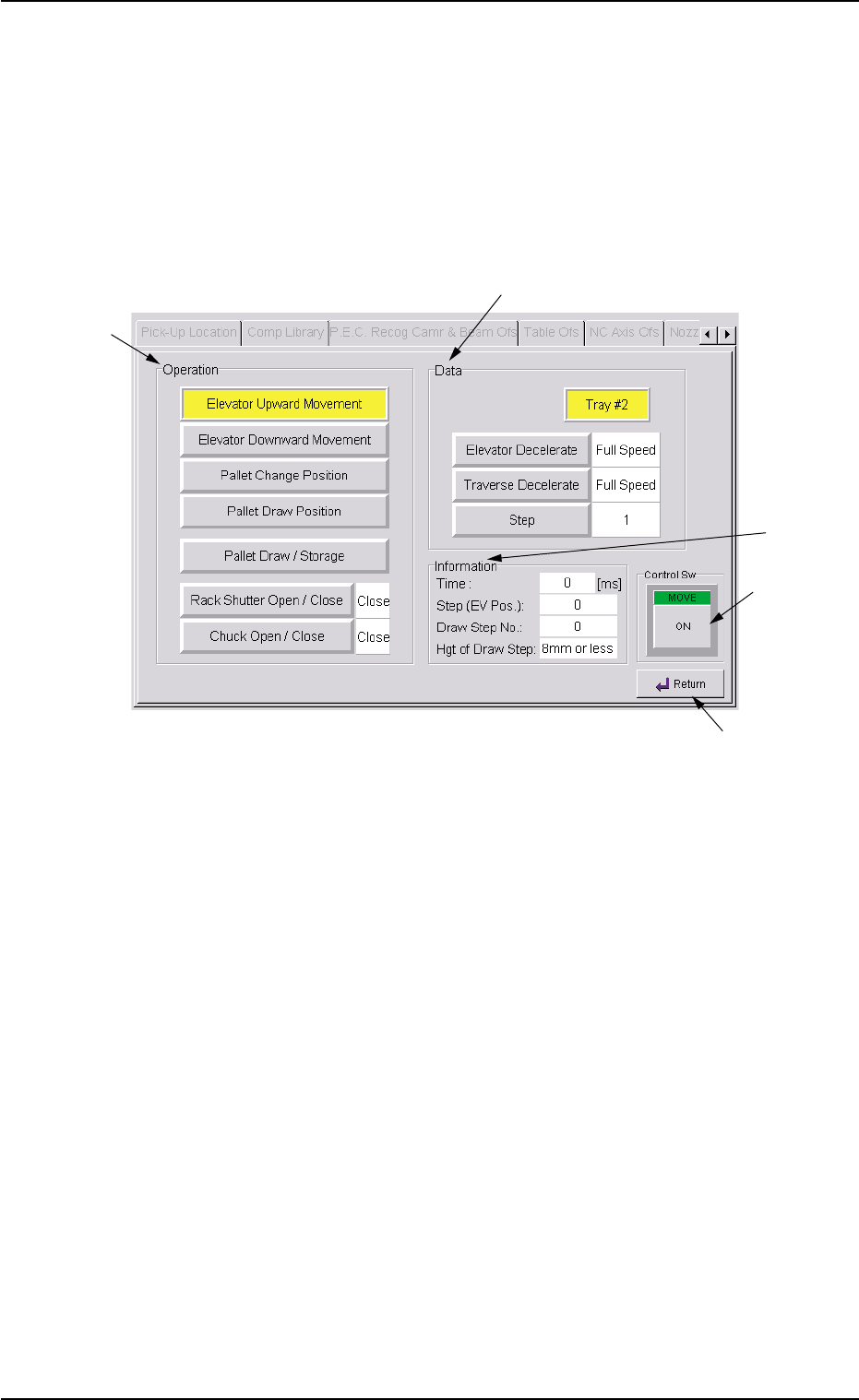
5.3.7 "Tray Unit Adj." Sheet
• Sheet Layout
When the [Tray Unit Adj.] button is pressed in the "Tray Teach Pick-
Up Pos. [Comp. Center Pos.]", the "Tray Teach Ecc. Pick-Up Pos.
[Pickup Loc. Adj]", or the "Tray Matrix Pitch XY-Side Length" sheet,
the following sheet appears.
Fig. B28 "Tray Unit Adj." Sheet
• Sheet Composition
*1 "Operation" Group Box
[Elevator Upward Movement] Button
When this button is selected and the [ON] button (entitled "MOVE")
is pressed, the elevator shaft moves up as far as 1 pitch of the
pallet.
[Elevator Downward Movement] Button
When this button is selected and the [ON] button (entitled "MOVE")
is pressed, the elevator shaft moves down as far as 1 pitch of the
pallet.
[Pallet Change Position] Button
When this button is selected and the [ON] button (entitled "MOVE")
is pressed, the elevator shaft moves to the pallet change position.
0311-002 2-44
AHI01EGP
5.3 "TEACHING" Window (Submenu)
*1
*2
*3
*4
*5

[Pallet Draw Position] Button
When this button is selected and the [ON] button (entitled "MOVE")
is pressed, the elevator shaft moves to the pallet drawout position.
[Pallet Draw / Storage] Button
When the pallet at the drawout position is not drawn out by the
traverses and the [ENABLE] button is pressed in 2 seconds after
this button and the [ON] button (entitled "MOVE"), the pallet is drawn
out. When the pallet is already drawn out, it is stored in the rack.
When the rack is loaded with new components, the pullout
and storage actions of the traverses take place approxi-
mately 10 times to check for any positional deviations and
plays (looseness) of the components.
[Rack Shutter Open / Close] Button
When pressed, this button opens or closes the rack shutter.
[Chuck Open / Close] Button
When pressed, this button opens or closes the chucks.
*2 "Data" Group Box
[Elevator Decelerate] Button
The set parameter is used to specify the reduction rate of the eleva-
tor up/down speed.
Set a parameter to specify the reduction rate of the speed (based
on the standard driving waveform) in the text box.
Use this function when there is a possibility that the components in
the tray may deviate from the correct position during elevator move-
ment.
[Traverse Decelerate] Button
The set parameter is used to specify the reduction rate of the traverse
shaft transfer speed while a pallet (tray) is being drawn out from the
rack or being stored.
Set a parameter to specify the reduction rate of the speed (based
on the standard driving waveform) in the text box.
Use this function when there is a possibility that the components in
the tray may deviate from the correct position during elevator move-
ment.
[Step] Button
Set the step No. for which the traverse drawout/storage actions
should take place.
0311-002 2-45
AHI01EGP
5.3 "TEACHING" Window (Submenu)
Note