OM-1078-002.pdf - 第163页
2 . 3 T roubleshooting after "ERROR" Window (Error ID) Refer to "3. T roubleshooting after "ERROR" Window (Error ID)" in "Section 2" (the instruction manual (V ol. 4: Maintenance a…
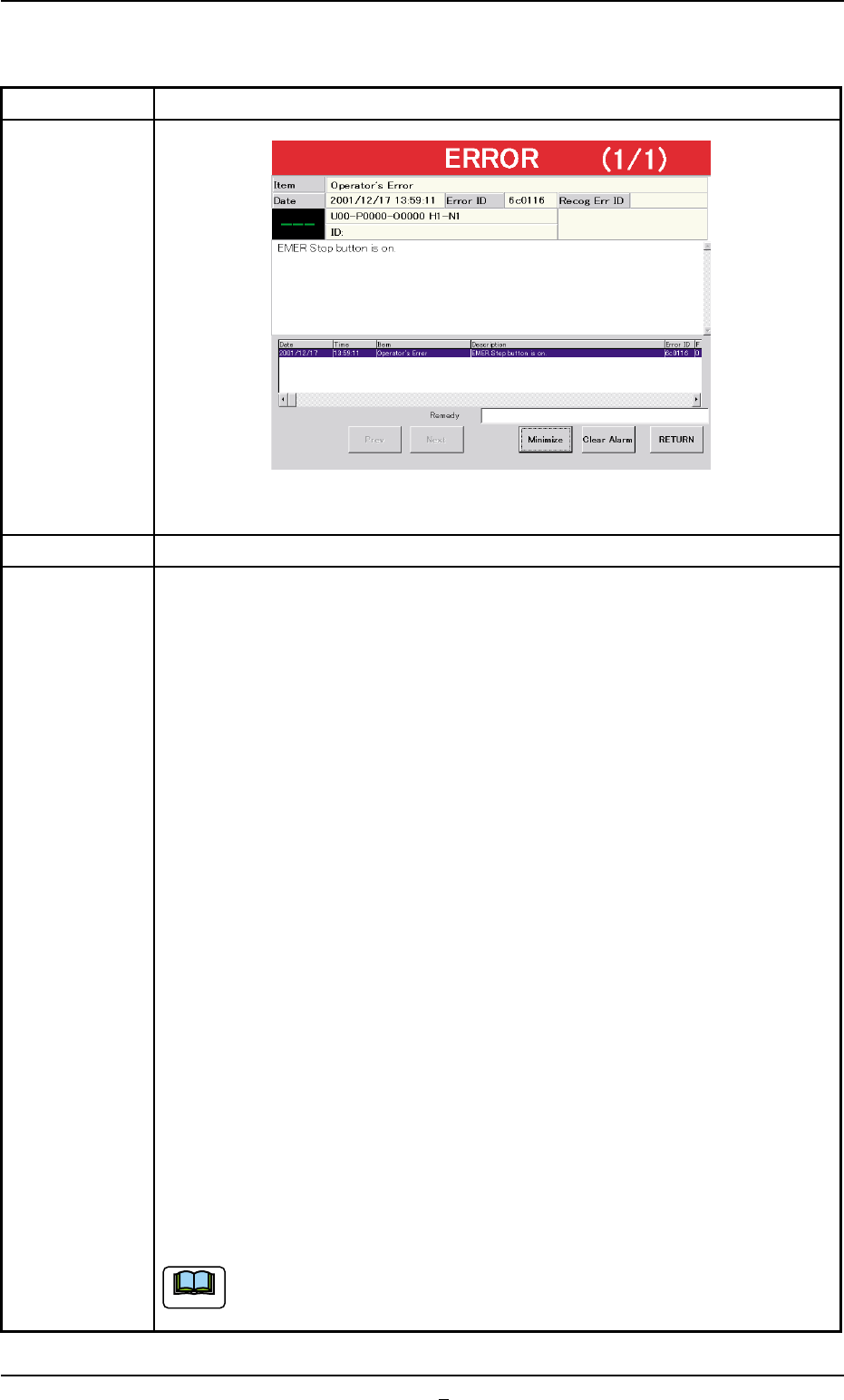
2.2.3 [EMERGENCY STOP] Button ON (Pressed)
Table D8
Symptom (1) The [POWER ON] turns red and the following window appears.
Fig. D9-1
Cause (1) An [EMERGENCY STOP] button was pressed.
Remedy (1) Check the displayed contents.
(2) Press the [RETURN] button.
(3) Remove the cause of the problem that prompted the operator to press
the [EMERGENCY STOP] button.
(4) Check the multi-layer tray feeder.
When the component to be picked up is left in the supply position, re-
move it.
(5) Check if there is a component which has dropped inside the machine.
(6) Check whether or not the P.C.B. in the middle of component placement
is located correctly (not out of the P.C.B. positioning section) and the
components are placed normally (not dispersed).
(7) Turn the [EMERGENCY STOP] button clockwise to release the locked
condition.
(8) Hold down the [POWER ON] button for more than 1 second to re-supply
power to the machine.
• When the LED of the [POWER ON] button illuminates in yellowish
green, it indicates that the power is supplied to the machine.
When the LED is kept red, re-check the cause and remove it.
(9) Press the [Up/Down Axis] button in the "Head #1" or the "Head #2" group
box of the "Manual Axis Opn." tab sheet. (Operation Sequence: [MAINT.]
Button Æ [MNL OPN.] Button Æ "Manual Axis Opn." Tab Sheet) After
that, press the [Tray2 Axis] button in the "Zeroing Opn." tab sheet for the
zeroing operation.
When the pallet is located on the traverses or in the middle of being
drawn out, it is stored in the elevator.
2.2 Easy Troubleshooting
0311-002 4-17-1 AHI01EGP
Note
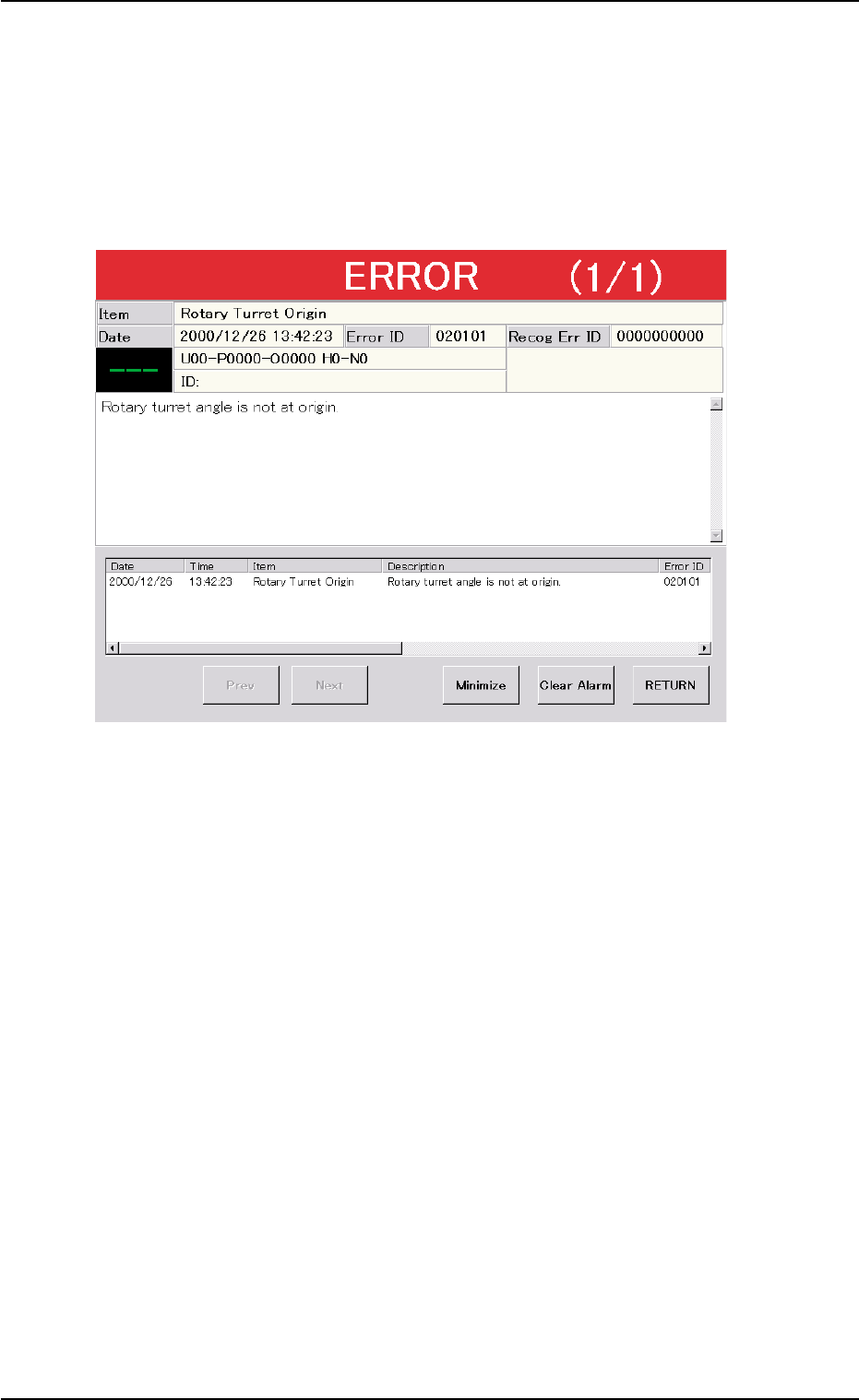
2.3 Troubleshooting after "ERROR" Window
(Error ID)
Refer to "3. Troubleshooting after "ERROR" Window (Error ID)" in
"Section 2" (the instruction manual (Vol. 4: Maintenance and Trouble-
shooting) of the main machine) for details.
Fig. D10 Example of "ERROR" Window
2.3.1 Typical Description
Refer to "3.1 Typical Description" in "Section 2" (the instruction
manual (Vol. 4: Maintenance and Troubleshooting) of the main ma-
chine) for details.
2.3.2 Error IDs and Controlled Areas
Refer to "3.2 Error IDs and Controlled Areas" in "Section 2" (the in-
struction manual (Vol. 4: Maintenance and Troubleshooting) of the
main machine) for details.
2.3 Troubleshooting after "ERROR" Window (Error ID)
0311-002 4-18 AHI01EGP
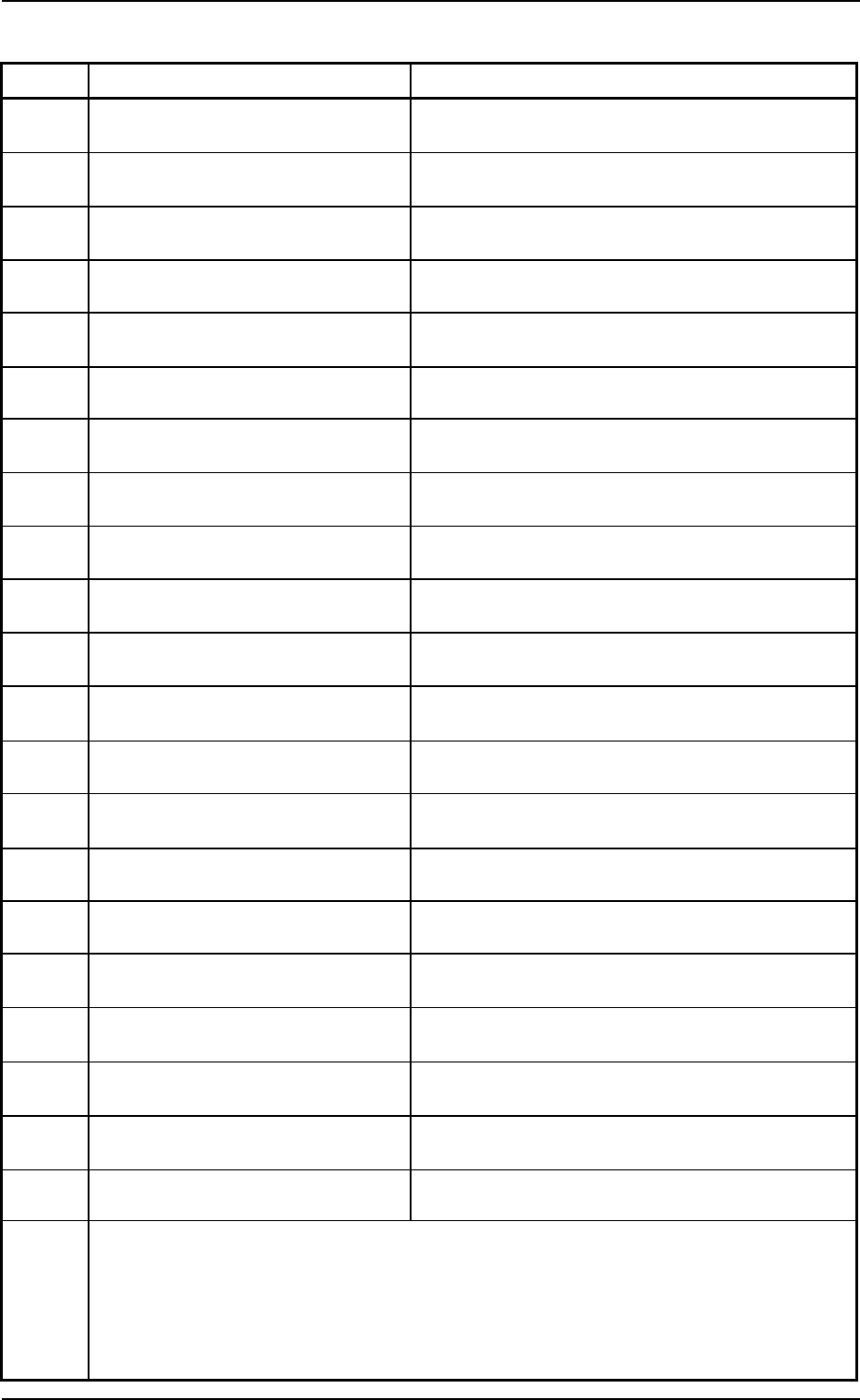
2.3.3 Error IDs and Controlled Areas
Error ID Item Description
110101 TV #1 Axis Origin Rack shutter not opened within specified time. (0101)
110102 TV #1 Axis Origin Pallet chuck not closed within specified time. (0102)
110103 TV #1 Axis Origin Operatiing condition for zeroing not fulfilled. (0103)
110104 TV #1 Axis Origin Pallet installation error detected; BPH504/505 (0201)
110105 TV #1 Axis Origin Pallet detected. (0202)
110106 TV #1 Axis Origin Operation not completed normally. (0203)
110107 TV #1 Axis Origin Zeroing not completed within specified time. (0204)
110108 TV #1 Axis Origin Pallet installation error detected.;BPH504/505 (0401)
110109 TV #1 Axis Origin Pallet detected. (0402)
11010a TV #1 Axis Origin Operation not completed normally. (0403)
11010b TV #1 Axis Origin Zeroing not completed within specified time. (0404)
11010c TV #1 Axis Origin Pallet detected. (0501)
11010d TV #1 Axis Origin Zeroing not completed within specified time. (0502)
11010e TV #1 Axis Origin Pallet installation error detected before destinatation.
(0601)
11010f TV #1 Axis Origin Pallet detected. (0701)
110110 TV #1 Axis Origin Operation not completed normally. (0702)
110111 TV #1 Axis Origin Zeroing not completed within specified time. (0703)
110112 TV #1 Axis Origin Rack shutter not closeed within specified time.
(0704)
110113 TV #1 Axis Origin Rack shutter not closeed within specified time.
(0801)
110114 TV #1 Axis Origin Origin detected after end of zeroing operation. (0901)
110115 TV #1 Axis Origin Origin detected after end of zeroing operation. (1001)
(Cause 1) Self-Diagnostics Error Message
(Remedy 1) Zero all axes and re-start the operation.
When the machine cannot be set to its normal condition, consult our service
personnel for the remedy.
0109-001 4-19 AHI01EGP
2.3 Troubleshooting after "ERROR" Window (Error ID)