OM-1078-002.pdf - 第87页
5 . 1 "MNL. OPN." Window (Submenu) 5.1.1 "Zeroing Opn." T ab The corresponding tab sheet enables the operator to zero each device (axis). • Sheet Layout When the "Zeroing Opn." tab is presse…
0311-001 2-15-3 AHI01EGP
5. Menus for Maintenance
5. Menus for Maintenance
••
••
• Windows Layout
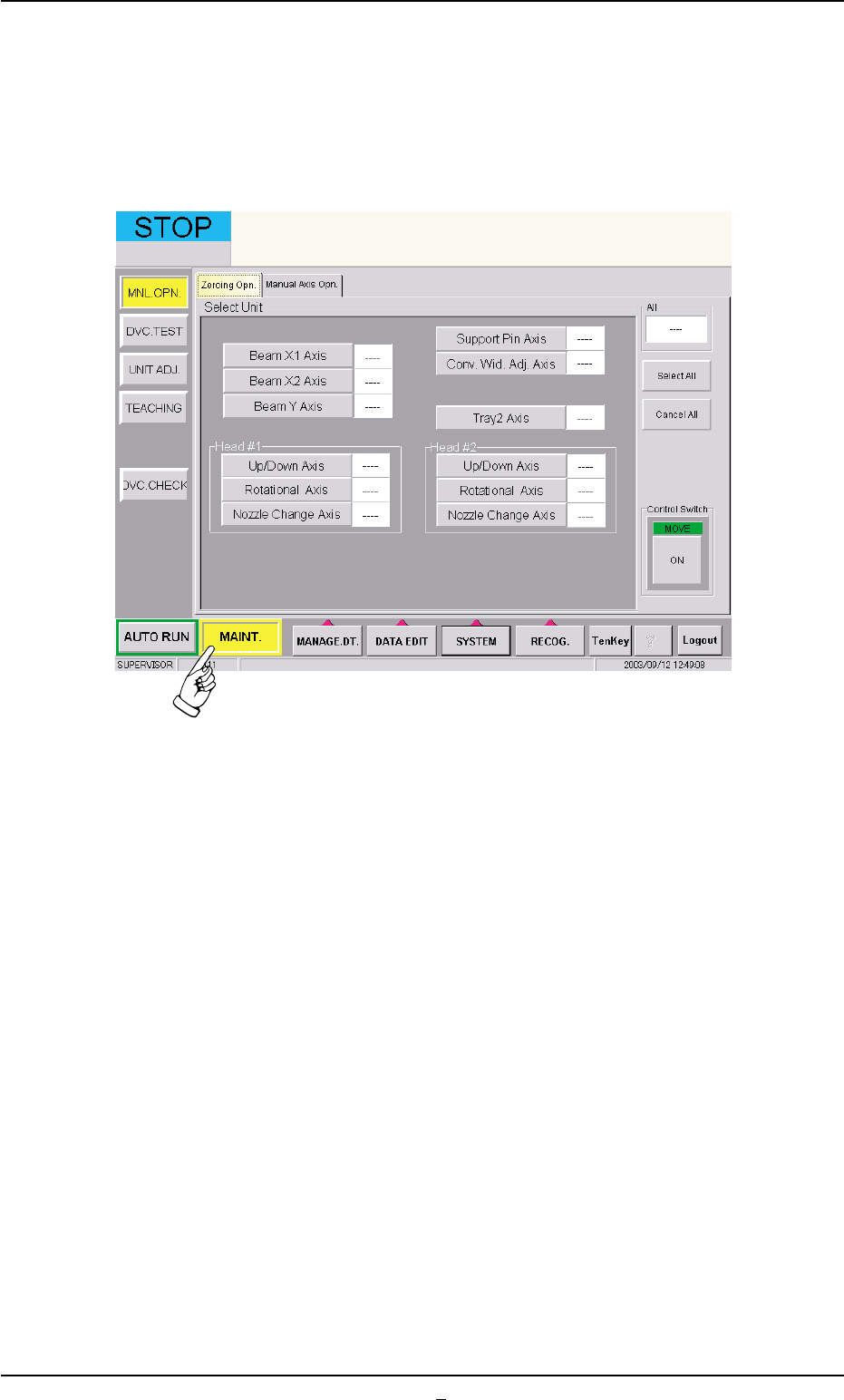
When the [MAINT.] button on the main menu bar is pressed, the fol-
lowing window opens.
Fig. B8 "MAINT." Window
5.1 "MNL. OPN." Window (Submenu)
5.1.1 "Zeroing Opn." Tab
The corresponding tab sheet enables the operator to zero each device
(axis).
• Sheet Layout
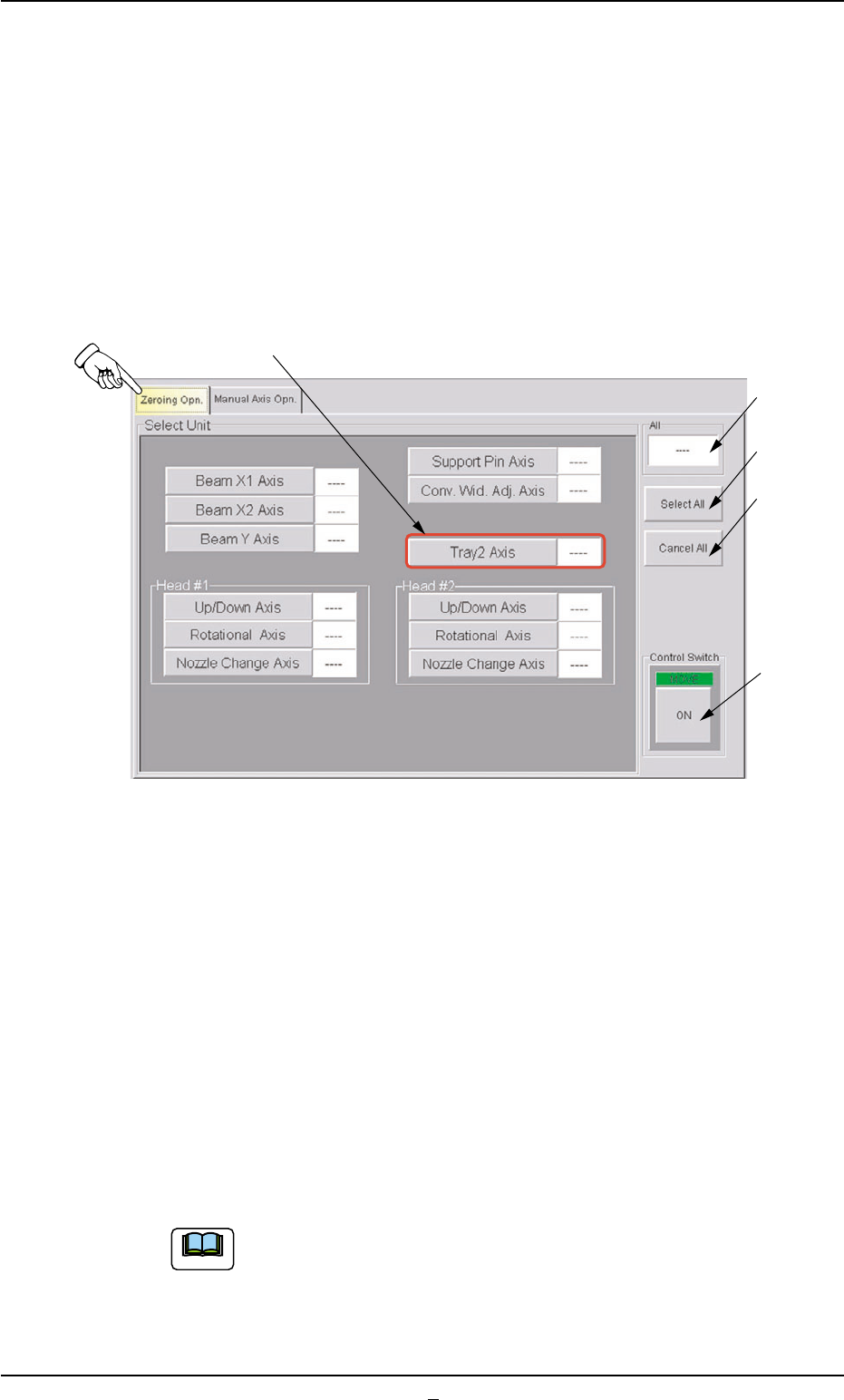
When the "Zeroing Opn." tab is pressed in the "MNL OPN." window
(submenu), the following tab sheet appears.
Fig. B8-1 "Zeroing Open." Tab Sheet (Provided with Multi-Layer Tray Feeder 2)
• Sheet Composition
*1 "Select Unit" Group Box
The following buttons are provided in this group box.
[Tray 2 Axis] Button
When a button is pressed, the background color turns yellow, indi-
cating that the device (axis) is selected.
Pressing the button again changes the background color to the origi-
nal one, indicating that the selection is canceled.
Each button has a box on the right side and the status of the corre-
sponding device is indicated in the box.
Two or more devices can be selected.
*2
*3
*4
*5
*1
0311-003 2-16 AHI01EGP
Note
5.1 "MNL. OPN." Window (Submenu)
*2 "All" Group Box
It is indicated whether or not all devices are zeroed.
"—" : All devices are not zeroed.
"Origin" : All devices are zeroed.
*3 [Select All] Button
When this button is pressed, all devices (possible to be returned to
their origins) are selected and the corresponding buttons turn yel-
low.
The [Select All] button cannot be used to select the [Sup-
port Pin Axis] and [Conv. Wid. Adj. Axis] buttons.
*4 [Cancel All] Button
When this button is pressed, the selection of all devices is can-
celed.
*5 "Control Switch" Group Box
When the [ENABLE] button on the operation panel is pressed in two
seconds after a device(s) is selected and the [ON] button (entitled
"MOVE") is pressed, the device is zeroed.
(a) After the zeroing operation is completed, "Origin" ap-
pears in the box on the right side of the corresponding
button.
(b) When the current position is being managed or indefi-
nite, "—" appears in the box.
0311-002 2-16-1
AHI01EGP
5.1 "MNL. OPN." Window (Submenu)
Note
Note