OM-1078-002.pdf - 第95页
• Sheet Composition *1 [T ray T each Pick-Up Pos. [Comp. Center Pos.]] Button When the center of the vacuum nozzle must be aligned with the center of the component to be supplied from the tray feeder through a teaching o…
5.3.2 "Pick-Up Location" Tab
Only a well-trained personnel shall perform teaching
operations.
The component library data and the pattern program
may be modified additionally for the teaching.
If the teaching operation is not performed correctly,
the pick-up rate may deteriorate.
• The pick-up position of the component at the multi-layer tray feeder is
taught through manual alignment operation.
The objective feeders for teaching are those whose pick-up position
is registered in the placement feeder location data of the current pat-
tern program.
The pick-up rate may be improved after the teaching of the pick-up
position is performed when the pick-up rate is low.
Menu selections become possible only when the machine is in
the "STOP" mode.
• Sheet Layout
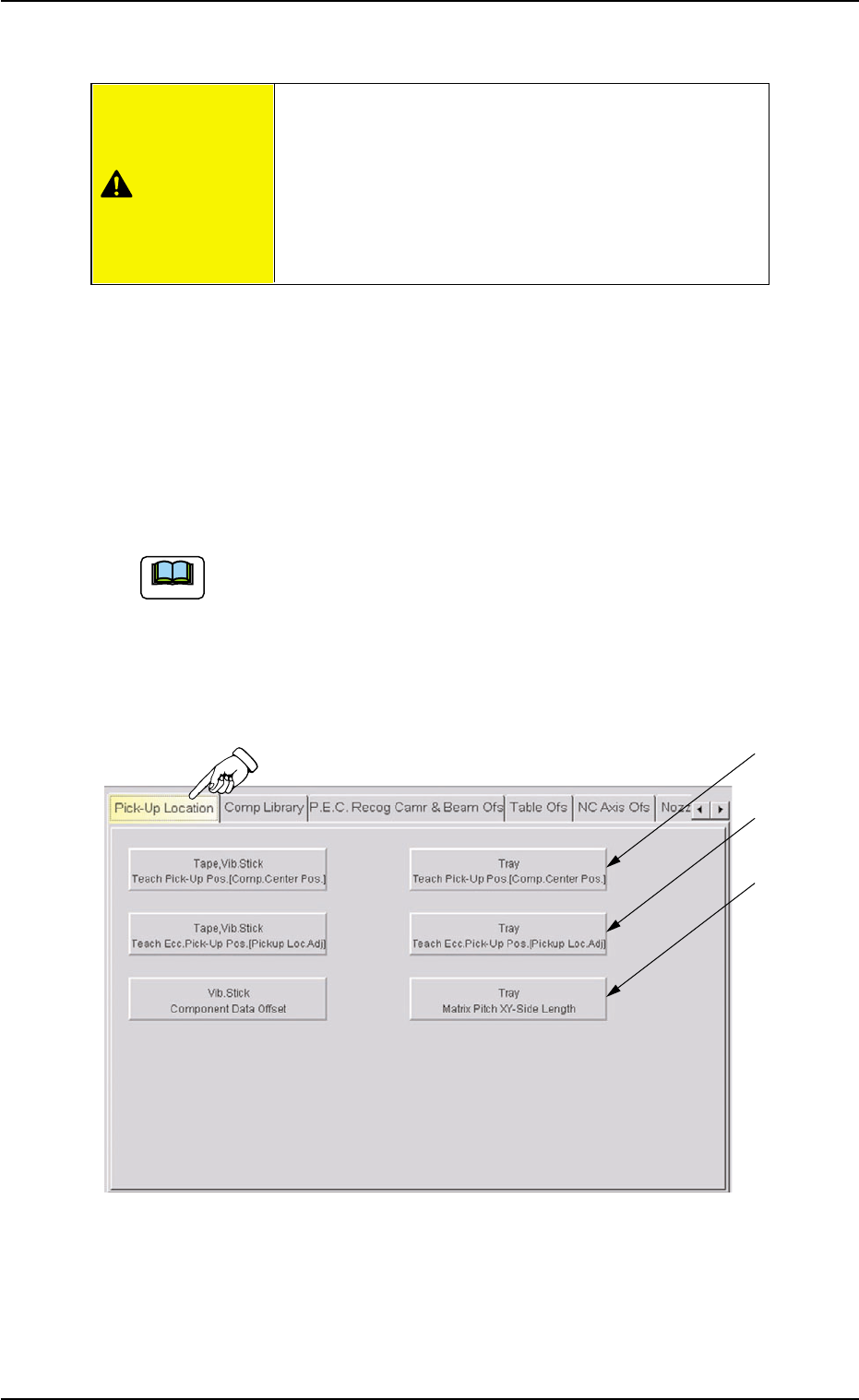
When the "Pick-Up Location" tab is pressed in the "TEACHING" win-
dow (submenu), the following tab sheet appears inside the window.
Fig. B10 "Pick-Up Location" Tab Sheet
0311-002 2-21 AHI01EGP
5.3 "TEACHING" Window (Submenu)
*1
*2
*3
Note
CAUTION

• Sheet Composition
*1 [Tray Teach Pick-Up Pos. [Comp. Center Pos.]] Button
When the center of the vacuum nozzle must be aligned with the
center of the component to be supplied from the tray feeder through
a teaching operation, press this button. The "Tray Pick-Up Pos.
[Comp. Center Pos.]" sheet appears.
Refer to "5.3.3 "Tray Teach Pick-Up Pos. [Comp. Center Pos.]"
Sheet" for details.
*2 [Tray Teach Ecc. Pick-Up Pos. [Pickup Loc. Adj] Button
When the component supplied from the tray feeder cannot be picked
up normally at the center and the eccentric pick-up correction posi-
tion must be taught, press this button. The "Tray Teach Ecc. Pick-
Up Pos. [Pickup Loc. Adj]" sheet appears.
Refer to "5.3.4 "Tray Teach Ecc. Pick-Up Pos. [Pickup Loc. Adj]"
Sheet" for details.
*3 [Tray Matrix Pitch XY-Side Length] Button
When the matrix pitch X and Y, the side lengths, and the positional
offsets must be taught for the tray, press this button. The "Tray Ma-
trix Pitch XY-Side Length" sheet appears.
Refer to "5.3.5 "Tray Matrix Pitch XY-Side Length" Sheet" for details.
0204-001 2-22
AHI01EGP
5.3 "TEACHING" Window (Submenu)
5.3.3 "Tray Teach Pick-Up Pos. [Comp. Center Pos.]" Sheet
This sheet makes it possible to perform a teaching operation to align the
center of the vacuum nozzle with the center of the component to be
supplied from the multi-layer tray feeder.
• Sheet Layout
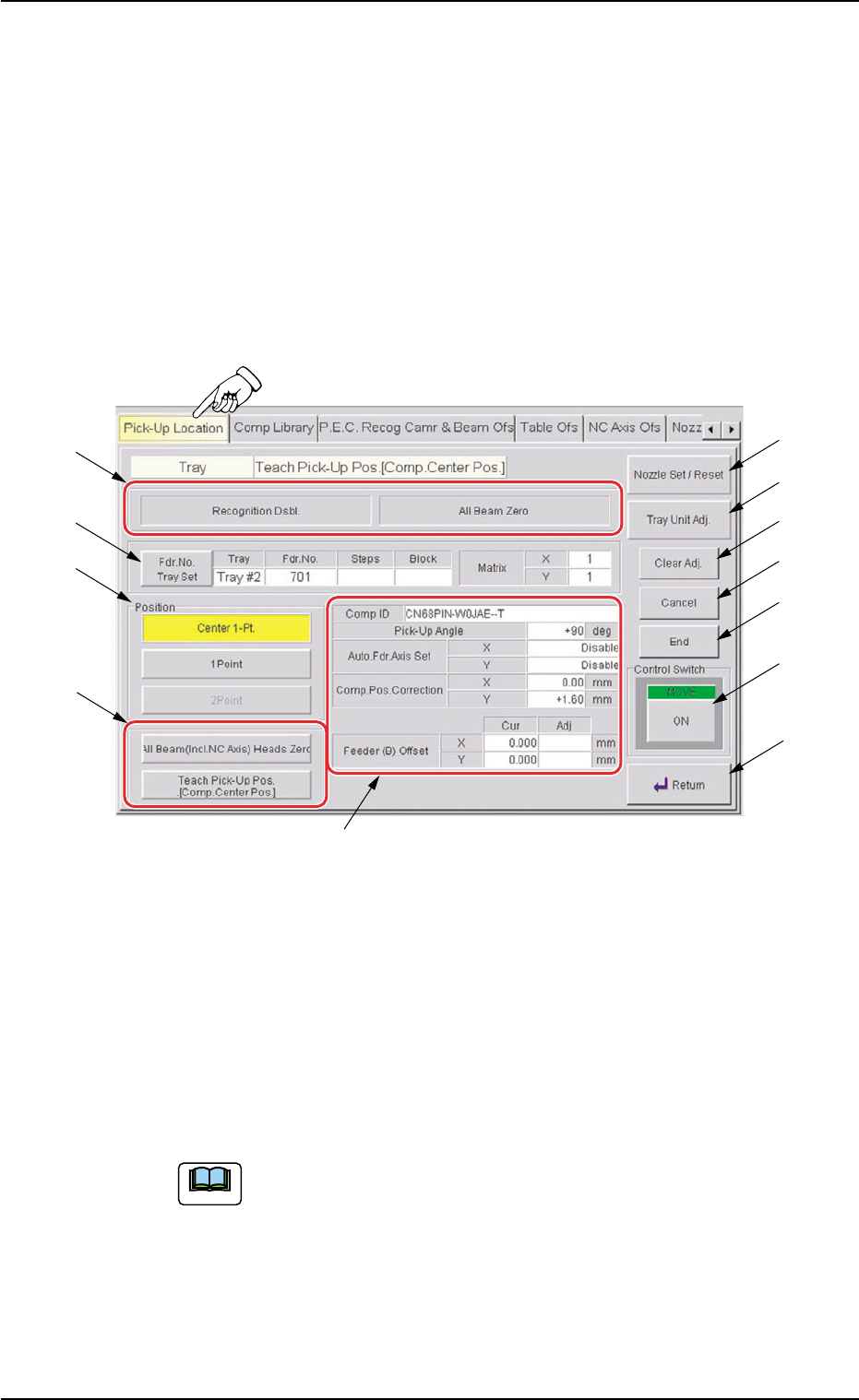
When the [Tray Teach Pick-Up Pos. [Comp. Center Pos.]] button is
pressed in the "Pick-Up Location" tab sheet , the following sheet ap-
pears.
Fig. B11 "Tray Teach Pick-Up Pos. [Comp. Center Pos.]" Sheet
• Sheet Composition
*1 Set Status
When the "P.E.C. Dsbl." or the "Comp. Recognition Dsbl." check
box in the "Test Run" tab sheet is turned on (checked), the back-
ground color of "Recognition Dsbl." turns light red (No background
color in normal cases).
No recognition processing is made even if a teaching op-
eration is performed when each check box is turned on
(checked) in the "Test Run" tab sheet. Therefore, various
teaching operations will get incorrect results.
When all beams are zeroed completely, the background color of "All
Beam Zero" turns green. Otherwise, the background has no color.
0311-002 2-23
AHI01EGP
5.3 "TEACHING" Window (Submenu)
*1
*6
*7
*8
*9
*10
*11
*12
*4
*5
*3
*2
Note