RS-1_instruction manual.pdf - 第269页
Part 1 B asic O peration Chapter 2 Pr oduction 2- 158 (3) R estart m ode Select ho w to restart r ecognizin g a mark to rest art the sus pended PWB produ ction. Menu item Description Retry at sam e positi on Recognizes a…
Part 1 Basic Operation Chapter 2 Production
2-157
If a mark recognition error occurs
Overview of the error
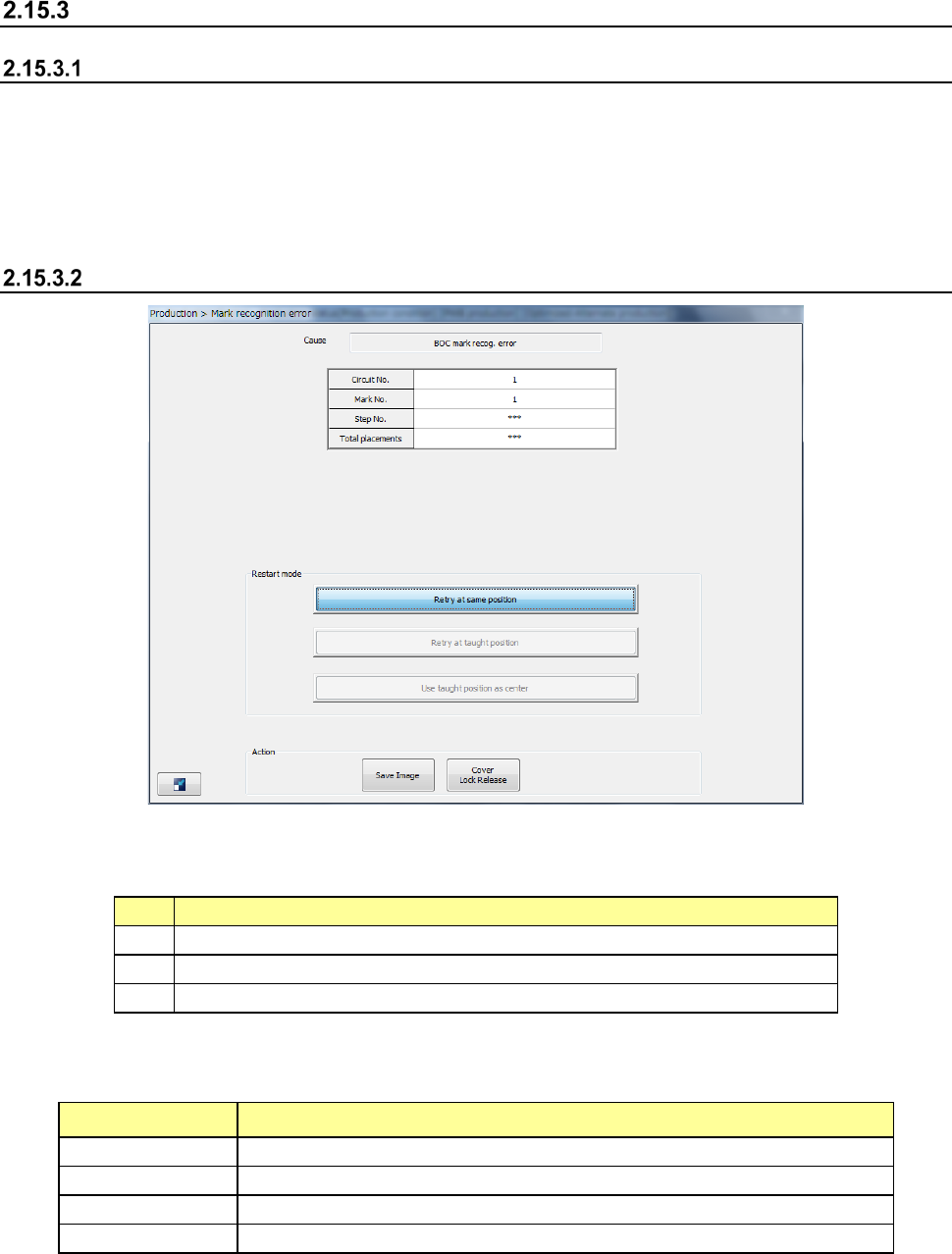
If a mark recognition error occurs while the system is recognizing a BOC mark or an area mark, the
system stops the current production temporarily and displays the following dialog box.
- When you press the <START> switch, the system restarts the suspended production.
- When you press the <STOP> switch, the system proceeds to the production interruption
operation.
Displayed screen
(1) Cause
This field shows the cause of pauses
No.
Cause
1
BOC mark recog. (recognition) error
2
Area mark recog. error
3
Bank mark recog. error
(2) Production information
The production information obtained when an error occurred is shown here.
Menu item Description
Circuit No.
Displays the circuit number of a component that caused an error.
Mark No.
Displays the mark number of a component that caused an error.
Step No.
Displays the step number of a component that caused an error.
Total placements
Displays the total number component placement operations.
Part 1 Basic Operation Chapter 2 Production
2-158
(3) Restart mode
Select how to restart recognizing a mark to restart the suspended PWB production.
Menu item
Description
Retry at same position
Recognizes a mark without changing the mark position.
Retry at taught position
Use the coordinates set with teaching operation as those
for recognizing a mark.
When you use the <Teach> button displayed on the
function bar to perform teaching, you can select this
button.
Use taught position as center
Set coordinates with teaching operation, and use them to
recognize a mark again.
When you use the <Teach> button displayed on the
function bar to perform teaching, you can select this
button.
(4) Action
These buttons allow you to display/set various types of information on pause.
Menu item Description
Save Image
Outputs the VRAM image as a file.
Cover Lock Release
Unlocks the protection cover when any component is not picked up with a head.
Selecting of Production Restart Mode
Immediately after the system pauses due to a mark recognition error other than a bank mark
recognition error, you can select only the <Retry at same position> button.
When you press the <Teach> button displayed on the function bar to perform teaching operation,
you can select other buttons of “Prod Restart Mode.”
Even after all of the “Prod Restart Mode” buttons becomes selectable after teaching, only the <Retry
at same position> button can be selected if you perform teaching operation again, and then press
the <CANCEL> button to return to the previous screen.
Teaching on this screen is valid for the current board only. If the same mark recognition error
occurs for another board, you have to terminate the current PWB production and use the Program
Editor to teach mark coordinates and/or recognition operation again.
CAUTION
Your selection on this screen is available for the board that is centered
now only. Therefore, the value in the production program will be
effective for the next board.
If the mark conditions are changed due to change of the lot or for any
other reason, edit a production program.
Part 1 Basic Operation Chapter 2 Production
2-159
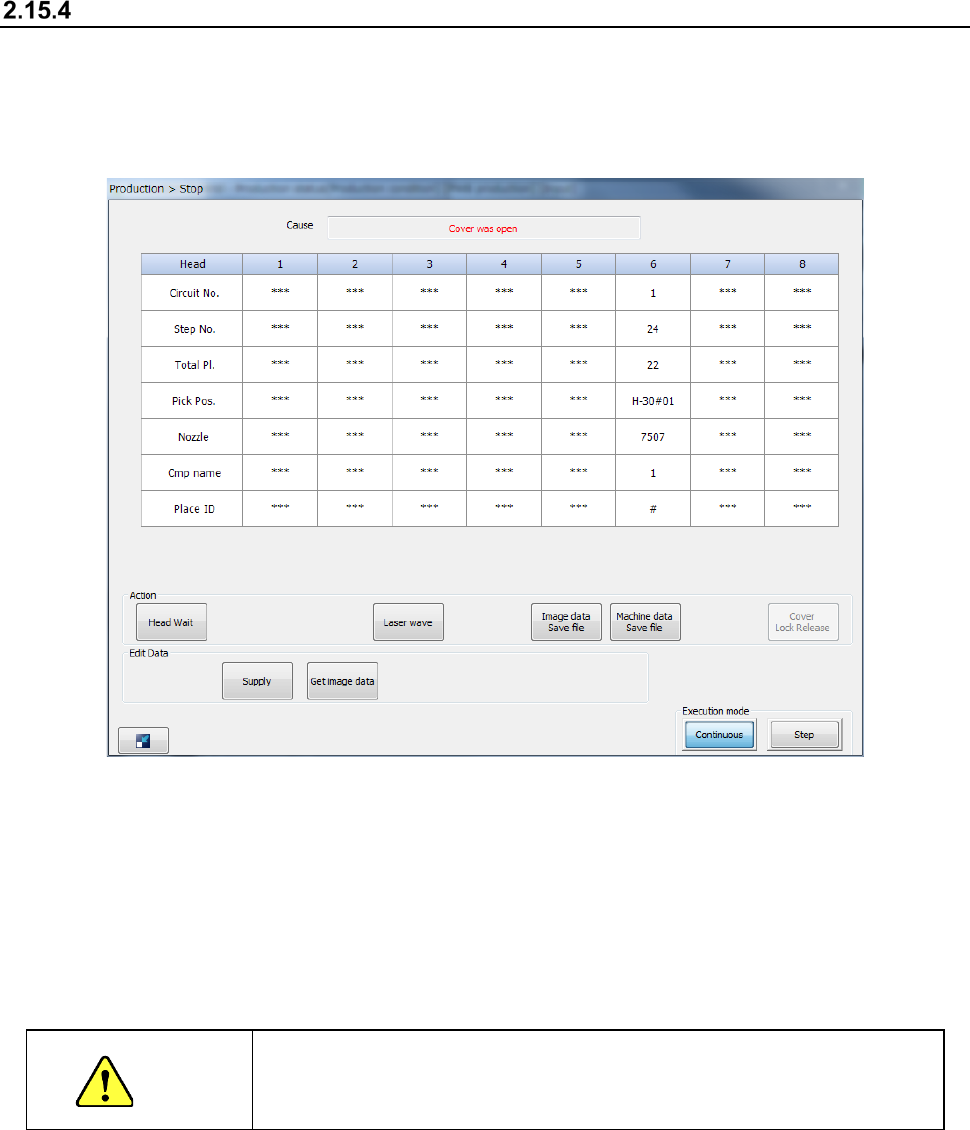
If the cover is opened (“Cover was open” error)
The protection cover is locked during PWB production in User mode, and you cannot open the
protection cover.
When you open the protection cover during PWB production in Maintenance mode, the following
“Stop” screen appears, and the system is put in the Pause state.
When you press the <START> switch while the protection cover is opened in Maintenance mode,
the system restarts the suspended production at low speed. You cannot restart the suspended
production while the protection cover is opened in User mode.
When you press the <STOP> switch, the system displays the message for aborting the production
to abort the current PWB production.
See Section 2.15.1 “If an error occurs” for details.
CAUTION
PWB production with the protection cover open is very dangerous.
Never put your hand or face in the machine nor move either one closer
to the machine.