RS-1_instruction manual.pdf - 第725页
Part 2 D etaile d Descript ion of E ach Functi on Chapter 8 Machine Set up 8- 17 3) V acuum Set the vacuu m value wh en a nozzle is mounted on the reference head ( Head 3 ). This value is us ed to judg e whether a nozzle…
Part 2 Detailed Description of Each Function Chapter 8 Machine Setup
8-16
(2) Setting items
No.
Items
Description
1
ATC No
ATC No.: 1 to 45
2
Nozzle No
Nozzle No. to be assigned to ATC
3
Nozzle Type
Nozzle type to be assigned to ATC (automatic acquisition only)
4
Vacuum
Vacuum value with a nozzle (automatic acquisition only)
5
Nozzle height
Length offset for the reference nozzle (automatic acquisition only)
6 Reflection
OK: Low reflection nozzle, NG: High reflection nozzle or
measurement not executed
7 Load cell
OK: A load cell is checked normally., NG: An error is detected
with a load cell check or a load cell check has not been run yet.
(3) How to set a nozzle
The reference head on which a nozzle is mounted measures the height of the nozzle tip
(measured value is to be entered into the “Noz. height” field) and nozzle width (to be entered
into the “Noz. No.) with laser. In addition, the reference head obtains the vacuum value
also.
1) Nozzle No
Set the number of a nozzle to be assigned to the ATC number displayed on the left.
a) The “ATC No” is a number assigned to the ATC, and enter the number indicating a
nozzle to be assigned to this ATC number.
b) The nozzle number on which the focus is located can be set. Validate the entered
characters with the [ENTER] key or the [Field Movement] key. You can enter a
nozzle number within the range shown in the table below.
No. Setting item Range
1 Nozzle No 7100 to 8999 or no assignment (no entry)
Eliminate input numerals from cells with the [DEL] key or with the [BACK SPACE] key,
then validate with the [ENTER] key or the [Field Movement] key. The nozzle assignment
is canceled and everything displayed for the assigned ATC is eliminated.
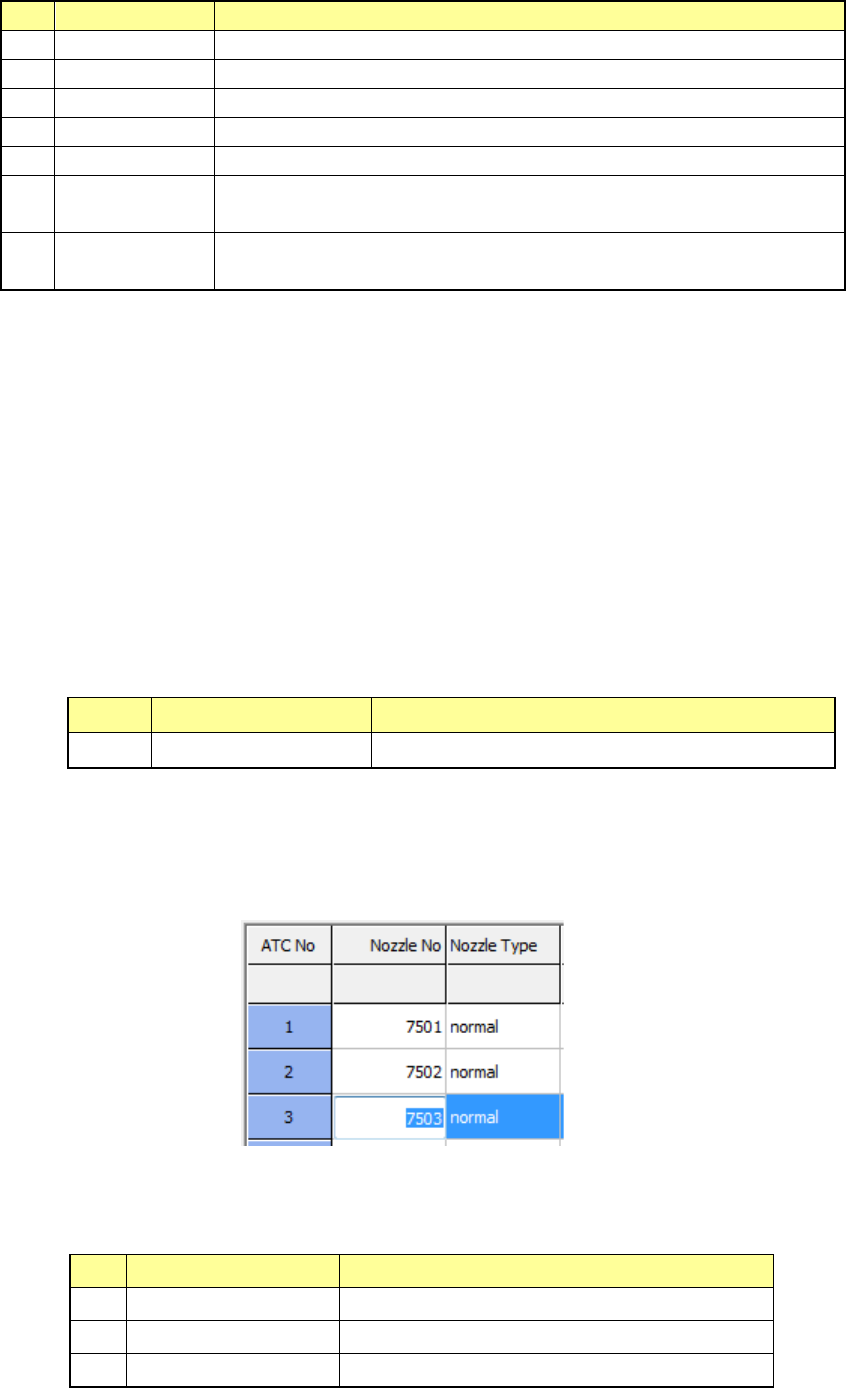
Example: In this case, a nozzle number is set in the “ATC” whose number is “3.”
2) Nozzle Type
The type of a nozzle to be attached to the ATC number displayed on the left of the
screen is displayed here.
No.
Setting item
Description
1
Normal
Normal nozzle
2 T-type Cleaner type nozzle
3
Gripper
Gripper nozzle
Part 2 Detailed Description of Each Function Chapter 8 Machine Setup
8-17
3) Vacuum
Set the vacuum value when a nozzle is mounted on the reference head (Head 3).
This value is used to judge whether a nozzle is mounted or whether a component is
located on the regulated position. Note that the value set here is just auxiliary
information since the system uses laser to check whether a nozzle is mounted or not or
whether a component is located at the regulated position.
4) Nozzle height
Set the offset value of the length with viewed from the reference nozzle.
This value is used to make fine adjustments for controlling the height when the system
measures a component with laser.
5) Single Assignment
When you press the <Single Assignment> button on the right side of the screen, the
system attaches a nozzle to the head of the ATC number in which the focus is located,
and sets each value.
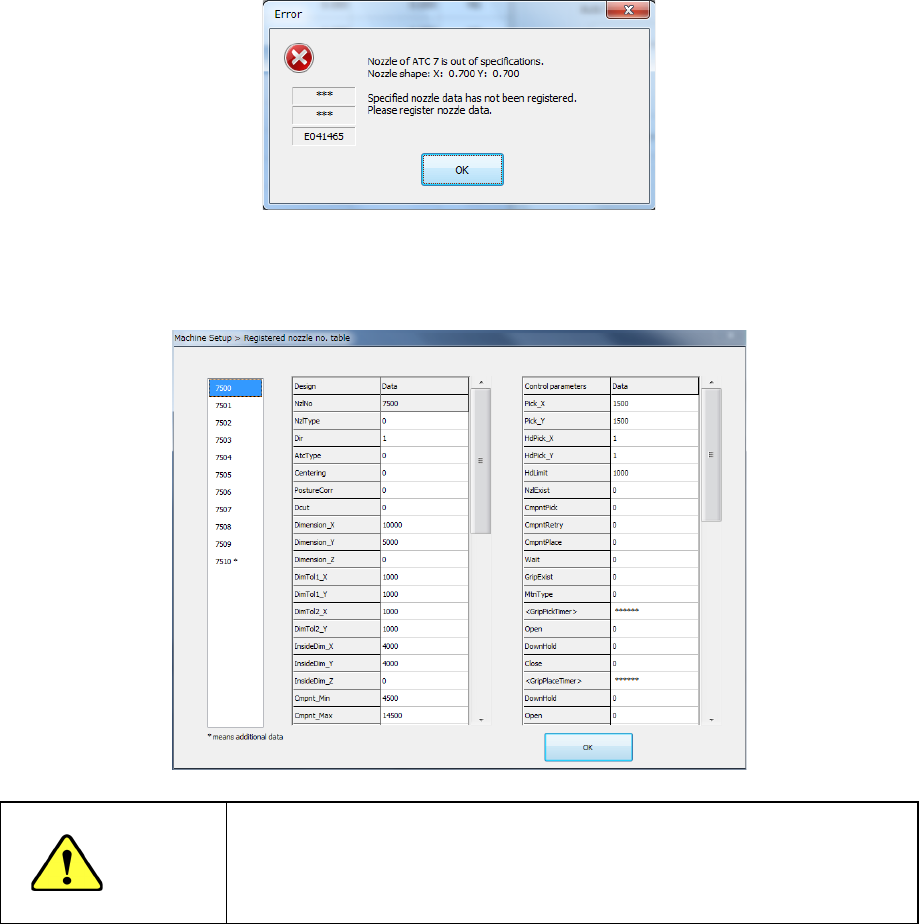
Note 1) If the obtained nozzle outer dimensions are not within the regulated range
and the system judges that there is no registered nozzle information on this specified
nozzle according to its width, the following message appears on the screen. In this
case, select another nozzle, and enter data on the nozzle manually.
Note 2) If the obtained nozzle outer dimensions are not within the regulated range
and the system judges that there is any registered nozzle information on the specified
nozzle according to its width, select a nozzle number from the list of nozzles.
If the desired nozzle is not in the list, select it and manually enter its data.
WARNING
When you select <OK>, the axis is moved and a nozzle can be mounted
or removed. Be sure to check whether any worker is in the equipment
before pressing <OK>. To avoid a risk of injury, do not put your hands
inside the machine nor move your face or head close the machine while
the machine is operating
Part 2 Detailed Description of Each Function Chapter 8 Machine Setup
8-18
6) Automatic Assignment
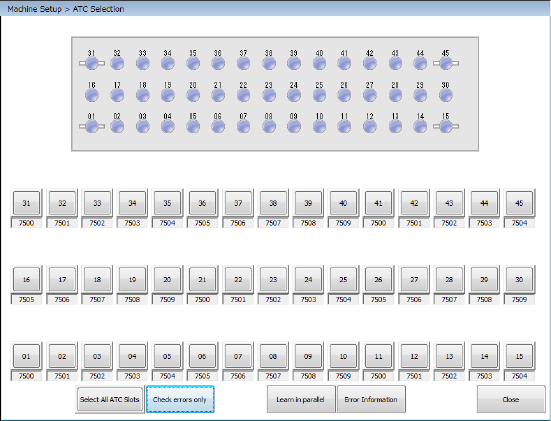
When you press the <Auto-assign> button on the right side of the screen shown in
Figure, the following screen appears.
Check the check boxes corresponding to the ATC numbers to which nozzles are to be
assigned, and press the <Auto-acquisition> button. The system sets the nozzles to the
checked ATC numbers sequentially.
- The <Select All ATC Slots> button permits selecting or releasing all ATCs/all nozzles.
- Nozzle height is obtained by measuring the height of the attached nozzle tip.
- The nozzle number is set from the from the external diameter of the attached nozzle.
- The vacuum value to be obtained is set with the nozzle attached.
Notes:
- When you are to set two or more ATC slots automatically, the <STOP> switch allows
you to stop the automatic setting process. When you press the <STOP> switch
while the system is automatically setting the ATC slots, the system displays the
“Question” dialog box for stopping the automatic setting. When you select the
<Yes> button on this dialog box, the automatic ATC slots setting process is
terminated at this point.
When you press the <No> button, the process continues.
You cannot stop this process with the <CANCEL> button.
- When you automatically set the ATC slots, you do not have to enter any nozzle
number because the system sets it automatically. However, if the nozzle number
you set before this automatic setting operation is different from the one automatically
set, the latter is preferred.
- When you automatically set the ATC slots, you do not have to enter any nozzle type
either because the system sets it automatically. Note that the nozzle type is set to
“Normal.” However, the nozzle type you validated before this automatic setting is
preferred.
- If the width of the nozzle obtained with this automatic ATC slot setting process is
different from that of any standard nozzle, the system checks it with the information
on the customized nozzles registered.
When multiple nozzles have matching data, the Nozzle No. Setting List screen
opens. Make a selection from the list.
When they match each other, the nozzle number is automatically set.
If the width matches widths of two or more nozzles registered in the nozzle
information, the system sets the selected nozzle number to the ATC shown in the
“Nozzle no. table”.
When you press the <CANCEL> button at this point, the nozzle number does not
change if it is already set. Otherwise, the system does not set any nozzle number.