User Manual SIPLACE Head Care Station -.pdf - 第26页
2 Safety 2.8 Residual voltages and discharge times in the machine 26 User Manual SIPLACE Head Care Station 10/2017 2.7.3.1 Overview of the safety contactor When the HCS is on standby, the contacts of the safety switches …
2 Safety
2.7 Safety features
User Manual SIPLACE Head Care Station 10/2017 25
EMERGENCY OFF button
(see item (2) in 2.7.2.1 "Position of switches and buttons on the HCS" [}23])
The EMERGENCY OFF button is red and latches in the ON position when pressed. When you
press the EMERGENCY OFF button, the safety contactor trips. The intermediate circuit voltage
(150VDC) for the star axes is switched off. The message "EMERGENCY OFF pressed" appears
on the screen. The servo amplifiers for the DP and Z axes are still supplied with 42VDC.
Press the EMERGENCY OFF button in case of an emergency. It performs the following tasks:
●
Stops the power supply of 150V to the head unit.
●
Puts the HCS in idle mode.
●
Aborts the current test run of the head verification process.
●
Unlocks the door.
NOTICE
The verification process is interrupted and can then either be continued or cancelled once
the HCS is working correctly again.
Continuing the head verification process
If the EMERGENCY OFF button has been pressed during a running test, the test is aborted.
► Ensure that head and stopper are installed correctly.
► Close the door.
► Release the EMERGENCY OFF button from the latched position.
► Switch on the HCS power switch.
► Press the Start button on the head unit.
ð The verification process is resumed. The aborted test is repeated and the process is con-
tinued from there.
Safety switch, protective door
This switch checks whether the protective door is open or closed. When the door is opened, the
safety switch triggers the safety contactor disabling individual components while some remain en-
abled.
Safety switch, cover
This switch checks whether the cover is open or closed. When the cover is opened, the safety
switch triggers the safety contactor disabling individual components while some remain enabled.
2.7.3 Safety contactor
The safety contactor is located in the head unit. It is used for the interlock function of the safety
equipment and for the EMERGENCY OFF function.
The following conditions must be fulfilled in order to activate the safety contactor:
●
All safety components must be closed.
●
The EMERGENCY OFF button must be released.
●
To start the verification process, the Start button must have been pressed, or to restart a
measurement, the Continue button must have been clicked.
As a result, the software activates locking of the door. When the door is locked, the safety con-
tactor is enabled.

2 Safety
2.8 Residual voltages and discharge times in the machine
26 User Manual SIPLACE Head Care Station 10/2017
2.7.3.1 Overview of the safety contactor
When the HCS is on standby, the contacts of the safety switches and of the EMER-
GENCYOFFbutton are closed. For example, if a safeguard is opened, the associated switch
opens and the safety contactor trips. A corresponding error message appears on the screen.
Requirements
The following conditions must be fulfilled in order to start and operate the HCS:
●
The protective door of the head unit must be closed.
●
The EMERGENCY OFF button must be released.
If the Start button is now pressed, and the head verification process is started or continued, the
safety contactor will turn on the supply voltages and the HCS will be ready for operation.
2.7.3.2 Components of the safety contactor
The safety contactor monitors the following components:
●
Safety switch of the protective door at the head unit
●
Safety switch of the cover at the head unit
●
EMERGENCY OFF button at the head unit
Initiating emergency OFF
In case of an emergency, the dangerous supply voltage of 150V to the head unit can be stopped
by pressing the EMERGENCY OFF button at the head unit.
Pressing the EMERGENCY OFF button triggers the emergency OFF.
In this case, the safety contactor of the HCS is triggered, the contactors are immediately switched
off, and any dangerous voltages that are stored in the head unit are immediately discharged.
Resetting emergency OFF
To reset an emergency OFF, the EMERGENCY OFF button must be released.
► Determine the cause for the trigger of the EMERGENCY OFF button.
► Eliminate the problem.
► Release the EMERGENCY OFF button.
2.7.3.3 Restoring the interlock function
To restore the interlock function, do the following:
► Close the protective door that has been opened at the head unit.
► Refit the cover at the back side of the head unit.
2.7.3.4 Triggering the interlock function
The interlock function is activated if one of the following actions are performed:
●
Opening the protective door at the head unit.
●
Opening the cover at the back side of the head unit.
2.8 Residual voltages and discharge times in the machine
If the EMERGENCY OFF button is pressed or the HCS is switched off, the 150V- intermediate cir-
cuit voltage for the star axes are reduced to harmless residual voltages within a very short time.
2 Safety
2.9 ESD Guidelines
User Manual SIPLACE Head Care Station 10/2017 27
2.9 ESD Guidelines
2.9.1 What does ESD mean?
Almost all of the modules in use today are equipped with highly integrated Metal-Oxide-Semicon-
ductor (MOS) blocks and components. The manufacturing techniques used mean that these elec-
tronic components are extremely sensitive to overvoltage and thus to electrostatic discharge.
The abbreviation for such modules is 'ESD' (Electrostatic Sensitive Device).
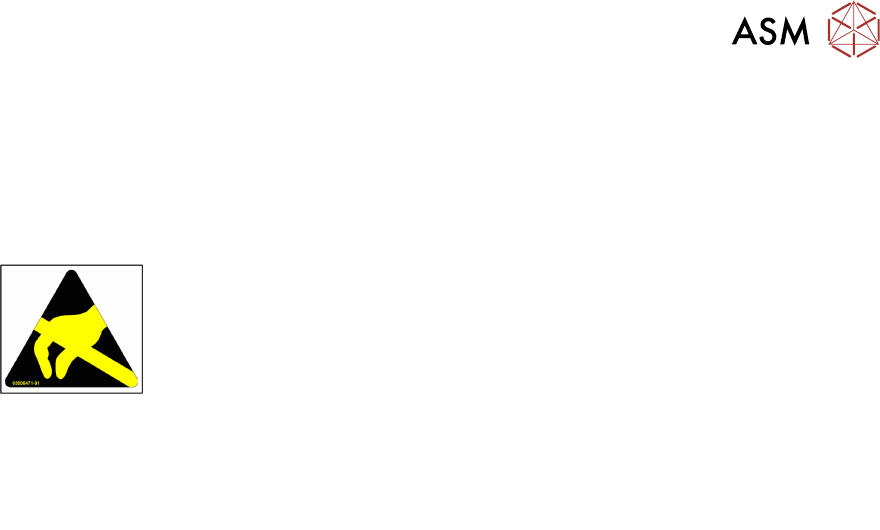
’ESD’ is used internationally. The following symbol on cabinet rating plates,
racks or packaging indicates that components which are sensitive to electro-
static discharge have been used and thus that the modules concerned are also
touch-sensitive.
ESDs can be destroyed by voltages and power levels that are far below the level that can be per-
ceived by humans. Such voltages occur if a person touches a component or module without
earthing themselves. Components that are exposed to such overvoltage do not generally appear
to be defective immediately - incorrect behavior starts after the component or module has been in
operation for some time.
2.9.2 Important Measures to Protect Against Static Charging
► Most plastics can easily become charged and must therefore be kept away from at-risk com-
ponents.
► Always ensure that people, the workplace and packaging are safely earthed when handling
electrostatic sensitive components.
2.9.3 Handling ESD Modules
Do not touch electronic modules unless it is absolutely essential to do so in order to carry out other
work. If it is necessary, make sure that you do not touch the pins or printed conductors when you
pick up flat modules.
Do not touch components unless:
●
You are constantly earthed by an ESD wrist strap or
●
You are wearing ESD shoes or ESD shoe earthing strips on an ESD floor.
Always discharge yourself before you touch an electronic module. To do this, simply touch a con-
ductive and earthed object immediately before you touch the module (such as unpainted parts of a
switch cabinet, a water pipe, etc.).
Do not allow modules with chargeable and highly insulating materials to touch one another, e.g.
plastic films, insulating table surfaces or items of clothing made from synthetic fibers.
Always place the modules on a conductive surface (table with an ESD coating, conductive ESD
foam, ESD bag or container).
Do not move the assemblies near to data view devices, monitors or television units. Keep a min-
imum distance of 10 cm to monitors.
2.9.4 Measurements and Modifications to ESD Modules
Do not take measurements on the modules unless the following conditions are fulfilled:
●
The measuring device is earthed (e.g. via PE conductors) or
●
You discharge the measuring head just before taking measurements with a potential-free
measuring device (e.g. by touching an unpainted metal part of the controller casing).
► Always use an earthed soldering iron if you carry out any soldering work.