3OM-1208-011_w.pdf - 第100页
3-13 AIVEDT -ID 0 0 0 0 2. When the PCB is detected by the deceleration sensor , the speed of the transfer conveyor starts to decelerate to the specified one (Speed 2 [mm/sec]) after the period of time specified as "…

3-12
AIVEDT-ID
(A01_10)
PCB transfer speed des
When "Specification Value" is set in "(A01_09) PCB transfer speed", it
is required to specify the following items.
Avoid comp deviation
Input, Between Stages, Output
Set one of the following options in each text box.
Speed 1 [mm/sec]
PCBs are transferred at the specified speed.
Speed 2 [mm/sec]
The PCB being transferred at "Speed 1" is detected by the
deceleration sensor and the transfer speed decreases to the
specified one.
Acceleration [G]
Set the acceleration value to reach the speed specified in "Speed
1 [mm/sec]".
Stop position control
Input, Positioning 1, Center, Positioning 2, Output
Set one of the following options in each text box.
Timer [msec]
Specify the time during which the transfer speed of the PCB
detected by the deceleration sensor is decelerated to "Speed 2
[mm/sec]".
•
Default:
350 [mm/sec]
Position [mm]
Specify the distance of the PCB transfer between the time when
the PCB was detected by the stop sensor and the time when the
PCB was stopped.
0606-009
1.2 Operation Data
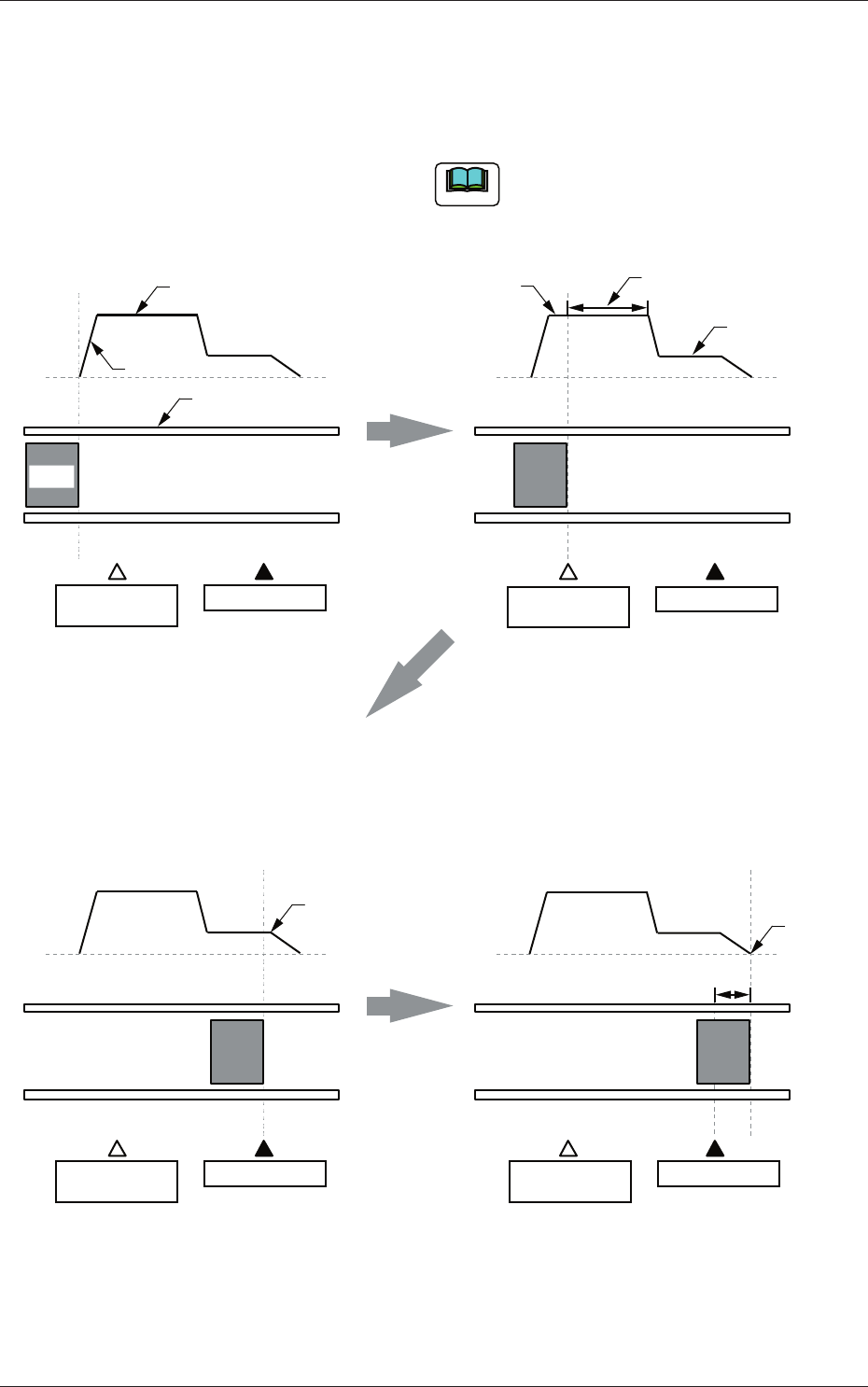
3-13
AIVEDT-ID
0 0
00
2. When the PCB is detected by the deceleration
sensor, the speed of the transfer conveyor
starts to decelerate to the specified one (Speed
2 [mm/sec]) after the period of time specified as
"Timer [mm/sec]" has elapsed.
1. The speed "Speed 1 [mm/sec]" of the
transfer conveyor is accelerated at the
specified "Acceleration [G]" and PCBs
are transferred at the accelerated speed.
The speed from "Speed 1 [mm/sec]" to
"Speed 2 [mm/sec]" is equivalent to
"Acceleration [G]".
Note
Position
Speed
Speed 1
Acceleration
Time
Conveyor
PCB
Deceleration
Sensor
Stop Sensor
Speed 1
Time
Speed
Speed 2
Timer
Deceleration
Sensor
Stop Sensor
3. When the PCB is detected by the stop
sensor, the transfer speed decreases and
the PCB is transferred to the stop position
specified as "Position [mm]".
4. The PCB stops completely.
Speed
Time
Deceleration
Sensor
Stop Sensor
Starting of
PCB Stop
Speed
Time
Deceleration
Sensor
Stop Sensor
PCB
Stop
Position
Fig. 3C15
0606-009
1.2 Operation Data

3-14
AIVEDT-ID
(A01_11)
Input Conveyor
Y Position arrange speed setup (% deceleration) [%]
Set the deceleration rate of the input conveyor Y arrangement speed in
this text box.
(A01_12)
Output Conveyor
Y Position arrange speed setup (% deceleration) [%]
Set the deceleration rate of the output conveyor Y arrangement speed in
this text box.
(A01_13)
PCB locate mode
Stage 1, Stage 2
Operation
"Std" or "Specification value" can be selected for the PCB locating
operation.
In normal cases, select "Std".
Std :
The PCB locating operation is performed
according to the standard value specifi
ed for
the machine.
Specification value
:
The desired numerical value can be specified
for the PCB locating operation.
The 1st sp dclr setting([%] deceleration) [%]
Set the deceleration rate of the backup base movement in this text box.
The specified value is refl
ected for the first action (first one of the two-
step actions) taken in the PCB locating operation.
When the locating
operation is released, the value is reflected for the second action.
The 2nd sp dclr setting([%] deceleration) [%]
Set the deceleration rate of the backup base movement in this text box.
The specified value is reflected for the second action (second one of
the two-step actions) taken in the PCB locating operation. When the
locating operation is released, the value is reflected for the fi
rst action.
0606-009
1.2 Operation Data