3OM-1208-011_w.pdf - 第194页
5-7 AIVEDT -ID 2. Management Data The corresponding window enables the operator to confirm the production performance data covering the whole machine performance. Note The contents of "T ype #1" are almost the s…
5-6
AIVEDT-ID
0606-009
1.3 Outline of Bypass & Rate Data
The corresponding tab sheet enables the operator to check the pickup rate
calculated for each feeder or nozzle and based on each pickup rate specified
in the auto operation setup data.
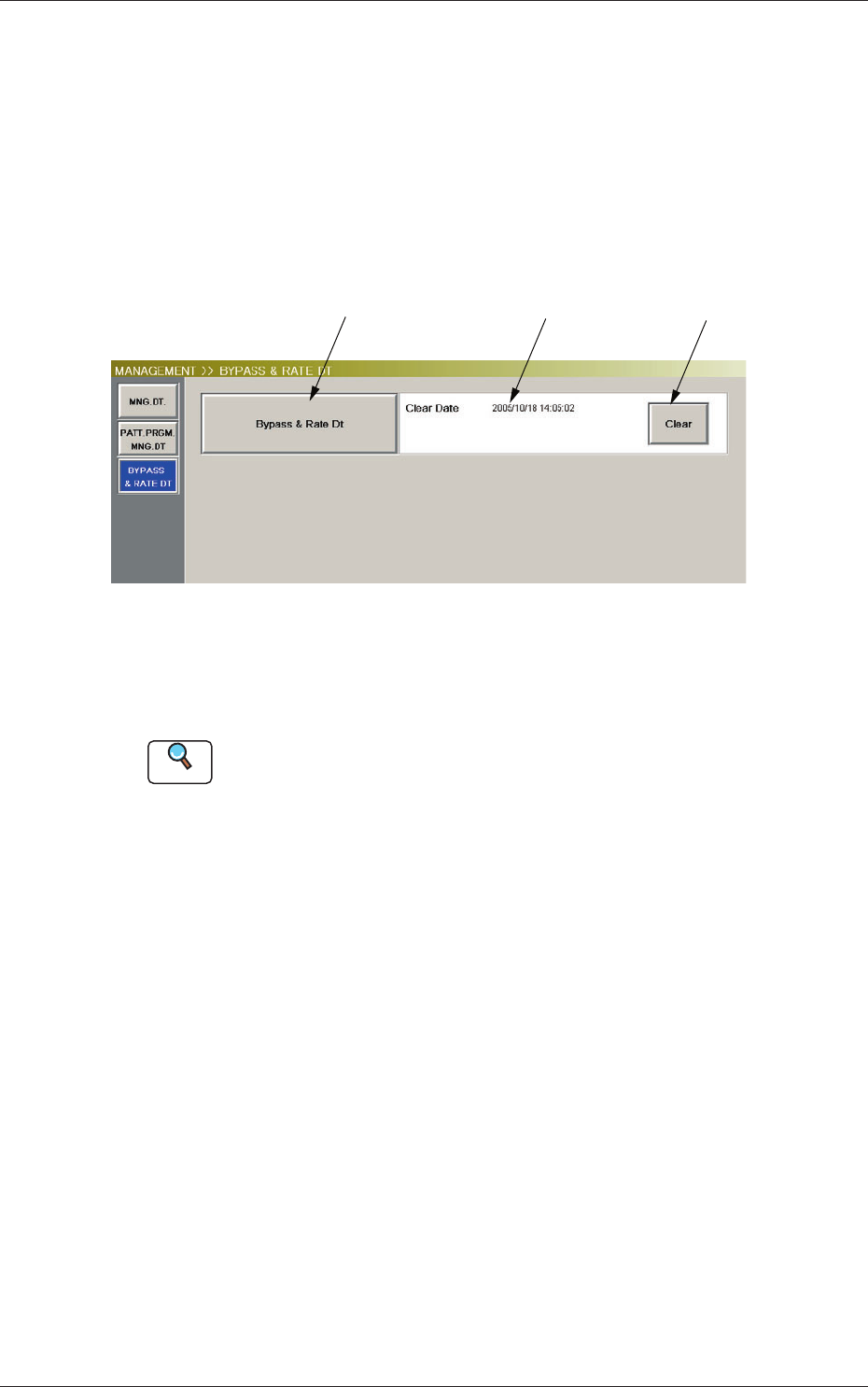
When the [Bypass & Rate Dt] button is pressed in the "MANAGEMENT
DATA" window, the following window opens.
[1] [2] [3]
Fig. 3E3 "Bypass & Rate Dt" Window
[1] [Bypass & Rate Dt] Button
When pressed, this button opens the "Bypass & Rate Data" window.
Reference
Refer to "4. Bypass & Rate Data" for the details of the "Bypass & Rate
Data" window.
[2] Clear Date and Comment
Displayed are the clear date and comment of the bypass & rate data.
[3] [Clear] Button
When this button is pressed, the all bypass & rate data is deleted and the
clear date is updated.
1.3 Outline of Bypass & Rate Data
5-7
AIVEDT-ID
2. Management Data
The corresponding window enables the operator to confirm the production
performance data covering the whole machine performance.
Note
The contents of "Type #1" are almost the same as "Type #2".
To use the required items, the management spans must be distinguished.
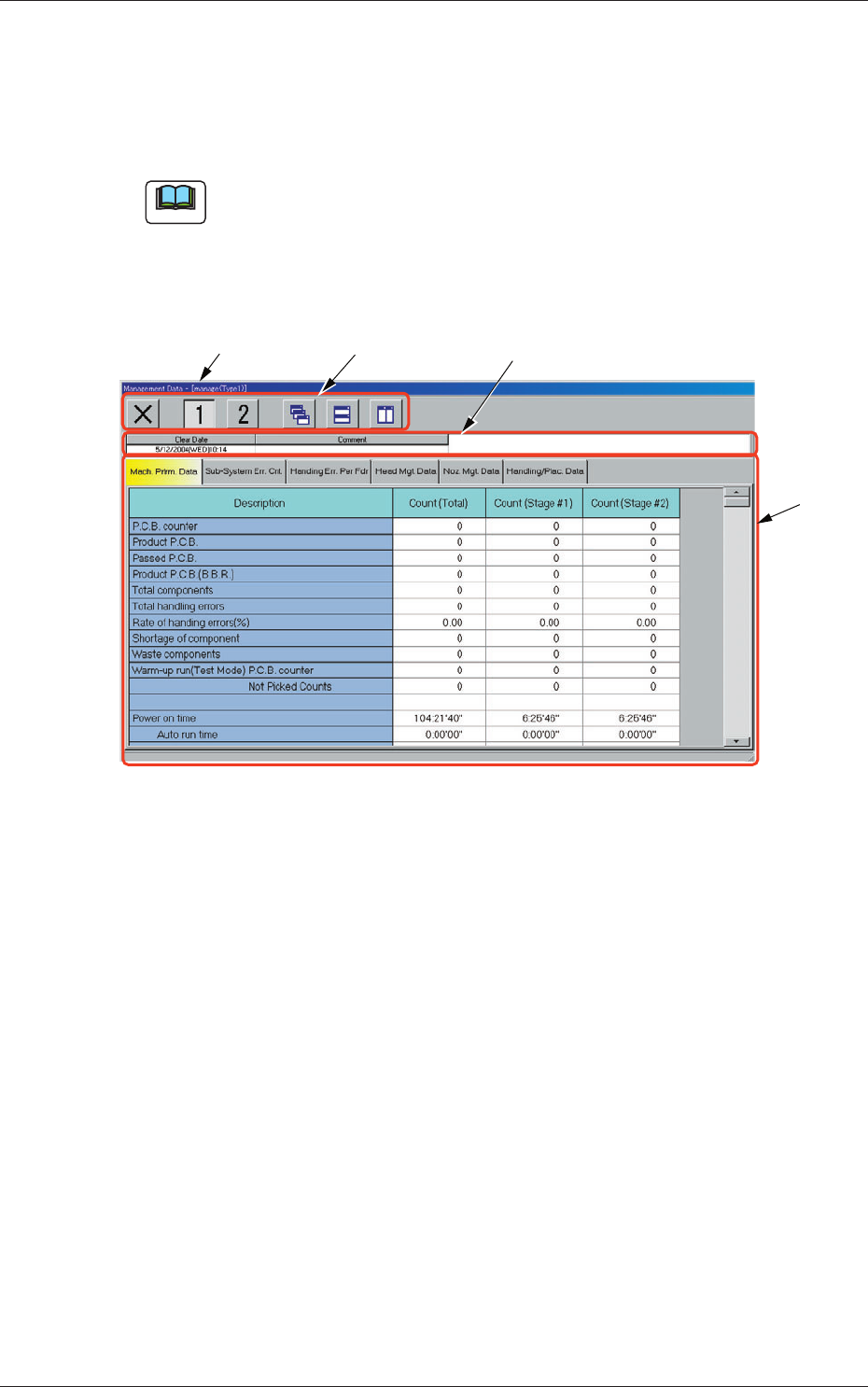
When the [Manage Dt.] button is pressed in the "MANAGEMENT DATA"
window, the "Management Data - [manage (Type1)]" window opens.
[3][2][1]
[4]
Fig. 3E5 "Management Data" Window
[1] Title Bar
The active window is titled "Management Data - [manage (Type1 or
Type2)]" on this bar, making it clear which data (Type #1 or #2) is
selected.
2. Management Data
0606-009
5-8
AIVEDT-ID
[2] Icons
Described below is the meaning of each icon that will be used only in
the "Management Data" window.
Reference
Refer to "1.2 Basic Icons" in "Chapter 2" for the meaning of the basic
icons.
: When pressed, this opens the "Management Data -
[manage(Type1)]" window.
: When pressed, this opens the "Management Data -
[manage(Type2)]" window.
[3] Information on Active File
This field displays "Clear Date" and "Comment".
[4] Tabs and Tab Sheets
The "Management Data" window is provided with the following six
tabs. When each tab is pressed, the corresponding tab sheet appears
inside the window.
Table 3E2
Tabs Description
Machine Performance Data
The corresponding tab sheet enables the operator to view various
counts (results of accumulated data) as machine performance data.
Sub-System Error Counts
The c
orresponding tab sheet enables the operator to view the summed
number of errors that occurred on each individual devices during
automatic operation.
Handling Errors Per Feeder
The corresponding tab sheet enables the operator to view the pickup
data of each individual feeders.
Head Management Data
The corresponding tab sheet enables the operator to view various
counts (results of accumulated performance data) of each individual
heads.
Nozzle Management Data
The corresponding tab sheet enables the operator to view various
counts (results of accumulated performance data) of each individual
nozzles.
Handling/Placement Data
The corresponding tab sheet enables the operator to view the
component pickup and placement data.
2. Management Data
0606-009