3OM-1208-011_w.pdf - 第219页
5-32 AIVEDT -ID 0606-009 3.3 Handling Errors Per Feeder 3.3 Handling Errors Per Feeder When the "Handling Error Per Feeder" tab is pressed in the "Pattern Program Management Data" window , the followi…

5-31
AIVEDT-ID
F: pick-up diff (% of Total handling errors)
Shown are the number of pickup difference errors detected in the
recognition process and the percentage of the errors per total number of
pickup errors.
G: component posture (% of Total handling errors)
Shown are the number of reversed component and polarity judgment
errors detected in the recognition process and the percentage of the
errors per total number of pickup errors.
Total handling errors
Shown is the total number of component handling errors.
Zones 1 through 5
1point errors (% of Total PEC recog. errors)
Shown are the total number of errors detected on the fi
rst fiducial
mark and the percentage of the detected errors per total number of
all errors detected by the PEC recognition function.
2point errors (% of T
otal PEC recog. errors)
Shown are the total number of errors detected on the second fiducial
mark and the percentage of the detected errors per total number of
all errors detected by the PEC recognition function.
3point errors (% of T
otal PEC recog. errors)
Shown are the total number of errors detected on the third fiducial
mark and the percentage of the detected errors per total number of
all errors detected by the PEC recognition function.
Local fiducial errors (% of T
otal PEC recog. errors)
Shown are the total number of recognition errors in each individual
components and the percentage of the detected errors per total number
of all errors detected by the PEC recognition function.
Total PEC recognition errors
Shown is the total number of errors detected by the PEC recognition
function.
The total number of errors detected by the global PEC recognition
function and the BBR recognition function are displayed.
3.2 Machine Performance Data
0606-009
5-32
AIVEDT-ID
0606-009
3.3 Handling Errors Per Feeder
3.3 Handling Errors Per Feeder
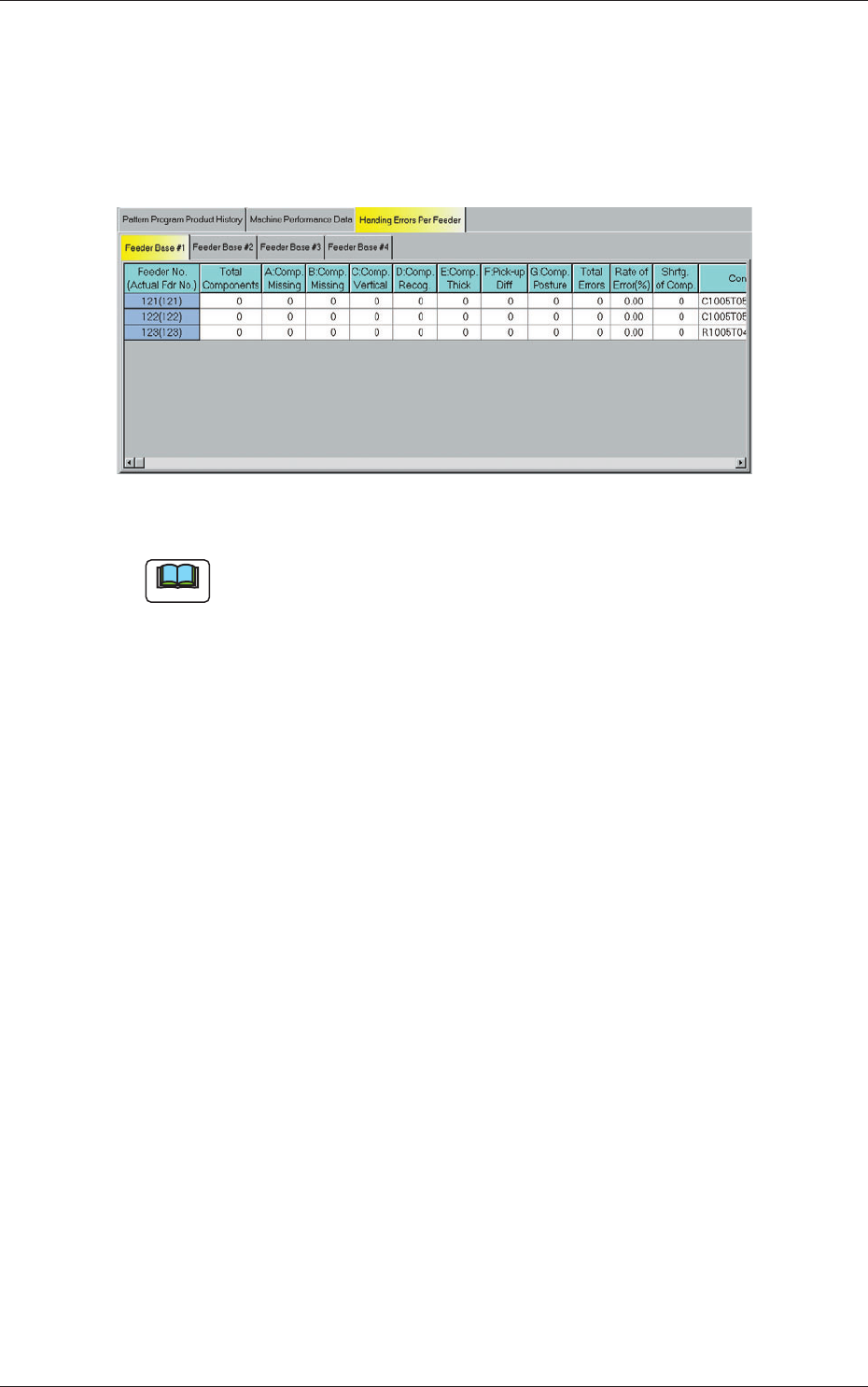
When the "Handling Error Per Feeder" tab is pressed in the "Pattern Program
Management Data" window, the following tab sheet appears inside the
window.
Fig. 3E15 "Handling Errors Per Feeder" Tab Sheet
Note
The displayed tab sheet will look different, depending on which option is
selected.
The corresponding tab sheet enables the operator to view the handling errors
on each individual feeders of the production model.
The "Handling Errors Per Feeder" tab sheet is divided further into several
tabs and each tab sheet shows the handling errors per feeder on each
individual feeder bases.
When a tab is pressed, the corresponding tab sheet appears, indicating that
the related feeder base is selected.
(1) Feeder No. (Actual Fdr No.)
Shown are the feeder Nos.
(2) Total Components
Each text box shows the total number of picked components (number of
pickup actions) for each individual feeders.
(3) A: Comp. Missing
Each text box shows the total number of missing components detected
by the linear measure detection sensor for each individual feeders.
(4) B: Comp. Missing
Each text box shows the total number of missing components detected
through recognition operation for each individual feeders.

5-33
AIVEDT-ID
(5) C: Comp. Vertical
Each text box shows the total number of vertical component errors
detected by the linear measure detection sensor for each individual
feeders.
(6) D: Comp. Recog.
Each text box shows the total number of errors detected through
recognition operation for each individual feeders.
(7) E: Comp. Thick
Each text box shows the total number of errors in component thickness
detected by the linear measure detection sensor for each individual
feeders.
(8) F: Pick-up Dif
f
Each text box shows the total number of pickup difference errors
detected in the recognition process for each individual feeders.
(9)
G: Comp. Posture
Each text box shows the total number of reversed component and
polarity judgment errors detected in the recognition process for each
individual feeders.
(10) Total Errors
Each text box shows the total number of errors detected in (3) through
(9).
(11)
Rate of Error (%)
Each text box shows the percentage of the total number of errors per the
number of picked components.
(12) Shrtg. of Comp.
Each text box shows the total number of the detected component
shortage errors for each individual feeders.
0606-009
3.3 Handling Errors Per Feeder