3OM-1208-011_w.pdf - 第75页
2-B AIVEDT -ID 0606-009

2-A
AIVEDT-ID
0606-009
Chapter 2
Basic Operations for Data Editing
This chapter describes the basic window navigation for
data editing.
•
Window Composition and Icons
•
Method of Data Entry

2-B
AIVEDT-ID
0606-009
2-1
AIVEDT-ID
0606-009
1. Window Composition and Icons
1. Window Composition and Icons
1.1 Window Composition
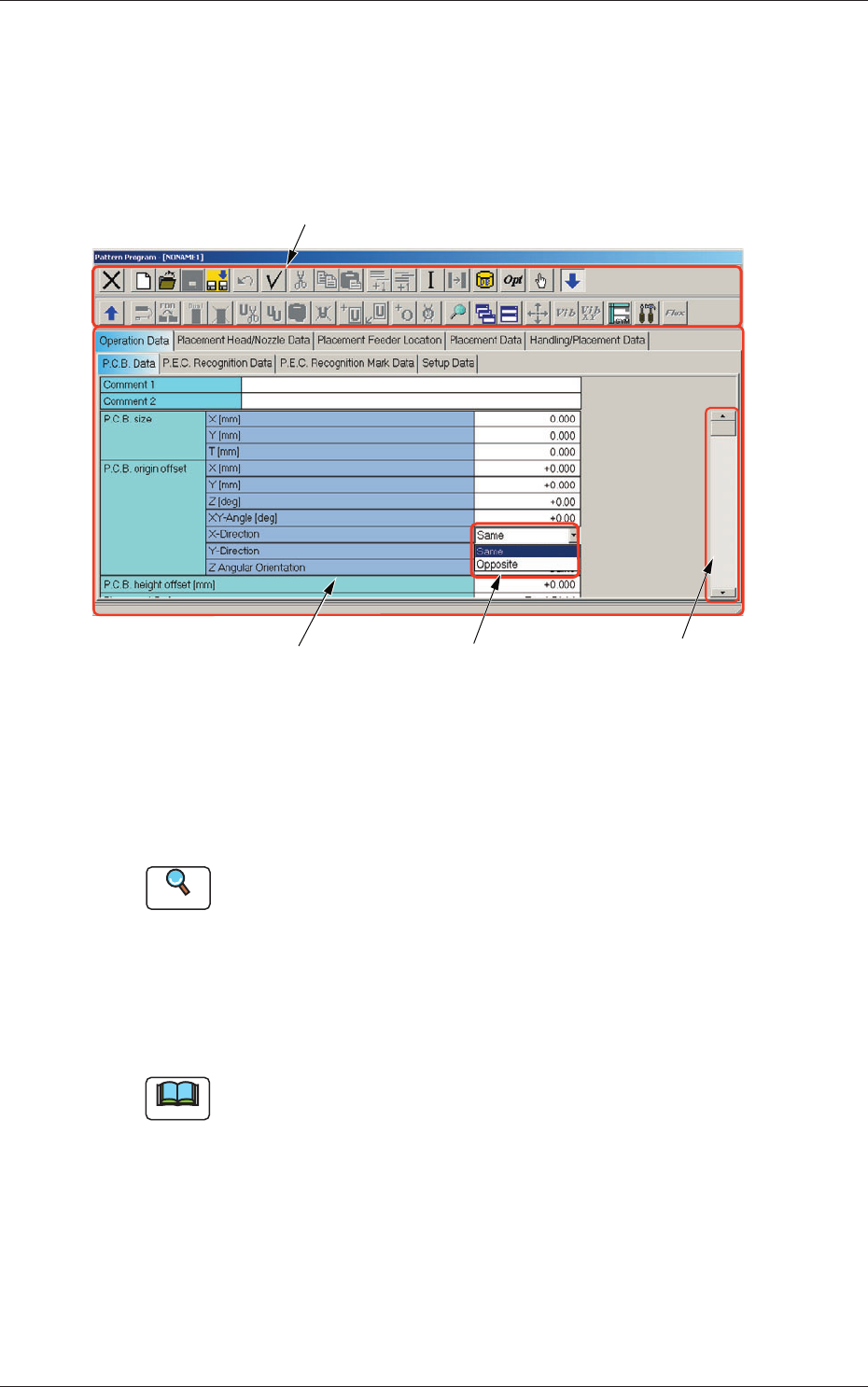
The following describes how the data edit windows are composed.
[1] Toolbar
[2] Tab Sheet [3] Drop-Down List
[4] Scrollbar
Fig. 3B1
"
Pattern Program
"
Edit Window (Example)
[1] Toolbar
The
"
Pattern Program
"
edit window is provided with the operation
commands (the icons on the toolbars) that can be executed.
Reference
Refer to "1.2 Basic Icons" for details.
[2] Tab Sheets
The provided tab sheets enable the operator to edit the data.
When
the size and/or the position of an edit window is changed, the size
and/or the position of each tab sheet also changes.
Note
When an item is selected and the right button of the track ball is pressed,
a menu opens and it contains a collection of commands that will be
frequently used.