ConneX_Help.pdf - 第12页
D iscove ry Net work I n t er f ace dro p -do wn li st. 4. Fo r Fla shCORE o nl y (ski p thi s step fo r L um e nX ): En sure the Flash CORE I I I co mmu n ication po rt val ue (d e f aul t is 70 27 ) ma tc he s the pro …
Configuration
This page provides instructions for configuring the programmers of a PSV System (Machine Manager instance) from the ConneX Server. To
establish connectivity between ConneX Server and each Machine Manager/PSV System, complete the steps under Adding a New System.
Configure Programmer Interface
1. On the Manage page, select a PSV System to configure.
2. In the system tile, click the Configuration tab.
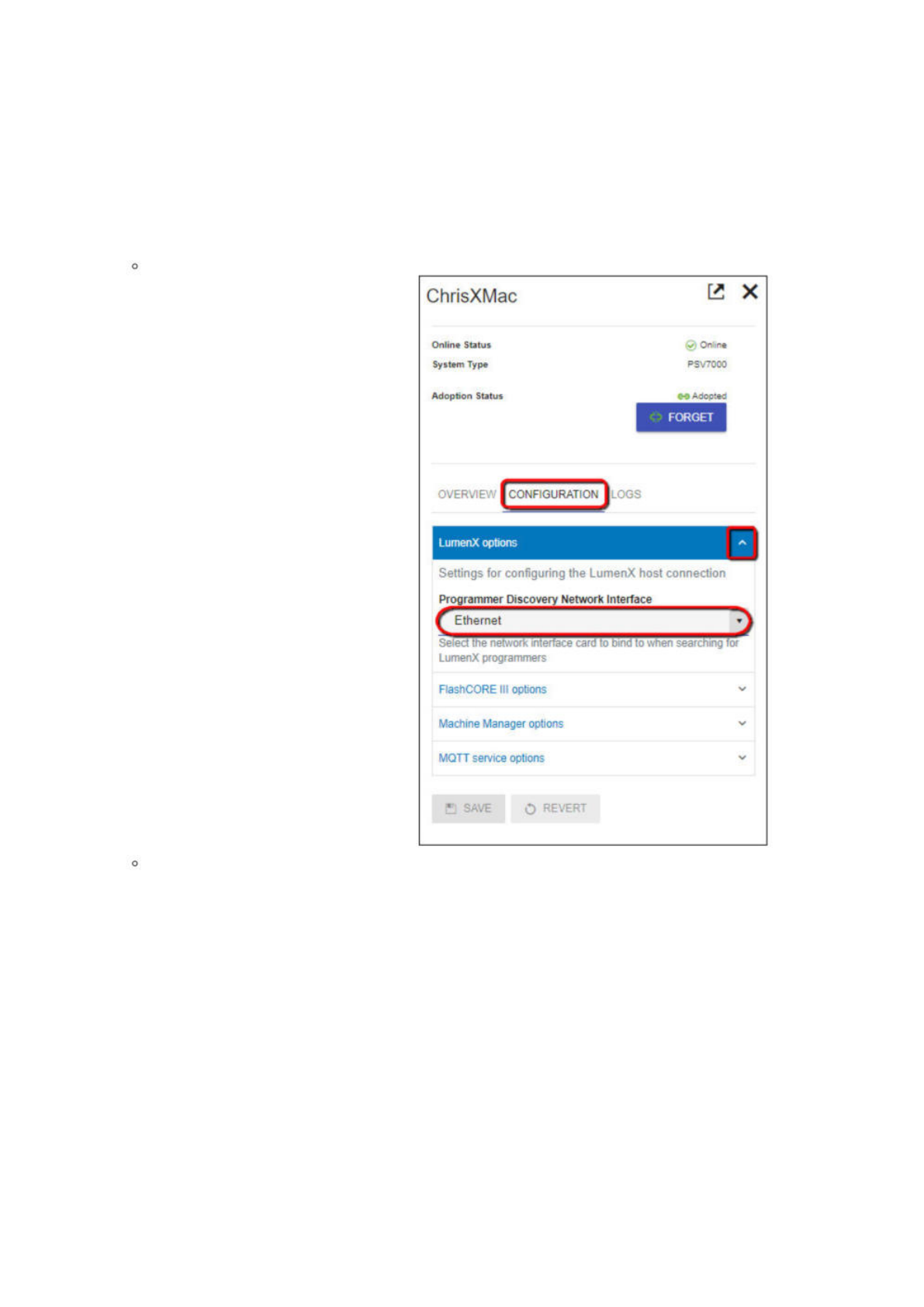
3. Now select the appropriate network interface for programmer communication:
For LumenX, click the LumenX options drop-down arrow, then select the appropriate option from the Programmer
Discovery Network Interface drop-down list.
For FlashCORE, click the FlashCORE III options drop-down arrow, then select the appropriate option from the Programmer
ChrisXMac
已
X
Online
Status
System
Type
Adoption
Status
>
On
me
PSV70O0
Adcoted
FORGET
OvERVIE
?/
CONFIGURATION
—
LumenX
options
人
Settings
for
configuring
the
LumenX
host
connection
Programmer
Discovery
Network
Interface
LumenX
programmers
FlashCORE
III
options
Machine
Manager
options
MQTT
service
options
H
SAVE
O
REVERT
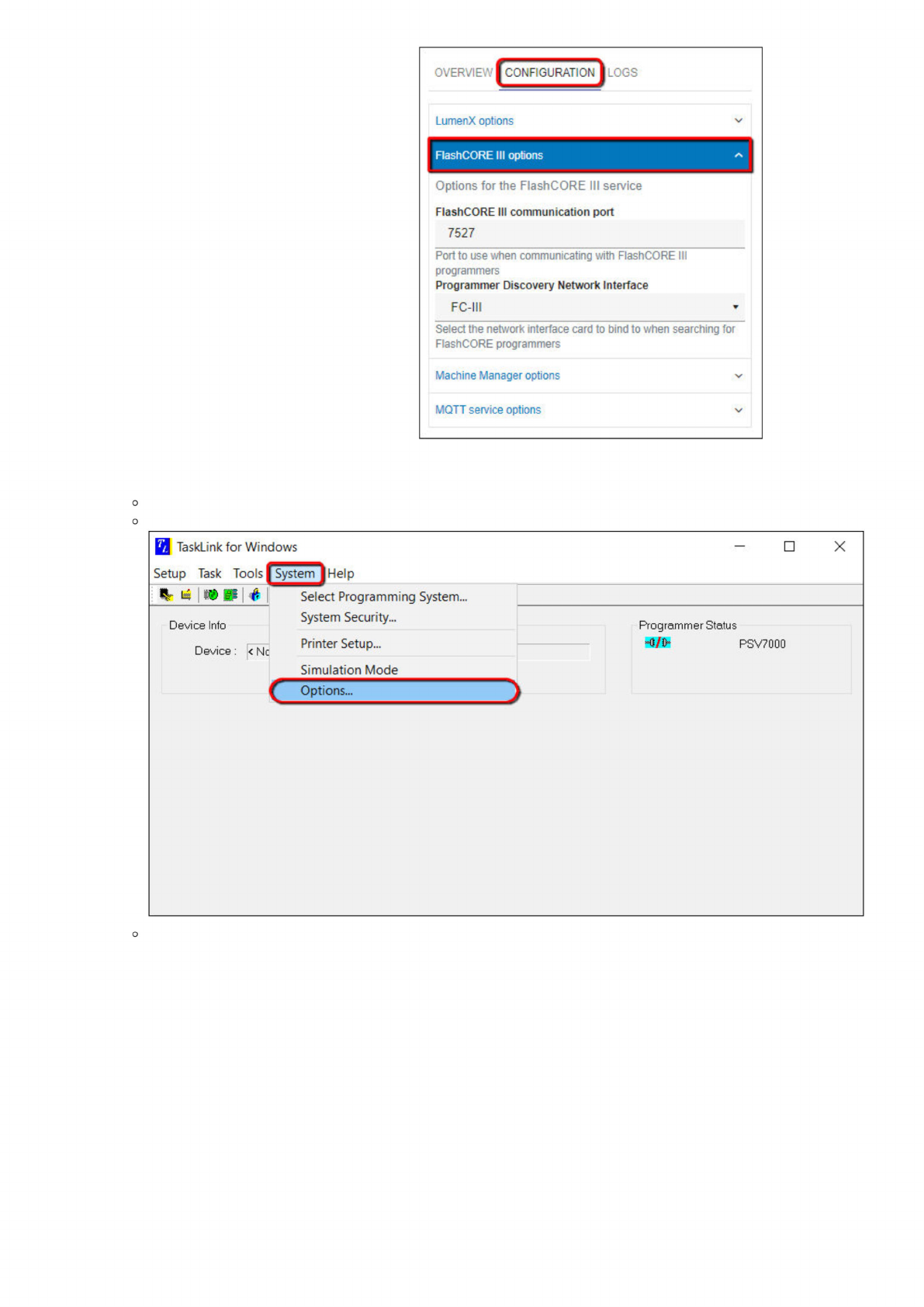
Discovery Network Interface drop-down list.
4. For FlashCORE only (skip this step for LumenX): Ensure the FlashCORE III communication port value (default is 7027) matches the
programmer port number configured in TaskLink:
Start TaskLink for Windows
Click the System menu (at top), then click Options.
In the Programming System Options dialog box, click the Communication tab, and then confirm the Programmer Port
jv'ERviE
I
CONF
GURATION
:
LumenX
options
AashCORE
III
options
人
Options
for
the
FlashCORE
III
service
FlashCORE
III
communication
port
7527
Port
to
use
when
communicating
with
FlashCORE
III
programmers
Programmer
Discovery
Network
Interface
FC-
川
Select
the
network
interface
card
to
bind
to
when
searching
for
FlashCORE
programmers
Machine
Manager
options
MQTT
service
options
/
TaskLink
for
Windows
Setup
Task
Tools
Help
Select
Programming
System...
一
一
System
Security...
Device
Info
Device:
际
c
Printer
Setup...
Simulation
Mode
Options...
X
Programmer
Status
WM
PSV7000
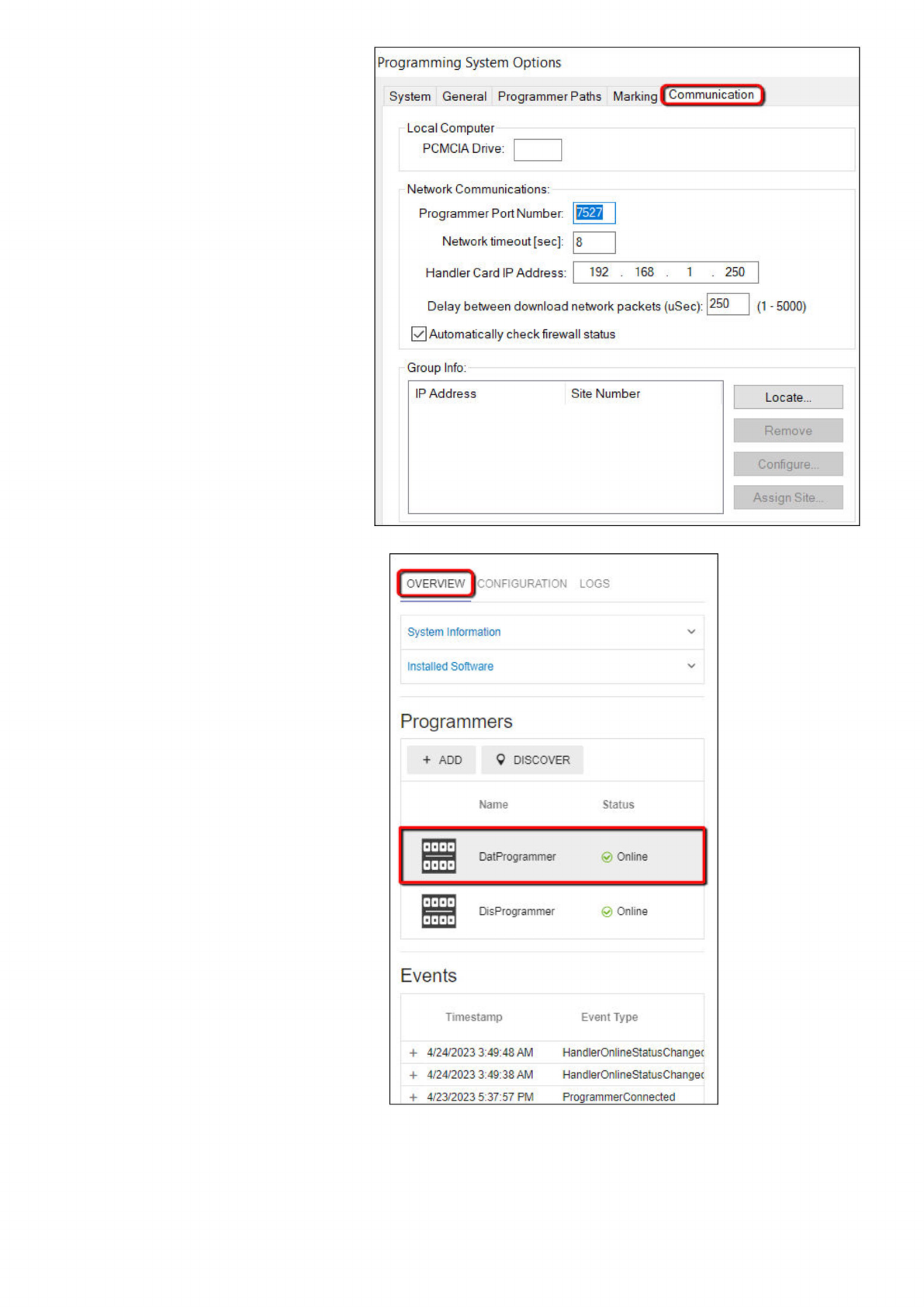
Number matches the value in ConneX.
5. To change the name of a programmer (which ConneX writes to logs and records), click the Overview tab, then select the desired
programmer (under the Programmers section).
6. In the programmer tile, click the Configuration tab, then expand the LumenX options (or FlashCORE III options) drop-down list.
Programming
System
Options
System
General
Programmer
Paths
Markinq
gommunicati。!]
Local
Computer
PCMCIA
Drive:
Programmer
Port
Number:
Network
timeout
[sec]:
Handler
Card
IP
Address:
Delay
between
download
network
packets
(uSec):
250
(1
-
5000)
0
Automatically
check
firewall
status
Group
Info:
IP
Address
Site
Number
Locate...
Remove
Configure...
Assign
Site...
[
OVERVIEW
[CONFIGURAHON
LOGS
System
Information
Installed
Software
Programmers
+
ADD
9
DISCOVER
Name
Status
DisProgrammer
0
Online
Events
Timestamp
Event
Type
+
4/24/2023
3:49:48
AM
HandlerOnlineStatusChanget
+
4/24/2023
3:49:38
AM
HandlerOnlineStatusChanget
+
4/23/2023
5:37:57
PM
Program
me「Conrected