ConneX_Help.pdf - 第18页
Prog ra mm i ng Syste m type s De sktop PS V30 0 0 PS V35 0 0 PS V50 0 0 PS V70 0 0 Prog ra mm e r ty pe s Fl ashCOR E II I Lume nX Type D escr ipt ion Ad opt ion Stat use s S ystem s c an ha ve the f o ll o w i ng ado p…
Manage
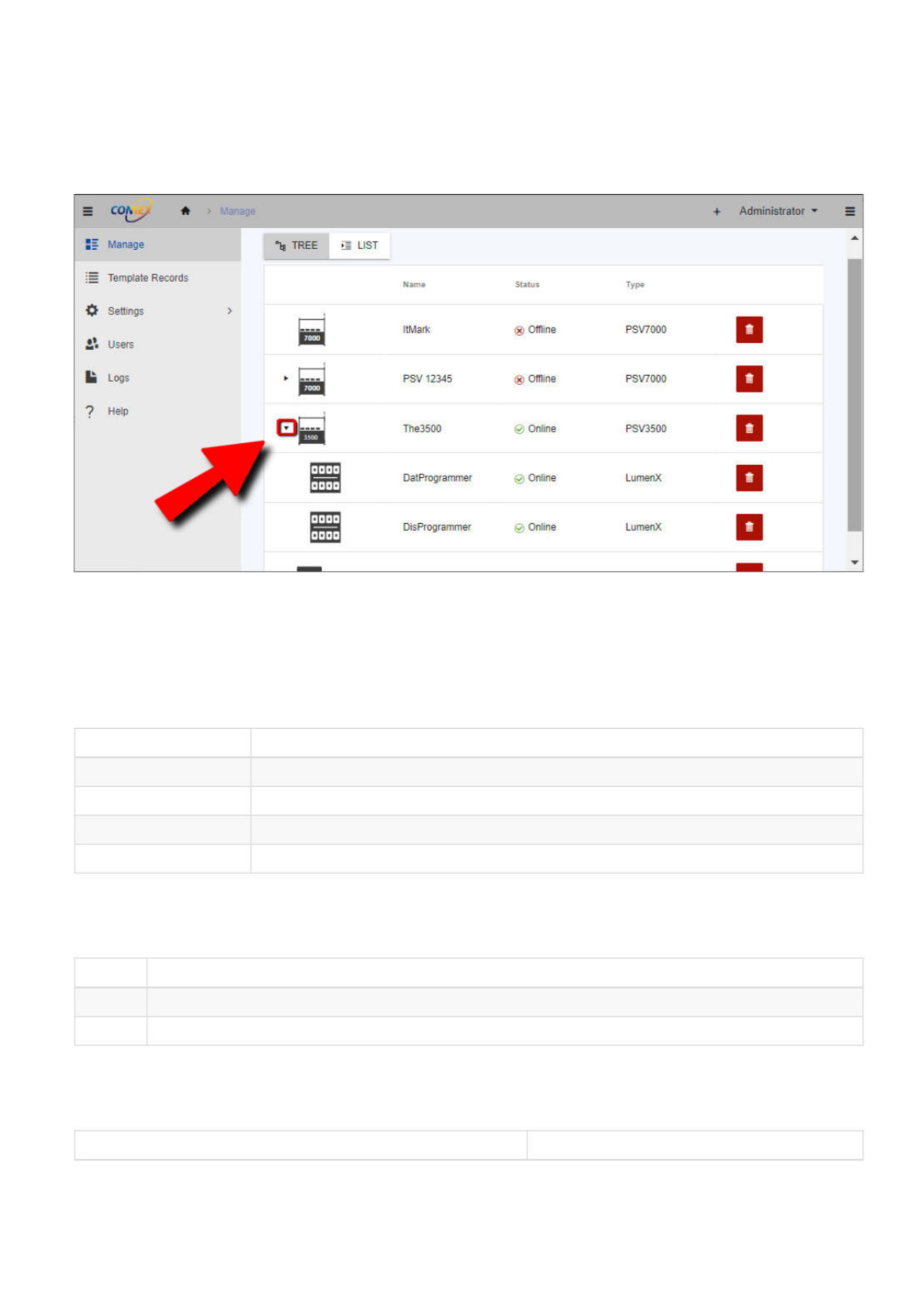
The Manage page displays all entities (such as systems, handlers, programmers, and associated programs) for the current instance. The
system and programs are organized in two views: tree view and flat view.
In the tree view, the systems are listed first and will expand, making it easy to see the hierarchical relationship between systems and their
associated programmers. This view is useful for understanding the layout of your programming systems and navigating quickly to the
system and programmer of interest.
In contrast, the flat view displays all systems and their associated programmers on the same level, making it easier to see all the systems
and programmers at once. This view is helpful when searching for a particular system or programmer and is a more condensed
representation of the programming systems.
Entity List
The manage grid shows the following for each entity (essentially a PSV System or programmer):
Column Description
Name The given name of the entity.
Online Status Indicates the status of the entity (Online or Offline).
Type Indicates the type of the entity (ex. PSV7000, PSV5000, etc.).
Adoption Status Indicates the adoption status of the system.
Online Statuses
Entities (PSV Systems or programmers) can have the following online statuses:
Status Description
Online The entity is online and is operational (sending information to ConneX Server)
Offline The entity is offline and is not operational (NOT sending data to ConneX Server)
Types
Systems can have the following types:
Type Description
*
Administrator
Manage
飞
TREE
遣
LIST
:
=
Template
Records
Name
Status
Type
*
Settings
>
储
Users
CT
ItMark
Offline
PSV7000
!■
Logs
口
ESI
PSV
12345
®
Offline
PSV7000
?
Help
盛
The3500
@
Online
PSV3500
n
三
DatProgrammer
@
Online
LumenX
Q
/
DisProgrammer
@
Online
LumenX
D
Programming System types Desktop
PSV3000
PSV3500
PSV5000
PSV7000
Programmer types FlashCORE III
LumenX
Type Description
Adoption Statuses
Systems can have the following adoption statuses:
Type Description
System adoption status Adopted: System is currently adopted and in use.
Not Adopted: System is NOT adopted and is available for adoption.
Adopted by other: System is adopted and in use by another entity.
Configuring an Entity
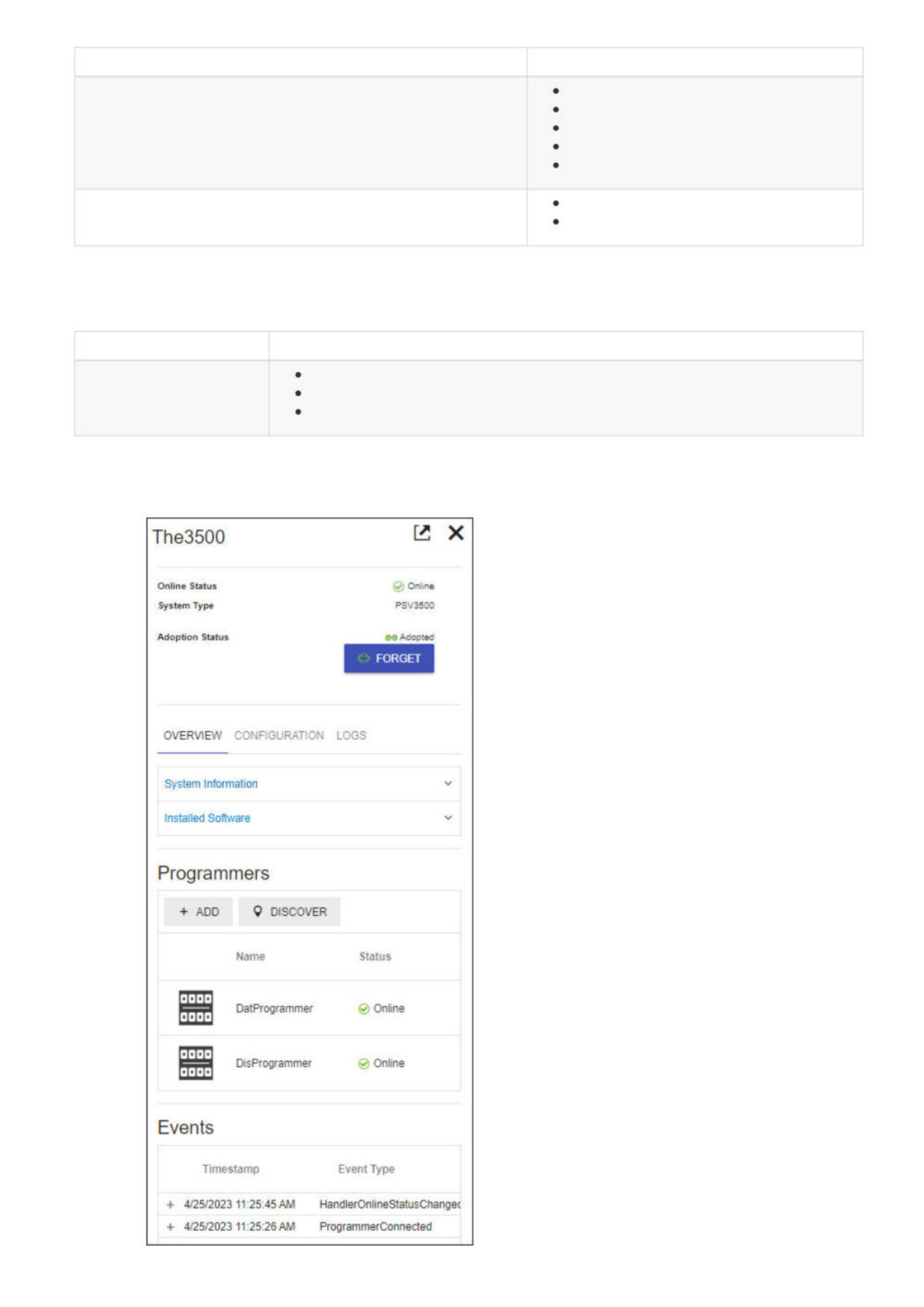
Clicking a row on the Manage page opens the Entity sidebar/tile (in the right pane), which allows you to view configuration and entity
information.
The3500
巳
X
Online
Status
@
Online
System
Type
PSV3500
Adoption
Status
~
Adopted
FORGET
OVERVIEW
CONFIGURATION
LOGS
System
Information
Installed
Software
Programmers
Events
+
ADD
9
DISCOVER
Name
Status
h
r
DatProgrammer
©
Online
j
r
DisProgrammer
©
Online
Timestamp
Event
Type
+
4/25/2023
11:25:45
AM
HandlerOnlineStatusChangec
+
4/25/2023
11:25:26
AM
ProgrammerConnected
The system tile helps you effectively monitor and manage your system by offering a clear view of your system's status, type, and adoption
status at the top of each tile.
Overview tab
On the Overview tab, you can find more details about your system configurations and installed software. For example, expanding the
System Information panel displays the following information:
Attribute Description
Hostname The system's assigned hostname.
Known IP Address(es) The IP address(es) assigned to the system.
Operating System The system's operating system.
Machine Manager Version The version of the Machine Manager software.
Machine Manager Identifier The unique identifier for this system.
Factory Name The name of the factory where the system is used.
While expanding the Installed Software panel displays a list of installed software including name, version, and installation directory.
The Programmers section allows you to easily add, discover, and manage programmers connected to the system. For information about
configuring programmers, see Configuration.
The Events section at bottom keeps track of system events in a table to simplify system monitoring activities.
Column Description
Timestamp The date and time when the event occurred.
Event Type The category of the event
Message A brief description of the event.
Click a row in the table to open a more detailed view of the event message (ex. additional information about the event and any related
actions).
Configuration tab
The Configuration tab lets you set options for the following (as described in the Configuration page):
LumenX options (Programmer Discovery Network Interface)
FlashCORE III options (FC3 communication port and Programmer Discovery Network Interface)
Machine Manager options (Machine Name, Factory Name, and Handler Type)
MQTT service options (Machine Manager MQTT port number)
Logs tab
The Logs tab allows you to remotely view and download Machine Manager logs for efficient troubleshooting and issue resolution.
Download the logs as a ZIP file to a directory of your choice, then review them on your local machine for in-depth analysis.
Adding a New System
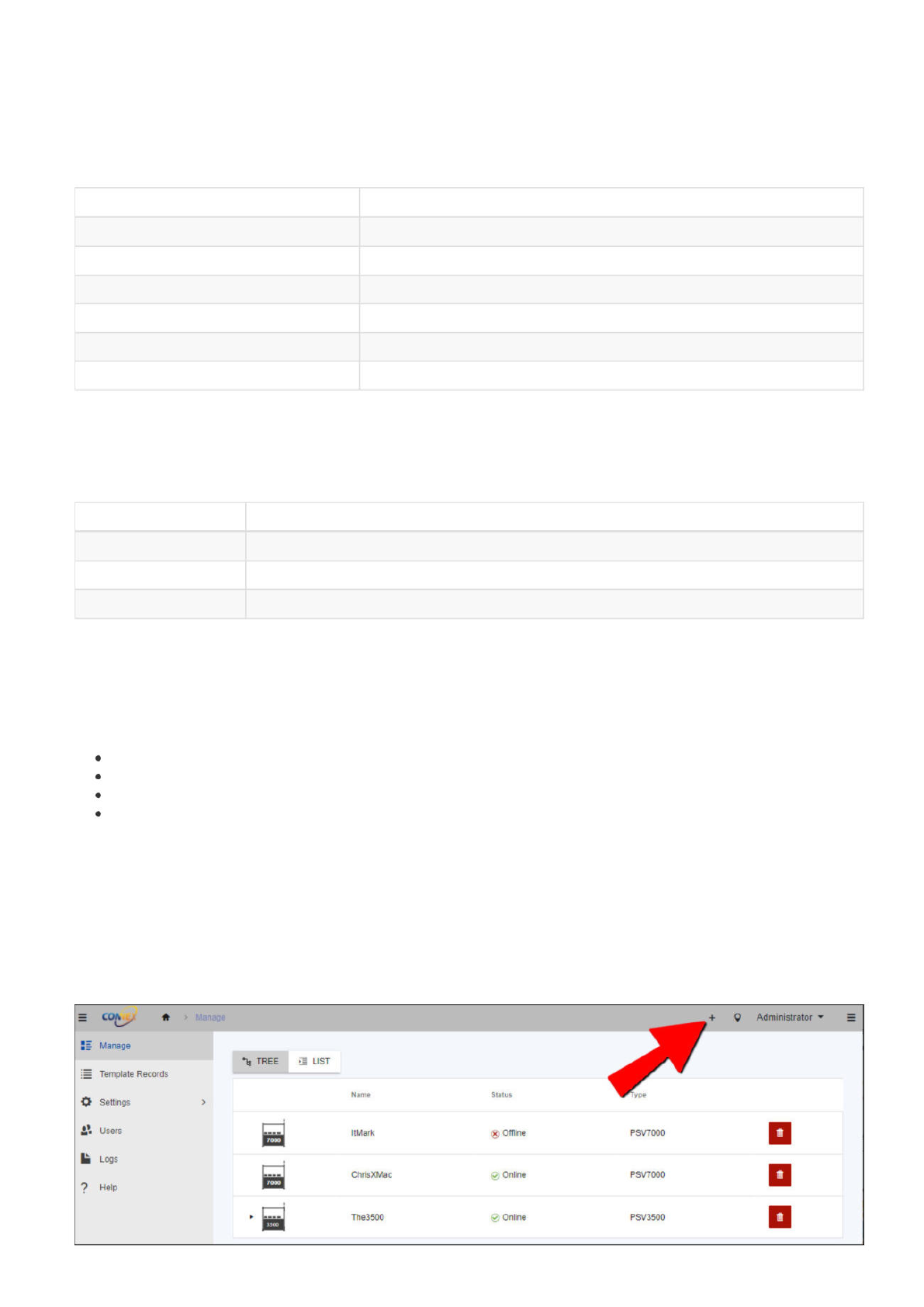
From the Manage page, click Add Connection (+ icon) in the upper-right corner.
=
c*
*
Manage
;=
Template
Records
*
Settings
2?
Users
!■
Logs
?
Help
ItMark
包
Offline
PSV7000
>
cd
工
ChrisXMac
The3500
©
Online
5
Online
PSV7000
PSV3500