ConneX_Help.pdf - 第24页
Template R ec or ds T hi s pa ge d is pl a ys a li st of your raw pro g ram m in g r e c o rd s (i f any) . For mo re inf o rma ti on, see the "T e mpl a te R e c o rds" se c ti on on t he Se ttin g s . = 含 >…
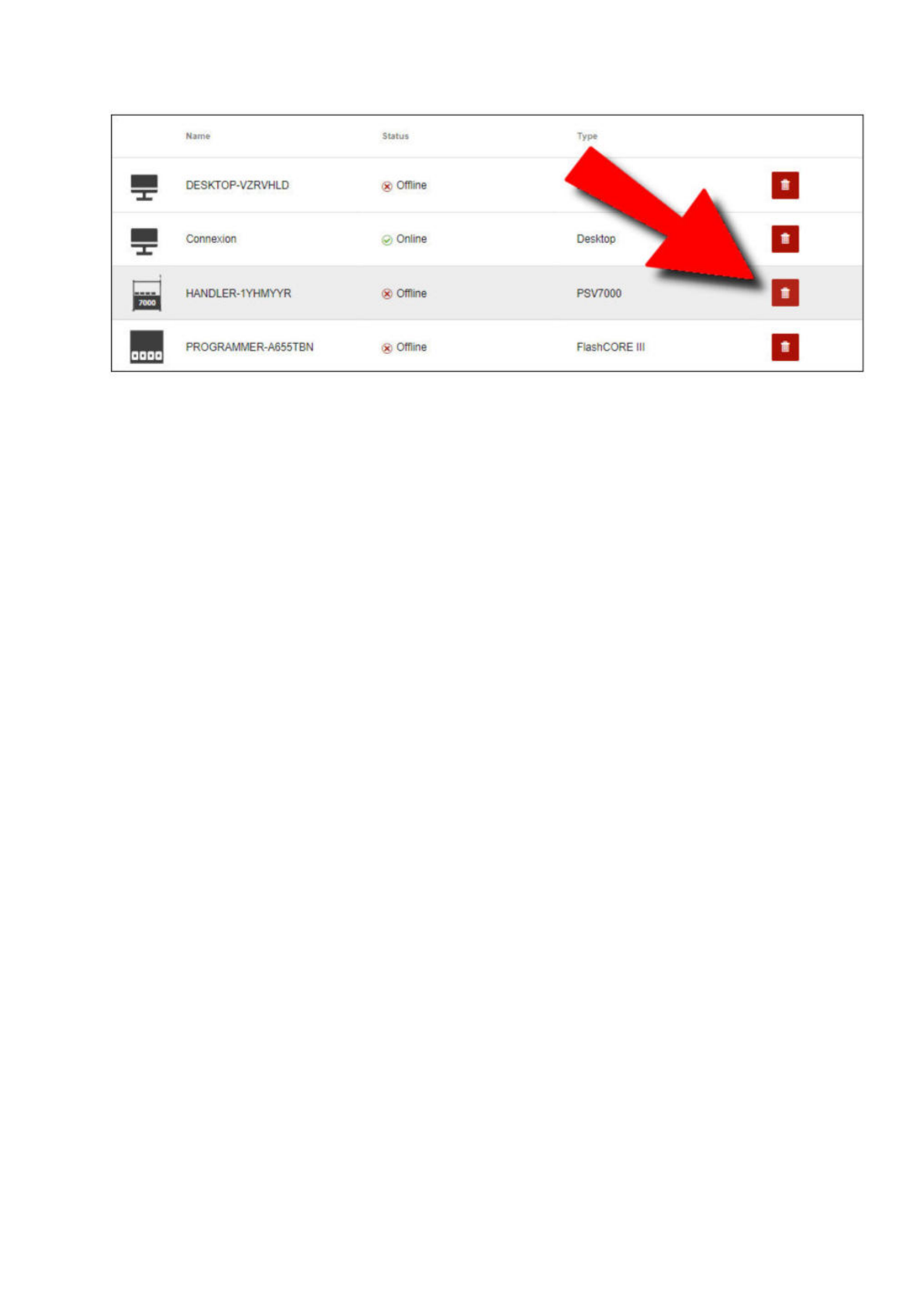
Removing a programming system/programmer
1. From the Manage page, locate the entity to remove and click Delete (garbage can icon).
2. In the Remove Entity dialog, click OK to confirm the removal.
Caution
Removing an adopted programming system results in future records and events being lost. Proceed with caution.
Name
Status
至
DESKTOP-VZRVHLD
(x:
Offline
Connexion
0
Online
HANDLER-1YHMYYR
Offline
PROGRAMMER-A655TBN
®
Offline
FlashCORE
III
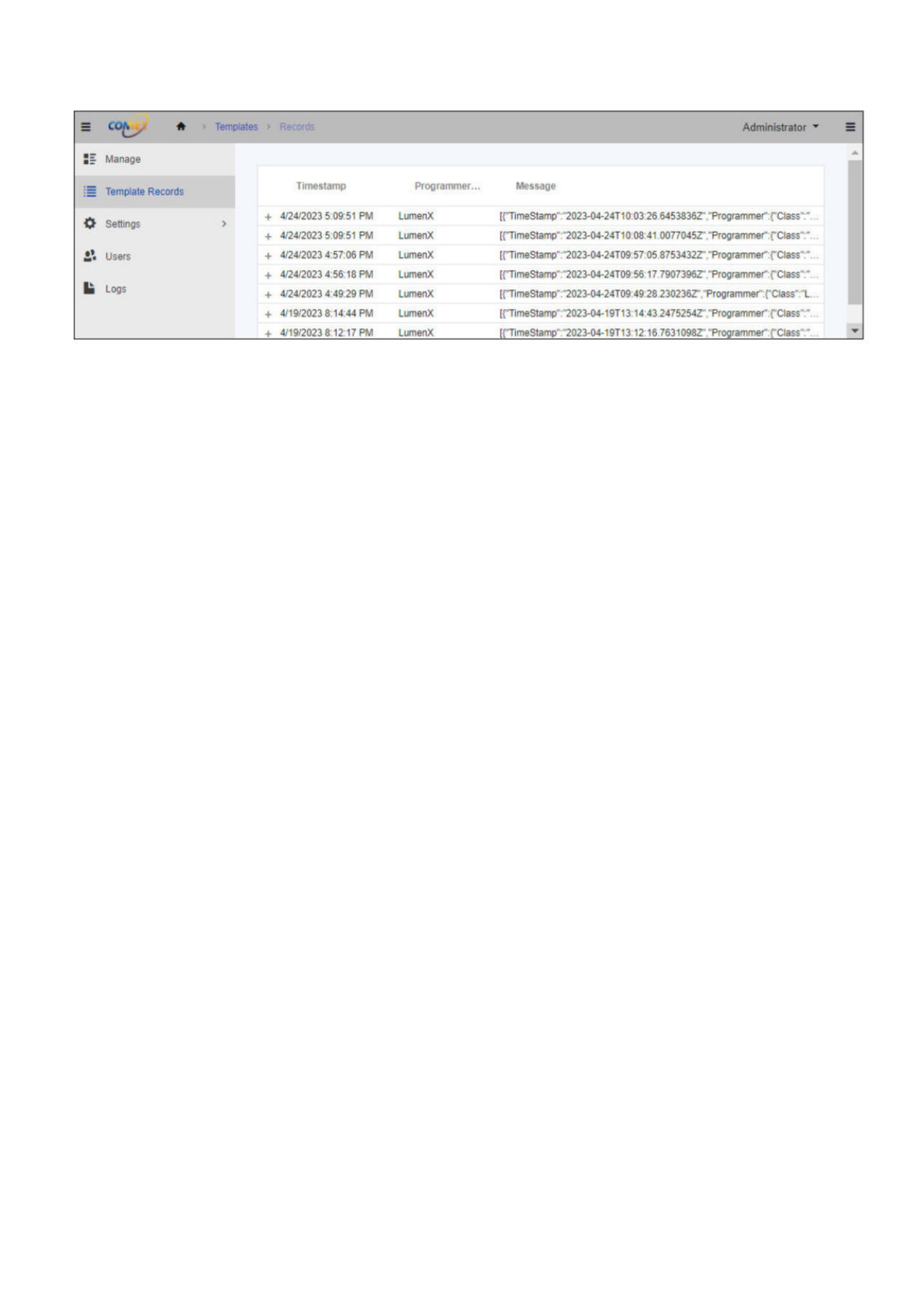
Template Records
This page displays a list of your raw programming records (if any).
For more information, see the "Template Records" section on the Settings.
=
含
>
Templates
>
Administrator
:
三
Manage
Template
Records
Timestamp
Programmer...
Message
自
Settinas
+
>
4/24/2023
5:09:51
PM
LumenX
[{"TimeStamp',:,'202a-04-24T10:03:26.6453836Z-'."Programmer":{'Class"
It
+
4/24/2023
5:09:51
PM
LumenX
[{"TimeStamp":-'2023-04-24T10:08:41.0077045Z"."Programmer":{'Class'
It
Users
+
4/24/2023
4:57:06
PM
LumenX
[{"TimeStamp":,'2023-04-24T09:57:05.8753432Z"."Programmer,:rclass"
1»
+
4/24/2023
4:56:18
PM
LumenX
[{"TimeStamp":“202±04-24T09:56:17-7907396Z"'."Programme「MCIass”
It
||
Logs
+
4/24/2023
4:49:29
PM
LumenX
[{"TimeStamp":"2023-04-24T09:49:28
230236Z',"Programmer:rclass,r:"
L
…
+
4/19/2023
8:14:44
PM
LumenX
[{"TimeStamp":-'2023-04-19T13:14:43
2475254Z"."Programmer":{'Class"
4-
4/19/2023
8:12:17
PM
LumenX
[{"TimeStamp',:-'202a-04-19T13:12:16
7631098Z'."Programmer:{'Class'
Settings
The Settings page displays a list of configuration parameters for ConneX.
Licensing
This section shows the software licensing information for ConneX service, including:
License type (ex. Trial or Perpetual for ConneX Service)
Available Connections (remaining number of client connections, or max connections minus used connections; a client connection is
an instance of the Machine Manager Service connecting to a centralized ConneX Service)
Maximum Connections (number of client connections licensed; possible number of Machine Manager Service connections to ConneX
Service)
ConneX Annual Maintenance Contract (expiration date for Machine Manager connections to ConneX Service)
To export or download a copy of the ConneX data for SentriX jobs, this section also provides a Download SentriX Report button.
For more information about your Data I/O software product licenses (including ConneX):
1. On the Handler/Host PC (of your PSV System), open a browser window (Chrome 100.0.x recommended) to the Data I/O License
Manager at http://localhost:5002/.
2. On the License Information page, under the ConneX section, click ConneX Service to expand and view its license details.
Users Settings
The Users Settings section shows the password options for user accounts:
Field Description
Password requires digit User password requires at least one digit
Password requires lowercase User password requires at least one lowercase character
Password requires uppercase User password requires at least one uppercase character
Password requires non alphanumeric User password requires at least one non-alphanumeric character
Password minimum length Type the minimum number of characters required for user passwords
MQTT Connections
The MQTT Connections section shows the configuration for MQTT ports:
Field Description
MQTT Broker Port The TCP port number for the ConneX MQTT Broker (default TCP port is 1883)
MQTT Machine Manager Client Port The TCP port number for the ConneX MQTT Machine Manager Client (default TCP port is 9002)
Template Records
In addition to accessing ConneX data through MQTT and GraphQL queries, the latest ConneX version also allows users of previous
versions to access ConneX data through standard templates for backwards-compatibility. The Template Records component and service
publishes ConneX data through templates for legacy users of Template Manager in previous versions.
First, you create a custom template (such as .XML and .JSON) to define the specific data fields to collect. Then as devices are programmed,
ConneX writes the programming statistics to the template-based record to effectively capture the user-specified data points.
By publishing the specified fields data (ex. programming statistics) through standard templates, ConneX simplifies the process of integrating
your programming data into your Manufacturing Execution System (MES) or other data processing application(s).
The Template Records page displays a list of your raw programming records while any customized template records are stored in
C:\ProgramData\DataIO\ConneX\TemplateManager\Audit\Output. To modify template settings, click Settings (in the left navigation
pane), then click Template Manager.
The Templates section lists your current templates and allows you to add a new template (using the Plus button at top), delete an existing
template (using the corresponding Trash button in right column), or specify a different file for an existing template (using Pencil button in
right column).