ConneX_Help.pdf - 第37页
[2 . 0 .0.8 7 ] - (M ar ch 1 9 , 2 0 1 9 ) Bu g Fi xes Fix ed audi t rec ord p arsi ng stabi l i ty. [2 . 0 .0.8 3 ] - (N ov ember 1 1 , 20 18 ) Bu g Fi xes Conne X now unlo c k s and p o l ls any Fl ashCOR E pro g r…

Change Log
This page lists all notable changes to ConneX.
[3.0.4] - (April, 2023)
New Features
ConneX system installation is split into Machine Manager installer for PSV/Desktop systems and ConneX Software for ConneX host
Add Handler wizard guides user through adding and adopting a handler.
Tree View shows a hierarchical view, which makes it easier to see which programmers belong to which handler.
Added support for PSV 3500 systems.
Enhancements/Bug Fixes
Improvements to Help documentation.
Template Manager record functionality fully integrated into ConneX service.
SentriX reports show number of FlashCORE and LumenX devices programmed.
Available fields in FlashCORE records fully populated.
Handler and Programmer names can be changed for easier differentiation.
Fixed an issue where switching adapters may cause a system to become unresponsive.
ConneX Software now supports Windows Server 2016, 2019, and 2022.
Improved performance for displaying programming records in ConneX.
[3.0.3] - (February 3, 2023)
New Features
License Manager updated to 1.0.0.61.
Enhancements/Bug Fixes
Increased querying performance of metrics.
Updated licensing for Machine Manager connections to ConneX Service.
Implemented demo/eval mode with restricted functionality (ex. Trial or Expired license, exceeded number of available connections...).
Added UI notifications/indicators for Trial, Expired, and No license.
[3.0.0] - (July 6, 2022)
New Features
License Manager updated to 1.0.0.60.
Added support for MQTT API protocol for real time data.
Added support for GraphQL API for querying historical data.
Added UI to support configuration of system.
[2.0.1.133] - (March 15, 2021)
New Features
Added support for larger log files to accommodate 32K serial numbers from LumenX DMS.
Added support for larger templates.
Updated License Manager to version 1.0.0.47 to match version in LumenX DMS.
Bug Fixes
Improved SentriX billing performance.
Removed support for double quotes in fields.

[2.0.0.87] - (March 19, 2019)
Bug Fixes
Fixed audit record parsing stability.
[2.0.0.83] - (November 11, 2018)
Bug Fixes
ConneX now unlocks and polls any FlashCORE programmers that were previously registered/locked to another machine.
API Overview
ConneX provides API hooks using the following standards:
GraphQL
MQTT
GraphQL
ConneX provides a GraphQL endpoint for querying data.
What is GraphQL?
GraphQL is a query language for APIs and a runtime for fulfilling those queries with your existing
data. GraphQL provides a complete and understandable description of the data in your API, gives
clients the power to ask for exactly what they need and nothing more, makes it easier to evolve APIs
over time, and enables powerful developer tools.
Source: https://graphql.org/
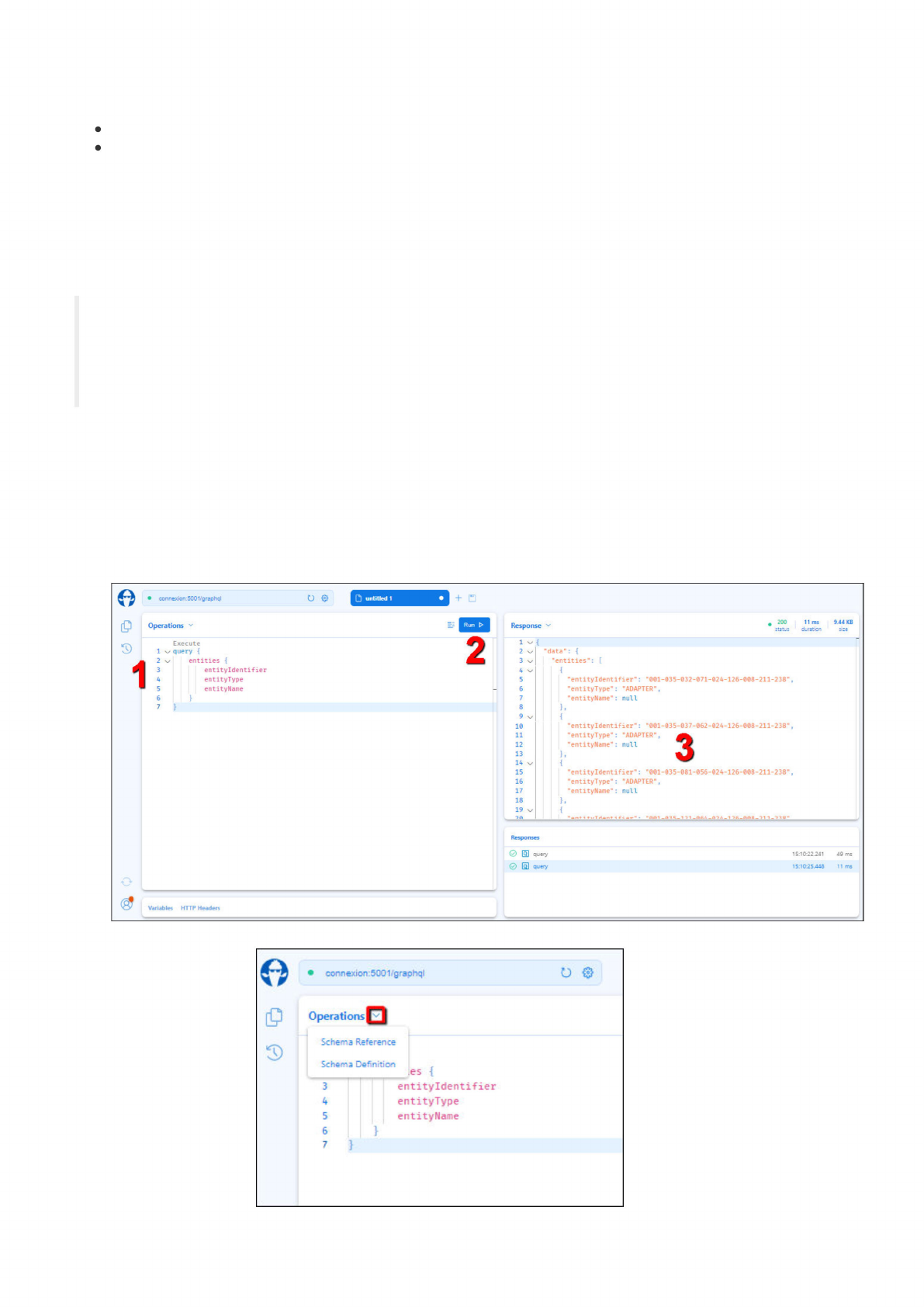
To get started with GraphQL in ConneX, expand GraphQL (in the left navigation pane) and review the available types of data fields you can
retrieve from the GraphQL API in ConneX. Then create a list of desired fields and begin to construct queries to retrieve them from ConneX.
To test your queries:
1. Visit http://localhost:5001/graphql from the ConneX Server.
2. Paste your query in the left pane, and then click Run.
3. Review the query results/output in the right pane. For example:
4. For help on modifying your queries, click the Operations drop-down arrow (near the top-left corner) to access the Schema
Reference and Definition.
5. Similarly, click the Response drop-down arrow (in the right pane) for more information about how ConneX processed the query.
•
connexion:5001»graphql
u
®
0
untitled
1
+
Execute
1
7
query
{
1
2
\z
entities
{
3
entityidentifier
4
entityType
5
entityName
6
}
7
}
2
Variables
HTTP
Headers
Response
200
11
ms
9.44
KB
duration
size
1
v
2
v
3
v
4
v
5
10
11
12
13
14
v
15
16
17
18
19
v
•data":
{
"entities":
[
I
{
"entityldentifier"
:
-001-035-032-071-024-126-008-211-238",
-entityType":
"ADAPTER",
"entityName"
:
null
},
{
•entityldentifier":
"0Ol-035-037-062-024-126-O08-211-238M
,
•entityType":
"ADAPTER"
f
"entityName"
:
null
(J
-entityldentifier"
:
"001-035-081-056-024-126-008-211-238",
-entityType"
:
"ADAPTER"
,
-entityName":
null
},
{
•■■TKad;
al
•
.AAA
1
Responses
0
画
query
0
回
query
15:1(^22241
49
ms
15:10^5448
11
ms
•
connexion:5001f'graphql
0
3)
Operations
Schema
Reference
Schema
Definition
.
—
©5
{
3
entityidentifier
4
entityType
5
entityName
6
}
7
}