ConneX_Help.pdf - 第40页
3. In the l ef t p ane t re e vie w , navi g ate to t he de si re d e ve nt. 4. In the rig ht pa ne , sc ro l l d ow n to the Pu blish se c tio n, an d c o nf i rm/ mod i f y the eve nt que ry in the T opic bo x . For e …
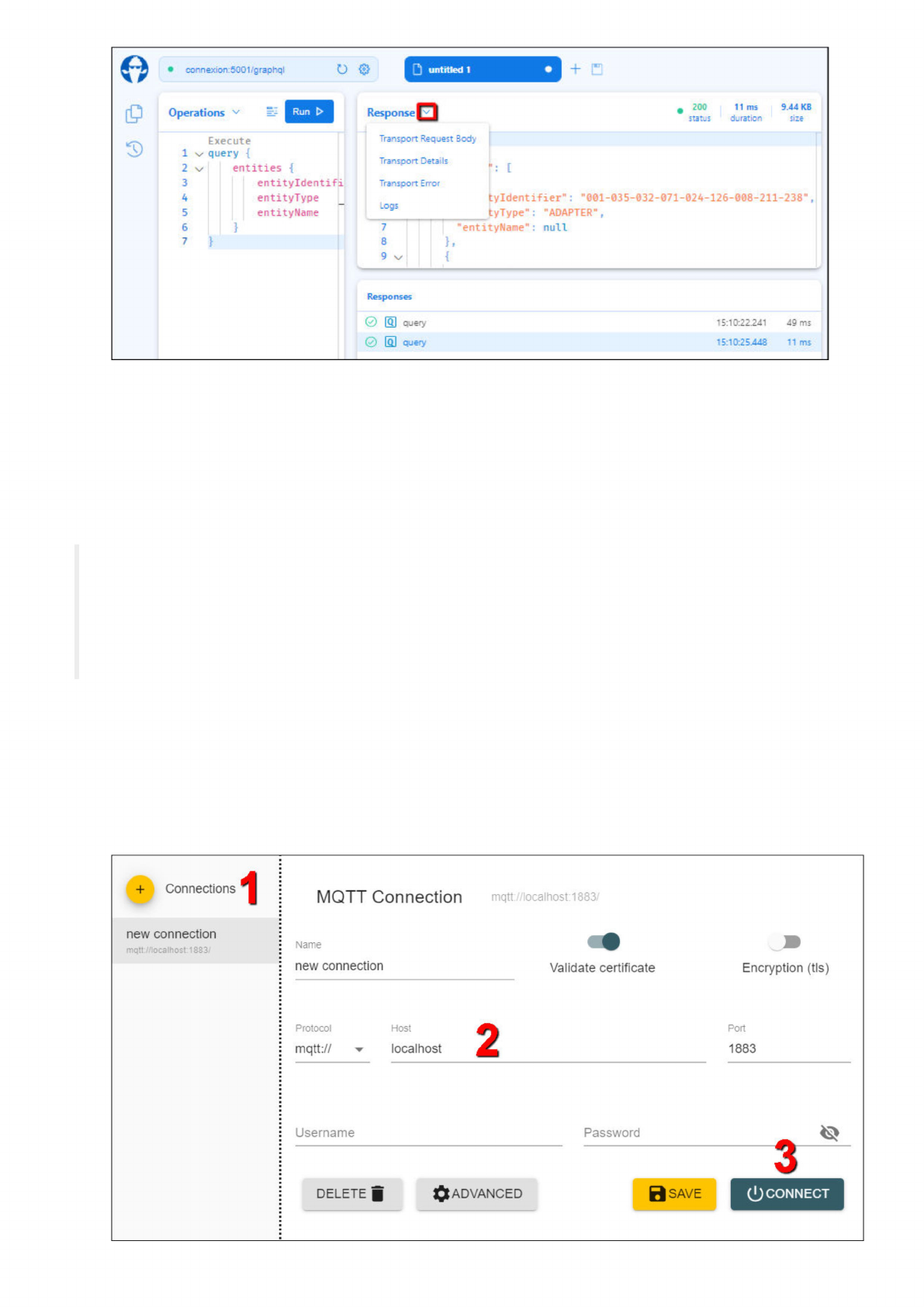
6. After crafting and perfecting your queries as desired, paste them into your manufacturing execution system (MES) or other
application and test the queries again from there.
MQTT
ConneX provides an MQTT broker that your MES (or other data processing application) can subscribe to.
What is MQTT?
MQTT is a lightweight, publish-subscribe network protocol that transports messages between
devices. The protocol usually runs over TCP/IP, however, any network protocol that provides ordered,
lossless, bi-directional connections can support MQTT. It is designed for connections with remote
locations where a resource constraints exist or the network bandwidth is limited. The protocol is an
open OASIS standard and an ISO recommendation (ISO/IEC 20922).
Source: https://en.wikipedia.org/wiki/MQTT
To get started with MQTT in ConneX, expand MQTT (in the left navigation pane) and review the available types of event notifications to
which you can subscribe from the MQTT API in ConneX. Then create a list of desired events and begin to construct queries to receive them
from ConneX.
To test your queries:
1. Install MQTT Explorer and launch it.
2. Add a new connection by specifying the appropriate host settings, then click Connect. For example:
D
untitled
1
+
Response
f
Hi
0
Operations
Transport
Request
Body
3)
Transport
Details
[
xz
Transport
Error
Logs
I
}
Responses
MQTT
Connection
mqtt://localhost:1883/
Name
new
connection
Validate
certificate
Encryption
(tls)
2
Protocol
Host
Port
mqtt://
localhost
1883
Username
Password
3
DELETE
jj
0SAVE
ADVANCED
1
2
3
4
5
6
7
connexion:500t'graphql
11
ms
duration
.
200
status
7
8
9
v
new
connection
mqtt.//localhost1883/
9.44
KB
size
0
叵]
query
0
叵)
query
15:10:25448
11
ms
15:10:22.241
49
ms
tyldentifier"
:
"001-035-032-071-024-126-008-211-238",
tyType":
"ADAPTER"
,
:
null
},
Connections
[
Execute
query
{
entities
{
entityldentifi
entityType
—
entityName
0
CONNECT
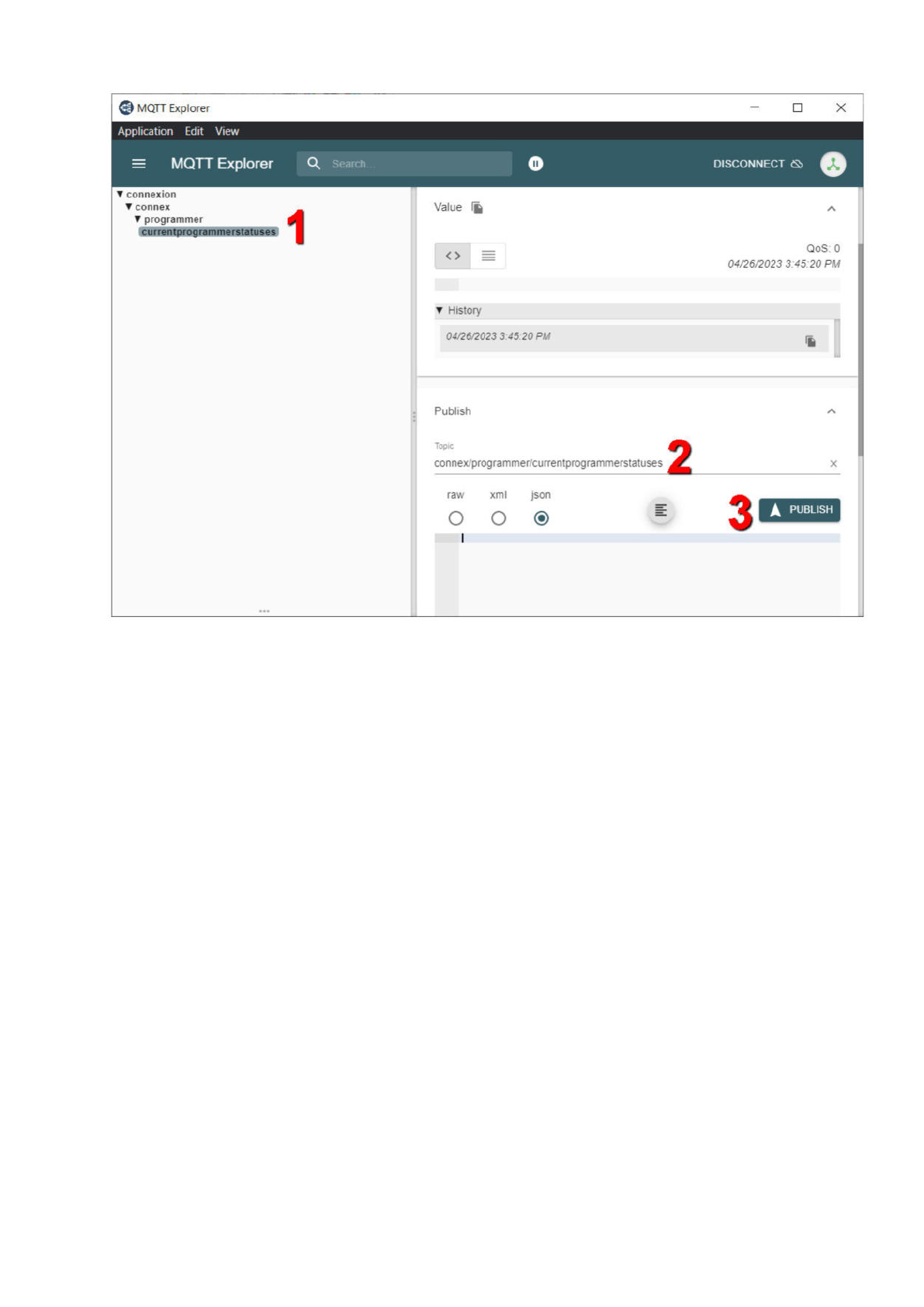
3. In the left pane treeview, navigate to the desired event.
4. In the right pane, scroll down to the Publish section, and confirm/modify the event query in the Topic box. For example:
5. Select a desired output format (raw, xml, or json) and click Publish to run the event query.
6. Review the query results/output in the right pane.
7. After crafting and perfecting your queries as desired, paste them into your manufacturing execution system (MES) or other
application and test the queries again from there.
X
@
MQTT
Explorer
Value
胸
History
04/26/2023
3.45
20
PM
Publish
人
2
Topic
connex/programmer/currentprogrammerstatuses
x
raw
3
o o
Application
Edit
View
MQTT
Explorer
DISCONNECT
0
A
PUBLISH
QoS:
0
04/26/2023
3:45:20
PM
xml
json
connexion
connex
programmer
currentprogrammerstatuses

Schema
schema {
query: Query
}
type AdapterMetrics {
id: Long!
identifier: String
timeStamp: DateTime!
programmingDuration: Int!
verifyDuration: Int!
blankCheckDuration: Int!
eraseDuration: Int!
}
"Represents an adapter for a programmer."
type AdapterModel {
"The database key for the adapter."
adapterKey: Int!
"The associated entity for this adapter."
entity: Entity
"The last associated programmer for this adapter."
programmer: ProgrammerModel
"The adapter's part number identifier."
adapterId: String
}
type AdapterStatistics {
adapterId: String
cleanCount: UnsignedInt!
lifetimeActuationCount: UnsignedInt!
lifetimeContinuityFailCount: UnsignedInt!
lifetimeFailCount: UnsignedInt!
lifetimePassCount: UnsignedInt!
socketIndex: Int!
adapterState: AdapterState!
}
"Information about the offset pagination."
type CollectionSegmentInfo {
"Indicates whether more items exist following the set defined by the clients arguments."
hasNextPage: Boolean!
"Indicates whether more items exist prior the set defined by the clients arguments."
hasPreviousPage: Boolean!
}
"Represents an abstract component that is connected to the ConneX system."
type Entity {
"The database key for the entity."
id: Int!
"The unique identifier for the entity."
entityIdentifier: String
"The type the entity represents."
entityType: EntityType!
"The given name of the entity."
entityName: String
}
"Represents a PSV system connected to ConneX."
type Handler {
"The database key for the PSV system."
handlerId: Int!
"The associated entity for this PSV system."
entity: Entity
"The associated programmers for this PSV system."
programmers: [ProgrammerModel]
"The PSV system's type (e.g. PSV2800\/3000\/5000\/7000)."
handlerType: HandlerType!
"The PSV system's IP address."
GraphQL