00195193-02 SG D4 FSE en (1).pdf - 第105页
Communication and Control Board type recognition Troubleshooting, if are missing tw o board type ID‘s S tudent Guide SIPLACE D4 (FSE) Communication and Control EN 09/2006 104 X Write the correct boar d ID with the comman…
Communication and Control
Reading the Board IDs out of the EEPROM Board type recognition
Student Guide SIPLACE D4 (FSE)
EN 09/2006 Communication and Control
103
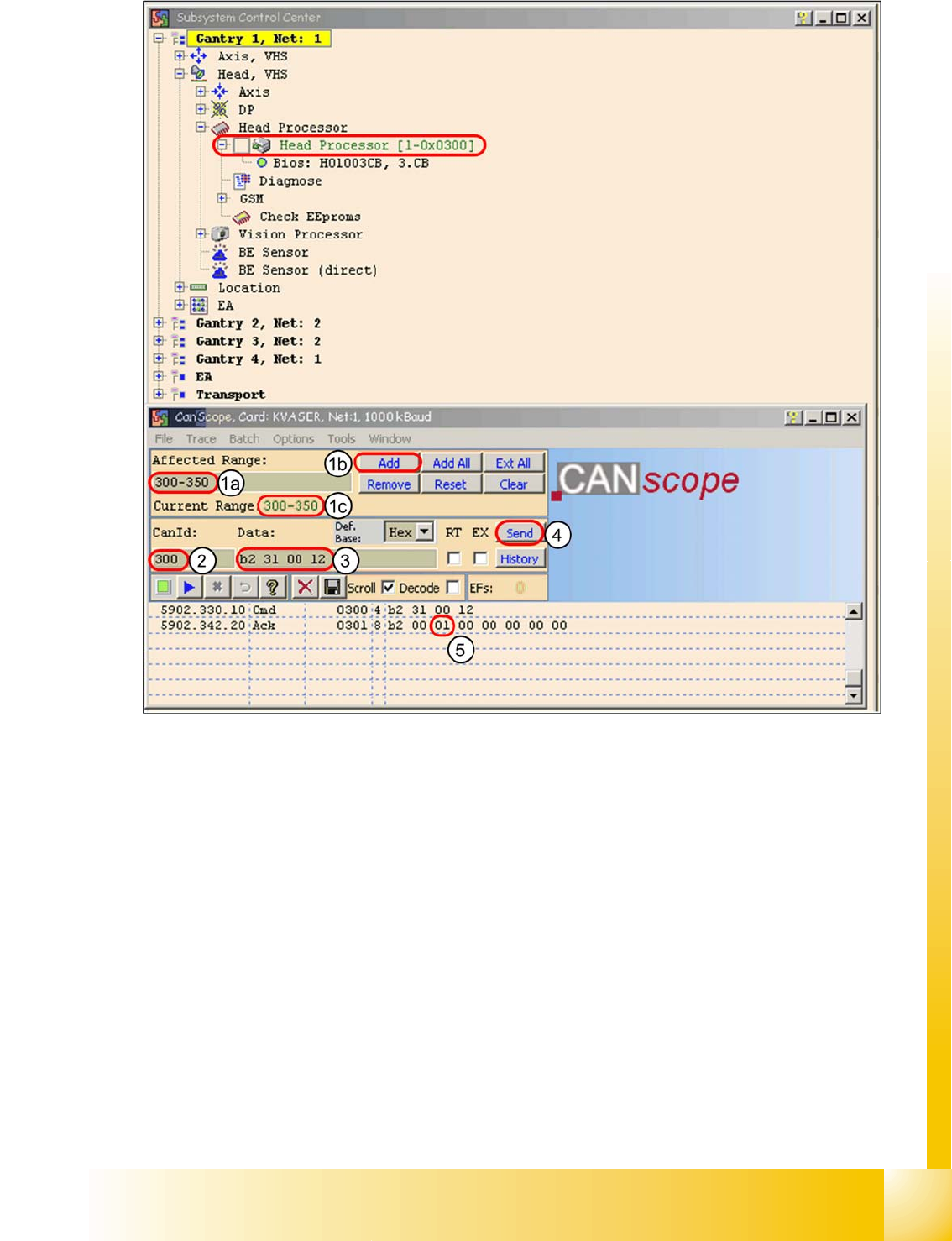
4.4 - 13: Read the board type ID Head interface
X (1) Restrict the address range for the CAN ID. Specify the smallest possible range at
Affected Range
, to reduce the counter of CAN Bus commands which appears in the network
window.
X Confirm with
Add
X The CAN ID range will now be shown at
Current Range
.
X (2) At
CanID
enter the relevant ID.
X (3) At
Data
enter the CAN command.
E.g.
B2 31 00 12
b2
--> read EEPROM
31
--> read out from head interface
12
--> Storage location in EEPROM memory in hex
X (4) Press
Send
.
X (5) Command will be shown in the network window and an answer will be sent (acknowledgment).
Ack
B2 00 01 00 00 00 00 00
--> Storage location 12 is occupied with the value
01
= board ID
head interface.
Communication and Control
Board type recognition Troubleshooting, if are missing two board type ID‘s
Student Guide SIPLACE D4 (FSE)
Communication and Control EN 09/2006
104
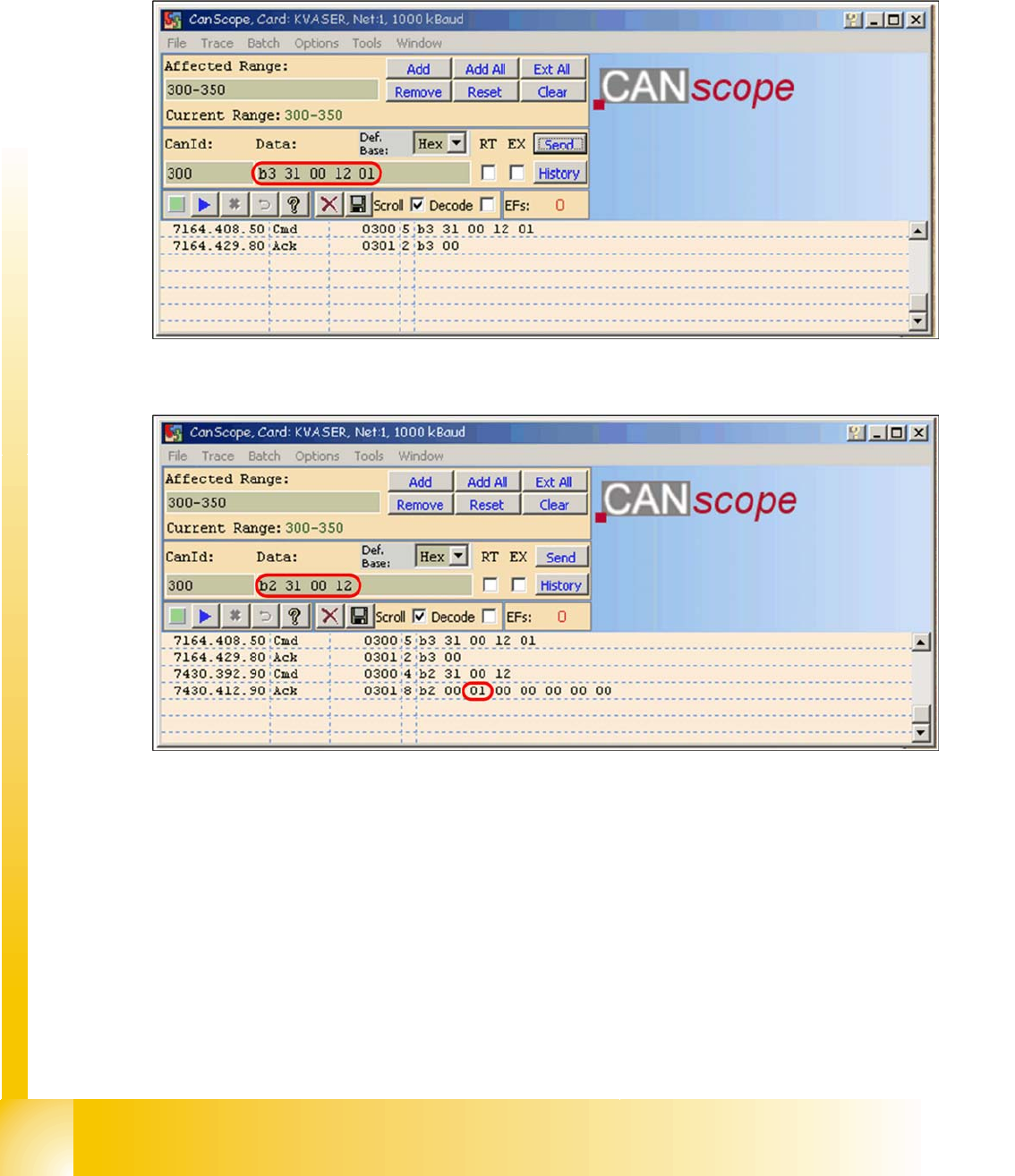
X Write the correct board ID with the command
B3 31 00 12 01
B3
--> write to EEPROM
31
--> head interface
12
--> storage location in EEPROM
01
board ID for head interface
Reply
B3 00
--> command OK
4.4 - 14: Writing the CAN command board ID on the head interface
X Check the board type ID after you written the ID in the EEPROM
4.4 - 15: Check the written board type ID
X Download the applications software on the TQM module.
> After performing the download, the TQM module should load again without error messages.
4.4.3 Troubleshooting, if are missing two board type ID‘s
If two IDs are missing, preventing the machine (TQM module) from booting, use the default CAN ID to
address the TQM module at the head processor (CAN ID +4hex) (see Section 4.4.2.2 Reading and Wri-
ting the Board IDs with CAN Commands [J 96]).

Communication and Control
CAN Commands for Reading and Writing the Board IDs Board type recognition
Student Guide SIPLACE D4 (FSE)
EN 09/2006 Communication and Control
105
4.4.4 CAN Commands for Reading and Writing the Board IDs
Applicable for SIPLACE X and SIPLACE D machines.
Read out the board type ID from the EEPROM:
(Example on gantry 1 CAN ID
300
on C&P20)
CAN ID:
300
command:
B2 31 00 12
Read head interface
CAN ID:
301
Acknowledge:
B2 00 01 00 00 00 00 00
Board ID 01
CAN ID:
300
command:
B2 32 00 12
Read head adapter
CAN ID:
301
Acknowledge:
B2 00 22 00 00 00 00 00
Board ID 22
CAN ID:
300
command:
B2 33 00 12
Read intermediate distributor
CAN ID:
301
Acknowledge:
B2 00 30 00 00 00 00 00
Board ID 30
CAN ID:
300
command:
B2 34 00 12
Read digital pressure valve
CAN ID:
301
Acknowledge:
B2 00 00 00 01 00 00 00
Board ID 00 not defined
(storage location 14 = assembly ID
01
digital pressure control valve)
CAN ID: 300 Command:
B2 35 00 12
Read vacuum sensor for hold circuit
CAN ID: 301 Acknowledge:
B2 00 31 00 00 00 00 00
Board ID 31
e.g. Gantry 1 Vision Board:
CAN ID:
180
command:
B2 11 00 12
Read Vision board
CAN ID:
181
Acknowledge:
B2 00 11 00 00 00 00 00
Board ID 11
e.g. Gantry 3 Vision Board stationary:
CAN ID:
150
command:
B2 11 00 12
Read Vision board stationary
CAN ID:
151
Acknowledge:
B2 00 12 00 00 00 00 00
Board ID 12
e.g. Gantry 3 vacuumgenerator (analog) Twin Head:
CAN ID:
180
command:
B2 36 00 12
Read analog pressure valve
CAN ID:
181
Acknowledge:
B2 00 00 00 02 00 00 00
Board ID 00 not defined
(Storage location 14= assembly ID 02 is analog pressure control valve)
When the TQM module on the head interface, so you can use the command 36, if the TQM module
directly on the twin head (main board, C600) so you have to use the command 22.
EEPROM write:
(Example on gantry 1 CAN ID
300
on C&P20)
CAN ID:
300
command:
B3 31 00 12 01
Write head interface board ID 01
CAN ID:
301
Acknowledge:
B3 00
CAN ID:
300
command:
B3 32 00 12 22
Write head adapter board ID 22
CAN ID:
301
Acknowledge:
B3 00
CAN ID:
300
command:
B3 33 00 12 30
Write intermediate distributor board ID 30
CAN ID:
301
Acknowledge:
B3 00
CAN ID:
300
command:
B3 35 00 12 31
Write vacuum sensor for hold circuit board ID 31
CAN ID:
301
Acknowledge:
B3 00
e.g. Gantry 1 Vision Board:
CAN ID:
180
command:
B3 11 00 12 11
Write Vision board board ID 11
CAN ID:
181
Acknowledge:
B3 00
e.g. Gantry 3 Vision Board stationary:
CAN ID:
150
command:
B3 11 00 12 12
Write Vision board stationary board ID 12
CAN ID:
151
Acknowledge:
B3 00