00195193-02 SG D4 FSE en (1).pdf - 第194页
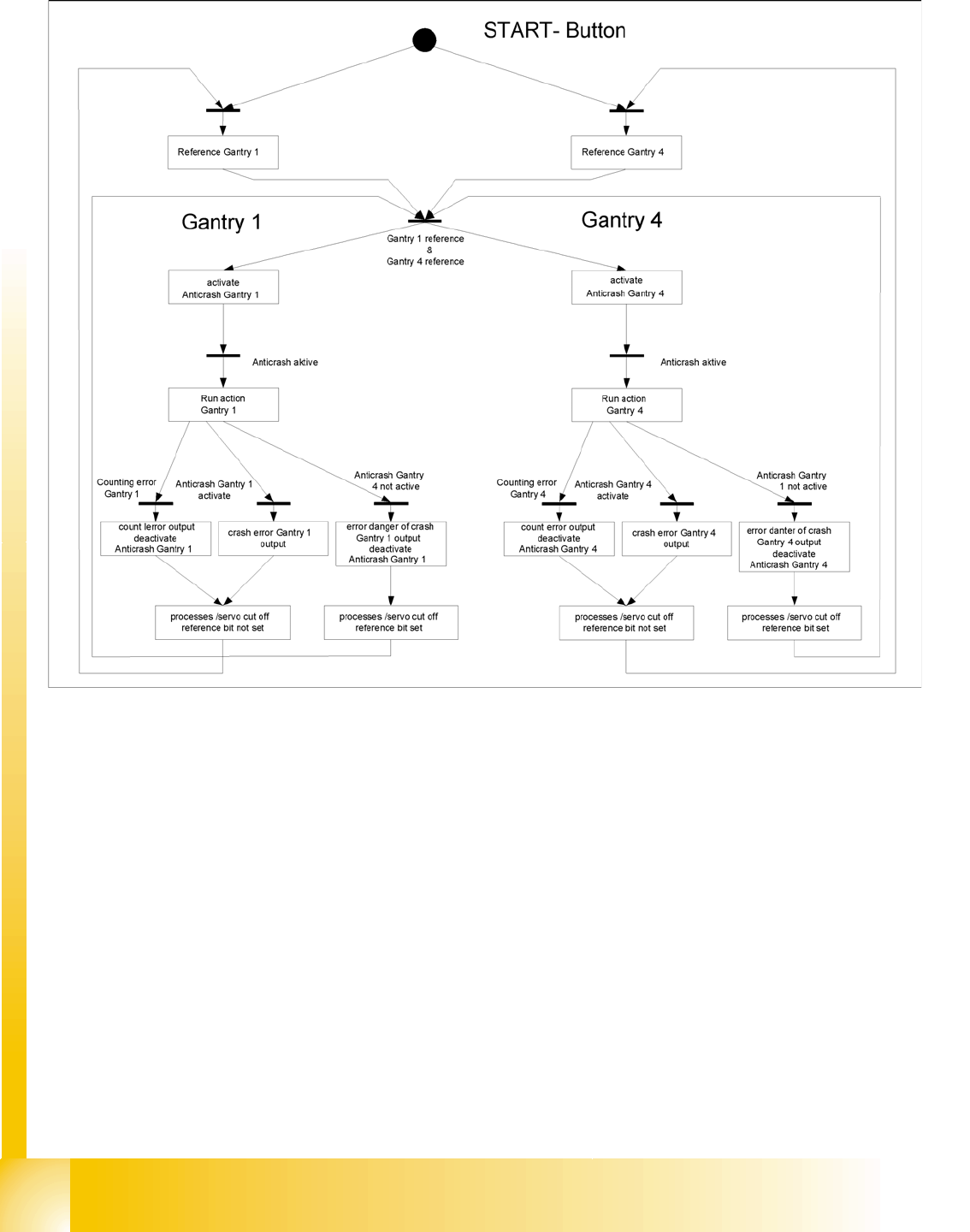
Gantry Settings Axis Board A364 Anticrash Function S tudent Guide SIPLACE D4 (FSE) Gantry EN 09/2006 180 8.2.2.5 Anticrash Function - Proc edure 8.2 - 1: Example of the sequence for the anticrash f unction in placement a…

Gantry
Axis Board A364 Anticrash Function Settings
Student Guide SIPLACE D4 (FSE)
EN 09/2006 Gantry
179
8.2.2 Axis Board A364 Anticrash Function
8.2.2.1 Anticrash Function for the A364
The anticrash function is no longer provided by the anticrash board but instead by the A364 software
(application 1). This means that the proximity switches used to monitor the travel range and the
sensor for monitoring the gantry spacing are no longer required.
Tasks:
– Monitoring the travel range of the X and Y axes
Evaluation of the actual axis position in the direction of the bumper, taking the speed into
account.
– Monitoring the distance for the two Y axes in one placement area
Evaluation of the actual positions of the own and partner gantries during gantry crash monitoring.
– Counter errors for an axis
Time-based monitoring of the counter pulses received (edge control).
8.2.2.2 Anticrash Monitoring for the A364
The anticrash function is activated after the X/Y axes have been referenced. When the gantry axes are
referenced for the first time, anticrash monitoring will not be active, which is not so important, due to the
low reference speed.
After this, the bit is set for the anticrash monitoring function and the actual position for the relevant
partner gantry is continuously communicated via the SPI Bus.
The following information is exchanged between the Y axes:
Actual position of the own gantry
Status information (reference state, anticrash monitoring state ).
8.2.2.3 Error "Gantry Crash"
A “gantry crash” error is established by calculating the position difference and speed difference for both
axes. A gantry crash error is signaled via the axis board and the CAN Bus. The servo is released for both
axes and needs to be referenced again.
8.2.2.4 Count Error:
If the axis board detects a "fatal count error", the axis concerned will be released and the anticrash
function disabled. The other axis is informed of this in the status information and will also disable the
anticrash function. The released axis now needs to be referenced again,
after which the anticrash function will be re-enabled for both axes.
Gantry
Settings Axis Board A364 Anticrash Function
Student Guide SIPLACE D4 (FSE)
Gantry EN 09/2006
180
8.2.2.5 Anticrash Function - Procedure
8.2 - 1: Example of the sequence for the anticrash function in placement area 1
Gantry
Description of the PCB boards on the Gantry Settings
Student Guide SIPLACE D4 (FSE)
EN 09/2006 Gantry
181
8.2.3 Description of the PCB boards on the Gantry
The boards on the gantry described below are basically identical and do not depend on the head
configuration of D1, D2 and D4 machines. The CAN Bus terminating resistor is fixed onto the gantry head
distributor.
8.2.3.1 Gantry head distributor
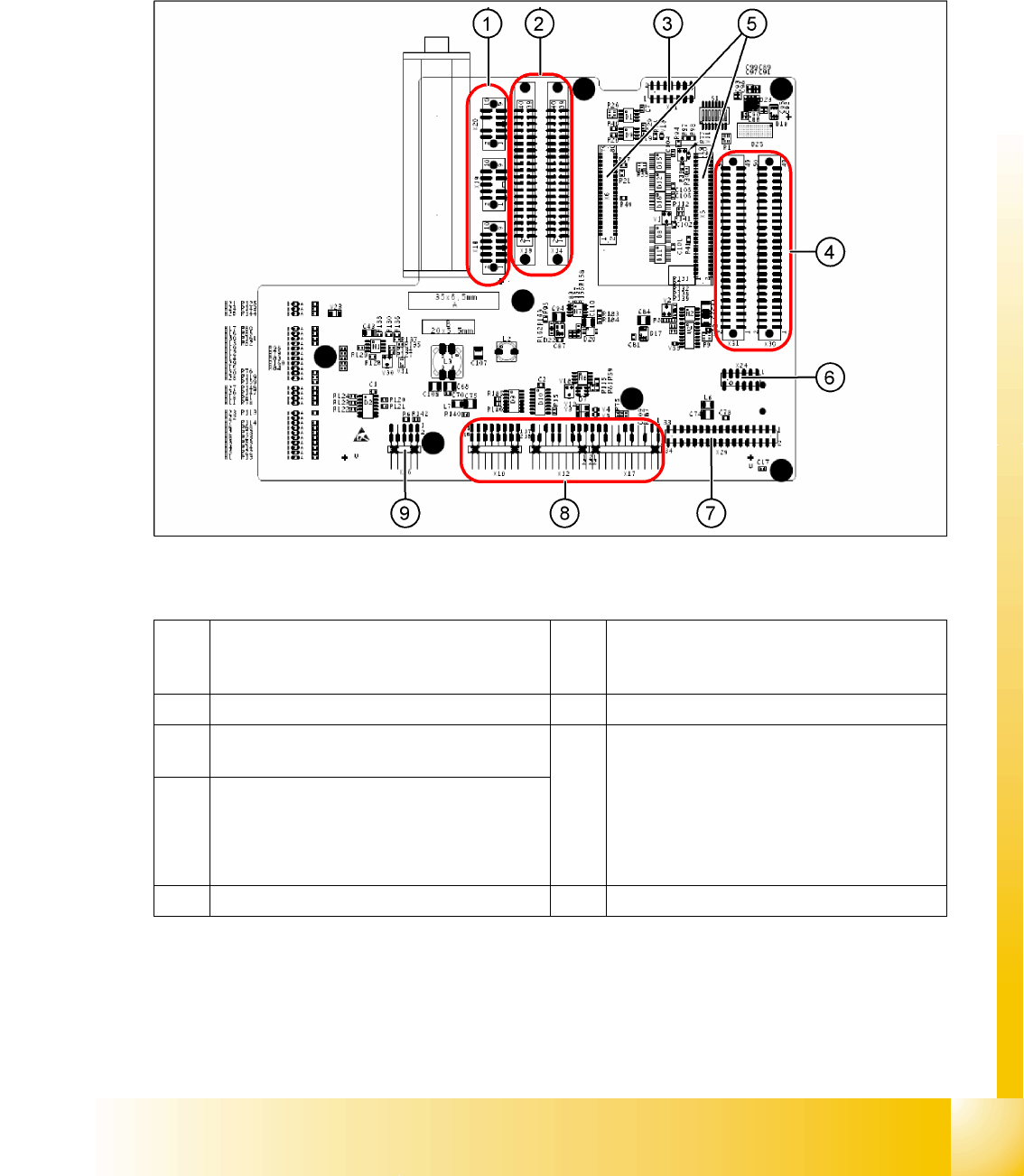
8.2 - 2: Gantry head distributor (from above)
Legend
1 X18 stepper motor DP axis
X19 stepper motor pick up position
X20 stepper motor reject position
6 X24 Test connector for „digital track signals for
X-axis“
2 X13/X14 flat ribbon cable to C&P head 7 X29 connector for Vision board
3 X11 test connector for CAN Bus, SPI Bus,
RS232
8 X10 connector for vacuum measurement
board
X12 motor for DP axis
X16 reference proximity switch (not in use)
X17 end position proximity switch for X-axis
(not in use)
X22/X21 one wire bus (not in use)
4 X30/X31 flat ribbon cable to P&P head for D1
(D4 not in use)
5 X5/X6 connector for 16 bit processor (TQM) 9 X26 connector for CO sensor