00198761-01_SM_Head_Care_Station_II_EN - 第56页
5 Service work – HCSII Control Box 5.4 Replacing the AC/DC converter (PS4) 56 Service Manual SIPLACE Head Care Station II 11/2019 Removal Fig.80: Removal 1 ► Open any cable ties where necessary. You may want to mark th…
5 Service work – HCSII Control Box
5.4 Replacing the AC/DC converter (PS4)
Service Manual SIPLACE Head Care Station II 11/2019 55
What to consider before the removal
To gain access to the PS4 you have to remove the PS3 first.
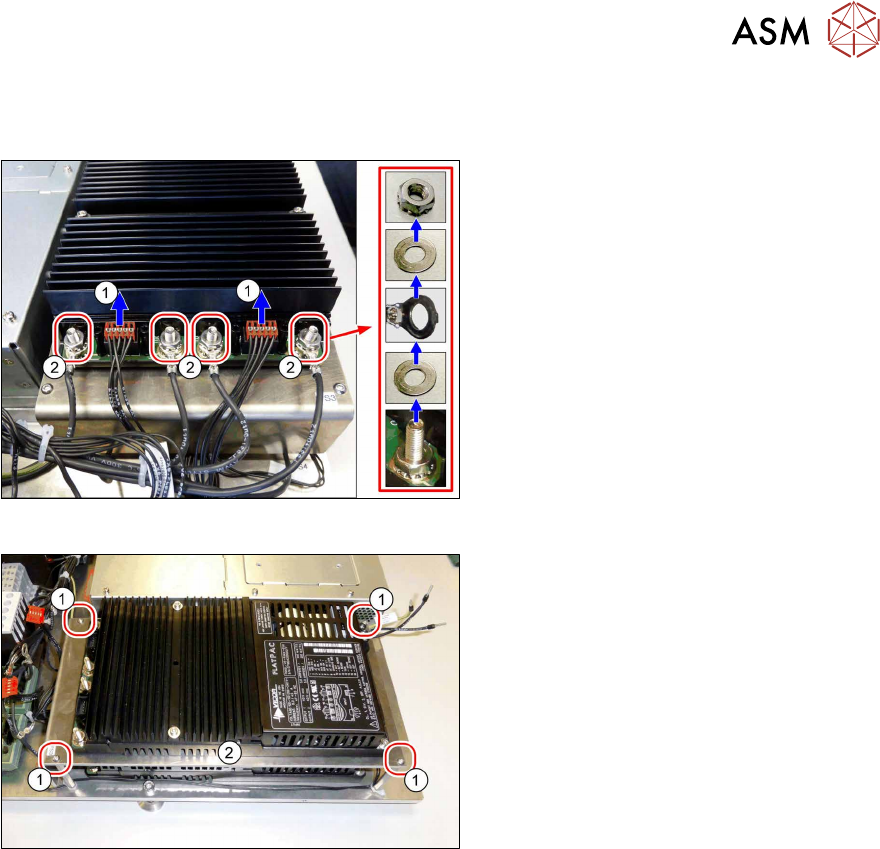
Fig.78: Removal
► Open any cable ties where necessary.
You may want to mark the positions of
the relevant connections to make clear
assignment easier later on.
► Carefully unplug the two cables(1) X4
and X3 from the PS3.
► Unplug the four cables(2) (nut size
M10).
Fig.79: Removal
► Remove the four screws(1).
► Carefully remove the mounting plate(2)
together with the AC/DC converter
(PS3).
5 Service work – HCSII Control Box
5.4 Replacing the AC/DC converter (PS4)
56 Service Manual SIPLACE Head Care Station II 11/2019
Removal
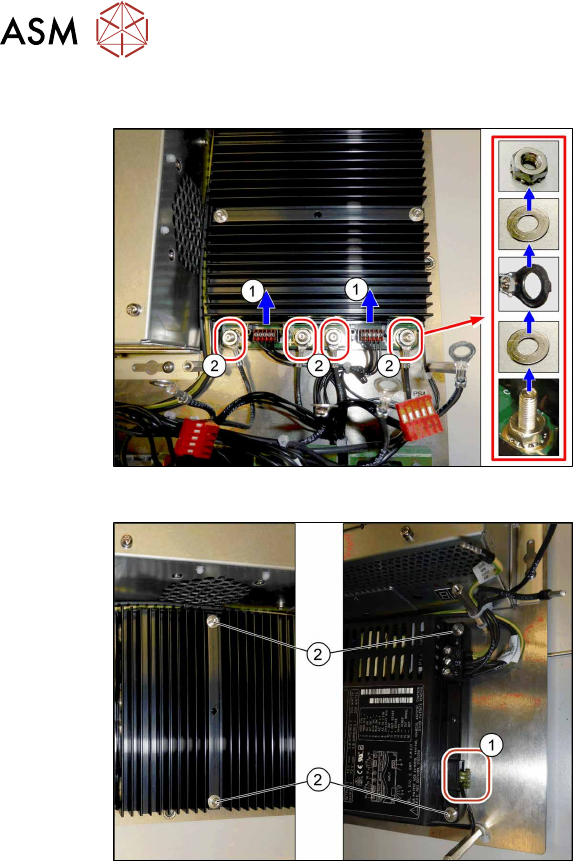
Fig.80: Removal 1
► Open any cable ties where necessary.
You may want to mark the positions of
the relevant connections to make clear
assignment easier later on.
► Carefully unplug the two cables(1) X4
and X3 from the PS4.
► Unplug the four cables(2) (nut size
M10).
Fig.81: Removal 2
► Carefully unplug the cable(1) from the
PS4.
► Remove the four screws(2).
► Carefully remove the AC/DC converter
(PS4).
Installation
► Follow the removal instructions in reverse order for installation.
► Replace any cable ties which you have removed.
► Check/Adjust the voltage.
5.9 "Checking/Adjusting voltage" [}64]
5 Service work – HCSII Control Box
5.5 Replacing the AC/DC converter (PS1)
Service Manual SIPLACE Head Care Station II 11/2019 57
5.5 Replacing the AC/DC converter (PS1)
DANGER
Hazardous voltage
Death, serious injury or considerable damage may result if the power supply is handled
incorrectly.
Only SIPLACE service technicians or adequately trained personnel, e.g. certified electrical
specialist, are allowed to perform this task on the power supply.
Parts
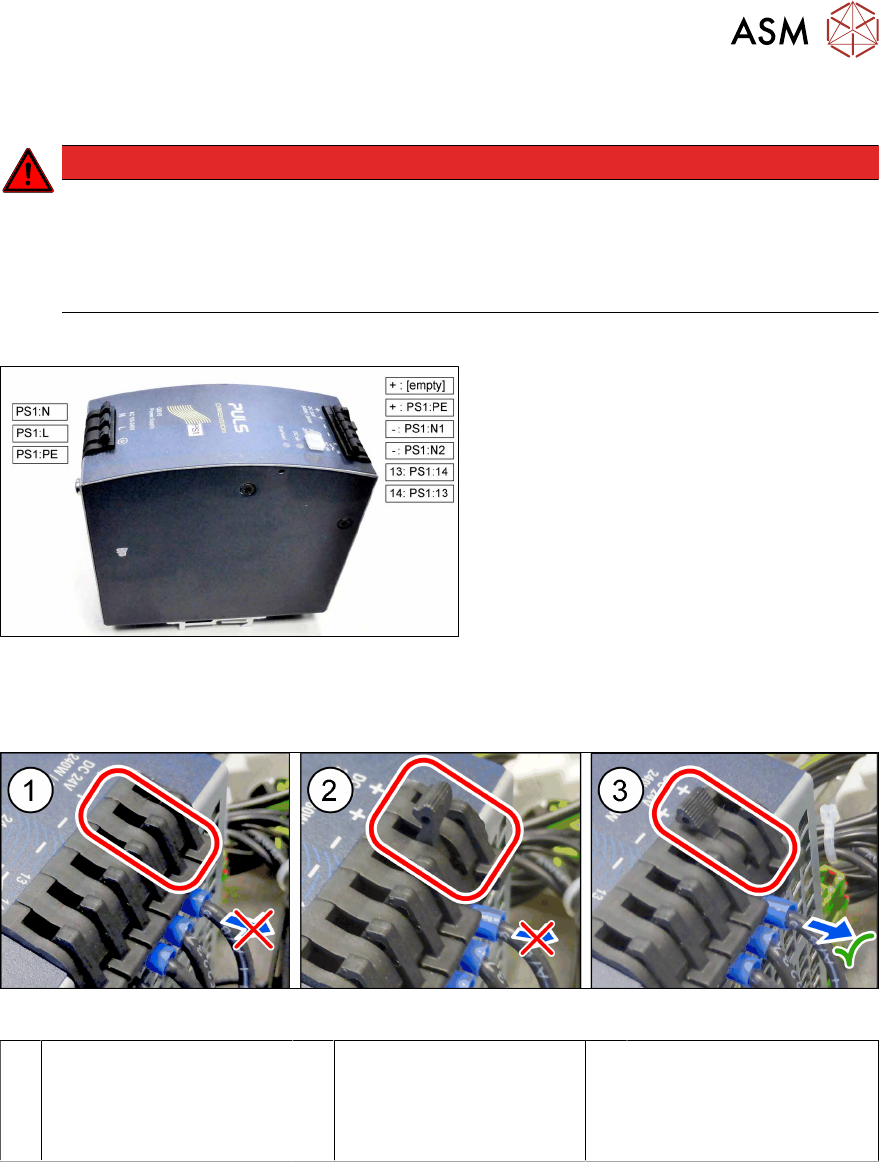
Fig.82: AC/DC converter QS10.241 24VDC 10A 240W
(PS1)
●
AC/DC converter QS10.241 24VDC
10A 240W (PS1) [03087898‑xx]
What to consider before the removal
Fig.83: PS1 – cable lock – closed / half open / open
1 Closed
► Cable is fixed.
2 Half open
► Cable is still fixed.
► Do not try to pull out
the cable.
3 Open
► You can pull out the
cable now.
Preparatory work...
► Turn off and disconnect the HCS II. See 3.1 "Turn off and disconnect the HCS II" [}19].
► Perform the steps described in section 3.4 "Access to the spare parts of the HCS II Control
Box" [}21].