80S-20用户手册 - 第179页
SIPLACE 80S -20/F4 User Manual 5 Single functions Software version SR.407.xx 01/2001 US Edition 5.2 Single functions, gantry 179 5 Fig. 5.2 - 1 " Revolver head functions " view (12-nozzle Collect&P lace hea…
5 Single functions SIPLACE 80S-20/F4 User Manual
5.2 Single functions, gantry Software version SR.407.xx 01/2001 US Edition
178
5.2 Single functions, gantry
NOTE
The travel functions of the x or y axis can only be carried out when the machine cover is closed.
To execute this function, press the start button.
As a rule, the gantry only travel slowly. 5
5
Å Click on the icon in the toolbar in the Main view (or choose the option SF gantry 1
from the View menu).
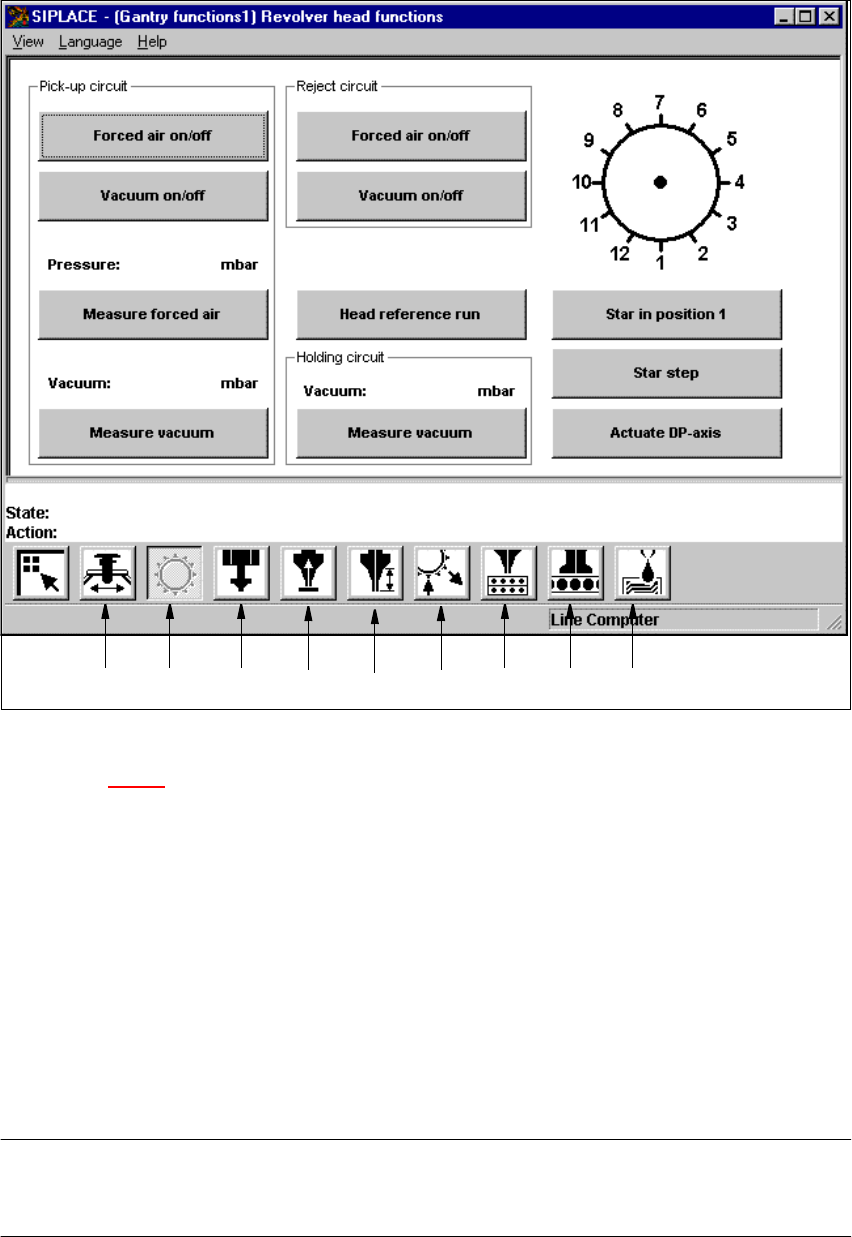
The user interface is switched to the "Revolver head functions" view (see Fig. 5.2 - 1
).
5
5
5.2.1 "Revolver head functions" view
The revolver head functions can be used to control all functions relating to the Collect&Place
head. 5
NOTE
The Collect&Place head functions can be executed with the machine cover open. To do this the
key-operated switch must be turned to position I. 5
5
5
SIPLACE 80S-20/F4 User Manual 5 Single functions
Software version SR.407.xx 01/2001 US Edition 5.2 Single functions, gantry
179
5
Fig. 5.2 - 1 "Revolver head functions" view (12-nozzle Collect&Place head)
Key to Fig. 5.2 - 1
(1) Gantry functions
(2) Revolver head functions
(3) IC-head functions
(4) Vacuum test, revolver head
(5) Nozzle offset, revolver head
(6) Nozzle configuration, revolver head
(7) Nozzle changer configuration, revolver head
(8) Nozzle changer configuration IC-head
(9) Fluxer head functions
NOTE
The current position of the Collect&Place head segment is shown by the graphic above the "Star in
position 1" button. 5
12 34 56789

5 Single functions SIPLACE 80S-20/F4 User Manual
5.2 Single functions, gantry Software version SR.407.xx 01/2001 US Edition
180
5.2.1.1 Functions
In the "Revolver head functions" view, the functions described below are available to help you test
the Collect&Place head. 5
– Vacuum test in the pick-up position
– Vacuum test in the reject position
– Vacuum test in the holding circuit
– Revolver head functions
The functions are triggered by clicking the appropriate button. 5
Pick-up circuit - Forced air on/off 5
When this function is activated, the forced air to the nozzle in the pick-up position is either
switched on or off.
Å In the "Pick-up circuit" area, click the Forced air on/off button.
This switches the forced air on or off.
Pick-up circuit - Vacuum on/off 5
When this function is activated, the vacuum at the nozzle in the pick-up position is either
switched on or off.
Å In the "Pick-up circuit" area, click the Vacuum on/off button.
This switches the vacuum on or off.
Pick-up circuit - Measure forced air 5
When this function is activated, forced air at the pick-up position is measured.
Å Switch on the forced air (using the "Forced air on/off" function in the "Pick-up circuit" area).
Å Click the Measure forced air button in the "Pick-up circuit" area.
The forced air is measured and the result displayed in [mbar] above the button.
NOTE
The value displayed after the measurement is taken does not correspond to the actual values at
the nozzle.
When calibrating the machine, you must use a manometer to establish the values (see Adjustment
instructions or the Service Manual). 5
Pick-up circuit - Measure vacuum 5
When this function is activated, vacuum at the pick-up position is measured.
Å Switch on the vacuum (using the "Vacuum on/off" function in the "Pick-up circuit" area).
Å Click the Measure Vacuum button in the "Pick-up circuit" area.
The vacuum is measured and the result displayed in [mbar] above the button.