80S-20用户手册 - 第182页
5 Single functions SIPLACE 80S-20 /F4 User Manual 5.2 Single functions, gantry Software version SR. 407.xx 01/2001 US E dition 182 Actuate DP-axis 5 When this function is acti vated, the D-axis is rotated by 90 0 . Å Cli…
SIPLACE 80S-20/F4 User Manual 5 Single functions
Software version SR.407.xx 01/2001 US Edition 5.2 Single functions, gantry
181
Reject circuit - Forced air on/off 5
When this function is activated, the forced air at the nozzle in the reject position is switched on or
off.
Å Click the Forced air on/off button in the "Reject circuit" area.
The forced air is switched on or off.
Reject circuit - Vacuum on/off 5
When this function is activated, the vacuum to the nozzle in the reject position is switched on or
off.
Å Click the Vacuum on/off button in the "Reject circuit" area.
The vacuum is switched on or off.
Head reference run 5
This function is used to start a head reference run of all the head axes, or in other words, all head
axes travel to their origin. The gantry axes travel over the reject container and discard compo-
nents in a defined manner.
Å Click the Head reference run button.
The head axes execute a head reference run.
Holding circuit - Measure vacuum 5
When this function is activated, the vacuum at the nozzle in the holding circuit is measured.
Å Click the Measure vacuum button in the "Holding circuit" area.
The vacuum is measured and the result displayed in [mbar] above the button.
Star in position 1 5
This function is used to bring the Collect&Place head into a defined starting position.
Å Click the Star in position 1 button.
The Collect&Place head is moved round so that segment 1 is in the pick up and placement
position (lowest position). In addition the Collect&Place head and the z-axis perform a refer-
ence run.
RV head indexing 5
This function is used to move the Collect&Place head. Each time you click the button the Col-
lect&Place head is moved round by one segment.
Å Click the RV head indexing button.
The Collect&Place head is moved by one segment.
The current positions of the segments is displayed in the graphic.
5 Single functions SIPLACE 80S-20/F4 User Manual
5.2 Single functions, gantry Software version SR.407.xx 01/2001 US Edition
182
Actuate DP-axis 5
When this function is activated, the D-axis is rotated by 90
0
.
Å Click the Actuate DP-axis button.
The nozzle in the D-axis is rotated by 90
0
once.
5.2.2 "IC-head functions" view
The IC-head functions can be used to control all functions relating to the IC-head. 5
NOTE
The IC-head functions can be executed with the machine cover open. To do this the key-operated
switch must be turned to position I. 5
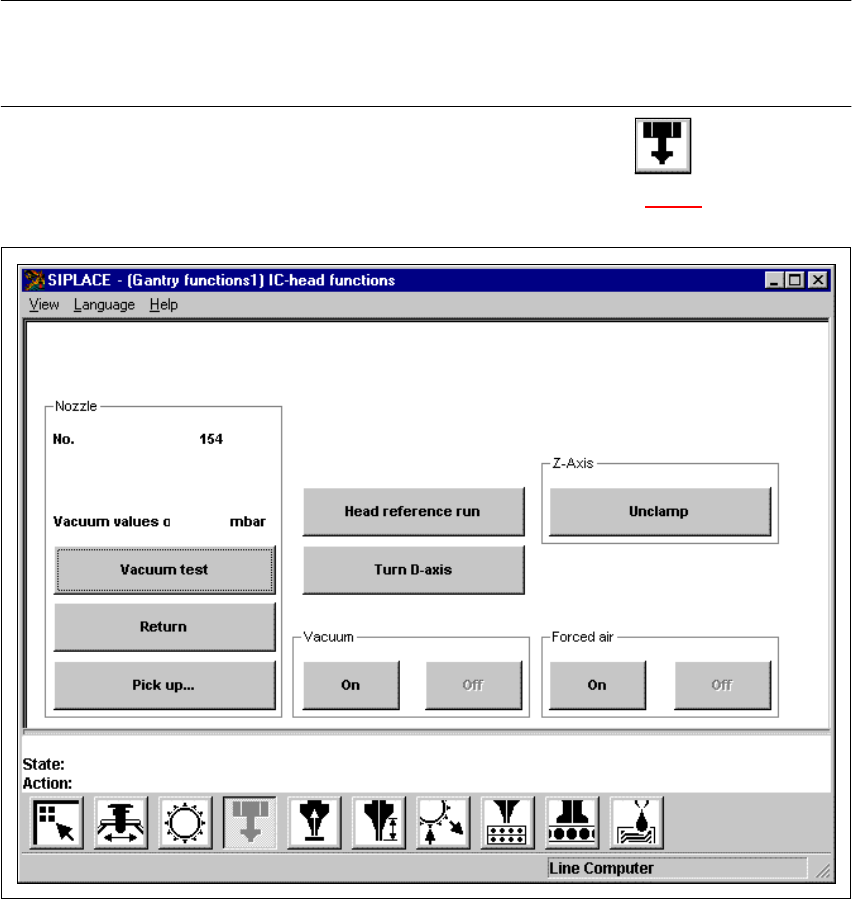
Å In the current view for the single functions for Gantry, click the symbol .
The user interface is switched to the "IC-head functions" view (see Fig. 5.2 - 2
).
5
Fig. 5.2 - 2 "IC-head functions" view
SIPLACE 80S-20/F4 User Manual 5 Single functions
Software version SR.407.xx 01/2001 US Edition 5.2 Single functions, gantry
183
5.2.2.1 Functions
In the "IC-head functions" view, the functions described below are available to help you test the
Pick&Place head. 5
– Vacuum test
– Return nozzle
– Pick up nozzle
– IC-head functions
The functions are triggered by clicking the appropriate button. 5
Vacuum/offset test 5
This function carries out a vacuum test and an offset test for the nozzle currently on the IC head.5
Å Click on the Vacuum test button.
The vacuum and the height of the current nozzle are tested.
The result of the vacuum test is displayed.
Return 5
This function returns the nozzle currently on the IC head to the nozzle changer. The number of the
current nozzle is displayed. 5
Å Click on the Return button.
The nozzle is returned to the nozzle changer.
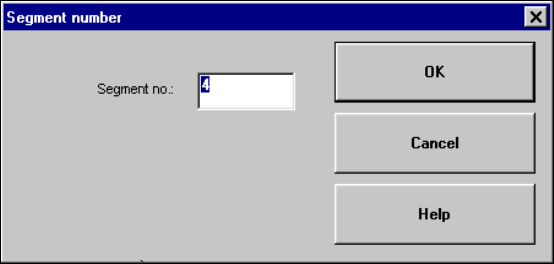
Pick up... 5
This function picks up a specific nozzle from the nozzle changer. 5
Å Click the Pick up... button.
The dialog box shown below is displayed.
5