80S-20用户手册 - 第190页
5 Single functions SIPLACE 80S-20 /F4 User Manual 5.2 Single functions, gantry Software version SR. 407.xx 01/2001 US E dition 190 5.2.5.1 Functions In the "Noz zle offset" view on ly the "Measure" bu…
SIPLACE 80S-20/F4 User Manual 5 Single functions
Software version SR.407.xx 01/2001 US Edition 5.2 Single functions, gantry
189
5.2.5 "Nozzle offset" view
5
Å In the current view for the single functions for Gantry, click the symbol .
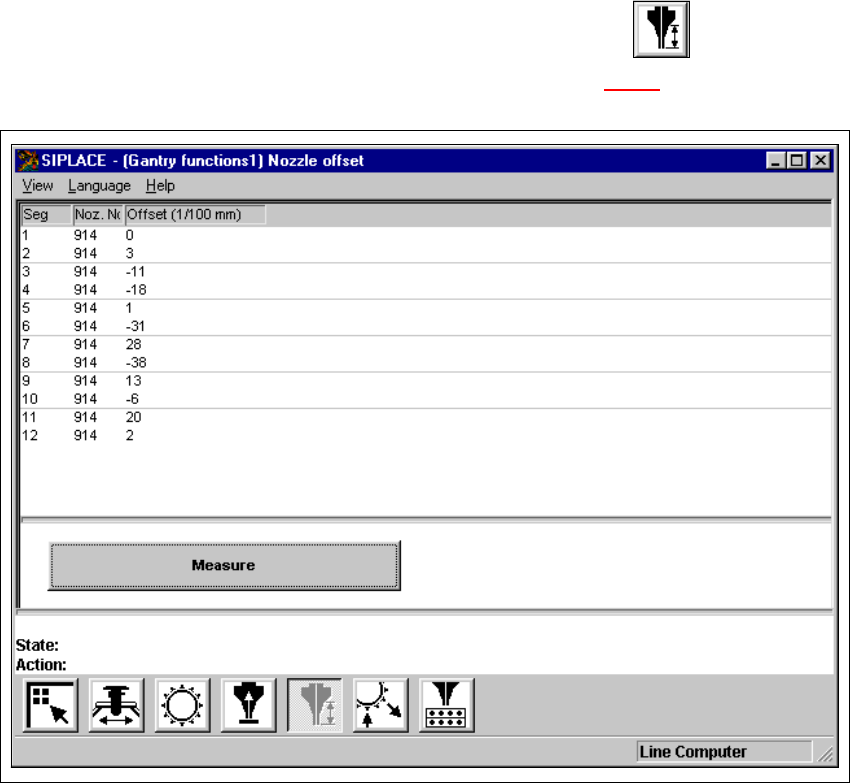
The user interface is switched to the "Nozzle offset" view (see Fig. 5.2 - 5
).
5
Fig. 5.2 - 5 "Nozzle offset" view (12-nozzle Collect&Place head)
5 Single functions SIPLACE 80S-20/F4 User Manual
5.2 Single functions, gantry Software version SR.407.xx 01/2001 US Edition
190
5.2.5.1 Functions
In the "Nozzle offset" view only the "Measure" button is available. This is used to start a evalua-
tion of the nozzle height for all nozzles.
Measure 5
When this function is activated, after a vacuum check the gantry moves the placement head to a
defined position above the board conveyor. The z-axis is lowered until the nozzle touches the con-
veyor, the procedure is then repeated for each nozzle. In this way, you can measure the height of
each nozzle.
The gantry then returns to its starting position. 5
Å Click the Measure button.
This starts the procedure used to measure nozzle height.
The values determined are displayed in the column "Offset (1/100 mm)" for each of the noz-
zles. These values can, for example, be used to determine whether the nozzle on a particular
segment broken.
SIPLACE 80S-20/F4 User Manual 5 Single functions
Software version SR.407.xx 01/2001 US Edition 5.2 Single functions, gantry
191
5.2.6 "Nozzle configuration revolver head" view
Å In the current view for the single functions for Gantry, click the symbol .
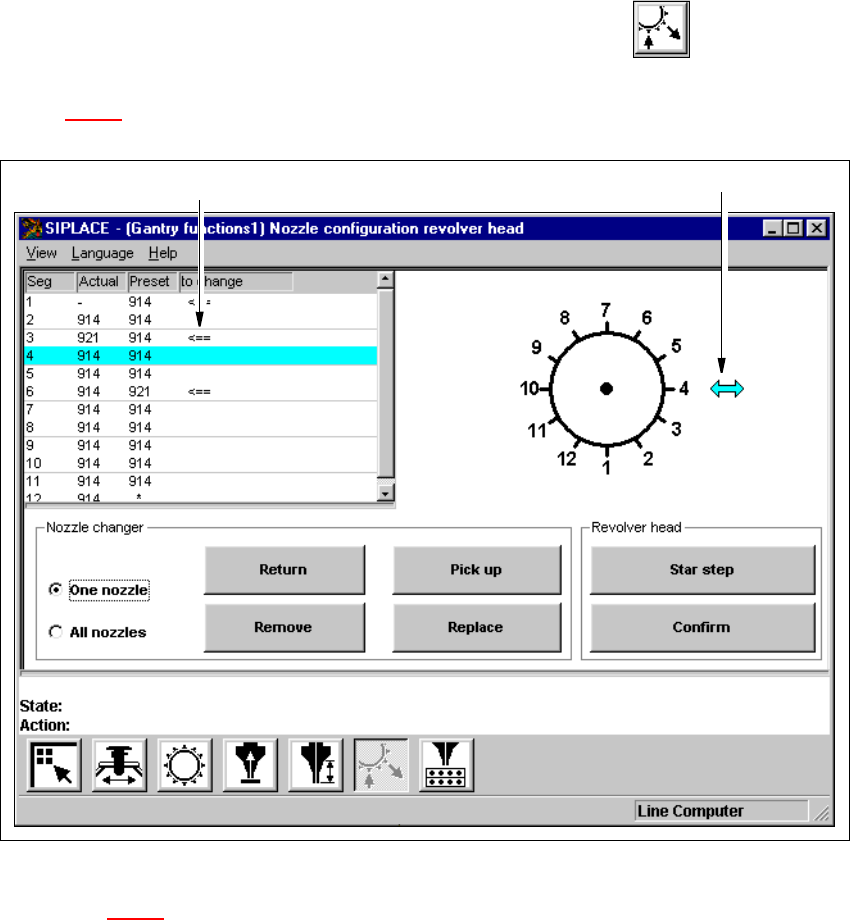
The user interface is switched to the "Nozzle configuration revolver head" view (see
Fig. 5.2 - 6
).
5
Fig. 5.2 - 6 "Nozzle configuration revolver head" view (12-nozzle Collect&Place head)
Key to Fig. 5.2 - 6
(1) The entry for the segment currently located in the changeover position is highlighted in light
blue.
(2) The arrow points to the number of the segment which is in the changeover position.
5.2.6.1 Functions
The "Nozzle configuration revolver head" view provides functions which allow you to change the
nozzle configuration and to then confirm that this change has been made. The required function
is carried out by clicking on the appropriate button. 5
1
2