80S-20用户手册 - 第399页
SIPLACE 80S -20/F4 User M anual 8 Error information and diagnost ics Software version SR.407.xx 01/2001 US Edition 8.3 Clearing errors 399 8.3 Clearing errors Once a n error h as been eliminate d, it must be c leared. Th…
8 Error information and diagnostics SIPLACE 80S-20/F4 User Manual
8.2 Calling error information Software version SR.407.xx 01/2001 US Edition
398
8.2.2.2 Inserting or editing comments on errors
In all the error information views you are able to enter comments which you can then subsequently
edit if necessary. In this way, you can, for example, document the operations which you have
performed.
If a comment has been created in a view, this is indicated by the presence of a paper clip icon. 8
8
Inserting a comment
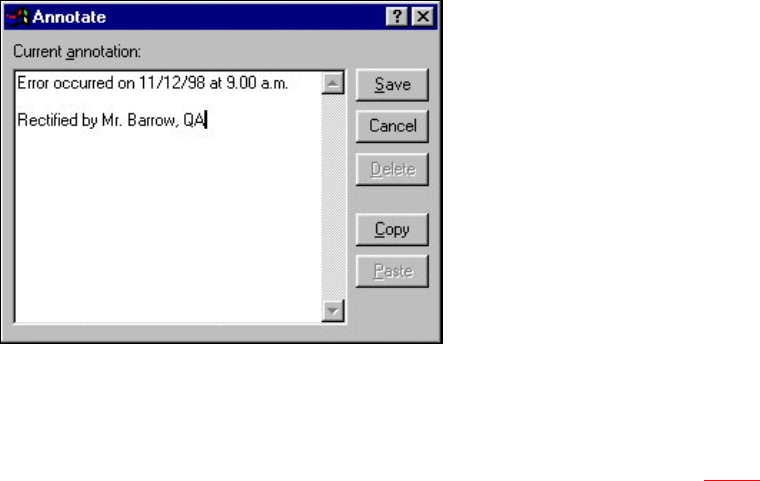
Å Click the Annotate button in the view in question.
The following dialog box is opened.
8
Å Enter the text of your comment in the edit field.
Å Click the Save button to confirm your input.
The dialog box is closed.
The paper clip icon is now displayed in the current help system view (see section 8.2 - 3
).
Click this icon if you want to open a window in which you can edit this comment.
Deleting a comment
Å Click the paper clip symbol in the appropriate view.
The dialog box is opened with the stored comment.
Å Click the Delete button.
The dialog box is closed. The paper clip icon is no longer displayed in the current view.

SIPLACE 80S-20/F4 User Manual 8 Error information and diagnostics
Software version SR.407.xx 01/2001 US Edition 8.3 Clearing errors
399
8.3 Clearing errors
Once an error has been eliminated, it must be cleared. This is not necessary in the case of errors
which cause a machine stoppage since they are automatically cleared when assembly is
resumed. 8
Once cleared, the error message is no longer displayed in the status bar. However, it is still
entered in the error table for the corresponding error type (see example in Fig. 8.2 - 2
). 8
8
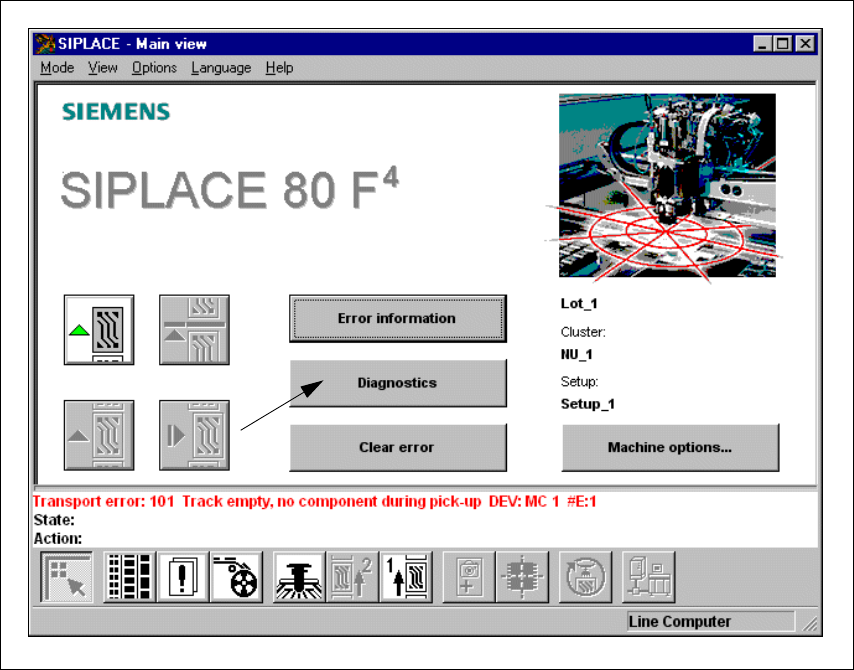
Å After eliminating the current error, click the Clear error button in main view. The error message
is removed from the status bar and assembly can be continued.
8
8 Error information and diagnostics SIPLACE 80S-20/F4 User Manual
8.4 Diagnostics Software version SR.407.xx 01/2001 US Edition
400
8.4 Diagnostics
8.4.1 General comments
If errors occur while the board is being processed, a diagnostics program can be started for this
error. You can start this diagnostics facility either from the main view or from Display error. 8
This diagnostics facility will guide you as far as identifying a possible cause for the error and
suggesting a remedy. This is done by means of a series of questions. Information on the questions
asked can be accessed by pressing an information button. 8
8.4.2 Basic operation
If an error should occur during processing of the board, this error will be displayed in the status
window. 8
Å Click on the Diagnostics button.
Fig. 8.4 - 1 Diagnostics for error message no. 101