80S-20用户手册 - 第453页
SIPLACE 80S -20/F4 User Manual 10 Component handling Software version SR.407.xx 01/2001 US Edition 10.7 Wafflepack Changer (80F4) 453 10.7.3 Principle of t he W afflep ack Changer With the w afflepack change r on the S I…

10 Component handling SIPLACE 80S-20/F4 User Manual
10.7 Wafflepack Changer (80F4) Software version SR.407.xx 01/2001 US Edition
452
10.7.2 General Information
The use of flatpack ICs is gaining more and more importance in the manufacture of printed circuit
boards. These components have now reached the point where they are almost always delivered
on trays (wafflepack magazines). 10
The space taken up by magazine trays is however relatively high when compared with the com-
ponent density. In addition, due to their low holding capacity, the wafflepack magazines must fre-
quently be changed and if this has to be done by hand this necessarily involves interrupting the
placement process. 10
But when a wafflepack changer is used there is no time lost unnecessarily in the storing and au-
tomatic changing of the wafflepack magazines. Programmed access to up to 28 freely selectable
wafflepack magazines also increases the range of available components. 10
NOTE
The wafflepack changer is located on the lefthand side of the SIPLACE F table.
The wafflepack changer does not require the entire width of the component table. On this side of
the table 10 locations remain free which can be used for the 20 x 8 mm tape module, for example.10
SIPLACE 80S-20/F4 User Manual 10 Component handling
Software version SR.407.xx 01/2001 US Edition 10.7 Wafflepack Changer (80F4)
453
10.7.3 Principle of the Wafflepack Changer
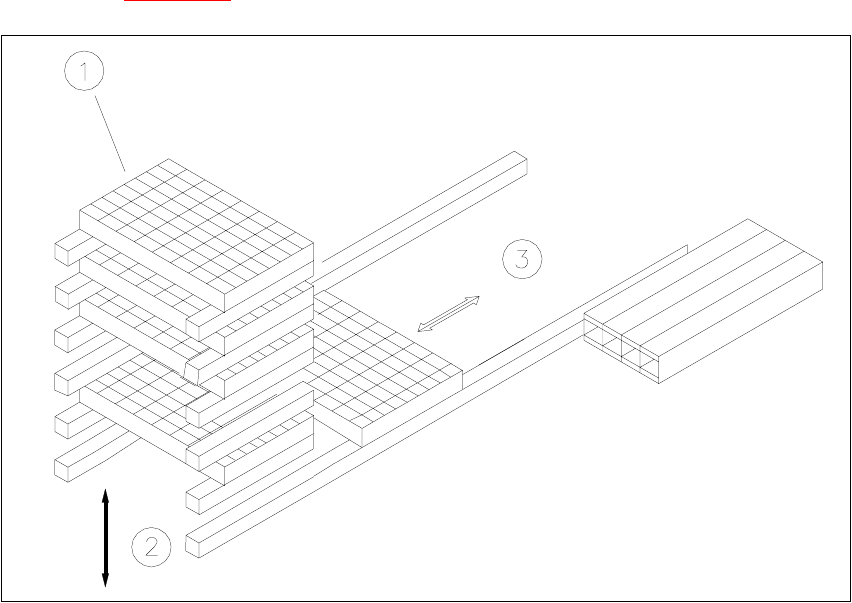
With the wafflepack changer on the SIPLACE F it is possible to hold up to 28 wafflepack maga-
zines and to change these fully automatically. The trays (level) for the wafflepack magazines are
numbered in sequence from bottom to top, with the lowest number at the bottom (1 - 28).
The magazine storage unit travels vertically until the level selected lies with in the travel range of
the horizontal axis. The horizontal axis then removes the tray from the level and transfers it into
the access area of the placement head.
The following Fig. 10.7 - 1
shows the basic principle behind the wafflepack changer.
Fig. 10.7.2 Principle of the wafflepack changer
(1) Magazine storage unit
(2) Lift
(3) Horizontal axis
10 Component handling SIPLACE 80S-20/F4 User Manual
10.7 Wafflepack Changer (80F4) Software version SR.407.xx 01/2001 US Edition
454
10.7.3.1 Functional Sequence
Requirements 10
Flatpack magazines with the corresponding components are defined in the set-up.
After set-up conversion the magazine storage unit will make a reference run.
The PCB camera approaches the fiducials which are marked on a strip (see Fig. 10.7.2
). 10
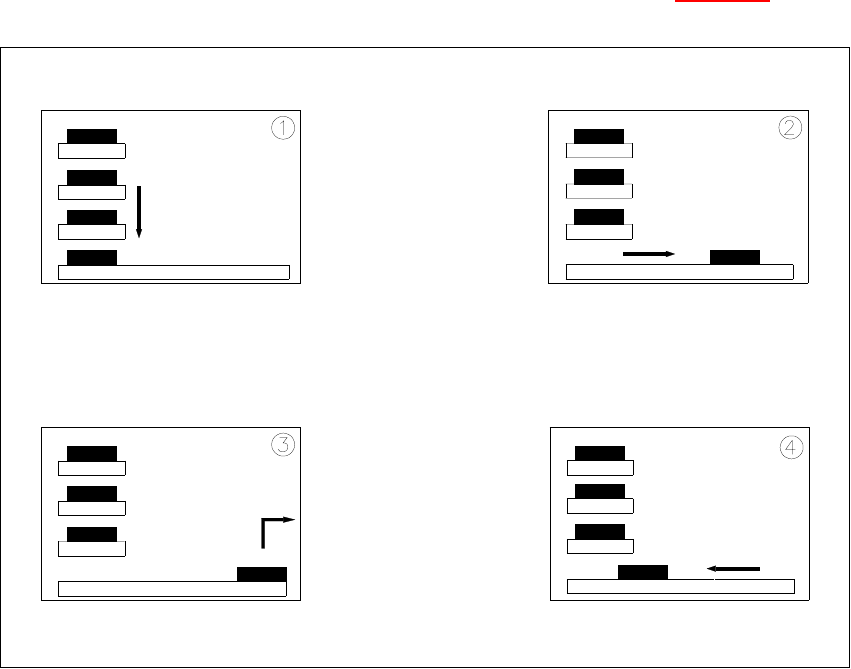
Fig. 10.7 - 3 Functional sequence
(1) The selected level of the magazine storage unit is positioned on the feeder axis (horizontal).
(2) The tray is transferred to the access area of the placement head.
(3) The components are removed.
(4) The tray is returned again.
10
– The lift in the magazine storage unit brings the tray from the selected level into position on the
horizontal feeder axis.
– The tray with the flatpack magazine is brought into the placement head's access area.
– Once the desired components have been removed by the placement head, the magazine is
returned in the reverse sequence of operations.