80S-20用户手册 - 第462页
10 Component handling SIPLACE 80S-20 /F4 User Manual 10.8 Support for F latpack Magazine 80F 4 (Manual Tray Rest) Software version SR. 407.xx 01/2001 US E dition 462 10.8.3 Changing th e Ret a iner Å Hold the re tainer f…

SIPLACE 80S-20/F4 User Manual 10 Component handling
Software version SR.407.xx 01/2001 US Edition 10.8 Support for Flatpack Magazine 80F4 (Manual Tray Rest)
461
10.8 Support for Flatpack Magazine 80F
4
(Manual Tray
Rest)
PLEASE NOTE
The manual tray holder must only be placed on the right side of the SIPLACE F. The tray holder
can only be positioned so that the right edge covers no more than track 73. 10
10.8.1 General Information
With the support for flatpack magazines components can be picked up from individual flatpack
magazines. The flatpack magazines are changed by hand. 10
The support for flatpack magazines is positioned on the component table like a feeder. 10
There are two different versions of the support which differ in their width. 10
Support for large flatpack magazine (260 mm) iitem No. 00116430-01 10
Support for small flatpack magazine (136 mm) item No. 00116432-01 10
10.8.2 Installation
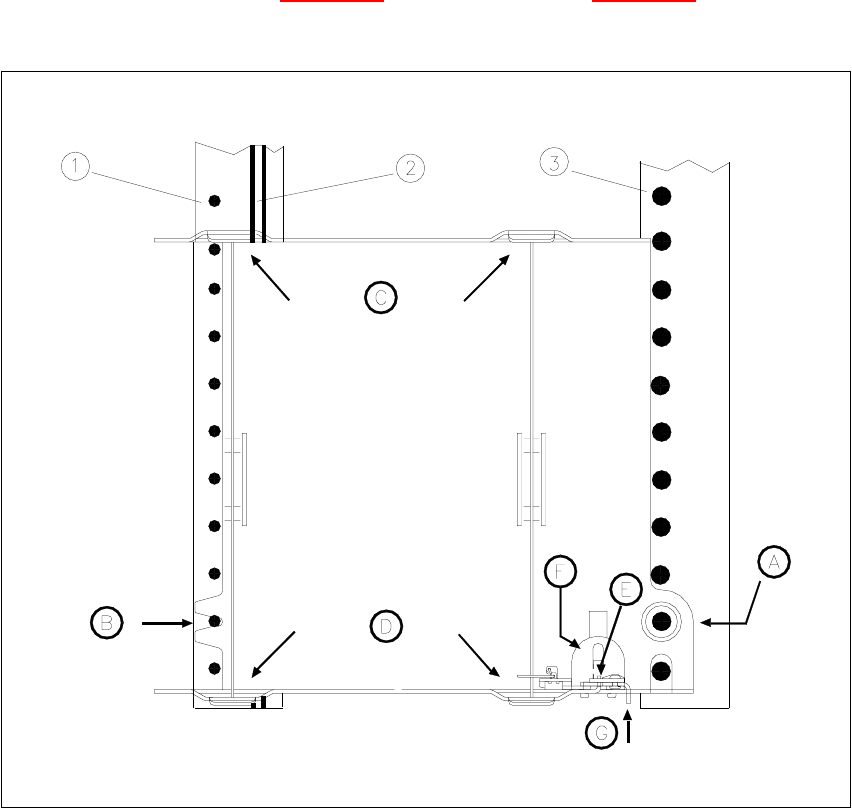
Å Insert the front side of the manual tray rest into the associated centering pin (B in Fig. 10.8 - 1).
Å Position the rear of the manual tray rest into the spherical cap on the component table (A in
Fig. 10.8 - 1
).
Å Make sure the manual tray rest is resting securely on the component table.
Å Position one side of the flatpack tray in the mounting (C in Fig. 10.8 - 1) and then press the
other side into the mounting (D in Fig. 10.8 - 1
).
Å Slide the flatpack magazine up against the stop (E in Fig. 10.8 - 1).
Å Secure the flatpack magazine carrier by pressing the clamp downwards (F in Fig. 10.8 - 1).
Å To remove the flatpack magazine carrier press the clamp once more.
NOTE
With the "mounting for small flatpack magazine" (136 mm) a flatpack magazine (JEDEC or CEN-
ELEC flatpack magazines) can be fitted directly to the mounting, in other words, without a flatpack
magazine carrier being used.The clamp will however need changing. 10
10 Component handling SIPLACE 80S-20/F4 User Manual
10.8 Support for Flatpack Magazine 80F4 (Manual Tray Rest) Software version SR.407.xx 01/2001 US Edition
462
10.8.3 Changing the Retainer
Å Hold the retainer firmly (G in Fig. 10.8 - 1). Press the clamp (F in Fig. 10.8 - 1) downwards and
remove the retainer by pressing it out sideways.
Fig. 10.8 - 1 Installation/Removal
(1) Centering pins
(2) Magnetic rail
(3) Spherical caps
10.8.4 Data Input
Define the flatpack magazines as described in the SIPLACE UNIX line computer UNIX user’s 10
manual.
10
10
SIPLACE 80S-20/F4 User Manual 10 Component handling
Software version SR.407.xx 01/2001 US Edition 10.9 Placing of Components With a Height Clearance of up to 21 mm (80F4)
463
10.9 Placing of Components With a Height Clearance of
up to 21 mm (80F
4
)
10.9.1 Defining the Height Clearance
Height clearance means the distance between the upper transport edge of the PCB and the upper
edge of the component, i.e. 10
10
10
In other words, the height clearance specifies the height that a placement head needs in order to
avoid the risk of a head crash when holding a component. 10
10.9.2 How to Verify a Height Clearance of 21 mm with the Pick&Place Head
In the past, the height clearance for a 6x or 12x Collect&Place head when holding a component
was limited to 11.5 mm in order to prevent the risk of a head crash when inserting tall components.10
10
A recently implemented function now enables components with a height clearance of up to 21 mm
to be inserted with the IC head. To do this, the nozzle is removed from the Collect&Place head for
the entire duration of the program for a segment. During placement by the IC head, the segment
is rotated into the bottom star position without a nozzle. 10
10
In order to insert a component with a height clearance of more than 11.5 mm, the line computer
generates a nozzle configuration without a nozzle for the 6x or 12x Collect&Place head. A mes-
sage also appears on screen to inform the operator that 5 or 11 nozzles are in use. Before the
placement program starts, the Collect&Place head sets down the extra nozzle in the nozzle
changer. If no nozzle changer is installed, the operator is prompted to remove the nozzle manually.10
WARNING
The extended height clearance function is only suitable use with 12 - 72 mm tape feeder modules.
It is not intended for use with wafflepack changers, manual trays and linear conveyors. 10
10
Height clearance = PCB height + component height